
SpringBoot JMS(ActiveMQ) 使用实践
ActiveMQ
1. 下载windows办的activeMQ后,在以下目录可以启动:

2. 启动后会有以下提示

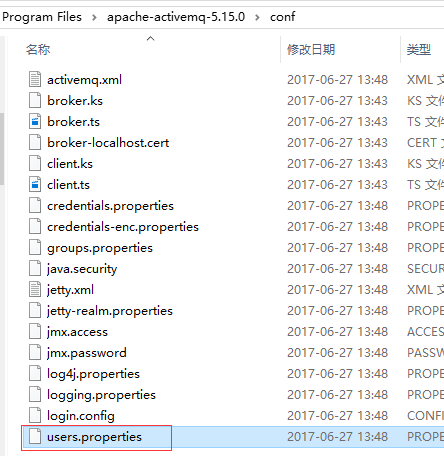
3. 所以我们可以通过http://localhost:8161访问管理页面,通过tcp://localhost:61616来连接消息服务器,用到的用户名和密码都在以下文件中(默认为admin=admin)
springboot连接ActiveMQ
1. 加入依赖:
spring-boot-starter-activemq
2. 配置连接属性:
spring.activemq.broker-url=tcp://localhost:61616

spring.activemq.user=admin

spring.activemq.password=admin

spring.activemq.pool.enabled=false
消息的发送和接收
生产者/消费者模式
1. 创建生产者
package com.example.demo8activemq.jms;

import org.apache.activemq.command.ActiveMQQueue;

import org.springframework.jms.core.JmsMessagingTemplate;

import org.springframework.stereotype.Service;

import javax.annotation.Resource;

import javax.jms.Destination;

/**

 * @author Created by yawn on 2017-10-26 16:15

 */

@Service

public class Producer {

    @Resource

    private JmsMessagingTemplate jmsMessagingTemplate;

    public void sendMsg(String destinationName, String message) {

        System.out.println("============>>>>> 发送queue消息 " + message);

        Destination destination = new ActiveMQQueue(destinationName);

        jmsMessagingTemplate.convertAndSend(destination, message);

    }

}
2. 创建消费者
package com.example.demo8activemq.jms;

import org.springframework.jms.annotation.JmsListener;

import org.springframework.stereotype.Service;

/**

 * @author Created by yawn on 2017-10-26 16:15

 */

@Service

public class Consumer {

    @JmsListener(destination = "test.queue")

    public void receiveMsg(String text) {

        System.out.println("<<<<<<============ 收到消息: " + text);

    }

}
注意: @JmsListener是一个可重复的注解,在java7及以下版本jdk中,可以使用@JmsListeners代替它。
3. 测试类
@RunWith(SpringRunner.class)

@SpringBootTest

public class Demo8ActivemqApplicationTests {

	@Resource

	private Producer producer;

	@Test

	public void contextLoads() {

		for (int i = 0; i < 10; i++) {

			producer.sendMsg("test.queue", "Queue Message " + i);

		}

	}

}
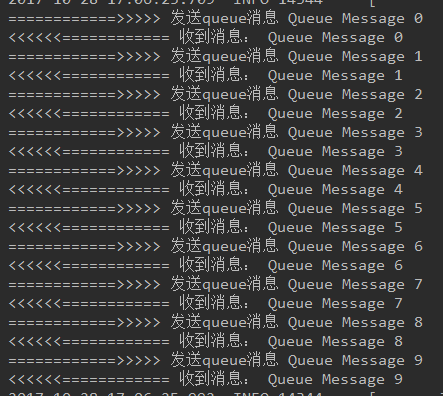
4. 运行测试
发布/订阅模式
1. 发布话题
package com.example.demo8activemq.jms;

import org.apache.activemq.command.ActiveMQTopic;

import org.springframework.jms.core.JmsMessagingTemplate;

import org.springframework.stereotype.Service;

import javax.annotation.Resource;

import javax.jms.Destination;

/**

 * @author Created by yawn on 2017-10-28 17:09

 */

@Service

public class Publisher {

    @Resource

    private JmsMessagingTemplate jmsMessagingTemplate;

    public void publish(String destinationName, String message) {

        Destination destination = new ActiveMQTopic(destinationName);

        System.out.println("============>>>>> 发布topic消息 " + message);

        jmsMessagingTemplate.convertAndSend(destination, message);

    }

}
2. 订阅话题
package com.example.demo8activemq.jms;

import org.springframework.jms.annotation.JmsListener;

import org.springframework.stereotype.Service;

/**

 * @author Created by yawn on 2017-10-28 17:15

 */

@Service

public class Subscriber {

    @JmsListener(destination = "test.topic", containerFactory = "myJmsContainerFactory")

    public void subscribe(String text) {

        System.out.println("===========<<<<<<<<收到订阅的消息" + text);

    }

}
注意: 在pub/sub模式中,对消息的监听需要对containerFactory进行以下配置
    @Bean

    JmsListenerContainerFactory<?> myJmsContainerFactory(ConnectionFactory connectionFactory){

        SimpleJmsListenerContainerFactory factory = new SimpleJmsListenerContainerFactory();

        factory.setConnectionFactory(connectionFactory);

        factory.setPubSubDomain(true);

        return factory;

    }
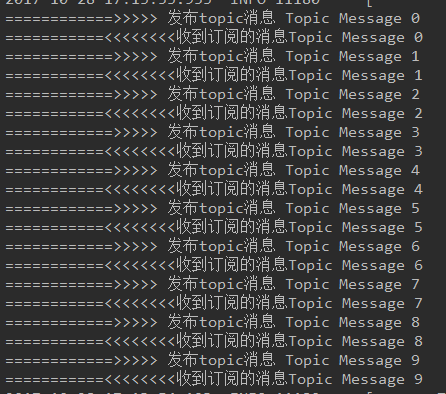
3. 测试
    @Test

	public void test() {

		for (int i = 0; i < 10; i++) {

			publisher.publish("test.topic", "Topic Message " + i);

		}

	}
应用
按照以上步骤,在springboot中很容易就实现类两种模式的消息发送和接收。但是jms具体的应用场景是在不同的应用程序之间,生产者和消费者往往是在不同的应用中的。此外,以上例子中的消息我们只发送字符串,其实还可以发送Object类型的消息,甚至可以使用messageCreator自定义消息的转换,而不使用convertAndSend方法默认转换。
多个应用程序之间发送消息
1. 先使用一个只有发送者,没有消费者或订阅者的应用发送两类消息各十条


2. 我们打开localhost:8161,可以看到


两类都曾有十条消息入队,但只有queues中还存留10条消息。
3. 现在我们启动包含消费者和订阅者的应用程序

果然,只有消费者收到了queues中的消息。
这说明订阅者接收topic是需要在topic发布之前订阅;而生产/消费模式下,消息发出后会存放在队列中,等待消费者消费。
4. 我们先启动两个包含订阅者和消费者的程序,再发布消息
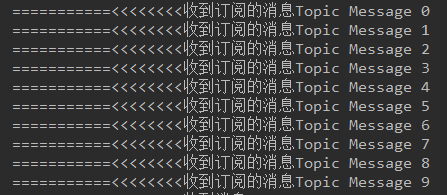
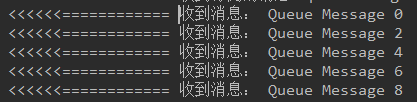
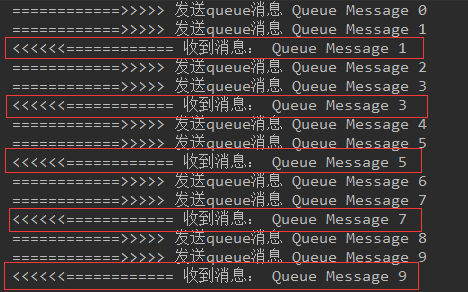
两个订阅者都收到 topic message 1~9, 而消费者中,一个收到消息 1、3、5、7、9,另一个收到0、2、4、6、8。
这说明有多个消息接收者时,生产/消费模式下多个消费者会轮流消费队列中的消息,而pub/sub模式下所有订阅者都会得到所有的消息。
以上就是在多个应用程序之间验证了发布/订阅模式和生产/消费模式的不同特点。
SpringBoot JMS(ActiveMQ) 使用实践的更多相关文章
- 简单记录下springboot+jms+activemq
1. 安装ActiveMQ 到Apache官方网站下载最新的ActiveMQ的安装包,并解压到本地目录下后运行 2. pom.xml引入 springboot配置文件中填写相关配置 3.创建生产者 ...
- SpringBoot使用JMS(activeMQ)的两种方式 队列消息、订阅/发布
刚好最近同事问我activemq的问题刚接触所以分不清,前段时间刚好项目中有用到,所以稍微整理了一下,仅用于使用 1.下载ActiveMQ 地址:http://activemq.apache.org/ ...
- Web项目容器集成ActiveMQ & SpringBoot整合ActiveMQ
集成tomcat就是随项目启动而启动tomcat,最简单的方法就是监听器监听容器创建之后以Broker的方式启动ActiveMQ. 1.web项目中Broker启动的方式进行集成 在这里采用Liste ...
- springboot与ActiveMQ整合
前言 很多项目, 都不是一个系统就做完了. 而是好多个系统, 相互协作来完成功能. 那, 系统与系统之间, 不可能完全独立吧? 如: 在学校所用的管理系统中, 有学生系统, 资产系统, 宿舍系统等等. ...
- spring boot整合JMS(ActiveMQ实现)
pom依赖如下: <?xml version="1.0" encoding="UTF-8"?> <project xmlns="ht ...
- SpringBoot集成ActiveMQ
前面提到了原生API访问ActiveMQ和Spring集成ActiveMQ.今天讲一下SpringBoot集成ActiveMQ.SpringBoot就是为了解决我们的Maven配置烦恼而生,因此使用S ...
- 使用SpringBoot集成ActiveMQ
SpringBoot是个好东西,好多java常用的东西都被集成进去了 JMS 在 Spring Boot 中的使用 使用Spring/Spring Boot集成JMS的陷阱 Spring-boot J ...
- SpringBoot系列八:SpringBoot整合消息服务(SpringBoot 整合 ActiveMQ、SpringBoot 整合 RabbitMQ、SpringBoot 整合 Kafka)
声明:本文来源于MLDN培训视频的课堂笔记,写在这里只是为了方便查阅. 1.概念:SpringBoot 整合消息服务 2.具体内容 对于异步消息组件在实际的应用之中会有两类: · JMS:代表作就是 ...
- SpringBoot整合ActiveMQ快速入门
Spring Boot 具有如下特性: 为基于 Spring 的开发提供更快的入门体验 开箱即用,没有代码生成,也无需 XML 配置.同时也可以修改默认值来满足特定的需求. 提供了一些大型项目中常见的 ...
随机推荐
- The 3rd tip of DB QueryAnalyzer
The 3rd tip of DB Query Analyzer Ma Genfeng (Guangdong Unitoll Services incorporated, Guangzhou 510 ...
- 恶补web之一:html学习(1)
发现以前欠下的web知识太多鸟,只有重头开始好好学吧,恶补第一站就是html知识啦! html指的是超文本标记语言,它不是编程语言,而是一种标记语言;标记语言是一套标记标签(markup tag),h ...
- 如何在centos操作系统上发布.net core的项目
环境:操作系统: centos 7.net core: 2.1.101 官方网站的示例地址: https://docs.microsoft.com/zh-cn/dotnet/core/linux-pr ...
- cookie的增删改查函数
function setCookie(name,value,expires,path,domain){ //设置过期时间 var oDate = new Date(); oDate.setDate(o ...
- mybatis自我总结
mybatis是一款优秀的持久层框架,它避免了JDBC代码.将SQL语句放在Java中以及结果集的处理.利于后期的维护.它将SQL语句放到XML文件中. mybatis有sqlsessionfacto ...
- oracle面试题目总结
阿里巴巴公司DBA笔试题 http://searchdatabase.techtarget.com.cn/tips/2/2535002.shtml 注:以下题目,可根据自己情况挑选题目作答,不必 ...
- Java 理论与实践: 并发集合类
Java 理论与实践: 并发集合类 DougLea的 util.concurrent 包除了包含许多其他有用的并发构造块之外,还包含了一些主要集合类型 List 和 Map 的高性能的.线程安全的实现 ...
- 使用nginx缓存服务器上的静态文件
一.nginx缓存的优点 如图所示,nginx缓存,可以在一定程度上,减少源服务器的处理请求压力. 因为静态文件(比如css,js, 图片)中,很多都是不经常更新的.nginx使用proxy_cach ...
- php判断图片是否存在的几种方法
在我们日常的开发中,经常需要用到判断图片是否存在,存在则显示,不存在则显示默认图片,那么我们用到的判断有哪些呢?今天我们就来看下几个常用的方法: 1.getimagesize()函数 getimage ...
- npoi生成excel流并在客户端下载(html+后台 )
//前端页面 <body> <input type="button" value="导出Excel" class="button&q ...