
Nginx实现负载均衡功能
一、什么是Nginx?
二、Nginx的优点:
- 高并发连接:官方测试Nginx能够支撑5万并发连接,实际测试可达到3万左右,每天可以处理亿次访问量;原因是:采用最新epoll(linux2.6内核)和kqueue(freebsd)网络I/O模型,而Apache采用的是传统的select模型
- 内存消耗小
- Nginx支持负载均衡
- Nginx支持反向代理
- 成本低廉
三、什么是正向代理/反向代理?
- 正向代理:是一个位于客户端和原始服务器(origin server)之间的服务器,为了从原始服务器取得内容,客户端向代理发送一个请求并指定目标(原始服务器),然后代理向原始服务器转交请求并将获得的内容返回给客户端。客户端必须要进行一些特别的设置才能使用正向代理。
- 反向代理:客户端发送请求给反向代理服务器,但是代理服务器上没有客户端需要的资源,代理服务器会判断转发到原始服务器获得资源,并把资源返回给客户端;在整个过程,客户端不知道自己访问的是一个代理服务器,而是一个原始服务器
- 总结:正向代理代理的是客户端;反向代理代理的是服务器
四、Nginx安装(安装Nginx所依赖的环境均用rpm包安装,Nginx用源码包安装)
- 构建编译环境
yum install -y gcc gcc-c++
- Nginx安装需要依赖以下三个包(此处安装rpm包)
- gzip 模块需要 zlib 库( 下载源码包:http://www.zlib.net/):zlib 库提供了很多种压缩和解压缩的方式, nginx 使用 zlib 对 http 包的内容进行 gzip ,所以需要在 Centos 上安装 zlib 库。
yum install -y zlib zlib-devel
- rewrite 模块需要 pcre 库( 下载源码包:http://www.pcre.org/):PCRE(Perl Compatible Regular Expressions) 是一个Perl库,包括 perl 兼容的正则表达式库。nginx 的 http 模块使用 pcre 来解析正则表达式,所以需要在 linux 上安装 pcre 库,pcre-devel 是使用 pcre 开发的一个二次开发库。nginx也需要此库。命令:
yum install -y pcre pcre-devel
- ssl 功能需要 openssl 库( 下载:http://www.openssl.org/):OpenSSL 是一个强大的安全套接字层密码库,囊括主要的密码算法、常用的密钥和证书封装管理功能及 SSL 协议,并提供丰富的应用程序供测试或其它目的使用。nginx 不仅支持 http 协议,还支持 https(即在ssl协议上传输http),所以需要在 Centos 安装 OpenSSL 库。
yum install -y openssl openssl-devel
- 此处提供三个依赖包源码包安装方式(rpm包安装和源码包安装选择一种即可):
openssl :

[root@localhost] tar zxvf openssl-fips-2.0.9.tar.gz

[root@localhost] cd openssl-fips-2.0.9

[root@localhost] ./config && make && make install

pcre:

[root@localhost] tar zxvf pcre-8.36.tar.gz

[root@localhost] cd pcre-8.36

[root@localhost] ./configure && make && make install

zlib:

[root@localhost] tar zxvf zlib-1.2.8.tar.gz

[root@localhost] cd zlib-1.2.8

[root@localhost] ./configure && make && make install
- gzip 模块需要 zlib 库( 下载源码包:http://www.zlib.net/):zlib 库提供了很多种压缩和解压缩的方式, nginx 使用 zlib 对 http 包的内容进行 gzip ,所以需要在 Centos 上安装 zlib 库。
- Nginx安装(源码包安装,下载地址:http://nginx.org/en/download.html)
- 用Xftp将nginx-x.x.x.tar.gz从本地上传到linux(严格上传至/usr/local路径下)
- 解压,得到nginx-x.x.x文件
[root@localhost] tar -zvxf nginx-x.x.x.tar.g

[root@localhost] cd nginx-x.x.x

[root@localhost] ./configure && make && make install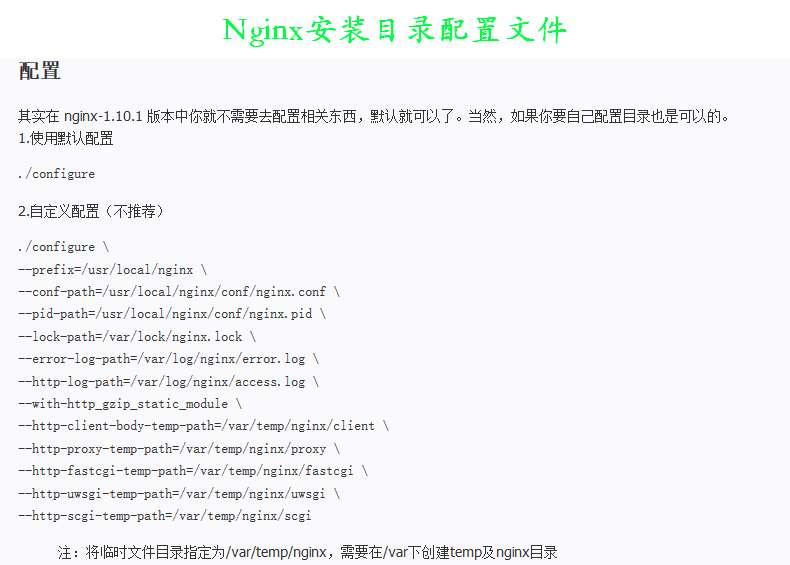
- 查看Nginx安装路径
[root@localhost] whereis nginx
- 检查是否安装成功
[root@localhost] cd /usr/local/nginx/sbin

[root@localhost] ./nginx -t

显示结果:

  nginx: the configuration file /usr/local/nginx/conf/nginx.conf syntax is ok

nginx: configuration file /usr/local/nginx/conf/nginx.conf test is successful - Nginx脚本文件配置(由于是源码包安装,所以Nginx相关命令只能在sbin目录下运行,过于繁琐,现在把Nginx命令的脚本文件添加到系统服务,就可以直接用server命令service nginx ~来操作Nginx)
- 首先进入/etc/init.d创建并编辑nginx文件,将Nginx脚本填入nginx文件
[root@localhost] cd /etc/init.d

[root@localhost] vim nginxNginx脚本文件(官方提供脚本https://www.nginx.com/resources/wiki/start/topics/examples/redhatnginxinit/):
#!/bin/sh

#

# nginx - this script starts and stops the nginx daemon

#

# chkconfig:   - 85 15

# description:  NGINX is an HTTP(S) server, HTTP(S) reverse \

#               proxy and IMAP/POP3 proxy server

# processname: nginx

# config:      /etc/nginx/nginx.conf

# config:      /etc/sysconfig/nginx

# pidfile:     /var/run/nginx.pid

# Source function library.

. /etc/rc.d/init.d/functions

# Source networking configuration.

. /etc/sysconfig/network

# Check that networking is up.

[ "$NETWORKING" = "no" ] && exit 0

nginx="/usr/local/nginx/sbin/nginx"

prog=$(basename $nginx)

NGINX_CONF_FILE="/usr/local/nginx/conf/nginx.conf"

[ -f /etc/sysconfig/nginx ] && . /etc/sysconfig/nginx

lockfile=/var/lock/subsys/nginx

make_dirs() {

   # make required directories

   user=`$nginx -V 2>&1 | grep "configure arguments:.*--user=" | sed 's/[^*]*--user=\([^ ]*\).*/\1/g' -`

   if [ -n "$user" ]; then

      if [ -z "`grep $user /etc/passwd`" ]; then

         useradd -M -s /bin/nologin $user

      fi

      options=`$nginx -V 2>&1 | grep 'configure arguments:'`

      for opt in $options; do

          if [ `echo $opt | grep '.*-temp-path'` ]; then

              value=`echo $opt | cut -d "=" -f 2`

              if [ ! -d "$value" ]; then

                  # echo "creating" $value

                  mkdir -p $value && chown -R $user $value

              fi

          fi

       done

    fi

}

start() {

    [ -x $nginx ] || exit 5

    [ -f $NGINX_CONF_FILE ] || exit 6

    make_dirs

    echo -n $"Starting $prog: "

    daemon $nginx -c $NGINX_CONF_FILE

    retval=$?

    echo

    [ $retval -eq 0 ] && touch $lockfile

    return $retval

}

stop() {

    echo -n $"Stopping $prog: "

    killproc $prog -QUIT

    retval=$?

    echo

    [ $retval -eq 0 ] && rm -f $lockfile

    return $retval

}

restart() {

    configtest || return $?

    stop

    sleep 1

    start

}

reload() {

    configtest || return $?

    echo -n $"Reloading $prog: "

    killproc $nginx -HUP

    RETVAL=$?

    echo

}

force_reload() {

    restart

}

configtest() {

  $nginx -t -c $NGINX_CONF_FILE

}

rh_status() {

    status $prog

}

rh_status_q() {

    rh_status >/dev/null 2>&1

}

case "$1" in

    start)

        rh_status_q && exit 0

        $1

        ;;

    stop)

        rh_status_q || exit 0

        $1

        ;;

    restart|configtest)

        $1

        ;;

    reload)

        rh_status_q || exit 7

        $1

        ;;

    force-reload)

        force_reload

        ;;

    status)

        rh_status

        ;;

    condrestart|try-restart)

        rh_status_q || exit 0

            ;;

    *)

        echo $"Usage: $0 {start|stop|status|restart|condrestart|try-restart|reload|force-reload|configtest}"

        exit 2

esac注意:将以上脚本保存到/etc/init.d/nginx文件,并修改两个地方:- nginx=”/usr/sbin/nginx” 修改成nginx执行程序的路径。
- NGINX_CONF_FILE=”/etc/nginx/nginx.conf” 修改成配置文件的路径。
- nginx文件显示白色,表示权限不够,授权
[root@localhost] chmod 755 nginx
- 将nginx服务加入chkconfig管理列表
[root@localhost] chkconfig --add /etc/init.d/nginx
- 首先进入/etc/init.d创建并编辑nginx文件,将Nginx脚本填入nginx文件
- 设置Nginx开机自启
vim /etc/rc.local

增加一行 /usr/local/nginx/sbin/nginx

设置执行权限:

chmod 755 rc.local
- 至此,Nginx安装完毕
五、Nginx负载均衡实现
搭建环境
准备三台linux(一台用作Nginx负载均衡服务器,另外两台配置app真实服务器)
Nginx负载均衡器配置:在默认安装的Nginx配置文件Nginx.conf中:
[root@bogon html]# cat /usr/local/nginx/conf/nginx.conf

#user  nobody;

worker_processes  1;

#error_log  logs/error.log;

#error_log  logs/error.log  notice;

#error_log  logs/error.log  info;

#pid        logs/nginx.pid;

events {

    worker_connections  1024;

}

http {

    include       mime.types;

    default_type  application/octet-stream;

    #log_format  main  '$remote_addr - $remote_user [$time_local] "$request" '

    #                  '$status $body_bytes_sent "$http_referer" '

    #                  '"$http_user_agent" "$http_x_forwarded_for"';

    #access_log  logs/access.log  main;

    sendfile        on;

    #tcp_nopush     on;

    #keepalive_timeout  0;

    keepalive_timeout  65;

    gzip  on;

    upstream serverCluster{

        server 192.168.182.131:8080 weight=1;

        server 192.168.182.133:8080 weight=1;

    }

    server {

        listen       80;

        server_name  localhost;

        #charset koi8-r;

        #access_log  logs/host.access.log  main;

        location / {

            root   html;

            index  index.html index.htm;

        }

        #error_page  404              /404.html;

        # redirect server error pages to the static page /50x.html

        #

        error_page   500 502 503 504  /50x.html;

        location = /50x.html {

            root   html;

        }

        # proxy the PHP scripts to Apache listening on 127.0.0.1:80

        #

        #location ~ \.php$ {

        #    proxy_pass   http://127.0.0.1;

        #}

        # pass the PHP scripts to FastCGI server listening on 127.0.0.1:9000

        #

        #location ~ \.php$ {

        #    root           html;

        #    fastcgi_pass   127.0.0.1:9000;

        #    fastcgi_index  index.php;

        #    fastcgi_param  SCRIPT_FILENAME  /scripts$fastcgi_script_name;

        #    include        fastcgi_params;

        #}

        # deny access to .htaccess files, if Apache's document root

        # concurs with nginx's one

        #

        #location ~ /\.ht {

        #    deny  all;

        #}

    }

    # another virtual host using mix of IP-, name-, and port-based configuration

    #

    #server {

    #    listen       8000;

    #    listen       somename:8080;

    #    server_name  somename  alias  another.alias;

    #    location / {

    #        root   html;

    #        index  index.html index.htm;

    #    }

    #}

    server{

        listen  80;

        server_name  www.test.com;

        index  index.jsp index.html index.htm;

        root  /data/www;

        location /{

            proxy_next_upstream http_502 http_504 error timeout invalid_header;

            proxy_set_header Host $host;

            proxy_set_header X-Real-IP $remote_addr;

            proxy_set_header X-Forwarded-For $proxy_add_x_forwarded_for;

            proxy_pass http://serverCluster;

            expires   3d;

        }

    }

    # HTTPS server

    #

    #server {

    #    listen       443 ssl;

    #    server_name  localhost;

    #    ssl_certificate      cert.pem;

    #    ssl_certificate_key  cert.key;

    #    ssl_session_cache    shared:SSL:1m;

    #    ssl_session_timeout  5m;

    #    ssl_ciphers  HIGH:!aNULL:!MD5;

    #    ssl_prefer_server_ciphers  on;

    #    location / {

    #        root   html;

    #        index  index.html index.htm;

    #    }

    #}

}
APP真实服务器搭建(tomcat服务器):
- JDK安装:下载地址:http://www.oracle.com/technetwork/java/javase/downloads/index.html
- 下载JDK的tar.gz包jdk-8u151-linux-i586.tar.gz
- 用Xftp将JDK的源码包上传至linux系统的/root文件中然后
- 解压源码包至/opt中,并改名为jdk
tar -zxvf  jdk-8u151-linux-i586.tar.gz      //解压

mv  jdk1.8.1_151  /opt                      //移动文件

mv jdk1.8.1_151 jdk //更名 - 配置环境变量
vim /etc/profile
在/etc/profile 文件的结尾添加所需编辑内容:export JAVA_HOME=/opt/jdk //这里是你的jdk的安装目录
export PATH=$JAVA_HOME/bin:$PATH
export CLASSPATH=.:$JAVA_HOME/lib/dt.jar:$JAVA_HOME/lib/tools.jar - 执行使配置信息马上生效的命令source
source /etc/profile // 这条命令是让配置马上生效。
- 测试jdk安装结果
java –version //显示java版本信息表示JDK安装完成
- Tomcat安装:下载地址:http://tomcat.apache.org
- 下载与jdk版本对应的tomcat版本apache-tomcat-8.5.24.tar.gz
- 用Xftp将apache-tomcat-8.5.24.tar.gz上传至/root目录
- 解压apache-tomcat-8.5.24.tar.gz至/opt目录,并更名为tomcat
tar -zvxf apache-tomcat-8.5.24.tar.gz    //解压文件

mv apache-tomcat-8.5.24 /opt             //转移文件

mv apache-tomcat-8.5.24 tomcat //文件更名 - 关闭防火墙
service iptables stop

chkconfig iptables off - 测试tomcat安装结果:打开浏览器,访问http://虚拟机IP地址:8080,出现Tom猫,则表示安装成功
- JDK安装:下载地址:http://www.oracle.com/technetwork/java/javase/downloads/index.html
测试Nginx负载均衡
(真实服务器IP1:192.168.182.131;真实服务器IP2:192.168.182.132;nginx服务器IP:192.168.182.130)
测试前工作(此处我修改为一个显示APP1,另一个显示APP2)
因为两台tomcat服务器测试跳转的页面都是Tom猫,为了显示负载均衡效果,需要更改tomcat服务器的显示页面;
显示页面位于/opt/tomcat/webapps/ROOT路径的index.jsp页面,故只需在此路径下编辑一个index.html页面,就会取代原先的index.jsp,因为/opt/tomcat/conf/web.xml中的欢迎页面的顺序是index.html>index.jsp
- 打开浏览器,访问Nginx配置文件nginx.conf中配置的代理域名www.test.com(此处需要注意的时,www.test.com这个域名和nginx服务器IP192.168.182.130并没有通过DNS域名解析服务,所以需要在本机的hosts文件中进行配置域名和IP的映射关系,具体配置不再展示,如果不配置,则nginx配置文件中不能使用www.test.com来作为http_server模块server_name的值,只能写具体的IP,即nginx服务器的IP),因为nginx配置中监控的端口是80,故不需要添加端口
- 结果就是:显示界面分别为两台tomcat中配置的自定义显示界面轮流出现
- 关闭一台tomcat服务器后,再访问www.test.com,只会出现另一台tomcat的页面,再开启这台tomcat服务器后,再访问www.test.com 会出现两台服务器页面交互出现的现象
实验结论:负载均衡功能——转发请求、故障移除、恢复添加
Nginx实现负载均衡功能的更多相关文章
- 6.Nginx作为负载均衡服务器应用
案例:Nginx作为负载均衡服务器应用 nginx的负载均衡功能是通过upstream命令实现的,因此他的负载均衡机制比较简单,是一个基于内容和应用的7层交换负载均衡的实现.Nginx负载均衡默认对后 ...
- 死磕nginx系列--使用nginx做负载均衡
使用nginx做负载均衡的两大模块: upstream 定义负载节点池. location 模块 进行URL匹配. proxy模块 发送请求给upstream定义的节点池. upstream模块解读 ...
- Nginx实现负载均衡&Nginx缓存功能
一.Nginx是什么 Nginx (engine x) 是一个高性能的HTTP和反向代理服务器,也是一个IMAP/POP3/SMTP服务器.Nginx是由伊戈尔·赛索耶夫为俄罗斯访问量第二的Rambl ...
- Nginx 反向代理功能-实现Nginx tcp负载均衡
Nginx 反向代理功能-实现Nginx tcp负载均衡 作者:尹正杰 版权声明:原创作品,谢绝转载!否则将追究法律责任.
- nginx实现负载均衡、缓存功能实战
nginx实现负载均衡.缓存功能实战 什么是正向代理?应用场景:翻墙 什么是反向代理?例如:haproxy和nginx Nginx实现反向代理 nginx代理基于是ngx_http_proxy_m ...
- 消费者用nginx做负载均衡,提供者用zookeeper自带功能实现负载均衡
公司的项目基于阿里的Dubbo微服务框架开发.为了符合相关监管部门的安全要求,公司购买了华东1.华东2两套异地服务器,一套是业务服务器,一套是灾备服务器.准备在这两套服务器上实现Dubbo的分布式服务 ...
- Nginx的负载均衡 - 整体架构
Nginx的负载均衡 - 整体架构 Nginx版本:1.9.1 我的博客:http://blog.csdn.net/zhangskd Nginx目前提供的负载均衡模块: ngx_http_upstre ...
- [转载] nginx的负载均衡
原文:http://www.srhang.me/blog/2014/08/27/nginx-loabbalance/ Nginx负载均衡 一.特点 1.1 应用情况 Nginx做为一个强大的Web服务 ...
- nginx+tomcat负载均衡策略
測试环境均为本地,測试软件为: nginx-1.6.0,apache-tomcat-7.0.42-1.apache-tomcat-7.0.42-2.apache-tomcat-7.0.42-3 利用n ...
随机推荐
- Ethercat 学习总结一:协议总结
原文地址:https://blog.csdn.net/qq923433160/article/details/83781812 EtherCAT 总线的国家标准相关资料,比较详细介绍了协议: http ...
- 3.python词云图的生成
安装库 pip install jieba wordcloud matplotlib 准备 txt文本 字体(simhei.ttf) 词云背景图片 代码 import matplotlib.pyplo ...
- 关于Python3.6中Twisted模块安装的问题
今天准备学习爬虫的scrapy模块,在这之前需要安装许多别的模块,Twisted就是其一 一开始想着直接用pycharm来安装就行了,没想到安装了一会就报错了,如下 后来就换到命令提示符来安装,在官网 ...
- UiPath针对SAP的输入技巧
我观察到在SAP中不论是SimulateType,还是SendWindowMessages,Type Into的输入速度都很慢(是逐个字符输入的).如果只是一次两次的输入倒也没什么,但如果是需要批量多 ...
- Odoo Tech World 2018(上海)互联网开源技术大会通告
会议概述 点击进入活动报名通道 高成本的软件开发,耗时的系统安装,繁琐的操作培训… 这一系列问题都是企业数字化管理的痛点, "软件"成为发展数企业数字化转型的瓶颈, 无论是小厂家或 ...
- GridView 的简单应用
gridView 是android一个控件主要是显示列似与九宫格这样的效果.废话不多说直接上代码. 首先是需要一个适配器来确定每一个里面的布局,在里面我自定义了一个点击事件,当点击图片布局的时候触发, ...
- Android6.0 源码修改之Settings音量调节界面增加通话音量调节
前言 今天客户提了个需求,因为我们的设备在正常情况下无法调节通话音量,只有在打电话过程中,按物理音量加减键才能出现调节通话音量seekBar,很不方便,于是乎需求就来了.需要优化两个地方 1.在正常情 ...
- oracle 简单备注
1. 建立数据库 备注: 1) oracle 不同于mysql 可以直接create database 2) oracle 创建schema时对应一个用户,即该schema的访问用户,与用户一一对应: ...
- C#实现将Chart图表生成JPG图片的方法
SaveFileDialog savefile= new SaveFileDialog(); savefile.Filter = "JPEG文件|*.jpg" ...
- 爬虫框架之Scrapy(三 CrawlSpider)
如何爬取一个网站的全站数据? 可以使用Scrapy中基于Spider的递归方式进行爬取(Request模块回调parse方法) 还有一种更高效的方法,就是基于CrawlSpider的自动爬取实现 简介 ...