
爬虫框架之Scrapy(三 CrawlSpider)
如何爬取一个网站的全站数据?
可以使用Scrapy中基于Spider的递归方式进行爬取(Request模块回调parse方法)
还有一种更高效的方法,就是基于CrawlSpider的自动爬取实现
简介
CrawlSpider其实是Spider的一个子类,除了继承到Spider的特性和功能外,还派生出了自己独有的强大功能和特性,其中最有名的就是"LInkExtractors"链接提取器,
Spider是所有爬虫的基类,其设计原则只是为了爬取start_url列表中的网页,但是使用从爬取的网页中提取出的url继续爬取的工作,CrawlSpider更加的合适。
创建示例
1 创建爬虫工程 scrapy startproject happy3
2 创建爬虫文件 scrapy genspider -t crawl demo www.qiushibaike.com
-t crawl表示创建的爬虫文件是基于CrawlSpider这个类的而不是Spider基类(当然CrawlSpider也是基于Spider的)
可以看下demo.py
# -*- coding: utf-8 -*-

import scrapy

# 导入模块

from scrapy.linkextractors import LinkExtractor

from scrapy.spiders import CrawlSpider, Rule

# 可以它继承与CrawSpider

class DemoSpider(CrawlSpider):

    name = 'demo'

    allowed_domains = ['www.qiushibaike.com']

    start_urls = ['http://www.qiushibaike.com/']

    # 提取link的规则

    rules = (

        Rule(LinkExtractor(allow=r'Items/'), callback='parse_item', follow=True),

    )

    # 解析方法

    def parse_item(self, response):

        i = {}

        #i['domain_id'] = response.xpath('//input[@id="sid"]/@value').extract()

        #i['name'] = response.xpath('//div[@id="name"]').extract()

        #i['description'] = response.xpath('//div[@id="description"]').extract()

        return i
LinkExtractor 链接提取器
主要作用是提取response中符合规则的链接。
每个LinkExtractor有唯一的公共方法是 extract_links(),它接收一个 Response 对象,并返回一个 scrapy.link.Link 对象
源码:
    def extract_links(self, response):

        base_url = get_base_url(response)

        if self.restrict_xpaths:

            docs = [subdoc

                    for x in self.restrict_xpaths

                    for subdoc in response.xpath(x)]

        else:

            docs = [response.selector]

        all_links = []

        for doc in docs:

            links = self._extract_links(doc, response.url, response.encoding, base_url)

            all_links.extend(self._process_links(links))

        return unique_list(all_links)
在上面代码中可以看到 LinkExtractor(allow=r'Items/'),它还有其他参数
allow=(),满足括号中的正则表达式则会被提取,如果为空,则全部匹配。
deny=(),与这个正则表达式(或正则表达式列表)不匹配的URL一定不提取。
allow_domains=(),会被提取链接的domains。
deny_domains=(),一定不会被提取链接的domains。
restrict_xpaths=(),使用xpath表达式,和allow共同作用过滤链接。
estrict_css=(),满足css表达式的值会被提取。
rule规则解析器
根据链接提取器中取到的链接,根据指定规则提取解析链接中的内容。
Rule(LinkExtractor(allow=r'Items/'), callback='parse_item', follow=True),
参数介绍:
1 指定链接提取器
2 指定解析数据的规则,是一个回调函数
3 是否将链接提取器继续作用到链接提取器提取出的链接网页中,当callback为None,follow默认为true.
注意:当编写爬虫规则时,避免使用parse作为回调函数。由于CrawlSpider使用parse方法来实现其逻辑,如果覆盖了parse方法,爬虫会运行失败。
rules=()
对应不同的规则解析器,一个Rule对象表示一种提取规则。
CrawlSpider的整体流程
1 爬虫文件根据起始url,获取该url的网页内容。
2 链接提取器会根据指定提取规则将网页内容中的链接进行提取。
3 规则解析器会根据指定解析规则将链接提取器中取到的链接中网页内容,根据指定规则解析。
4 讲解析的数据分装到item中,然后交给管道进行持久化操作。
程序示例
# -*- coding: utf-8 -*-

import scrapy

# 导入模块

from scrapy.linkextractors import LinkExtractor

from scrapy.spiders import CrawlSpider, Rule

# 可以它继承与CrawSpider

class DemoSpider(CrawlSpider):

    name = 'demo'

    # allowed_domains = ['www.qiushibaike.com']

    # 起始url,糗事百科的糗图

    start_urls = ['http://www.qiushibaike.com/pic/']

    # 提取link的规则

    link = LinkExtractor(allow=r'/pic/$') # 提取第一页

    link1 = LinkExtractor(allow=r'/pic/page/\d+\?') #其他页面

    # rule中存放的是不同的解析规则的解析器

    rules = (

        Rule(link, callback='parse_item', follow=True),

        Rule(link1, callback='parse_item', follow=True),

    )

    # 解析方法

    def parse_item(self, response):

        # i = {}

        #i['domain_id'] = response.xpath('//input[@id="sid"]/@value').extract()

        #i['name'] = response.xpath('//div[@id="name"]').extract()

        #i['description'] = response.xpath('//div[@id="description"]').extract()

        # return i

        print(response)
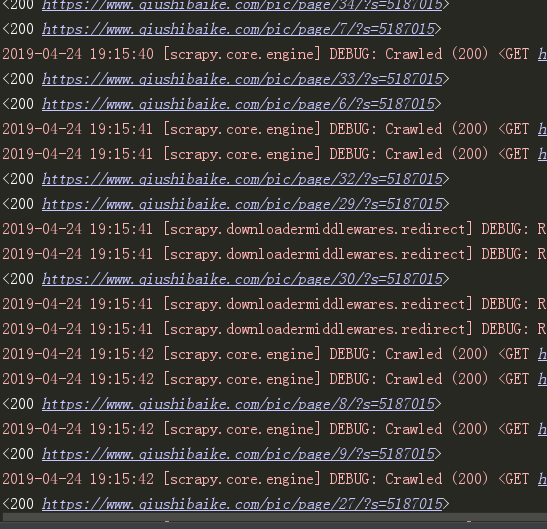
我们可以看到它获取到了这些网站的url:
糗事百科糗图爬取保存到本地
demo.py
# -*- coding: utf-8 -*-

import scrapy

# 导入模块

from scrapy.linkextractors import LinkExtractor

from scrapy.spiders import CrawlSpider, Rule

from happy3.items import Happy3Item

# 可以它继承与CrawSpider

class DemoSpider(CrawlSpider):

    name = 'demo'

    # allowed_domains = ['www.qiushibaike.com']

    # 起始url,糗事百科的糗图

    start_urls = ['http://www.qiushibaike.com/pic/']

    # 提取link的规则

    link = LinkExtractor(allow=r'/pic/$') # 提取第一页

    link1 = LinkExtractor(allow=r'/pic/page/\d+\?') #其他页面

    # rule中存放的是不同的解析规则的解析器

    rules = (

        Rule(link, callback='parse_item', follow=True),

        Rule(link1, callback='parse_item', follow=True),

    )

    # 解析方法

    def parse_item(self, response):

        div_list = response.xpath('//div[@id="content-left"]/div')

        for one_div in div_list:

            item = Happy3Item()

            item['title'] = one_div.xpath('.//div[@class="content"]/span/text()').extract_first().strip('\n')

            item['link'] = one_div.xpath('.//div[@class="thumb"]/a/img/@src').extract_first().strip('\n')

            #i['domain_id'] = response.xpath('//input[@id="sid"]/@value').extract()

            #i['name'] = response.xpath('//div[@id="name"]').extract()

            #i['description'] = response.xpath('//div[@id="description"]').extract()

            yield item
item.py
import scrapy

class Happy3Item(scrapy.Item):

    # define the fields for your item here like:

    # name = scrapy.Field()

    title = scrapy.Field()

    link = scrapy.Field()
pipelines.py
# -*- coding: utf-8 -*-

# Define your item pipelines here

#

# Don't forget to add your pipeline to the ITEM_PIPELINES setting

# See: https://doc.scrapy.org/en/latest/topics/item-pipeline.html

from scrapy.pipelines.images import ImagesPipeline

from scrapy.spiders import Request

import os

# 记录下载记录

class Happy3Pipeline(object):

    def create_dir(self, path):

        path = path.strip()

        if not os.path.exists(path):

            os.mkdir(path)

    def process_item(self, item, spider):

        # 让标题里只保留汉字

        # 文件夹名字

        apath = './pic/' + ''.join([ i for i in (item['title'])[0:15] if i >= u'\u4e00' and i <= u'\u9fa5'])

        # 里面的title的txt文件名字

        file_name = (apath + '/' + item['link'].split('/')[-1]).replace('jpg', 'txt')

        # 创建文件夹

        self.create_dir(apath)

        with open(file_name, 'w', encoding='utf-8') as f:

            f.write(item['title'])

        return item

# 下载图片

class QiushiImagePipeline(ImagesPipeline):

    def file_path(self, request, response=None, info=None):

        item = request.meta['item']

        apath = ''.join([ i for i in (item['title'])[0:15] if i >= u'\u4e00' and i <= u'\u9fa5'])

        img_name = item['link'].split('/')[-1]

        path = apath + '/' + img_name

        return path

    def get_media_requests(self, item, info):

        url = ['https:' + item['link']]

        print(url)

        return Request(url=url[0], meta={'item':item})
settings.py
BOT_NAME = 'happy3'

SPIDER_MODULES = ['happy3.spiders']

NEWSPIDER_MODULE = 'happy3.spiders'

# Crawl responsibly by identifying yourself (and your website) on the user-agent

USER_AGENT = 'Mozilla/5.0 (Windows NT 6.1; WOW64) AppleWebKit/535.1 (KHTML, like Gecko) Chrome/14.0.835.163 Safari/535.1'

# Obey robots.txt rules

ROBOTSTXT_OBEY = False

# Configure maximum concurrent requests performed by Scrapy (default: 16)

CONCURRENT_REQUESTS = 100

DOWNLOAD_DELAY = 1

ITEM_PIPELINES = {

   'happy3.pipelines.Happy3Pipeline': 300,

   'happy3.pipelines.QiushiImagePipeline':400,

}

IMAGES_STORE = 'pic'
得到结果:

大概630张图吧,自己练习的话可以少加载点网页。
爬虫框架之Scrapy(三 CrawlSpider)的更多相关文章
- 06 爬虫框架:scrapy
爬虫框架:scrapy 一 介绍 Scrapy一个开源和协作的框架,其最初是为了页面抓取 (更确切来说, 网络抓取 )所设计的,使用它可以以快速.简单.可扩展的方式从网站中提取所需的数据.但目前S ...
- 九、爬虫框架之Scrapy
爬虫框架之Scrapy 一.介绍 二.安装 三.命令行工具 四.项目结构以及爬虫应用简介 五.Spiders 六.Selectors 七.Items 八.Item Pipelin 九. Dowload ...
- Python-S9-Day125-Web微信&爬虫框架之scrapy
01 今日内容概要 02 内容回顾:爬虫 03 内容回顾:网络和并发编程 04 Web微信之获取联系人列表 05 Web微信之发送消息 06 为什么request.POST拿不到数据 07 到底使用j ...
- Golang 网络爬虫框架gocolly/colly 三
Golang 网络爬虫框架gocolly/colly 三 熟悉了<Golang 网络爬虫框架gocolly/colly一>和<Golang 网络爬虫框架gocolly/colly二& ...
- 洗礼灵魂,修炼python(72)--爬虫篇—爬虫框架:Scrapy
题外话: 前面学了那么多,相信你已经对python很了解了,对爬虫也很有见解了,然后本来的计划是这样的:(请忽略编号和日期,这个是不定数,我在更博会随时改的) 上面截图的是我的草稿 然后当我开始写博文 ...
- 爬虫框架之Scrapy
一.介绍 二.安装 三.命令行工具 四.项目结构以及爬虫应用简介 五.Spiders 六.Selectors 七.Items 八.Item Pipelin 九. Dowloader Middeware ...
- 爬虫框架:scrapy
一 介绍 Scrapy一个开源和协作的框架,其最初是为了页面抓取 (更确切来说, 网络抓取 )所设计的,使用它可以以快速.简单.可扩展的方式从网站中提取所需的数据.但目前Scrapy的用途十分广泛,可 ...
- Scrapy爬虫框架补充内容三(代理及其基本原理介绍)
前言:(本文参考维基百科及百度百科所写) 当我们使用爬虫抓取数据时,有时会产生错误比如:突然跳出来了403 Forbidden 或者网页上出现以下提示:您的ip访问频率太高 或者时不时跳出一个验证码需 ...
- 爬虫框架之Scrapy(四 ImagePipeline)
ImagePipeline 使用scrapy框架我们除了要下载文本,还有可能需要下载图片,scrapy提供了ImagePipeline来进行图片的下载. ImagePipeline还支持以下特别的功能 ...
随机推荐
- 你不知道的JavaScript--Item24 ES6新特性概览
ES6新特性概览 本文基于lukehoban/es6features ,同时参考了大量博客资料,具体见文末引用. ES6(ECMAScript 6)是即将到来的新版本JavaScript语言的标准,代 ...
- 把封装脚本做成jar包
前提: eclipse, selenium, maven 把二次封装过的脚本做成jar包, 这样可以在新建工程里也调用封装过的方法. 实现步骤: 1. project 右键 => maven = ...
- 【UOJ】67 新年的毒瘤 &【BZOJ】1123 BLO
[UOJ 67] 题目链接: 传送门 题解: 第一眼很懵逼……这什么鬼. 思考什么点复合条件……(o(>﹏<)o 1.树,也就是说还剩n-2条边,等价于要删去一个度数为m-n+2的点. 2 ...
- BZOJ_4128_Matrix_矩阵乘法+哈希+BSGS
BZOJ_4128_Matrix_矩阵乘法+哈希+BSGS Description 给定矩阵A,B和模数p,求最小的x满足 A^x = B (mod p) Input 第一行两个整数n和p,表示矩阵的 ...
- BZOJ_4873_[Shoi2017]寿司餐厅_最大权闭合子图
BZOJ_4873_[Shoi2017]寿司餐厅_最大权闭合子图 题意:http://www.lydsy.com/JudgeOnline/problem.php?id=4873 分析:我们发现分数正负 ...
- BZOJ_1058_[ZJOI2007]报表统计_STL
BZOJ_1058_[ZJOI2007]报表统计_STL Description 小Q的妈妈是一个出纳,经常需要做一些统计报表的工作.今天是妈妈的生日,小Q希望可以帮妈妈分担一些工 作,作为她的生日礼 ...
- BZOJ_2152_聪聪可可_点分治
BZOJ_2152_聪聪可可_点分治 Description 聪聪和可可是兄弟俩,他们俩经常为了一些琐事打起来,例如家中只剩下最后一根冰棍而两人都想吃.两个人都想玩儿电脑(可是他们家只有一台电脑)…… ...
- 用Java为Hyperledger Fabric(超级账本)编写区块链智能合约链代码
编写第一个 Java 链代码程序 在上一节中,您已经熟悉了如何构建.运行.部署和调用链代码,但尚未编写任何 Java 代码. 在本节中,将会使用 Eclipse IDE.一个用于 Eclipse 的 ...
- Linux下可以ping ip地址但无法ping域名解决方法
分析:当前系统无法解决域名至ip地址故障. 步骤阅读 2 三:解决过程: 1.分析dns故障: 2.物理机可以ping 地址,但无法ping域名: 3.检查/etc/resolv.conf: 注: ( ...
- python中线程和进程(一)
目录 进程和线程 Python中的线程 1. Thread类 2. 线程的启动 3. 线程的传参 4. 线程的属性和方法 5. daemon线程和non-daemon线程 6. join方法 7. 定 ...