
latex beamer技巧
%章节标题
\section{Related work(LSH)}

%开始一页ppt

\begin{frame}{Related work}{}

\partitle{Locality-Sensitive Hashing, LSH} \\ \vspace{1ex}

\qquad  LSH reduces the dimensionality of \alert{high-dimensional data}. LSH hashes input items so that similar items map to the same “buckets” with high probability. \footnote{Locality-Sensitive Hashing, LSH. Wikipedia}

\vspace{2ex}

%插入图片

\begin{figure}[H]

    \includegraphics[width=6cm,height=3cm]{2}

    \hspace{3ex}

    \includegraphics[width=4cm,height=3cm]{3}

\end{figure}

\end{frame}
下面是整个ppt的模板
\documentclass[10pt, aspectratio=43]{beamer}

\usepackage[utf8]{inputenc}

\usepackage[english]{babel}

\usepackage{verbatim}

\usepackage{amsmath, amsfonts, amssymb, amsthm, bm}

\usepackage{graphicx, tikz, pgfplots}

\usepackage{times, courier, verbatim}

\usepackage{multicol, multirow}

\usepackage{booktabs}

\usepackage{caption}

%\usepackage[UTF8,noindent]{ctexcap}

\usetheme{CambridgeUS}

\usecolortheme{seahorse}

%主题:AnnArbor Antibes Bergen Berkeley Berlin Boadilla boxes CambridgeUS Copenhagen Darmstadt default Dresden Frankfurt Goettingen Hannover Ilmenau JuanLesPinsLuebeck Madrid Malmoe Marburg Montpellier PaloAlto Pittsburgh Rochester Singapore Szeged Warsaw

%颜色:albatross beaver beetle crane default dolphin dove fly lily orchid rose seagull seahorse sidebartab structure whale wolverine

\defbeamertemplate*{footline}{myfootline}

{%

    \leavevmode%

    \begin{beamercolorbox}[wd=.333333\paperwidth,ht=2.5ex,dp=1.125ex,center]{author in head/foot} Shan Yiran %

    \end{beamercolorbox}%

    \begin{beamercolorbox}[wd=.333333\paperwidth,ht=2.5ex,dp=1.125ex,center]{subsection in head/foot} Group\_meeting %

    \end{beamercolorbox}%

    \begin{beamercolorbox}[wd=.333333\paperwidth,ht=2.5ex,dp=1.125ex,center]{time in head/foot}

        \usebeamerfont{date in head/foot}\insertshortdate{}\hspace*{2em}

        \insertframenumber{} / \inserttotalframenumber\hspace*{2ex}

    \end{beamercolorbox}%

    \vskip0pt%

}

\newcommand{\partitle}[1]{\underline{\textbf{\large#1}}}

\setlength{\columnsep}{2ex}

\setbeamertemplate{items}[ball]

%\renewcommand\thesection{\arabic{section}}

%\renewcommand\thesubsection{\thesection.\arabic{subsection}}

\begin{document}

    \setbeamertemplate{footline}{}

    \bibliographystyle{unsrt}

    \title{Graph Neural Networks}

    \subtitle {A review of Methods and Applications}

    \author{Shan Yiran}

    \institute {BNRIST Bioinformatics Division\\ Department of Automation \\Tsinghua University,Beijing 100084, China

    }

    \date{\today}

    \setbeamercovered{invisible}

    \setbeamertemplate{navigation symbols}{}

%第一页ppt

\begin{frame}

\titlepage

\end{frame}

\begin{frame}

\begin{center}

    \includegraphics[width=1\linewidth]{1}

\end{center}

\end{frame}

%测试ppt

\begin{frame}

\frametitle{Frame title}

\begin{block}{Observation 1}

    Simmons Hall is composed of metal and concrete.

\end{block}

\begin{exampleblock}{Observation 2}

    Simmons Dormitory is composed of brick.

\end{exampleblock}

\begin{alertblock}{Conclusion}

    Simmons Hall $\not=$ Simmons Dormitory.

\end{alertblock}

\end{frame}

%第二页ppt

\begin{frame}

\frametitle{Frame title}

\begin{block}{Observation 1}

    Simmons Hall is composed of metal and concrete.

\end{block}

\begin{exampleblock}{Observation 2}

    Simmons Dormitory is composed of brick.

\end{exampleblock}

\begin{alertblock}{Conclusion}

    Simmons Hall $\not=$ Simmons Dormitory.

\end{alertblock}

\end{frame}

\setbeamertemplate{footline}[myfootline]

\begin{frame}{Content}

\setbeamertemplate{section in toc}[]

\tableofcontents[]

\end{frame}

\AtBeginSection[] {

\begin{frame}<beamer>

\frametitle{Content}

\tableofcontents[currentsection]

\end{frame}

}

\section{The fundamental computing problem}

\begin{frame}{The fundamental computing problem}{}

\partitle{The query of High dimension data} \\ \vspace{1ex}

\qquad  \alert{Large-scale} and \alert{high dimension data} attracts more and more attention.

\vspace{2ex}

The specific application:

\begin{itemize}

    \item Duplicate checking

    \item Identifying similar images in a database

    \item Identifying similar documentson the web

    \item Image retrieval

    \item Music retrieval

    \item Fingerprint matching

\end{itemize}

\vspace{1ex}

\end{frame}

\section{Related work(LSH)}

\begin{frame}{Related work}{}

\partitle{Locality-Sensitive Hashing, LSH} \\ \vspace{1ex}

\qquad  LSH reduces the dimensionality of \alert{high-dimensional data}. LSH hashes input items so that similar items map to the same “buckets” with high probability. \footnote{Locality-Sensitive Hashing, LSH. Wikipedia}

\vspace{2ex}

\end{frame}

\section{The fly algorithm }

\begin{frame}{The fly algorithm}{based on the fly olfactory circuit}

\partitle{The fly algorithm principle} \\ \vspace{1ex}

\qquad  The fly circuit assigns

\alert{similar neural activity patterns} to similar odors, so that behaviors learned from one odor can

be applied when a similar odor is experienced.

\vspace{2ex}

\end{frame}

\section{Differences between Fly \& LSH}

\begin{frame}{Differences between Fly \& LSH}{}

\partitle{The fly algorithm principle} \\ \vspace{1ex}

\begin{itemize}

    \item Sparse, binary random projections VS Dense,

    Gaussian random projections

    \item Expands the dimensionality VS Reduces

    the dimensionality

    \item The higher-dimensionality representation

    VS A dense representation.

\end{itemize}

\vspace{2ex}

\end{frame}

\section{Result}

\begin{frame}{Result\&Conclusion}{}

\partitle{Overall comparison between the fly algorithm and LSH.} \\ \vspace{1ex}

\partitle{Conclussion: AI already has olfactory systems...}

\end{frame}

\begin{frame}{}{}

{\centering\begin{center}

        \bf \Huge  Thanks!

    \end{center} }

\end{frame}

\end{document}
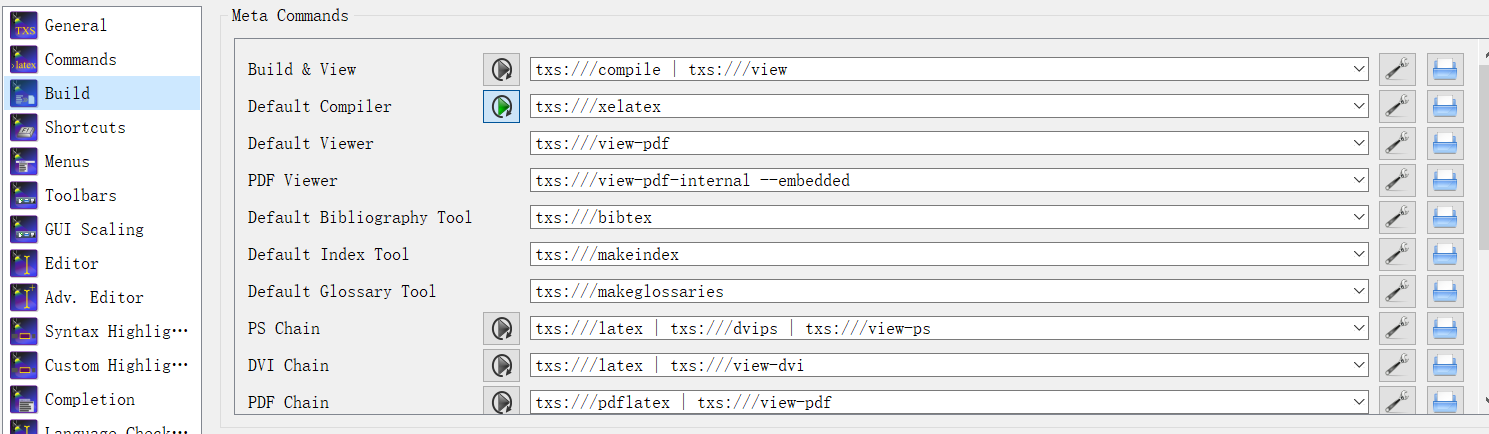
编译器的设置:
下面是具体的一些小贴士和实现效果,持续更新中...
1.-------------------------------------------------------------------------------------------------------------------------------------------------------------------------------------------------
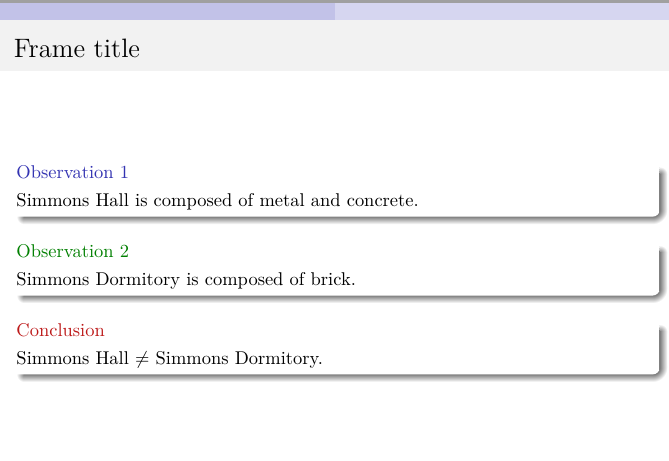
文字加入边框:(exampleblock)
\begin{frame}

\frametitle{Frame title}

\begin{block}{Observation 1}

    Simmons Hall is composed of metal and concrete.

\end{block}

\begin{exampleblock}{Observation 2}

    Simmons Dormitory is composed of brick.

\end{exampleblock}

\begin{alertblock}{Conclusion}

    Simmons Hall $\not=$ Simmons Dormitory.

\end{alertblock}

\end{frame}
效果
2.-------------------------------------------------------------------------------------------------------------------------------------------------------------------------------------------------
举例
\begin{frame}

\begin{enumerate}

    \item haha

    \textbf{PGF}: dd

    \textbf{TikZ}: dd

    \item dd: dd(dd、2-dd-dd)

    \item dd:dd

\end{enumerate}

\end{frame}
效果

3.-------------------------------------------------------------------------------------------------------------------------------------------------------------------------------------------------
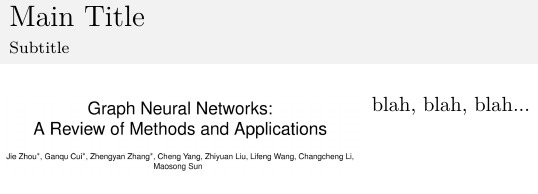
双栏
\begin{frame}[t]{Main Title}{Subtitle}

\begin{columns}

    \begin{column}[T]{0.5\textwidth}

        \includegraphics[width=\textwidth]{1}

    \end{column}

    \begin{column}[T]{0.5\textwidth}

        blah, blah, blah...

    \end{column}

\end{columns}

\end{frame}
latex beamer技巧的更多相关文章
- 使用Markdown+Pandoc+LaTex+Beamer制作幻灯片
概述 为什么使用markdown? mardown是一种轻量级的标记语言,语法简单,可读性好,并且容易转化成其他格式的文档, 在技术文档撰写中得到越来越广泛的应用.相信大家对markdown都有一定了 ...
- Latex小技巧
最近由于离散数学课程作业的需要, 使用$\LaTeX$写pdf报告, 积累了一些$\LaTeX$小技巧, 以后还会陆续补充. 1. 查看某个包的使用手册, 在命令行中输入texdoc XXX, 其中X ...
- [整理][LaTex]小技巧之——首行缩进
0. 简介 在LaTex编辑时,有时会遇到这样一个有关于首行缩进的问题.在汉语环境的编辑下,习惯上每段会进行一个两个字的缩进.但是在默认编辑模式下,一个章节下的首段是没有首行缩进的,本文的目的主要是解 ...
- LaTex 小技巧
首行缩进 参考:小技巧之--首行缩进 %-------------------------------------------------------------------------------- ...
- Latex beamer
使用明体(gbsn)和楷体(gkai)两种字型.以下的编程是一开始的宣告,并自动生成第一张封面投影片. \documentclass[cjk]{beamer}\usepackage{CJKutf8}\ ...
- LaTeX使用技巧
使用LaTex的方法: (1)推荐一个手写公式.自动生成LaTex的网站——Web Equation. (2)如果会LaTex,可以直接用在线LaTex编辑 (3)从mathtype转换: 首先打开文 ...
- LaTeX小技巧——File ended while scanning use of \@writefile错误的
早上在修改编译论文时发现了这个问题,仔细检查代码并没发现错误,一时也找不到具体的解决办法.我一直以为是因为runaway argument的错误提示,可实际上就是因为aux文件没有完整输入,导致上次编 ...
- latex beamer 插入代码
有网友在beamer中使用mcode也就是 listings 输出源代码时遇到如下错误: Runaway argument?! Paragraph ended before \lst@next was ...
- Latex 文本编辑技巧
临时取消首行缩进 \noindent 生成随机文本 \usepackage{lipsum} \begin{document} \lipsum \end{document} 多栏模式 \usepacka ...
随机推荐
- Excel透视表进阶之排序、筛选、分组、总计与分类汇总
排序 自动排序 升序: 数字(从小到大) 日期(日期越早越靠小) 英文(按照A-Z) 中文(按照拼音的A-Z) 手动排序 通过鼠标的拖拽来完成手动排序 通过快捷菜单的方式:右击-移动 依据其他字段进行 ...
- MySQL-4- 索引及执行计划
1. 索引作用 提供了类似于书中目录的作用,目的是为了优化查询 2. 索引的种类(算法) B树索引 Hash索引 R树 Full text GIS 3. B树 基于不同的查找算法分类介绍 B-tr ...
- Mybatis(一) 入门
对原生态jdbc程序中问题总结 创建mysql数据库 jdbc程序 使用jdbc查询mysql数据库中用户表的记录. 创建java工程,加入jar包 数据库驱动包 第一个是mysql驱动 第二个是or ...
- Microsoft BarCode Control 16.0属性
Labview(2018)可通过Active调用Microsoft BarCode Control 16.0来生成条形码, 参考资料如下: 生成效果: 二维码: 条形码: 执行程序发现修改线条宽度不影 ...
- AT2292 Division into Two
题目 不妨认为\(A>B\). 首先判一下无解. 设\(f_i\)表示\(A\)集合最后选第\(i\)个数的方案数. 转移的话枚举一下从哪个\(j\)转移过来. 显然\(j\)需要满足以下条件: ...
- 用C#取个中文名字
*注意:此方法获得的名字很可能出现生僻字,若要get一个好记/常见的名字,还请另作操作. 以百家姓(444个单姓,60个复姓)作为姓氏,再添加两个随机的中文,You can get a chinese ...
- thread 多线程2
###24.04_多线程(多线程程序实现的方式1)(掌握) * 1.继承Thread * 定义类继承Thread * 重写run方法 * 把新线程要做的事写在run方法中 * 创建线程对象 * 开启新 ...
- pyhton自动化项目编码以及命名规范
对于任何一个编程项目来说,都需要一个编码的规范以及标准,这里整理了一些Google python的命名规范以及python语言PEP8的编码规范. 一.命名规范 命名示例: module_name, ...
- Numpy 基础函数 --《Python 数据分析从入门到精通》
在Numpy中,方向称作轴,轴的数目称作维.(array(z,y,x)) np.empty() 函数的使用待完全确定.(eg: np.empty([2,3]) -> ([[0,0,0] [0, ...
- 史上最全的大厂Mysql面试题在这里
1.MySQL的复制原理以及流程 基本原理流程,3个线程以及之间的关联: 主:binlog线程——记录下所有改变了数据库数据的语句,放进master上的binlog中: 从:io线程——在使用star ...