
C#中使用Join与GroupJoin将两个集合进行关联与分组
转自:https://www.cnblogs.com/cncc/p/7985843.html
对于Join的用法说明如下:
语法:

public static IEnumerable<TResult> Join<TOuter, TInner, TKey, TResult>(

    this IEnumerable<TOuter> outer,

    IEnumerable<TInner> inner,

    Func<TOuter, TKey> outerKeySelector,

    Func<TInner, TKey> innerKeySelector,

    Func<TOuter, TInner, TResult> resultSelector

)
参数说明:
outer

Type: System.Collections.Generic.IEnumerable<TOuter>

要联接的第一个序列。

inner

Type: System.Collections.Generic.IEnumerable<TInner>

要与第一个序列联接的序列。

outerKeySelector

Type: System.Func<TOuter, TKey>

用于从第一个序列的每个元素提取联接键的函数。

innerKeySelector

Type: System.Func<TInner, TKey>

用于从第二个序列的每个元素提取联接键的函数。

resultSelector

Type: System.Func<TOuter, TInner, TResult>

用于从两个匹配元素创建结果元素的函数。

返回值

Type: System.Collections.Generic.IEnumerable<TResult>

IEnumerable<T> ,其类型的元素 TResult 通过对两个序列执行内部联接获得的。
参数类型:
TOuter

第一个序列中的元素的类型。

TInner

第二个序列中的元素的类型。

TKey

键选择器函数返回的键的类型。

TResult

结果元素的类型。
参考链接如下:
https://msdn.microsoft.com/zh-cn/library/bb534675.aspx
https://docs.microsoft.com/zh-cn/dotnet/api/system.linq.enumerable.join?f1url=https%3A%2F%2Fmsdn.microsoft.com%2Fquery%2Fdev15.query%3FappId%3DDev15IDEF1%26l%3DZH-CN%26k%3Dk(System.Linq.Enumerable.Join%60%604);k(TargetFrameworkMoniker-.NETFramework,Version%3Dv4.0);k(DevLang-csharp)%26rd%3Dtrue&view=netframework-4.7.1
例程:
using System;

using System.Collections.Generic;

using System.Linq;

namespace ConsoleApp33

{

    class Program

    {

        static void Main(string[] args)

        {

            GroupJoinEx();

        }

        static void GroupJoinEx()

        {

            Person p1 = new Person() { Name = "ABC", Age = 18 };

            Person p2 = new Person() { Name = "EFG", Age = 19 };

            Person p3 = new Person() { Name = "LMN", Age = 20 };

            Person p4 = new Person() { Name = "XYZ", Age = 21 };

            List<Person> pList = new List<Person> { p1, p2, p3, p4 };

            Department d1 = new Department() { Name = "A1", Employee = p1 };

            Department d2 = new Department() { Name = "A2", Employee = p2 };

            Department d3 = new Department() { Name = "A3", Employee = p1 };

            Department d4 = new Department() { Name = "B1", Employee = p3 };

            Department d5 = new Department() { Name = "B2", Employee = p4 };

            Department d6 = new Department() { Name = "B3", Employee = p4 };

            List<Department> dList = new List<Department> { d1, d2, d3, d4, d5, d6 };

            var result = pList.Join(dList,

                person => person,

                department => department.Employee,

                (person, department) => new

                {

                    Person = person,

                    Department = department

                });

            foreach(var item1 in result)

            {

                Console.Write($"Name:{item1.Person} & Department:{item1.Department} ");

                Console.WriteLine();

            }

        }

    }

    class Person

    {

        public string Name { set; get; }

        public int Age { set; get; }

        public override string ToString()

        {

            return $"{Name},{Age}";

        }

    }

    class Department

    {

        public string Name { set; get; }

        public Person Employee { set; get; }

        public override string ToString()

        {

            return $"{Name}";

        }

    }

}
输出结果:
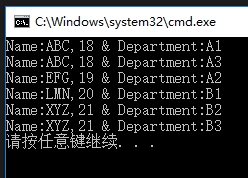
对于GroupJoin的用法说明如下:
语法:
public static IEnumerable<TResult> GroupJoin<TOuter, TInner, TKey, TResult>(

    this IEnumerable<TOuter> outer,

    IEnumerable<TInner> inner,

    Func<TOuter, TKey> outerKeySelector,

    Func<TInner, TKey> innerKeySelector,

    Func<TOuter, IEnumerable<TInner>, TResult> resultSelector

)
参数说明:
outer

Type: System.Collections.Generic.IEnumerable<TOuter>

要联接的第一个序列。

inner

Type: System.Collections.Generic.IEnumerable<TInner>

要与第一个序列联接的序列。

outerKeySelector

Type: System.Func<TOuter, TKey>

用于从第一个序列的每个元素提取联接键的函数。

innerKeySelector

Type: System.Func<TInner, TKey>

用于从第二个序列的每个元素提取联接键的函数。

resultSelector

Type: System.Func<TOuter, IEnumerable<TInner>, TResult>

用于从第一个序列的元素和第二个序列的匹配元素集合中创建结果元素的函数。

返回值

Type: System.Collections.Generic.IEnumerable<TResult>

IEnumerable<T> ,其中包含类型的元素 TResult 通过对两个序列执行分组的联接获得的。
参数类型:
TOuter

第一个序列中的元素的类型。

TInner

第二个序列中的元素的类型。

TKey

键选择器函数返回的键的类型。

TResult

结果元素的类型。
参考链接如下:
https://msdn.microsoft.com/zh-cn/library/bb534297.aspx
https://docs.microsoft.com/zh-cn/dotnet/api/system.linq.enumerable.groupjoin?f1url=https%3A%2F%2Fmsdn.microsoft.com%2Fquery%2Fdev15.query%3FappId%3DDev15IDEF1%26l%3DZH-CN%26k%3Dk(System.Linq.Enumerable.GroupJoin%60%604);k(TargetFrameworkMoniker-.NETFramework,Version%3Dv4.0);k(DevLang-csharp)%26rd%3Dtrue&view=netframework-4.7.1
例程:
using System;

using System.Collections.Generic;

using System.Linq;

namespace ConsoleApp33

{

    class Program

    {

        static void Main(string[] args)

        {

            GroupJoinEx();

        }

        static void GroupJoinEx()

        {

            Person p1 = new Person() { Name = "ABC", Age = 18 };

            Person p2 = new Person() { Name = "EFG", Age = 19 };

            Person p3 = new Person() { Name = "LMN", Age = 20 };

            Person p4 = new Person() { Name = "XYZ", Age = 21 };

            List<Person> pList = new List<Person> { p1, p2, p3, p4 };

            Department d1 = new Department() { Name = "A1", Employee = p1 };

            Department d2 = new Department() { Name = "A2", Employee = p2 };

            Department d3 = new Department() { Name = "A3", Employee = p1 };

            Department d4 = new Department() { Name = "B1", Employee = p3 };

            Department d5 = new Department() { Name = "B2", Employee = p4 };

            Department d6 = new Department() { Name = "B3", Employee = p4 };

            List<Department> dList = new List<Department> { d1, d2, d3, d4, d5, d6 };

            var result = pList.GroupJoin(dList,

                person => person,

                department => department.Employee,

                (person, departments) => new

                {

                    Person = person,

                    Department = departments.Select(d => d)

                });

            foreach(var item1 in result)

            {

                Console.Write($"Name:{item1.Person} & ");

                foreach(var item2 in item1.Department)

                {

                    if(item1.Department.First() == item2)

                        Console.Write($"Department:{item2} ");

                    else

                        Console.Write($"{item2} ");

                }

                Console.WriteLine();

            }

        }

    }

    class Person

    {

        public string Name { set; get; }

        public int Age { set; get; }

        public override string ToString()

        {

            return $"{Name},{Age}";

        }

    }

    class Department

    {

        public string Name { set; get; }

        public Person Employee { set; get; }

        public override string ToString()

        {

            return $"{Name}";

        }

    }

}
输出结果:
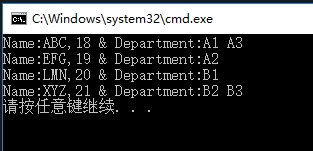
以上代码仅在Join与GroupJoin最后一个参数有区别,可以参见红色字体部分,
并从以上结果来看,Join与GroupJoin的区别一个在于:Join仅仅是将两个结合进行关联,而GroupJoin则会进行分组。
C#中使用Join与GroupJoin将两个集合进行关联与分组的更多相关文章
- [C#]使用Join与GroupJoin将两个集合进行关联与分组
本文为原创文章.源代码为原创代码,如转载/复制,请在网页/代码处明显位置标明原文名称.作者及网址,谢谢! 本文使用的开发环境是VS2017及dotNet4.0,写此随笔的目的是给自己及新开发人员作为参 ...
- sql 查询 一张表里面的数据 在另一张表中是否存在 和 比对两个集合中的差集和交集(原创)
这两天在搞一个修复的小功能 需求: A表,B表,C表,日志文件 先筛选出A表和B表中都符合条件的数据,然后检查这些数据在C表中是否存在.如果不存在,就从日志中读取数据,存入C表中,如果存在,则不做操作 ...
- [C#]使用GroupJoin将两个关联的集合进行分组
本文为原创文章.源代码为原创代码,如转载/复制,请在网页/代码处明显位置标明原文名称.作者及网址,谢谢! 本文使用的开发环境是VS2017及dotNet4.0,写此随笔的目的是给自己及新开发人员作为参 ...
- 使用LINQ、Lambda 表达式 、委托快速比较两个集合,找出需要新增、修改、删除的对象
本文需要对C#里的LINQ.Lambda 表达式 .委托有一定了解. 在工作中,经常遇到需要对比两个集合的场景,如: 页面集合数据修改,需要保存到数据库 全量同步上游数据到本系统数据库 在这些场景中, ...
- c#封装DBHelper类 c# 图片加水印 (摘)C#生成随机数的三种方法 使用LINQ、Lambda 表达式 、委托快速比较两个集合,找出需要新增、修改、删除的对象 c# 制作正方形图片 JavaScript 事件循环及异步原理(完全指北)
c#封装DBHelper类 public enum EffentNextType { /// <summary> /// 对其他语句无任何影响 /// </summary> ...
- LINQ标准查询操作符(二)——Join、GroupJoin、GroupBy、Concat、
四.联接操作符 联接是指将一个数据源对象与另一个数据源对象进行关联或者联合的操作.这两个数据源对象通过一个共同的值或者属性进行关联. LINQ有两个联接操作符:Join和GroupJoin. 1. J ...
- [C#] LINQ之Join与GroupJoin
声明:本文为www.cnc6.cn原创,转载时请注明出处,谢谢! 一.编写Person与City类,如下: class Person { public int CityID { set; get; } ...
- LINQ TO SQL 中的join(转帖)
http://www.cnblogs.com/ASPNET2008/archive/2008/12/21/1358152.html join对于喜欢写SQL的朋友来说还是比较实用,也比较容易接受的东西 ...
- LINQ之 Join 与 GroupJoin
声明:本文为www.cnc6.cn原创,转载时请注明出处,谢谢! 一.编写Person与City类,如下: class Person { public int CityID { set; get; } ...
随机推荐
- django项目学习之QQ登录
最近在用django框架写一个商城项目(前后端分离),里面用到的一些技术其他项目也可以借鉴,于是就想写一些博客记录,以防自己忘记,今天先写一个关于登录接口中引入QQ登录接口的流程. 关于QQ登录接口的 ...
- 搜索专题: HDU1372Knight Moves
Knight Moves Time Limit: 2000/1000 MS (Java/Others) Memory Limit: 65536/32768 K (Java/Others) Tot ...
- nodeJS打包安装和问题处理
一,执行步骤,打包报错 1,查看npm版本npm -v 2,查看gulp版本(报错怎么证明没安装)gulp --version 3,安装gulpnpm install --global gulp-cl ...
- 2019 上海市大学生网络安全大赛 RE部分WP
这次比赛就做了这一道逆向题,看到队友的WP,下面的对v10的加密方式为RC4,从我提取的v4数组就能够察觉出这是CR4了,自己傻乎乎的用OD调试,跟踪数据半天才做出来,还是见得的少了... ...下面 ...
- 1-ES简单介绍
一.ES简单介绍 ES:Elastic Search,一个分布式.高扩展.高实时的搜索与数据分析引警.它可以准实时地快速存储.搜索.分析海量的数据. 1.ES实现原理 a.用户数据提交到ES数据库中 ...
- win10常用的dos命令
1.calc:启动计算器 2.appwiz.cpl:程序和功能 3.certmgr.msc:证书管理实用程序 4.charmap:启动字符映射表 5.chkdsk.exe:Chkdsk磁盘检查(管理员 ...
- spring服务器接收参数格式
注:@RequestParam 或@RequestBody等注解是否添加有什么区别 不加:参数可有可无,无参数时为null,但当参数类型是 数字基本类型(int.double)时会报错: 加上@Req ...
- win10系统中photoshop cs6中界面字体太小的解决方法
win10系统中photoshop cs6中界面字体太小的解决方法 ps页面系统字体特别小,解决方法如下: 右键ps图标—属性—兼容性—勾选替代高dpi缩放行为,缩放执行选为默认,如果不行三个都试试
- modinfo - 显示当前内核模块信息
总览 modinfo [ options ] <module_file> 描述 modinfo 工具软件用来对内核模块的目标文件 module_file 进行测试并打印输出相关信息. 选项 ...
- PAT Advanced 1019 General Palindromic Number (20 分)
A number that will be the same when it is written forwards or backwards is known as a Palindromic Nu ...