
React-Native 之 GD (四)使用通知方式隐藏或显示TabBar
1.GDHalfHourHot.js 发送通知
/**

 * 近半小时热门

 */

import React, { Component } from 'react';

import {

    StyleSheet,

    Text,

    View,

    TouchableOpacity,

    Image,

    ListView,

    Dimensions,

    DeviceEventEmitter,

} from 'react-native';

// 获取屏幕宽高

const {width, height} = Dimensions.get('window');

// 引入自定义导航栏组件

import CommunalNavBar from '../main/GDCommunalNavBar';

// 引入 cell

import CommunalHotCell from '../main/GDCommunalHotCell';

export default class GDHalfHourHot extends Component {

    // 构造

    constructor(props) {

        super(props);

        // 初始状态

        this.state = {

            dataSource: new ListView.DataSource({rowHasChanged:(r1, r2) => r1 !== r2}), // 数据源 优化

        };

        // 绑定

        this.fetchData = this.fetchData.bind(this);

    }

    // 网络请求

    fetchData() {

        fetch('http://guangdiu.com/api/gethots.php')  // 请求地址

            .then((response) => response.json())  // 定义名称 将数据转为json格式

            .then((responseData) => { // 处理数据

                // 修改dataSource的值

                this.setState({

                    dataSource: this.state.dataSource.cloneWithRows(responseData.data)

                });

            })

            .done() // 结束

    }

    // 跳回首页

    popToHome() {

        this.props.navigator.pop();

    }

    // 返回中间按钮

    renderTitleItem() {

        return(

            <Text style={styles.navbarTitleItemStyle}>近半小时热门</Text>

        );

    }

    // 返回右边按钮

    renderRightItem() {

        return(

            <TouchableOpacity

                onPress={() => {this.popToHome()}}

            >

                <Text style={styles.navbarRightItemStyle}>关闭</Text>

            </TouchableOpacity>

        );

    }

    // 返回每一行cell的样式

    renderRow(rowData) {

        // 使用cell组件

        return(

            <CommunalHotCell

                image={rowData.image}

                title={rowData.title}

            />

        );

    }

    componentWillMount() {

        // 向GDMain.js 发送通知 隐藏tabBar

        DeviceEventEmitter.emit('isHiddenTabBar', true);

    }

    componentWillUnmount() {

        // 向GDMain.js 发送通知 显示tabBar

        DeviceEventEmitter.emit('isHiddenTabBar', false);

    }

    // 生命周期 组件渲染完成 已经出现在dom文档里

    componentDidMount() {

        // 请求数据

        this.fetchData();

    }

    render() {

        return (

            <View style={styles.container}>

                {/* 导航栏样式 */}

                <CommunalNavBar

                    titleItem = {() => this.renderTitleItem()}

                    rightItem = {() => this.renderRightItem()}

                />

                {/* 顶部提示 */}

                <View style={styles.headerPromptStyle}>

                    <Text>根据每条折扣的点击进行统计,每5分钟更新一次</Text>

                </View>

                {/* 商品列表 */}

                <ListView

                    dataSource={this.state.dataSource}  // 数据源 通过判断dataSource是否有变化,来判断是否要重新渲染、

                    renderRow={this.renderRow}

                    showsHorizontalScrollIndicator={false} // 隐藏水平线

                    style={styles.listViewStyle}

                />

            </View>

        );

    }

}

const styles = StyleSheet.create({

    container: {

        flex:1,

        alignItems: 'center',

    },

    navbarTitleItemStyle: {

        fontSize:17,

        color:'black',

        marginLeft:50

    },

    navbarRightItemStyle: {

        fontSize:17,

        color:'rgba(123,178,114,1.0)',

        marginRight:15

    },

    headerPromptStyle: {

        height:44,

        width:width,

        backgroundColor:'rgba(239,239,239,0.5)',

        justifyContent:'center',

        alignItems:'center'

    },

    listViewStyle: {

        width:width,

    }

});
核心代码:
componentWillMount() {

        // 发送通知

        DeviceEventEmitter.emit('isHiddenTabBar', true);

    }

    componentWillUnmount() {

        // 发送通知

        DeviceEventEmitter.emit('isHiddenTabBar', false);

    }
2.GDMain.js 接收通知 判断 tabBar 是否隐藏
/**

 * 主页面

 * 通过此文件连接其他文件

 */

import React, {

    Component

} from 'react';

import {

    StyleSheet,

    Text,

    View,

    Image,

    Platform,

    DeviceEventEmitter,

} from 'react-native';

// tab组件(第三方框架)

import TabNavigator from 'react-native-tab-navigator';

// 导航器

import CustomerComponents, {

    Navigator

} from 'react-native-deprecated-custom-components';

// 引入其他组件

import Home from '../home/GDHome';

import HT from '../ht/GDHt';

import HourList from '../hourList/GDHourList';

export default class GD extends Component {

    // ES6

    // 构造

    constructor(props) {

        super(props);

        // 初始状态

        this.state = {

            selectedTab: 'home',

            isHiddenTabBar:false,   // 是否隐藏tabbar

        };

    }

    // 返回TabBar的Item

    renderTabBarItem(title, selectedTab, image, selectedImage, component) {

        return (

            <TabNavigator.Item

                selected={this.state.selectedTab === selectedTab}

                title={title}

                selectedTitleStyle={{color:'black'}}

                renderIcon={() => <Image source={{uri:image}} style={styles.tabbarIconStyle} />}

                renderSelectedIcon = {() => <Image source={{uri:selectedImage}} style={styles.tabbarIconStyle} />}

                onPress = {() => this.setState({selectedTab: selectedTab})}>

                <Navigator

                // 设置路由

                initialRoute = {

                    {

                        name: selectedTab,

                        component: component

                    }

                }

                renderScene = {

                    (route, navigator) => {

                        let Component = route.component;

                        return <Component {...route.params} navigator={navigator} />

                    }

                } />

            </TabNavigator.Item>

        );

    }

    tongZhi(data) {

        this.setState({

            isHiddenTabBar:data,

        })

    }

    // 使用通知,进行隐藏和显示tabBar

    componentDidMount() {

        // 注册通知

        this.subscription = DeviceEventEmitter.addListener('isHiddenTabBar', (data)=>{this.tongZhi(data)});

    }

    componentWillUnmount() {

        // 销毁

        this.subscription.remove();

    }

    render() {

        return (

            <TabNavigator

                tabBarStyle={this.state.isHiddenTabBar !== true ? {} : {height:0, overflow:'hidden'}}

                sceneStyle={this.state.isHiddenTabBar !== true ? {} : {paddingBottom:0}}

            >

                { /* 首页 */ }

                {this.renderTabBarItem("首页", 'home', 'tabbar_home_30x30', 'tabbar_home_selected_30x30', Home)}

                { /* 海淘 */ }

                {this.renderTabBarItem("海淘", 'ht', 'tabbar_abroad_30x30', 'tabbar_abroad_selected_30x30', HT)}

                { /* 小时风云榜 */ }

                {this.renderTabBarItem("小时风云榜", 'hourlist', 'tabbar_rank_30x30', 'tabbar_rank_selected_30x30', HourList)}

            </TabNavigator>

        );

    }

}

const styles = StyleSheet.create({

    container: {

        flex: 1,

        justifyContent: 'center',

        alignItems: 'center',

        backgroundColor: '#F5FCFF',

    },

    tabbarIconStyle: {

        width: Platform.OS === 'ios' ? 30 : 25,

        height: Platform.OS === 'ios' ? 30 : 25,

    }

});
核心代码:
componentDidMount() {

        // 注册通知

        this.subscription = DeviceEventEmitter.addListener('isHiddenTabBar', (data)=>{this.tongZhi(data)});

    }

    componentWillUnmount() {

        // 销毁

        this.subscription.remove();

    }
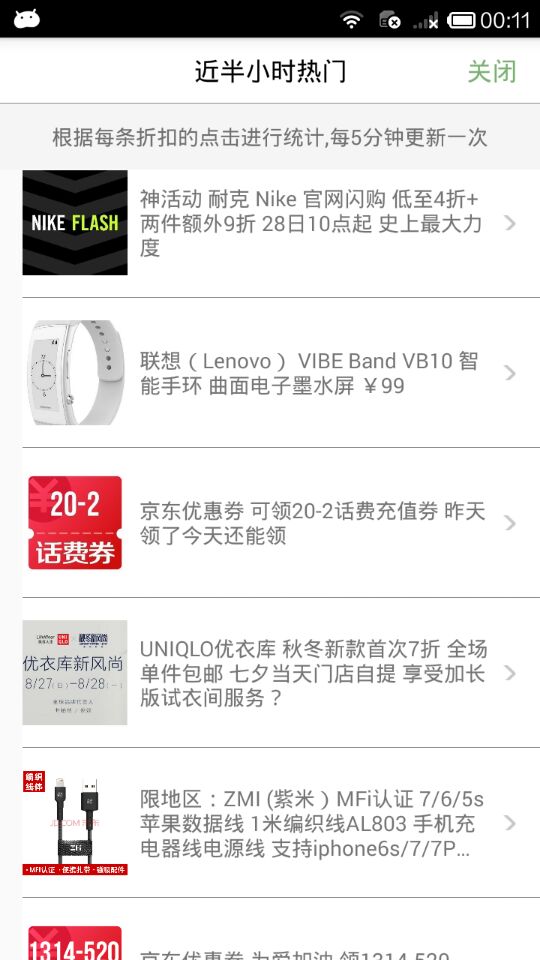
效果图:

React-Native 之 GD (四)使用通知方式隐藏或显示TabBar的更多相关文章
- React Native学习(四)—— 写一个公用组件(头部)
本文基于React Native 0.52 Demo上传到Git了,有需要可以看看,写了新内容会上传的.Git地址 https://github.com/gingerJY/React-Native-D ...
- React Native探索(四)Flexbox布局详解
相关文章 React Native探索系列 前言 在Android开发中我们有很多种布局,比如LinearLayout和RelativeLayout,同样在React Native也有它的布局,这个布 ...
- react中如何实现一个按钮的动态隐藏和显示(有效和失效)
初始准备工作 constructor(props) { super(props); /* * 构建导出数据的初始参数,结合用户下拉选择后动态设置参数值 * */ this.state = { btnS ...
- React Native 之 项目实战(一)
前言 本文有配套视频,可以酌情观看. 文中内容因各人理解不同,可能会有所偏差,欢迎朋友们联系我. 文中所有内容仅供学习交流之用,不可用于商业用途,如因此引起的相关法律法规责任,与我无关. 如文中内容对 ...
- 最火移动端跨平台方案盘点:React Native、weex、Flutter
1.前言 跨平台一直是老生常谈的话题,cordova.ionic.react-native.weex.kotlin-native.flutter等跨平台框架的百花齐放,颇有一股推倒原生开发者的势头. ...
- React Native开发入门
目录: 一.前言 二.什么是React Native 三.开发环境搭建 四.预备知识 五.最简单的React Native小程序 六.总结 七.参考资料 一.前言 虽然只是简单的了解了一下Reac ...
- React Native 弹性布局FlexBox
React Native采用一中全新的布局方式:FlexBox(弹性布局).可以很方便的实现各种复杂布局,是全新的针对web和移动开发布局的一种实现方式. 何为FlexBox? 完整名称为:the f ...
- React Native组件只Image
不管在Android还是在ios原生的开发中,图片都是作为控件给出来的,在RN中也有这么一个控件(Image).根据官网的资料,图片分为本地静态图片,网络图片和混合app资源.一下分类介绍来源官网. ...
- React Native组件(二)View组件解析
相关文章 React Native探索系列 React Native组件系列 前言 了解了RN的组件的生命周期后,我们接着来学习RN的具体的组件.View组件是最基本的组件,也是首先要掌握的组件,这一 ...
随机推荐
- [Bzoj1911][Apio2010]特别行动队(斜率优化)
题目链接 斜率优化的经典模型,将序列分成若干段,每段有一个权值计算方法,求权值和最大/小 暴力的dp $O(n^{2})$ dp[i]为1-i的序列的最优解.sum[i]为前缀和,$D(i)=ax^{ ...
- lambda map() filter() zip()练习
练习: 用map来处理字符串列表,把列表中所有人都变成sb,比方alex_sb l=[{'name':'alex'},{'name':'y'}] l=[{'name':'alex'},{'name': ...
- Vue:Elementui中的Tag与页面其它元素相互交互的两三事
前言 公司系统在用elementui做后台开发,不免遇到一些需要自己去根据原有的功能上,加一些交互的功能.今天来介绍下我在用elementUi里的Tag标签与多选框交互的过程,东西听上去很简单,但就是 ...
- Paper Reading_Computer Architecture
最近(以及预感接下来的一年)会读很多很多的paper......不如开个帖子记录一下读paper心得 Computer Architecture Last level cache (llc) perf ...
- PowerEdge T630服务器安装机器学习环境(Ubuntu18.04、Nvidia 1080Ti驱动、CUDA及CUDNN安装)
安装步骤 在开始安装之前,我要说明一下,这个Ubuntu18.04系统的安装,使用的连接线(就是服务器和电脑显示器的连接线)必须两头都是VGA连接线,不能使用VGA转HDMI连接线,也不能用DVI转D ...
- AF封装的关于一次请求上传多图到服务器!!!
方式一:图片封装在模型数组中 /** * 上传多图到服务器 * * @param URLString 请求地址 * @param parameters 请求的其他参数 * ...
- OC+swift混编
作者:fengsh998 原文地址:http://blog.csdn.net/fengsh998/article/details/34440159 转载请注明出处 如果觉得文章对你有所帮助,请通过留言 ...
- nginx 安装 thinkphp5 配置
nginx.conf server { listen ; server_name s.huailaixx.com; charset utf-; location ~ \.php { root /dat ...
- 07java进阶——集合框架(set)
1.list接口中常用的特有方法 package cn.jxufe.java.chapter7; import java.util.ArrayList; import java.util.List; ...
- java:在Conllection接口中实际上也规定了两个可以将集合变成对象数组的操作
在Conllection接口中实际上也规定了两个可以将集合变成对象数组的操作 //在Conllection接口中实际上也规定了两个可以将集合变成对象数组的操作 List<String> a ...