
IOS页面自动布局 之 NSLayoutConstraint基础篇
使用AutoLayout之前需要知道以下两点:
1.必须设置 translatesAutoresizingMaskIntoConstraints为NO。
2.如果是viewControl则AutoLayout适配写在[- updateViewConstraints]中;
如果是view则AutoLayout适配写在[- updateConstraints]中。
一、要讲解的方法:
 /* Create constraints explicitly.  Constraints are of the form "view1.attr1 = view2.attr2 * multiplier + constant"

  If your equation does not have a second view and attribute, use nil and NSLayoutAttributeNotAnAttribute.

  */

 +(instancetype)constraintWithItem:(id)view1

                         attribute:(NSLayoutAttribute)attr1

                         relatedBy:(NSLayoutRelation)relation

                            toItem:(id)view2

                         attribute:(NSLayoutAttribute)attr2

                        multiplier:(CGFloat)multiplier

                          constant:(CGFloat)c;
参数说明:
第一个参数 view1: 要设置的视图;
第二个参数 attr1: view1要设置的属性,稍后详解;
第三个参数 relation: 视图view1和view2的指定属性之间的关系,稍后详解;
第四个参数 view2: 参照的视图;
第五个参数 attr2: 参照视图view2的属性,稍后详解;
第六个参数 multiplier: 视图view1的指定属性是参照视图view2制定属性的多少倍;
第七个参数 c: 视图view1的指定属性需要加的浮点数。
根据参数的讲解,得出计算公式如下:
view1.attr1 [= , >= , <=] view2.attr2 * multiplier + c;
参数详解:
1、NSLayoutAttribute
 typedef NS_ENUM(NSInteger, NSLayoutAttribute) {

     NSLayoutAttributeLeft = ,

     NSLayoutAttributeRight,

     NSLayoutAttributeTop,

     NSLayoutAttributeBottom,

     NSLayoutAttributeLeading,

     NSLayoutAttributeTrailing,

     NSLayoutAttributeWidth,

     NSLayoutAttributeHeight,

     NSLayoutAttributeCenterX,

     NSLayoutAttributeCenterY,

     NSLayoutAttributeBaseline,

     NSLayoutAttributeLastBaseline = NSLayoutAttributeBaseline,

     NSLayoutAttributeFirstBaseline NS_ENUM_AVAILABLE_IOS(8_0),

     NSLayoutAttributeLeftMargin NS_ENUM_AVAILABLE_IOS(8_0),

     NSLayoutAttributeRightMargin NS_ENUM_AVAILABLE_IOS(8_0),

     NSLayoutAttributeTopMargin NS_ENUM_AVAILABLE_IOS(8_0),

     NSLayoutAttributeBottomMargin NS_ENUM_AVAILABLE_IOS(8_0),

     NSLayoutAttributeLeadingMargin NS_ENUM_AVAILABLE_IOS(8_0),

     NSLayoutAttributeTrailingMargin NS_ENUM_AVAILABLE_IOS(8_0),

     NSLayoutAttributeCenterXWithinMargins NS_ENUM_AVAILABLE_IOS(8_0),

     NSLayoutAttributeCenterYWithinMargins NS_ENUM_AVAILABLE_IOS(8_0),

     NSLayoutAttributeNotAnAttribute =

 };
分三部分解释 NSLayoutAttribute
第一部分:常用的
NSLayoutAttributeLeft: CGRectGetMinX(view.frame);
NSLayoutAttributeRight: CGRectGetMaxX(view.frame);
NSLayoutAttributeTop: CGRectGetMinY(view.frame);
NSLayoutAttributeBottom: CGRectGetMinY(view.frame);
NSLayoutAttributeWidth: CGRectGetWidth(view.frame);
NSLayoutAttributeHeight: CGRectGetHeight(view.frame);
NSLayoutAttributeCenterX: view.center.x;
NSLayoutAttributeCenterY:view.center.y ;
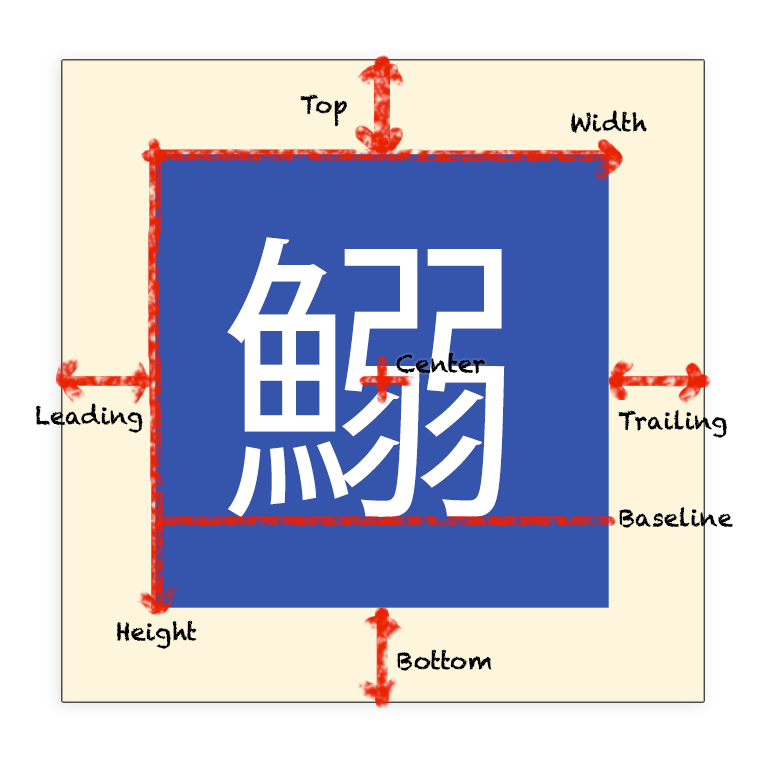
NSLayoutAttributeBaseline: 文本底标线,在大多数视图中等同于NSLayoutAttributeBottom; 在少数视图,如UILabel,是指字母的底部出现的位置;
NSLayoutAttributeLastBaseline: 相当于NSLayoutAttributeBaseline;
NSLayoutAttributeFirstBaseline: 文本上标线;
NSLayoutAttributeNotAnAttribute: None;
第二部分: 根据国家使用习惯不同表示的意思不同
NSLayoutAttributeLeading: 在习惯由左向右看的地区,相当于NSLayoutAttributeLeft;在习惯从右至左看的地区,相当于NSLayoutAttributeRight;
NSLayoutAttributeTrailing: 在习惯由左向右看的地区,相当于NSLayoutAttributeRight;在习惯从右至左看的地区,相当于NSLayoutAttributeLeft;
第三部分:ios8新增属性,各种间距,具体用法下节介绍
NSLayoutAttributeLeftMargin,
NSLayoutAttributeRightMargin,
NSLayoutAttributeTopMargin,
NSLayoutAttributeBottomMargin,
NSLayoutAttributeLeadingMargin,
NSLayoutAttributeTrailingMargin,
NSLayoutAttributeCenterXWithinMargins,
NSLayoutAttributeCenterYWithinMargins,
从网上找了一张图,标注以上属性
2、NSLayoutRelation
 typedef NS_ENUM(NSInteger, NSLayoutRelation) {

     NSLayoutRelationLessThanOrEqual = -,

     NSLayoutRelationEqual = ,

     NSLayoutRelationGreaterThanOrEqual = ,

 };
NSLayoutRelationLessThanOrEqual: <=;
NSLayoutRelationEqual: =;
NSLayoutRelationGreaterThanOrEqual: >=;
二、要讲解的方法
1、获取当前view中所有的 NSLayoutConstraint
- (NSArray *)constraints NS_AVAILABLE_IOS(6_0);
2、旧版方法,将指定的NSLayoutConstraint添加到页面或者从页面中移除
  - (void)addConstraint:(NSLayoutConstraint *)constraint NS_AVAILABLE_IOS(6_0); // This method will be deprecated in a future release and should be avoided.  Instead, set NSLayoutConstraint's active property to YES.

  - (void)addConstraints:(NSArray *)constraints NS_AVAILABLE_IOS(6_0); // This method will be deprecated in a future release and should be avoided.  Instead use +[NSLayoutConstraint activateConstraints:].

  - (void)removeConstraint:(NSLayoutConstraint *)constraint NS_AVAILABLE_IOS(6_0); // This method will be deprecated in a future release and should be avoided.  Instead set NSLayoutConstraint's active property to NO.

  - (void)removeConstraints:(NSArray *)constraints NS_AVAILABLE_IOS(6_0); // This method will be deprecated in a future release and should be avoided.  Instead use +[NSLayoutConstraint deactivateConstraints:].
3、ios8新加方法,激活或者停用指定约束
 /* The receiver may be activated or deactivated by manipulating this property.  Only active constraints affect the calculated layout.  Attempting to activate a constraint whose items have no common ancestor will cause an exception to be thrown.  Defaults to NO for newly created constraints. */

 @property (getter=isActive) BOOL active NS_AVAILABLE(10_10, 8_0);

 /* Convenience method that activates each constraint in the contained array, in the same manner as setting active=YES. This is often more efficient than activating each constraint individually. */

 + (void)activateConstraints:(NSArray *)constraints NS_AVAILABLE(10_10, 8_0);

 /* Convenience method that deactivates each constraint in the contained array, in the same manner as setting active=NO. This is often more efficient than deactivating each constraint individually. */

 + (void)deactivateConstraints:(NSArray *)constraints NS_AVAILABLE(10_10, 8_0);
三、Coding Time
a> 设置视图view1为 宽度=20的正方形
两种写法,第一种 宽度=20,高度=20
     [self addConstraint:[NSLayoutConstraint constraintWithItem:view1 attribute:NSLayoutAttributeWidth relatedBy:NSLayoutRelationEqual toItem:nil attribute:NSLayoutAttributeNotAnAttribute multiplier:1.0 constant:]];

     [self addConstraint:[NSLayoutConstraint constraintWithItem:view1 attribute:NSLayoutAttributeHeight relatedBy:NSLayoutRelationEqual toItem:nil attribute:NSLayoutAttributeNotAnAttribute multiplier:1.0 constant:]];
第二种 宽度=20, 高度=宽度
     [self addConstraint:[NSLayoutConstraint constraintWithItem:view1 attribute:NSLayoutAttributeWidth relatedBy:NSLayoutRelationEqual toItem:nil attribute:NSLayoutAttributeNotAnAttribute multiplier:1.0 constant:]];

     [self addConstraint:[NSLayoutConstraint constraintWithItem:view1 attribute:NSLayoutAttributeHeight relatedBy:NSLayoutRelationEqual toItem:view1 attribute:NSLayoutAttributeWidth multiplier:1.0 constant:]];
第二种方法的优势是,如果想修改view1的大小,只需要修改一处。
b>设置视图view1.frame.origin.x = 视图view2.frame.origin.x
NSLayoutConstraint *leftConstraint = [NSLayoutConstraint constraintWithItem:view1 attribute:NSLayoutAttributeLeft relatedBy:NSLayoutRelationEqual toItem:view2 attribute:NSLayoutAttributeLeft multiplier:1.0 constant:];

//旧版方法

//[self addConstraint:leftConstraint];

//新版方法1

[NSLayoutConstraint activateConstraints:@[leftConstraint]];

//新版方法2

leftConstraint.active = YES;
IOS页面自动布局 之 NSLayoutConstraint基础篇的更多相关文章
- iOS开发swift语法0基础篇—————(swift技术交流群:361513739)
iOS开发之swift语法0基础篇:点击打开链接 swift技术交流QQ群361513739
- Hybrid APP基础篇(三)->Hybrid APP之Native和H5页面交互原理
本文已经不维护,新地址: http://www.cnblogs.com/dailc/p/8097598.html 说明 Hybrid模式原生和H5交互原理 目录 前言 参考来源 前置技术要求 楔子 A ...
- iOS系列 基础篇 03 探究应用生命周期
iOS系列 基础篇 03 探究应用生命周期 目录: 1. 非运行状态 - 应用启动场景 2. 点击Home键 - 应用退出场景 3. 挂起重新运行场景 4. 内存清除 - 应用终止场景 5. 结尾 本 ...
- iOS系列 基础篇 04 探究视图生命周期
iOS系列 基础篇 04 探究视图生命周期 视图是应用的一个重要的组成部份,功能的实现与其息息相关,而视图控制器控制着视图,其重要性在整个应用中不言而喻. 以视图的四种状态为基础,我们来系统了解一下视 ...
- iOS系列 基础篇 05 视图鼻祖 - UIView
iOS系列 基础篇 05 视图鼻祖 - UIView 目录: UIView“家族” 应用界面的构建层次 视图分类 最后 在Cocoa和Cocoa Touch框架中,“根”类时NSObject类.同样, ...
- iOS系列 基础篇 06 标签和按钮 (Label & Button)
iOS系列 基础篇 06 标签和按钮 (Label & Button) 目录: 标签控件 按钮控件 小结 标签和按钮是两个常用的控件,下面咱们逐一学习. 1. 标签控件 使用Single Vi ...
- iOS系列 基础篇 07 Action动作和输出口
iOS系列 基础篇 07 Action动作和输出口 目录: 1. 前言及案例说明 2. 什么是动作? 3. 什么是输出口? 4. 实战 5. 结尾 1. 前言及案例说明 上篇内容我们学习了标签和按钮 ...
- iOS系列 基础篇 08 文本与键盘
iOS系列 基础篇 08 文本与键盘 目录: 1. 扯扯犊子 2. TextField 3. TextView 4. 键盘的打开和关闭 5. 打开/关闭键盘的通知 6. 键盘的种类 7. 最后再扯两句 ...
- iOS系列 基础篇 09 开关、滑块和分段控件
iOS系列 基础篇 09 开关.滑块和分段控件 目录: 案例说明 开关控件Switch 滑块控件Slider 分段控件Segmented Control 1. 案例说明 开关控件(Switch).滑块 ...
随机推荐
- Scala 深入浅出实战经典 第60讲:Scala中隐式参数实战详解以及在Spark中的应用源码解析
王家林亲授<DT大数据梦工厂>大数据实战视频 Scala 深入浅出实战经典(1-87讲)完整视频.PPT.代码下载:百度云盘:http://pan.baidu.com/s/1c0noOt6 ...
- Scala深入浅出实战经典之 List的foldLeft、foldRight、sort操作代码实战
Scala 深入浅出实战经典(1-64讲)完整视频.PPT.代码下载:百度云盘:http://pan.baidu.com/s/1c0noOt6 腾讯微云:http://url.cn/TnGbdC 3 ...
- Android xml 格式 随笔
打包的时候Android xml文件会由字符格式(utf-8编码)转换为二进制格式.具体如:http://blog.csdn.net/jiangwei0910410003/article/detail ...
- 降低屏幕亮度,减缓眼疲劳 (linux/windows/firefox/android)
Linux 在Linux上自动调整屏幕亮度来保护眼睛 - 51CTO.COM -- 介绍了Camera和RedShift这两款工具 How to automatically dim your scre ...
- C#3.0新特性之扩展方法介绍
C#3.0扩展方法是给现有类型添加一个方法.现在类型即可是基本数据类型(如int,String等),也可以是自己定义的类.以下是引用片段: //Demo--1 //扩展基本类型 namespace T ...
- 【cocos2d-x 手游研发小技巧(8)通讯的数据压缩与解压 】
今天说一下手机游戏通讯协议中的数据问题,大量的数据将给服务器端和客户端带来很大的压力,一般来说. 转载请注明出处:http://www.cnblogs.com/zisou/p/cocos2dxJQ-8 ...
- PowerShell读取Windows产品密钥
之前大多数人可能用过VBS读取Windows产品密钥的VBS脚本,VBS脚本通常都比较隐晦.难懂,今天忙里偷闲,随手写了一个用于读取Windows产品密钥的PowerShell脚本. 代码如下: == ...
- php安装phalcon扩展
一.关于phalcon: 简介: Phalcon 是开源.全功能栈.使用 C /zephir 编写.针对高性能优化的 PHP 5 框架. 开发者不需要学习和使用 C 语言的功能, 因为所有的功能都以 ...
- 条件注释判断IE浏览器
最近在用jquery 2.0 才知道已不支持IE6/7/8 但又不想换回 jquery 1.X; 找了一资料发现条件注释可以解决这个问题 这个也像程序中的条件判断,先来介绍几个单词lt :Less t ...
- 突破短板,传统桌面程序 使用webapi 扩展迎合web和移动端融合的需求
传统桌面程序不能完全被web和移动端替代,但是需要改造.这里要说的是巧用webapi把以前用dll和com组件,ocx等方式做接口,做分布式开发的方式,改成restful 风格api的方式实现跨平台, ...