前段时间在玩Chef-一个IT基础设施自动化工具。由于Chef是由Ruby写的一个gem,那么就需要安装Ruby。当然Ruby我早就安装了,并且使用rvm来管理Ruby及Gem。本来一切看似正常,但是不会预料后面会遇到那么多的坑。

Chef本地的repo包中有一个vagrant虚拟机的模板文件,通过它可以setup一个虚拟机,然后使用Chef来操作这个节点。那么就使用vagrant命令来setup这个虚拟机把。

1
2
3
4
5
6
7
8
9
10
11
12
13
14
$ vagrant up --no-color
Vagrant failed to initialize at a very early stage: It appears that you've ran a newer version of Vagrant on this
computer. Unfortunately, newer versions of Vagrant change internal
directory layouts that cause older versions to break. This version
of Vagrant cannot properly run. If you'd like to start from a clean state, please remove the
Vagrant state directory: /Users/twer/.vagrant.d Warning that this will remove all your boxes and potentially corrupt
existing Vagrant environments that were running based on the future
version.

console中说Vagrant版本有问题,那么就按说明删除.vagrant.d文件夹把。

1
2
3
4
5
6
$ rm -rf ~/.vagrant.d/
$ vagrant up --no-color
/Users/twer/sourcecode/chef-repo/Vagrantfile:8:in `<top (required)>': undefined method `configure' for Vagrant:Module (NoMethodError)
from /usr/local/rvm/gems/ruby-1.9.3-p194/gems/vagrant-1.0.7/lib/vagrant/config/loader.rb:115:in `load'
from /usr/local/rvm/gems/ruby-1.9.3-p194/gems/vagrant-1.0.7/lib/vagrant/config/loader.rb:115:in `block in procs_for_source'
from /usr/local/rvm/gems/ruby-1.9.3-p194/gems/vagrant-1.0.7/lib/vagrant/config.rb:41:in `block in capture_configures'

窝里个去,又出新问题了。那好吧,看看当前ruby的版本。

1
2
3
4
5
6
7
8
9
10
$ rvm list

rvm rubies

   ruby-1.9.2-p320 [ x86_64 ]
=* ruby-1.9.3-p194 [ x86_64 ] # => - current
# =* - current && default
# * - default

试着将Ruby的版本切换到1.9.2-p320再试试。

1
2
3
4
5
6
7
8
9
10
11
12
13
14
15
16
17
$ rvm use ruby-1.9.2-p320
Using /usr/local/rvm/gems/ruby-1.9.2-p320
$ vagrant up
Bringing machine 'default' up with 'virtualbox' provider...
[default] Setting the name of the VM...
[default] Clearing any previously set forwarded ports...
[default] Creating shared folders metadata...
[default] Clearing any previously set network interfaces...
[default] Preparing network interfaces based on configuration...
[default] Forwarding ports...
[default] -- 22 => 2222 (adapter 1)
[default] Booting VM...
[default] Waiting for VM to boot. This can take a few minutes.
[default] VM booted and ready for use!
[default] Setting hostname...
[default] Mounting shared folders...
[default] -- /vagrant

搞定。看来问题是当前使用的ruby的版本有问题。

老是使用旧版本也不是个事,把Ruby升级到最新版本看还有这个问题不。

1
2
3
4
5
6
7
8
9
10
11
$ rvm list known
# MRI Rubies
[ruby-]1.8.6[-p420]
[ruby-]1.8.7[-p374]
[ruby-]1.9.1[-p431]
[ruby-]1.9.2[-p320]
[ruby-]1.9.3[-p448]
[ruby-]2.0.0-p195
[ruby-]2.0.0[-p247]
[ruby-]2.0.0-head
ruby-head

看来ruby的1.9.3已经有p448了,那么就升级到p448。

1
2
3
4
5
6
7
8
$ rvm install 1.9.3
Checking requirements for osx.
Installing requirements for osx.
Updating system.
Installing required packages: libksba, openssl..........
Error running 'requirements_osx_brew_libs_install gcc libksba openssl',
please read /usr/local/rvm/log/1379843991_ruby-1.9.3-p448/package_install_gcc_libksba_openssl.log
Requirements installation failed with status: 1.

升级失败,那么看看log。

1
2
3
4
5
6
7
8
9
10
11
12
==> make bootstrap
configure: error: cannot compute suffix of object files: cannot compile
See `config.log' for more details.
make[2]: *** [configure-stage1-target-libgcc] Error 1
make[1]: *** [stage1-bubble] Error 2
make: *** [bootstrap] Error 2 READ THIS: https://github.com/mxcl/homebrew/wiki/troubleshooting There were package installation errors, make sure to read the log. Try `brew tap --repair` and make sure `brew doctor` looks reasonable.

通过看log是gcc编译失败,并且通过log可以看出rvm是通过homebrew来安装必备文件的。

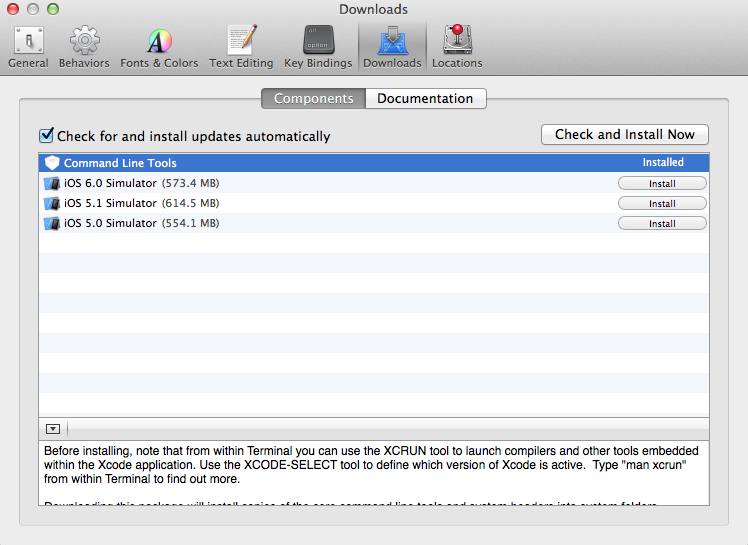
通过一番查资料后,找到了解决办法。那就是将Xcode升级到最新版本,然后在Preference里选择Downloads标签,然后安装Command Line Tools。

安装完毕后再用Homebrew安装gcc49。

1
2
3
4
5
6
7
8
9
10
11
12
$ brew install gcc49
==> Downloading ftp://gcc.gnu.org/pub/gcc/snapshots/4.9-20130915/gcc-4.9-20130915.tar.bz2
Already downloaded: /Library/Caches/Homebrew/gcc49-4.9-20130915.tar.bz2
==> ../configure --build=x86_64-apple-darwin12.5.0 --prefix=/usr/local/Cellar/gcc49/4.9-20130915/gcc
==> make bootstrap
==> make install
==> Caveats
This is a snapshot of GCC trunk, which is in active development and
supposed to have bugs and should not be used in production
environment.
==> Summary

升级ruby版本那"不堪回首的经历"的更多相关文章

  1. 【转】如何在Mac 终端升级ruby版本

    原文网址:https://segmentfault.com/a/1190000003784636 rvm是什么?为什么要安装rvm呢,因为rvm可以让你拥有多个版本的Ruby,并且可以在多个版本之间自 ...

  2. Ruby学习笔记之升级ruby的版本

    升级ruby版本,有时候安装ruby的版本过低,需要进行升级,例如安装在centos6.7安装fpm需要ruby版本在1.9以上. 0x00 主机环境如下 [root@test ~]# cat /et ...

  3. 升级ruby的版本

    升级ruby版本,有时候安装ruby的版本过低,需要进行升级,例如安装在centos6.7安装fpm需要ruby版本在1.9以上. 1.主机环境如下: [root@test ~]# cat /etc/ ...

  4. 升级ruby的版本 https://gems.ruby-china.com/

    升级ruby版本,有时候安装ruby的版本过低,需要进行升级,例如安装在centos6.7安装fpm需要ruby版本在1.9以上. 1.主机环境如下: 1 [root@test ~]# cat /et ...

  5. 升级ruby后再安装cocodPod

    1.移除现有的Ruby $gem sources --remove https://rubygems.org/ 2.使用淘宝镜像 $gem sources -a https://ruby.taobao ...

  6. mac下升级ruby环境版本

    在ios开发中会经常使用到cocoapods来管理第三方框架,在安装cocoapods的时候会涉及到ruby环境,有时候会因为版本过低会导致安装失败,本文主要讲一下如何升级ruby环境 安装rvm,r ...

  7. 关于IOS新手在安装cocoa pods失败,因为ruby版本过低的解决方法+ (void) {升级ruby}

    http://blog.csdn.net/zhaoen95/article/details/51995520     现在: 使用 OS 系统, 正在学习iOS 需要配置cocoapods 命令行中显 ...

  8. macOS Ruby版本需要升级到2.2.2以上

    在安装 Ruby on Rails 时遇到问题,提示依赖 ruby 2.2.2 或更高的版本. ERROR: Error installing rails: activesupport require ...

  9. Mac下升级ruby至最新版本

    Mac自身的ruby 版本 2.x,通过ruby -v可以查看版本号. 为更新到ruby的最新版本,可通过以下命令解决: brew update brew install ruby 执行完命令后,ru ...

随机推荐

  1. scala学习:apply方法

    摘抄两段话: 在明确了方法调用的接收者的情况下,若方法只有一个参数时,调用的时候就可以省略点及括号.如 " to ",实际完整调用是 ".to()".但 &qu ...

  2. Spring Framework------>Class RestTemplate----->

    org.springframework.web.client.RestTemplate 官方文档 学习心得: class RESTTemplate用于管理与客户端的HTTP连接

  3. 开源PLM软件Aras详解五 如何让ItemType显示在TOC上

    通过上一边ItemType我们大概了解,那么如何让ItemType显示在左侧的菜单上呢,又如何设置增删查改的权限呢,接下来将为演示. 在上一篇中,我们知道了ItemType的结构图,如下图 那么如何让 ...

  4. Python:装饰器

    格式:在执行的参数前加上@functon 例1:传一个参数 #模拟验证功能 def login(auth): def fun(arg): #为了避免程序一执行的时候就执行验证,需要再加一层函数. pr ...

  5. STREAMS流机制

    STREAMS流机制 基本概念 STREAMS(流)是系统V提供的构造内核设备驱动程序和网络协议包的一种通用方法,对STREAMS进行讨论的目的是为了理解系统V的终端接口,I/O多路转接中poll(轮 ...

  6. mvc深入理解

    对于v和c好理解, 对于model分为数据对象模型和业务逻辑模型,一般为一个类,数据对象模型包含对一个具体数据表的相关操作,业务逻辑模型为处理一些业务逻辑.

  7. shell 小问题汇总

    写脚本的时候难免会判断变量是否为空或者为定义 变量a未定义 if [ -n $a ];then echo "exists"; else echo "not exists& ...

  8. Hibernate缓存之初探

    数据层的访问效率优化可能第一想到的就是利用缓存,缓存的机能可以简单理解为将从数据库中访问的数据放在内存中,在以后再次使用到这些数据时可以直接从内存中读取而不必要再次访问数据库,尽量减少和数据库的交互提 ...

  9. [转载~笔记]CentOS单独编译安装PHP gd库扩展

    http://www.nowamagic.net/librarys/veda/detail/2610 安装gd前置库: freetype, jpegsrc, libpng 1. freetypewge ...

  10. 《深入理解Spark:核心思想与源码分析》一书正式出版上市

    自己牺牲了7个月的周末和下班空闲时间,通过研究Spark源码和原理,总结整理的<深入理解Spark:核心思想与源码分析>一书现在已经正式出版上市,目前亚马逊.京东.当当.天猫等网站均有销售 ...