
快速入门Maven(三)
一、整合ssh框架的Maven项目
1.传递依赖
只添加了一个struts2-core依赖,发现项目中出现了很多jar,
这种情况叫 依赖传递
2.依赖版本冲突的解决
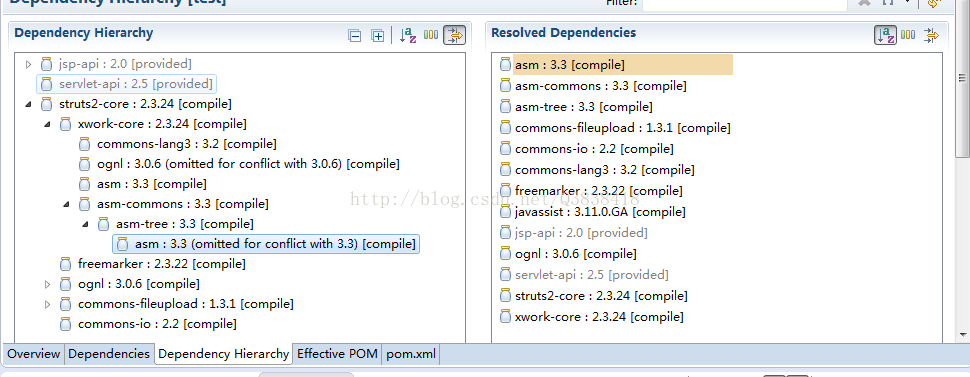
(1)第一声明优先原则(就是谁写在前面一点就用谁)
<dependencies>

  <!--   spring-beans-4.2.4 -->

  	<dependency>

  		<groupId>org.springframework</groupId>

  		<artifactId>spring-context</artifactId>

  		<version>4.2.4.RELEASE</version>

  	</dependency>

<!--   spring-beans-3.0.5 -->

  	<dependency>

  		<groupId>org.apache.struts</groupId>

  		<artifactId>struts2-spring-plugin</artifactId>

  		<version>2.3.24</version>

  	</dependency>
(2)路径近者优先原则(如果我们直接对项目添加一个依赖项,而该依赖项是之前其他依赖项的传递依赖 项,那么直接依赖项会被导入而传递依赖项不会导入。)
如自己添加jar包
	<dependency>

  		<groupId>org.springframework</groupId>

  		<artifactId>spring-beans</artifactId>

  		<version>4.2.4.RELEASE</version>

  	</dependency>
(3)排除原则(排除一个不需要的依赖jar)
使用eclipse 提供的工具,在pom.xml的dependency hierarchy视图下,选中自己需要排 除的冲突jar包,右键点击之后选择exclude artifact。这样做的结果就是将需要排除的jar在使用<exclusions>标签标注(包裹)。
  		<exclusions>

  		  <exclusion>

  		    <groupId>org.springframework</groupId>

  		    <artifactId>spring-beans</artifactId>

  		  </exclusion>

  		</exclusions>
(4)版本锁定原则(指明一定要哪个版本的jar,其它版本屏蔽)
<!-- 锁定版本,一定要spring-beans的4.2.4.RELEASE -->

<dependencyManagement>

	<dependencies>

		<dependency>

			<groupId>org.springframework</groupId>

			<artifactId>spring-beans</artifactId>

			<version>4.2.4.RELEASE</version>

		</dependency>

	</dependencies>

</dependencyManagement>
上面这种直接指定数字的太不灵活,可以采用引用变量的方式
<properties>

	<spring.version>4.2.4.RELEASE</spring.version>

	<hibernate.version>5.0.7.Final</hibernate.version>

	<struts.version>2.3.24</struts.version>

</properties>

<!-- 锁定版本,struts2-2.3.24、spring4.2.4、hibernate5.0.7 -->

<dependencyManagement>

	<dependencies>

		<dependency>

			<groupId>org.springframework</groupId>

			<artifactId>spring-context</artifactId>

			<version>${spring.version}</version>

		</dependency>

	</dependencies>

</dependencyManagement>
3.编写Pom.xml文件
这个Pom文件如果要自己写的话 要写很久,实际上百度一下 “ssh pom” 或者“ssm pom”复制粘贴过来,再修改里面所需的版本和一点点几分钟改改就行了。能看懂就行,自己写很浪费没必要的时间。
二、分模块开发
1.Maven多模块项目,适用于一些比较大的项目,通过合理的模块拆分,实现代码的复用,便于维护和管理。尤其是一些开源框架,也是采用多模块的方式,提供插件集成,用户可以根据需要配置指定的模块。
比如项目结构如下:
test-hd-parent (父级)
---pom.xml
---test-hd-api (第三方接口层)
----pom.xml
---test-hd-foundation (基础工具层)
----pom.xml
---test-hd-resource (资源层)
----pom.xml
---test-hd-service (逻辑业务层)
----pom.xml
---test-hd-modules (web层)
----pom.xml
---test-hd-www (web模块1)
----pom.xml
---test-hd-admin (web模块2)
----pom.xml
2.依次创建父工程、dao层子模块、service层子模块等等
(1)创建父工程:
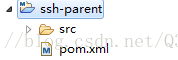
创建出的父工程如下:
整个项目所有的依赖都放在父工程的Pom里(如下ssh项目的所有依赖放在这个父工程的pom里):
 <!-- 属性 -->

	<properties>

		<spring.version>4.2.4.RELEASE</spring.version>

		<hibernate.version>5.0.7.Final</hibernate.version>

		<struts.version>2.3.24</struts.version>

	</properties>

	<!-- 锁定版本,struts2-2.3.24、spring4.2.4、hibernate5.0.7 -->

	<dependencyManagement>

		<dependencies>

			<dependency>

				<groupId>org.springframework</groupId>

				<artifactId>spring-context</artifactId>

				<version>${spring.version}</version>

			</dependency>

			<dependency>

				<groupId>org.springframework</groupId>

				<artifactId>spring-aspects</artifactId>

				<version>${spring.version}</version>

			</dependency>

			<dependency>

				<groupId>org.springframework</groupId>

				<artifactId>spring-orm</artifactId>

				<version>${spring.version}</version>

			</dependency>

			<dependency>

				<groupId>org.springframework</groupId>

				<artifactId>spring-test</artifactId>

				<version>${spring.version}</version>

			</dependency>

			<dependency>

				<groupId>org.springframework</groupId>

				<artifactId>spring-web</artifactId>

				<version>${spring.version}</version>

			</dependency>

			<dependency>

				<groupId>org.hibernate</groupId>

				<artifactId>hibernate-core</artifactId>

				<version>${hibernate.version}</version>

			</dependency>

			<dependency>

				<groupId>org.apache.struts</groupId>

				<artifactId>struts2-core</artifactId>

				<version>${struts.version}</version>

			</dependency>

			<dependency>

				<groupId>org.apache.struts</groupId>

				<artifactId>struts2-spring-plugin</artifactId>

				<version>${struts.version}</version>

			</dependency>

		</dependencies>

	</dependencyManagement>

	<!-- 依赖管理 -->

	<dependencies>

		<!-- spring -->

		<dependency>

			<groupId>org.springframework</groupId>

			<artifactId>spring-context</artifactId>

		</dependency>

		<dependency>

			<groupId>org.springframework</groupId>

			<artifactId>spring-aspects</artifactId>

		</dependency>

		<dependency>

			<groupId>org.springframework</groupId>

			<artifactId>spring-orm</artifactId>

		</dependency>

		<dependency>

			<groupId>org.springframework</groupId>

			<artifactId>spring-test</artifactId>

		</dependency>

		<dependency>

			<groupId>org.springframework</groupId>

			<artifactId>spring-web</artifactId>

		</dependency>

		<!-- hibernate -->

		<dependency>

			<groupId>org.hibernate</groupId>

			<artifactId>hibernate-core</artifactId>

		</dependency>

		<!-- 数据库驱动 -->

		<dependency>

			<groupId>mysql</groupId>

			<artifactId>mysql-connector-java</artifactId>

			<version>5.1.6</version>

			<scope>runtime</scope>

		</dependency>

		<!-- c3p0 -->

		<dependency>

			<groupId>c3p0</groupId>

			<artifactId>c3p0</artifactId>

			<version>0.9.1.2</version>

		</dependency>

		<!-- 导入 struts2 -->

		<dependency>

			<groupId>org.apache.struts</groupId>

			<artifactId>struts2-core</artifactId>

		</dependency>

		<dependency>

			<groupId>org.apache.struts</groupId>

			<artifactId>struts2-spring-plugin</artifactId>

		</dependency>

		<!-- servlet jsp -->

		<dependency>

			<groupId>javax.servlet</groupId>

			<artifactId>servlet-api</artifactId>

			<version>2.5</version>

			<scope>provided</scope>

		</dependency>

		<dependency>

			<groupId>javax.servlet</groupId>

			<artifactId>jsp-api</artifactId>

			<version>2.0</version>

			<scope>provided</scope>

		</dependency>

		<!-- 日志 -->

		<dependency>

			<groupId>org.slf4j</groupId>

			<artifactId>slf4j-log4j12</artifactId>

			<version>1.7.2</version>

		</dependency>

		<!-- junit -->

		<dependency>

			<groupId>junit</groupId>

			<artifactId>junit</artifactId>

			<version>4.9</version>

			<scope>test</scope>

		</dependency>

		<!-- jstl -->

		<dependency>

			<groupId>javax.servlet</groupId>

			<artifactId>jstl</artifactId>

			<version>1.2</version>

		</dependency>

	</dependencies>

	<build>

		<plugins>

			<!-- 设置编译版本为1.7 -->

			<plugin>

				<groupId>org.apache.maven.plugins</groupId>

				<artifactId>maven-compiler-plugin</artifactId>

				<configuration>

					<source>1.7</source>

					<target>1.7</target>

					<encoding>UTF-8</encoding>

				</configuration>

			</plugin>

			<!-- maven内置 的tomcat6插件 -->

			<plugin>

				<groupId>org.codehaus.mojo</groupId>

				<artifactId>tomcat-maven-plugin</artifactId>

				<version>1.1</version>

				<configuration>

					<!-- 可以灵活配置工程路径 -->

					<path>/ssh</path>

					<!-- 可以灵活配置端口号 -->

					<port>8080</port>

				</configuration>

			</plugin>

		</plugins>

	</build>
(2)创建dao子模块

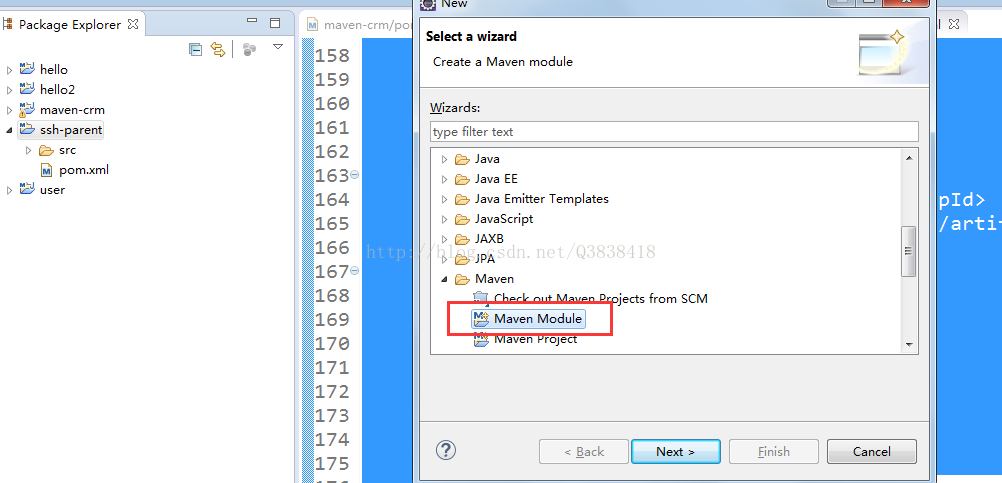
在ssh-parent项目上右击 ,创建时选择 Maven Module
填写子模块名称ssh-dao
接下来在这里面写dao相关的代码和配置信息即可
(3)创建service子模块
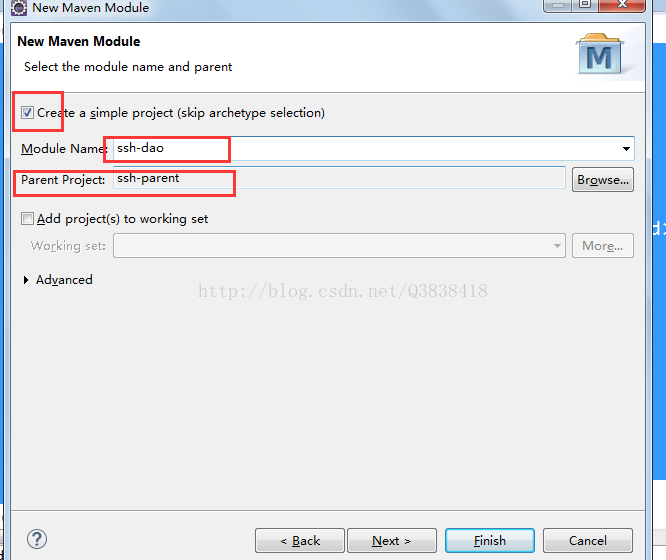

和上一步一样。
3.分模块开发中的问题
1.父工程和子模块 以及 子模块之间都有互相依赖的关系(比如Service模块肯定会用到Dao模块),那么在各自创建完成之后,及时发布到本地仓库,大家要用都从本地仓库中取。
那么Service 和Dao都要被引用,那么创建的时候选Packaging就以jar包的方式创建。这样Service要用dao的时候就直接从本地仓库拿到dao的jar。web要用service的时候同理
然而子模块web创建时要选择war,因为是个web项目,也不需要给其它的依赖。
一句话:打成jar方式 是为了其它的模块依赖。
三、私服(自己的远程仓库)
需要使用nexus软件。(略)
快速入门Maven(三)的更多相关文章
- Maven快速入门(三)Maven的坐标和仓库
之前通过一个helloworld的例子来说一说如何创建maven项目以及maven项目的项目结构,然后讲maven如何编译运行项目.接下来介绍maven中几个比较重要的概念:坐标和仓库.Maven快速 ...
- SuperSocket快速入门(三):实现你的AppServer和AppSession
什么是AppSession? AppSession 代表一个和客户端的逻辑连接,基于连接的操作应该定义于在该类之中.你可以用该类的实例发送数据到客户端,接收客户端发送的数据或者关闭连接.同时可以保存客 ...
- 元素(WebElement)-----Selenium快速入门(三)
上一篇<元素定位-----Selenium快速入门(二)>说了,如何定位元素,本篇说说找到的元素(WebElement)该怎么用. WebElement常用方法: 返回值 方法名 说 ...
- ELK快速入门(三)logstash收集日志写入redis
ELK快速入门三-logstash收集日志写入redis 用一台服务器部署redis服务,专门用于日志缓存使用,一般用于web服务器产生大量日志的场景. 这里是使用一台专门用于部署redis ,一台专 ...
- spring快速入门(三)
一.在spring快速入门(二)的基础上,原先我们是采用构造方法完成对象的注入.这里还有其他的方法可以完成注入,通过set方法来完成. 修改UserActionImpl package com.mur ...
- HTML5快速入门(三)—— 标签综合运用
前言: 1.HTML5的发展非常迅速,可以说已经是前端开发人员的标配,在电商类型的APP中更是运用广泛,这个系列的文章是本人自己整理,尽量将开发中不常用到的剔除,将经常使用的拿出来,使需要的朋友能够真 ...
- TinyXml 快速入门(三)
在<TinyXml 快速入门(二)>介绍使用tinyxml库获取xml文件声明,查询指定节点.删除指定节点的做法.在本文中继续介绍修改指定节点和增加节点的做法. 修改节点其实和查询指定节点 ...
- 快速入门maven
1.快速介绍 maven(翻译:专家,内行)是apache(一个公司/组织)做的一个项目,或者说是软件,这个东西可以干什么? 可以用它来对咱们做的项目进行改进,增加开发效率,比如帮助你自动导入jar包 ...
- 快速入门Maven(一)
一.Maven简介 1.什么是maven Apache组织中的一个颇为成功的开源项目,Maven主要服务于基于Java平台的项目构建.依赖管理和项目信息管理. 2.Maven的好处 构建是程序员每天要 ...
随机推荐
- spring boot监听器的实现
spring boot监听器的实现 如下所示: import javax.servlet.ServletContextEvent; import javax.servlet.ServletContex ...
- Mybatis 分页查询
该篇博客记录采用pagehelper分页插件实现Mybatis分页功能 一.依赖 pom.xml <!-- pagehelper --> <dependency> <gr ...
- 虚拟化(二)-VMware workstation
https://www.cnblogs.com/zhrngM/p/9547945.html vmware workstation的最新版本是10.0.2.相信大家也都使用过,其中的简单的虚拟机的创建, ...
- 时钟AnalogClock和DigitalClock
<AnalogClock android:layout_width="fill_parent" android:layout_height="fill_parent ...
- WeakMap 本身释放,而 keyObject 没有释放的情况下,value 会释放吗?
const keyObject = ['keyObject']; new WeakMap().set(keyObject, ['value']); 问题:现在 ['value'] 会被释放吗? 听说W ...
- CentOS7.2搭建LAMP环境
所谓的Lamp就是:Linux+Apache+mysql+php.这里的Linux使用CentOS7.2. 0x00 开始我们可以先更新一下yum: # 升级所有包同时也升级软件和系统内核 yum - ...
- 一次容器化springboot程序OOM问题探险
背景 运维人员反馈一个容器化的java程序每跑一段时间就会出现OOM问题,重启后,间隔大概两天后复现. 问题调查 一查日志 由于是容器化部署的程序,登上主机后使用docker logs Contain ...
- redux的简单使用
Redux 我从学react起,一共写了三次react项目第一次是学生选课系统,完全不知道生命周期的规律和顺序,也不知道axios到底应该放在哪里才能更好的请求到,文件分工不明确,没有体现组件化的优势 ...
- [Optimized Python] 17 - Performance bottle-neck
前言 对于一门编程语言,没接触到“优化”和“库代码”的源码理解程度,不足以谈“掌握”二字. 本篇的学习笔记,同时也意味着自己终于触及到了Python的junior国际水准.(joke) 要学的东西有很 ...
- 规模、性能、弹性全面升级,让天下没有难用的 K8s
作者 | 汤志敏 阿里云容器服务开发负责人 Kubernetes 是云原生时代的基础设施.云上的分布式操作系统. 9 月 26 日云栖大会容器专场,在<拐点已至,云原生引领数字化转型升级> ...