
Chrome 开发工具之 Application
{

  "name": "testApp",

  "short_name": "tApp",

  "display": "fullscreen",

  "background_color": "#000",

  "start_url": "/",

  "description": "A test web app for manifest",

  "icons": [

    {

      "src": "https://developers.google.com/web/images/web-fundamentals-icon192x192.png",

      "type": "image/png",

      "sizes": "192x192"

    }

  ]

}

if ('serviceWorker' in navigator) {

  const sw = navigator.serviceWorker

    .register('/testhtml/sw.js', { scope: '/testhtml/' })

    .then(function(reg) {

      if (reg.installing) {

        console.log('Service worker installing')

      } else if (reg.waiting) {

        console.log('Service worker installed')

      } else if (reg.active) {

        console.log('Service worker active')

      }

      reg.update()

    })

    .catch(function(error) {

      console.log('Registration failed with ' + error)

    })

  navigator.serviceWorker.ready.then(sw => {

    return sw.sync.register('hello-sync')

  })

  navigator.serviceWorker.ready.then(async sw => {

    const bgFetch = await sw.backgroundFetch.fetch('custom-fetch', ['1.jpg'], {

      title: 'download 1.jpg',

      icons: [

        {

          sizes: '300x300',

          src: '2.jpg',

          type: 'image/jpg'

        }

      ]

    })

  })

}
self.addEventListener('install', event => {

  event.waitUntil(

    caches.open('v1').then(cache => {

      return cache.addAll([

        '/testhtml/test.html',

        '/testhtml/test.css',

        '/testhtml/test.js',

        '/testhtml/2.jpg'

      ])

    })

  )

})

self.addEventListener('sync', event => {

  if (event.tag == 'hello-sync') {

    console.log('receive hello-sync')

  }

})

self.addEventListener('fetch', event => {

  event.respondWith(

    caches.match(event.request).then(response => {

      if (response !== undefined) {

        return response

      } else {

        return fetch(event.request)

          .then(response => {

            let responseClone = response.clone()

            caches.open('cache_1').then(cache => {

              cache.put(event.request, responseClone)

            })

            return response

          })

          .catch(() => {})

      }

    })

  )

})


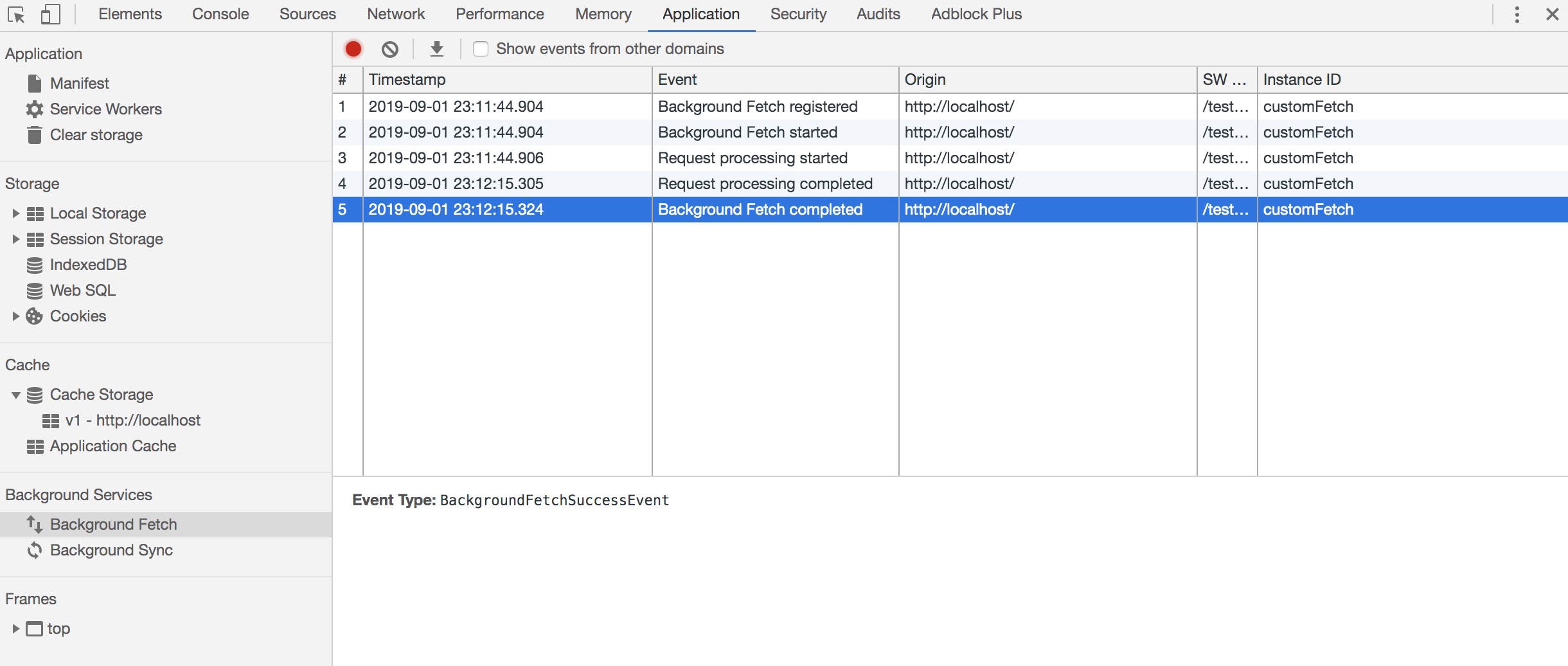

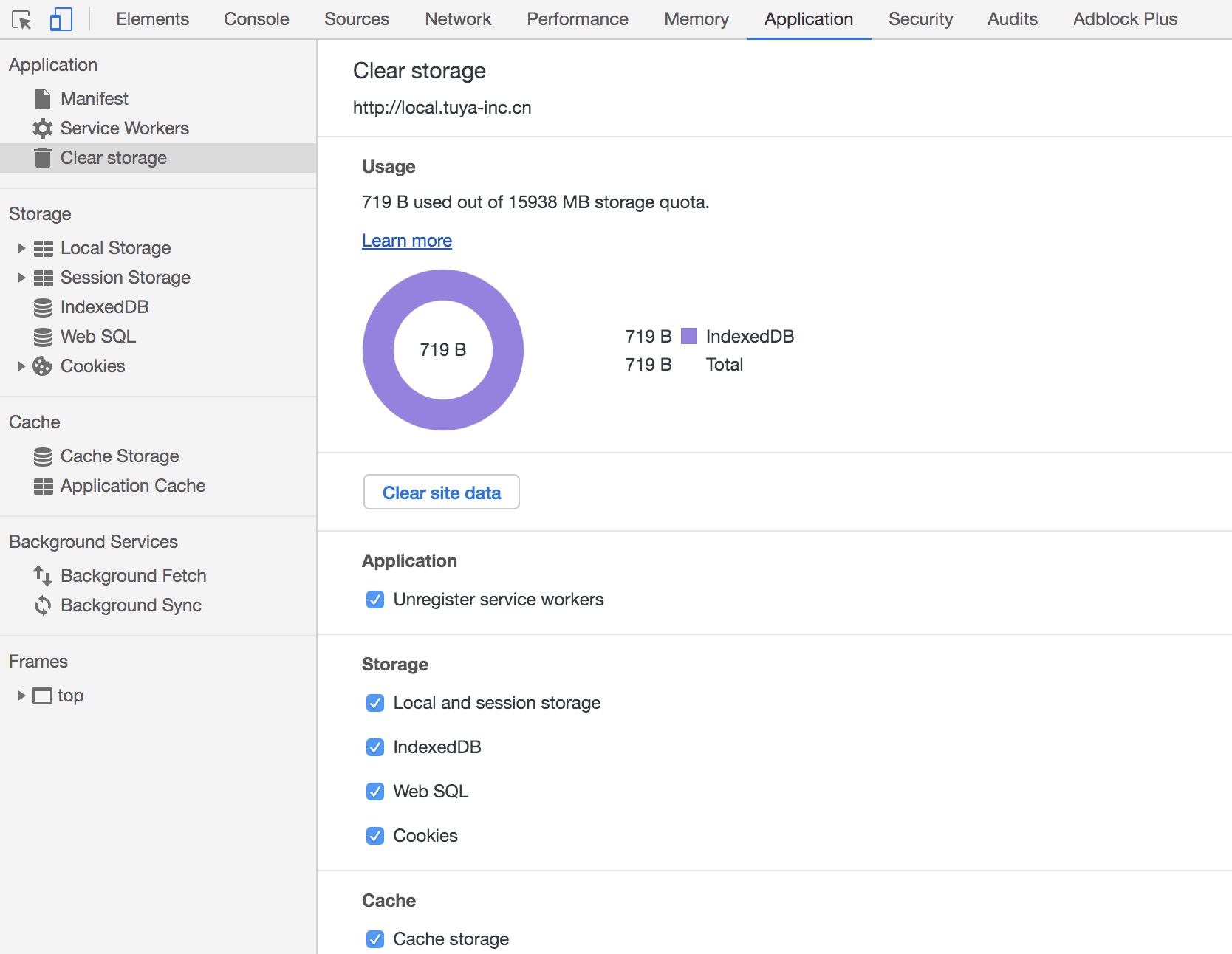
- 卸载 services workers
- Local storage 和 Session storage
- IndexedDB 数据
- Web SQL 数据
- Cookies
- Cache storage
- 图中底下还有 Application Cache 的选项未能截全...
localStorage.setItem('astring', 'This is an apple')

localStorage.setItem('aobject', { say: 'hello' })

localStorage.setItem('aboolean', false)

const IDBOpenDBRequest = indexedDB.open('testDB', 1)

IDBOpenDBRequest.onsuccess = e => {

  const db = IDBOpenDBRequest.result

  const transaction = db.transaction(['User', 'Book'], 'readwrite')

  const objStore = transaction.objectStore('User')

  const objBookStore = transaction.objectStore('Book')

  // User 表加2条数据

  objStore.put({

    name: 'xiaoming',

    age: 18,

    sex: 1

  })

  objStore.put({

    name: 'xiaohong',

    age: 18,

    sex: 2

  })

  // Book 表加一条数据

  objBookStore.put({

    bookName: '< hello world >',

    price: 29,

    status: 1

  })

}

IDBOpenDBRequest.onupgradeneeded = e => {

  const db = IDBOpenDBRequest.result

  const store = db.createObjectStore('User', {

    keyPath: 'name'

  })

  store.createIndex('name', 'name')

  store.createIndex('age', 'age')

  store.createIndex('sex', 'sex')

  const bookStore = db.createObjectStore('Book', {

    keyPath: 'id',

    autoIncrement: true

  })

  bookStore.createIndex('bookName', 'bookName')

  bookStore.createIndex('price', 'price')

  bookStore.createIndex('status', 'status')

}

add_header Set-Cookie "say=hello;Domain=local.tuya-inc.cn;Path=/;Max-Age=10000";


Chrome 开发工具之 Application的更多相关文章
- Chrome 开发工具之Timeline
之前有说到Element,Console,Sources大多运用于debug,Network可用于debug和查看性能,今天的主角Timeline更多的是用在性能优化方面,它的作用就是记录与分析应用程 ...
- Chrome 开发工具之Sources
Sources面板主要用于查看web站点的资源列表及javascript代码的debug 熟悉面板 了解完面板之后,下面来试试这些功能都是如何使用的. 文件列表 展示当前页面内所引用资源的列表,和平常 ...
- Chrome 开发工具之Console
前段时间看git的相关,记的笔记也大致写到了博客上,还有些因为运用不熟,或者还有一些疑惑点,暂时也不做过多纠缠,之后在实践中多运用得出结论再整理分享吧. 工欲善其事,必先利其器.要想做好前端的工作,也 ...
- Chrome开发工具之Console
Chrome开发工具-Console 看了别人的博客,才发现在百度主页用开发工具“Console”可以看到百度的招聘信息 前端调试工具可以按F12打开,谷歌的开发工具中的Console面板可以查看错误 ...
- Chrome 开发工具指南
Chrome 开发工具指南 谷歌 Chrome 开发工具,是基于谷歌浏览器内含的一套网页制作和调试工具.开发者工具允许网页开发者深入浏览器和网页应用程序的内部.该工具可以有效地追踪布局问题,设置 Ja ...
- Chrome 开发工具之Timeline/Performance
之前有说到Element,Console,Sources大多运用于debug,Network可用于debug和查看性能,今天的主角Timeline(现已更名Performance)更多的是用在性能优化 ...
- Chrome 开发工具之 Memory
开发过程中难免会遇到内存问题,emmm... 本文主要记录一下Chrome排查内存问题的面板,官网也有,但有些说明和例子跟不上新的版本了,也不够详细... !!! 多图预警!!! 简单的内存 ...
- Chrome开发工具Elements面板(编辑DOM和CSS样式)详解
Element 译为“元素”,Element 面板可以让我们动态查看和编辑DOM节点和CSS样式表,并且立即生效,避免了频繁切换浏览器和编辑器的麻烦. 我们可以使用Element面板来查看源代码,它不 ...
- Chrome 开发工具 Javascript 调试技巧
http://www.w3cplus.com/tools/dev-tips.html 一.Sources 面板介绍: Sources 面板分为左中右 3 部分左:Sources 当前页面加载的资源列表 ...
随机推荐
- 备战金九银十,Java研发面试题(Spring、MySQL、JVM、Mybatis、Redis、Tomcat)[带答案],刷起来!
八月在即,马上就是"金九银十",又是跳槽招聘季.咱们这行公认涨薪不如跳槽加的快.但不建议频繁跳槽,还是要学会融合团队,抓住每个机会提升技能. 苏先生在这里给大家整理了一套各大互联网 ...
- javaScript常用运算符和操作符总结
javaScript常用运算符和操作符总结 类别 操作符 算术操作符 +. –. *. /. %(取模) 字符串操作符 + 字符串连接 +=字符串连接复合 布尔操作符 !. &&. ...
- 网站性能优化的方法--Yahoo
如何能让用户更快的打开我们的网页? 1.尽可能减少HTTP请求数 2.使用CDN(内容分发网络) 3.添加Expire/Cache-Control头 4.启用Gzip压缩 5.将CSS放在页面最上面 ...
- js 实现 联动
使用jQuery实现联动效果 应用场景:收货地址 1.准备三个下拉框 <select class="changeArea" id='province'> <opt ...
- 转载 vue-awesome-swiper - 基于vue实现h5滑动翻页效果
说到h5的翻页,很定第一时间想到的是swiper.但是我当时想到的却是,vue里边怎么用swiper?! 中国有句古话叫:天塌下来有个高的顶着. 在前端圈里,总有前仆后继的仁人志士相继挥洒着热汗(这里 ...
- sed流编辑器
一.前言 (一).sed 工作流程 sed 是一种在线的.非交互式的流编辑器,它一次处理一行内容.处理时,把当做前处理的行存储在临时缓存区中,成为“模式空间”(pattern space),接着用se ...
- Linux下Docker以及portainer相关配置
一.安装使用Docer CE 本文以CentOS 7为例,安装docker CE版本,docker有两种版本,社区版本CE和企业版本EE,此处学习研究以CE版本为例, 两种安装方式可选:1.使用yum ...
- Samba:基于公网 IP 的服务访问
写在前面的话 由于使用过程中,发现如果 Samba 只用于内网访问,同事在外面甚至其它不是一个网段的同事就无法访问了.这显然不符合我们最终的需求,最后没法,只能把访问部署到云服务器上面去,此时问题来了 ...
- Starling 环形进度条实现
项目初期想实现这个效果来着,查了很多资料(包括式神的<神奇的滤镜>),也没找到完美的实现方法,,当时时间紧迫,就找了传统的进度条来代替实现. 最近偶然心血来潮,查了各方面资料,终于找到实现 ...
- Excel批量导入(导出同理)
在做JavaWeb中添加数据使我们在所难免会遇到的,在大数据的环境下批量添加和批量删除是必须的,而批量删除只需要获取到我们需要删除的ID就可以了,在批量添加中我们就会遇到问题,问题是得到批量的数据,这 ...