
Oracle安装 - shmmax和shmall设置
一、概述
在Linux上安装oracle,需要对内核参数进行调整,其中有shmmax和shmall这两个参数,那这两个参数是什么意思,又该如何设置呢?
二、官方文档
在oracle的官方文档( https://docs.oracle.com/en/database/oracle/oracle-database/19/ladbi/minimum-parameter-settings-for-installation.html#GUID-CDEB89D1-4D48-41D9-9AC2-6AD9B0E944E3 )中对这两个参数,设置了最小的标准值。
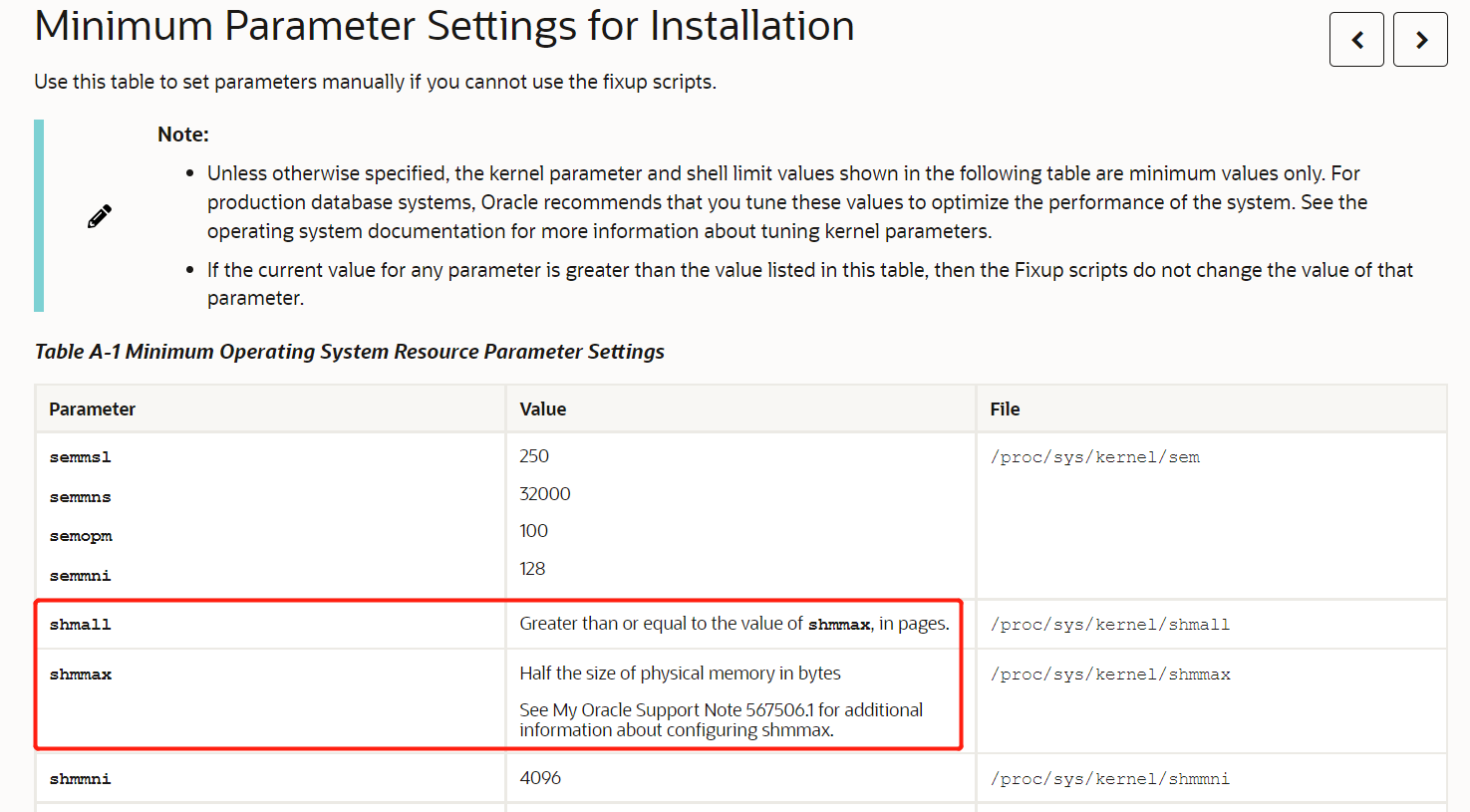
shmall - Greater than or equal to the value of shmmax, in pages.
shmmax - Half the size of physical memory in bytes. See My Oracle Support Note 567506.1 for additional information about configuring shmmax.
再根据redhat的官方文档( https://access.redhat.com/documentation/en-us/red_hat_enterprise_linux/7/html/performance_tuning_guide/sect-red_hat_enterprise_linux-performance_tuning_guide-configuration_tools-configuring_system_memory_capacity ),去查这两个参数所表达的含义。
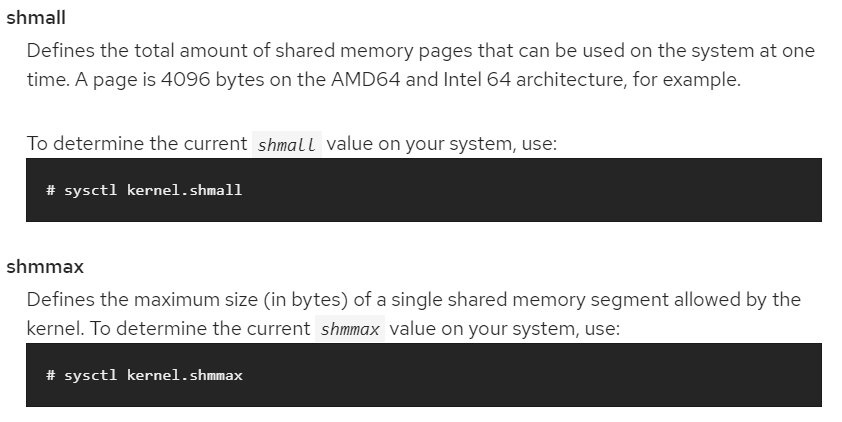
shmall - Defines the total amount of shared memory pages that can be used on the system at one time. A page is 4096 bytes on the AMD64 and Intel 64 architecture, for example.
shmmax - Defines the maximum size (in bytes) of a single shared memory segment allowed by the kernel.
以上两段英文翻译过来:shmmax单个最大共享内存段,shmall同一时刻能使用的所有共享内存页。shmmax最小一半的物理内存,shmall >= shmmax/4096。
oracle的sga(Shared Global Area)使用的就是共享内存,共享内存的优势redhat官方文档( https://access.redhat.com/documentation/en-us/red_hat_enterprise_linux/5/html/tuning_and_optimizing_red_hat_enterprise_linux_for_oracle_9i_and_10g_databases/chap-oracle_9i_and_10g_tuning_guide-setting_shared_memory#sect-Oracle_9i_and_10g_Tuning_Guide-Setting_Shared_Memory-Setting_SHMMAX_Parameter_ )中也有提及。直白点说就是多进程使用共享内存交流数据最快。例如:服务器进程从磁盘读取数据到sga的buffer cache,dbwn进程从buffer cache将数据写回到磁盘,操作的是同一片内存区域。如果没有共享内存,那么就需要将服务器进程操作的这片内存复制一份到dbwn所操作的内存中去,来完成读取和写入操作。
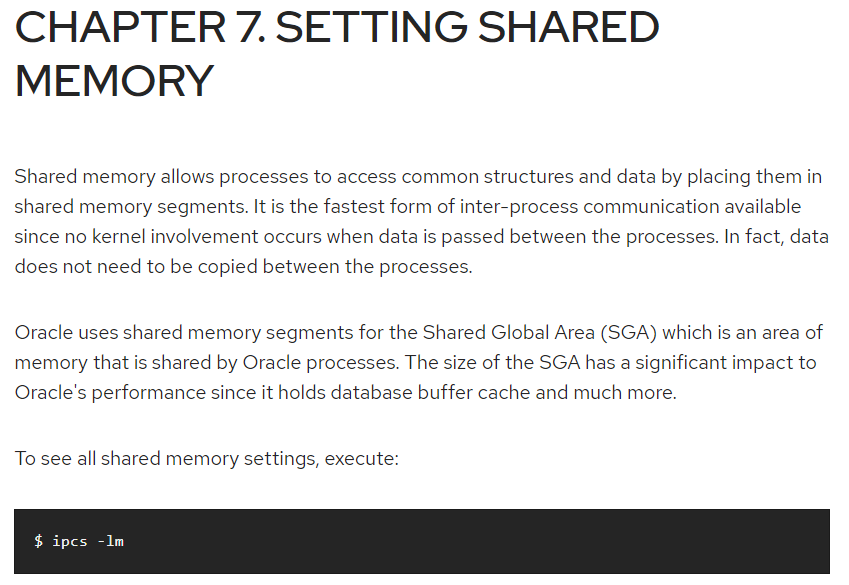
Shared memory allows processes to access common structures and data by placing them in shared memory segments. It is the fastest form of inter-process communication available since no kernel involvement occurs when data is passed between the processes. In fact, data does not need to be copied between the processes.
Oracle uses shared memory segments for the Shared Global Area (SGA) which is an area of memory that is shared by Oracle processes. The size of the SGA has a significant impact to Oracle's performance since it holds database buffer cache and much more.
从上面的官方文档我们了解了这两个参数的含义,但是oracle只给了shmmax和shmall的最小值。接下来我们就通过实验来看看这两个参数对oracle的影响。
三、实验
我的实验机器物理内存是1877M,设置SGA_TAEGET为1000M。接下来测试几个场景。
a. shmmax 200M, shmall 200M
将/etc/sysctl.conf参数设置为
kernel.shmmax = 209715200
kernel.shmall = 51200
oracle启动直接报错
SQL> startup nomount pfile='/home/oracle/test.ora'

ORA-27102: out of memory

Linux-x86_64 Error: 28: No space left on device

Additional information: 209715200

Additional information: 1
b. shmmax 1200M, shmall 200M
将/etc/sysctl.conf参数设置为
kernel.shmmax = 1258291200
kernel.shmall = 51200
oracle启动报跟上面一样的错
SQL> startup nomount pfile='/home/oracle/test.ora'

ORA-27102: out of memory

Linux-x86_64 Error: 28: No space left on device

Additional information: 1035993088

Additional information: 1
从a和b的实验结果来看,oracle是否能够正常启动跟shmmax参数无关,只与shmall有关。shmall不能设置的比SGA_TAEGET小。
c. shmmax 200M, shmall 1200M
将/etc/sysctl.conf参数设置为
kernel.shmmax = 209715200
kernel.shmall = 307200
数据库能够正常启动
SQL> startup nomount pfile='/home/oracle/test.ora'

ORACLE instance started.

Total System Global Area 1043886080 bytes

Fixed Size                  2259840 bytes

Variable Size             327156864 bytes

Database Buffers          708837376 bytes

Redo Buffers                5632000 bytes
查看共享内存的信息
[root@oracletest ~]# ipcs -m

------ Shared Memory Segments --------

key        shmid      owner      perms      bytes      nattch     status

0x00000000 229376     oracle     640        12582912   18

0x00000000 262145     oracle     640        209715200  18

0x00000000 294914     oracle     640        209715200  18

0x00000000 327683     oracle     640        209715200  18

0x00000000 360452     oracle     640        209715200  18

0x00000000 393221     oracle     640        197132288  18

0x276f5044 425990     oracle     640        2097152    18
把上面的共享内存段bytes全部加起来(12582912+209715200...+2097152)/1024/1024=1002MB。可以看到oracle分配内存段的时候,单个共享内存段的确没有超过shmmax(209715200)。总的共享内存刚好等于SGA_TAEGET。
d. shmmax 1200M, shmall 1200M
将/etc/sysctl.conf参数设置为
kernel.shmmax = 1258291200
kernel.shmall = 307200
数据库同样能够正常启动
SQL> startup nomount pfile='/home/oracle/test.ora'

ORACLE instance started.

Total System Global Area 1043886080 bytes

Fixed Size                  2259840 bytes

Variable Size             327156864 bytes

Database Buffers          708837376 bytes

Redo Buffers                5632000 bytes
查看共享内存的信息
[root@oracletest ~]# ipcs -m

------ Shared Memory Segments --------

key        shmid      owner      perms      bytes      nattch     status

0x00000000 557056     oracle     640        12582912   18

0x00000000 589825     oracle     640        1035993088 18

0x276f5044 622594     oracle     640        2097152    18
把上面的共享内存段bytes全部加起来(12582912+1035993088+2097152)/1024/1024=1002MB。总的共享内存仍然刚好等于SGA_TAEGET。内存段的数量却只有三个,最大的内存段达到1035993088/1024/1024=988M
f. shmmax 2400M, shmall 2400M
将/etc/sysctl.conf参数设置为
kernel.shmmax = 2516582400
kernel.shmall = 614400
SQL> startup nomount pfile='/home/oracle/test.ora'

ORACLE instance started.

Total System Global Area 1043886080 bytes

Fixed Size                  2259840 bytes

Variable Size             327156864 bytes

Database Buffers          708837376 bytes

Redo Buffers                5632000 bytes
[root@oracletest ~]# ipcs -m

------ Shared Memory Segments --------

key        shmid      owner      perms      bytes      nattch     status

0x00000000 688128     oracle     640        12582912   18

0x00000000 720897     oracle     640        1035993088 18

0x276f5044 753666     oracle     640        2097152    18
可以看到f跟e没啥区别,shmmax这个值你就算设置超过了物理内存也不受影响。因为oracle实际上分配的共享内存不会超过SGA_TAEGET。
四、总结
- 为了让共享内存不至于切分成多个段,建议将shmmax设置比SGA_TAEGET大,shmall=shmmax/4096即可。至于大多少,个人认为随意。
++本人水平有限,特别是对于共享内存这块,我仍然有很多疑问,比如共享内存能否被交换出去?多个共享内存段有什么缺点?暂时就先记录到这里,后面了解之后,再来更新此文。如果有专家看到文章错误,还望指正。++
Oracle安装 - shmmax和shmall设置的更多相关文章
- Oracle安装前用户信息设置
如果是重复安装,首先需要清除已经存在的软件安装记录: rm -fr /usr/local/bin/*oraenv rm -fr /usr/local/bin/dbhome rm -fr /usr/tm ...
- Window系统Oracle 安装
一:安装Oracle 数据库软件 1.先去官网下载所需文件:http://www.oracle.com/technetwork/database/enterprise-edition/download ...
- 安装ORACLE时在Linux上设置内核参数的含义
前两天看到一篇Redhat官方的Oracle安装文档,对于Linux内核参数的修改描述的非常清晰. 安装Oracle之前,除了检查操作系统的硬件和软件是否满足安装需要之外,一个重点就是修改内核参数,其 ...
- oracle安装内核参数设置
安装oracle内核参数说明及设置 kernel.shmmax 说明: Linux进程可以分配的单独共享内存段的最大值(byte) 64位的linux操作系统,设置应该大于SGA_MAX_TARGET ...
- Linux环境下Oracle安装参数设置
前面讲了虚拟机的设置和OracleLinux的安装,接下来我们来说下Oracle安装前的准备工作.1.系统信息查看系统信息查看首先服务器ip:192.168.8.120服务器系统:Oracle Lin ...
- [INS-30131] 执行安装程序验证所需的初始设置失败问题解决,windows下oracle安装步骤
[INS-30131] 执行安装程序验证所需的初始设置失败问题解决,windows下oracle安装步骤 配置: 系统:windows10 数据库:Oracle Database 12c 第 1 版 ...
- 002.Oracle安装部署-ASM
一 环境准备 图形界面:略 安装包: linux.x64_11gR2_database_1of2.zip linux.x64_11gR2_database_2of2.zip 二 安装ASM-Oracl ...
- 001.Oracle安装部署-本地文件系统
一 环境准备 安装包:linux.x64_11gR2_database_1of2.zip linux.x64_11gR2_database_2of2.zip 二 安装Oracle准备 2.1 用户名/ ...
- Oracle安装部署之RedHat安装Oracle11g_R2
硬件配置 内存 :≥1G 硬盘空间:≥10G 上传oracle11g安装包: putty上用wcw用户登录,通过ftp服务上传oracle安装文件到/home/wcw目录下解压 #unzip linu ...
随机推荐
- CF802O题解
太厉害啦,出题人究竟是怎么想到的. 首先这题很显然可以使用费用流:对于 \(i \leq j\),连接一条边 \((i,j+n)\),流量为 \(1\),费用为 \(a_i+b_j\).最后连接 \( ...
- bash shell 快捷键
Bash Shell 快捷键: Ctrl + a - 跳到行首 Ctrl + e - 跳到行尾 Ctrl + k - 从光标处删除到行尾 Ctrl + l - 清屏,类似 ...
- 017tcpflow的简单用法
tcpflow tcpflow是服务器上经常使用的一个小程序,它能够捕获tcp的数据流,并将其存储为方便分析和调试的格式.每一条tcp流都会被存储到独立的文件中,因此,典型的tcp流将会被分别存储为进 ...
- Java8 中的流式数据处理
java8的流式处理极大了简化我们对于集合.数组等结构的操作,让我们可以以函数式的思想去操作,本篇文章将探讨java8的流式数据处理的基本使用. 一. 流式处理简介 在我接触到java8流式处理的时候 ...
- KVM虚拟机cpu资源限制和vcpu亲缘性绑定
前言 KVM中添加的实例存在资源分布不均的情况,这样如果有消耗资源的实例会影响到其他实例的服务正常运行,所以给kvm做资源限制是很有必要的,下面记录一下在centos7中KVM环境下使用cgroup限 ...
- SpringCloud项目中接入Nacos作为注册中心
具体demo https://blog.csdn.net/qq_33619378/article/details/95212754 <?xml version="1.0 ...
- Linux 的目录结构是怎样的?
这个问题,一般不会问.更多是实际使用时,需要知道.Linux 文件系统的结构层次鲜明,就像一棵倒立的树,最顶层是其根目录:Linux的目录结构常见目录说明: /bin:存放二进制可执行文件(ls,ca ...
- ClassLoader如何加载class ?
jvm里有多个类加载,每个类加载可以负责加载特定位置的类,例如,bootstrap类加载负责加载jre/lib/rt.jar中的类, 我们平时用的jdk中的类都位于rt.jar中.extclasslo ...
- 去掉一个Vector集合中重复的元素 ?
Vector newVector = new Vector(); For (int i=0;i<vector.size();i++) { Object obj = vector.get(i); ...
- mysqlbench无法启动
mysqlbean双击没有反应,应用无法启动,缺少3要素 都缺什么呢?看这个MySQL官方链接:https://dev.mysql.com/doc/workbench/en/wb-installing ...