
springboot-mail发邮件,不需要邮件服务器
很简单 步骤走起->
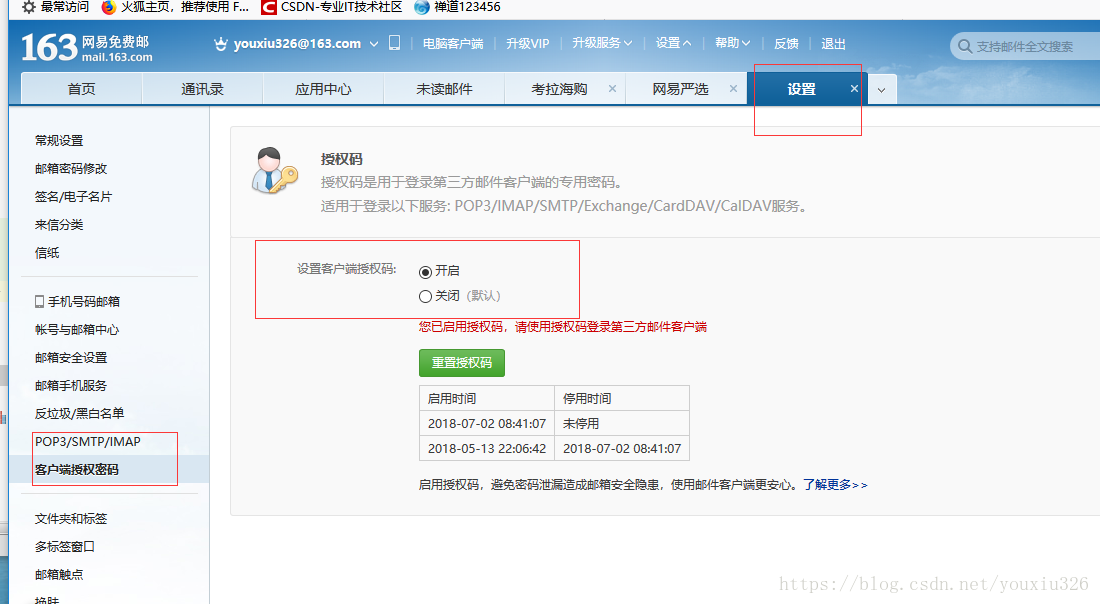
1.需要一个邮箱账号,我以163邮箱为例,先开启第三方服务后获得密码,后面用来邮箱登录
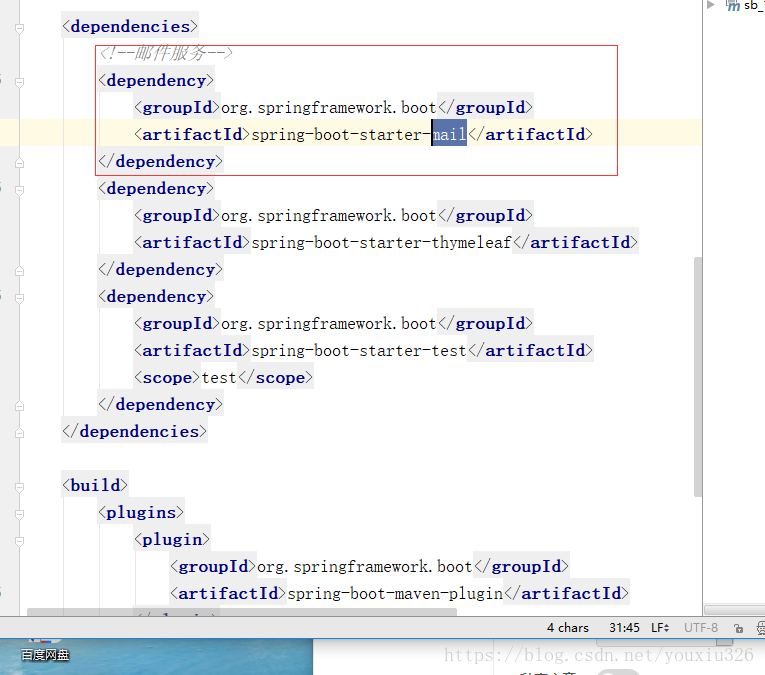
2.加入mail 依赖
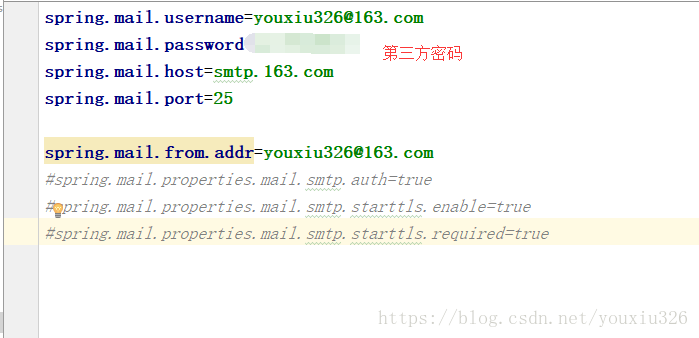
3.properties配置账号和第三方服务密码(不是邮箱密码,是第一步中的密码)
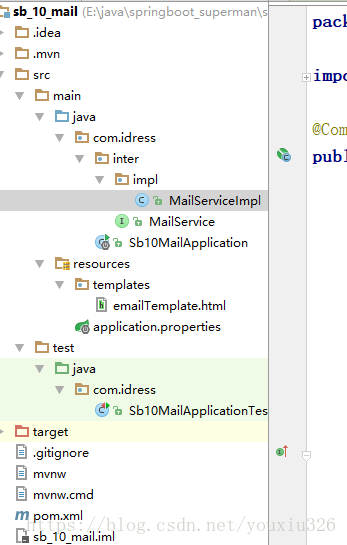
4.简单看下项目结构:
5.直接上serviceImpl
package com.idress.inter.impl;
import com.idress.inter.MailService;
import org.slf4j.Logger;
import org.slf4j.LoggerFactory;
import org.springframework.beans.factory.annotation.Autowired;
import org.springframework.beans.factory.annotation.Value;
import org.springframework.core.io.FileSystemResource;
import org.springframework.mail.SimpleMailMessage;
import org.springframework.mail.javamail.JavaMailSender;
import org.springframework.mail.javamail.MimeMessageHelper;
import org.springframework.stereotype.Component;
import javax.mail.MessagingException;
import javax.mail.internet.MimeMessage;
import java.io.File;
@Component
public class MailServiceImpl implements MailService {
private final Logger logger = LoggerFactory.getLogger(this.getClass());
@Autowired
private JavaMailSender mailSender;
@Value("${spring.mail.from.addr}")
private String from;//由谁发出邮件 is my
@Override
public void sendSimpleMail(String to, String subject, String content) {
SimpleMailMessage message = new SimpleMailMessage();
message.setFrom(from);
message.setTo(to);
message.setSubject(subject);
message.setText(content);
try {
mailSender.send(message);
logger.info("简单邮件已经发送。");
} catch (Exception e) {
logger.error("发送简单邮件时发生异常!", e);
}
}
//发送html格式邮件
@Override
public void sendHtmlMail(String to, String subject, String content) {
MimeMessage message = mailSender.createMimeMessage();
try {
//true表示需要创建一个multipart message
MimeMessageHelper helper = new MimeMessageHelper(message, true);
helper.setFrom(from);
helper.setTo(to);
helper.setSubject(subject);
helper.setText(content, true);
mailSender.send(message);
logger.info("html邮件发送成功");
} catch (MessagingException e) {
logger.error("发送html邮件时发生异常!", e);
}
}
//发送带附件的邮件
@Override
public void sendAttachmentsMail(String to, String subject, String content, String filePath) {
MimeMessage message = mailSender.createMimeMessage();
try {
MimeMessageHelper helper = new MimeMessageHelper(message, true);
helper.setFrom(from);
helper.setTo(to);
helper.setSubject(subject);
helper.setText(content, true);
FileSystemResource file = new FileSystemResource(new File(filePath));
String fileName = filePath.substring(filePath.lastIndexOf(File.separator));
helper.addAttachment(fileName, file);
mailSender.send(message);
logger.info("带附件的邮件已经发送。");
} catch (MessagingException e) {
logger.error("发送带附件的邮件时发生异常!", e);
}
}
/**
* 嵌入静态资源的邮件
*/
@Override
public void sendInlineResourceMail(String to, String subject, String content, String rscPath, String rscId) {
MimeMessage message = mailSender.createMimeMessage();
try {
MimeMessageHelper helper = new MimeMessageHelper(message, true);
helper.setFrom(from);
helper.setTo(to);
helper.setSubject(subject);
helper.setText(content, true);
FileSystemResource res = new FileSystemResource(new File(rscPath));
helper.addInline(rscId, res);
mailSender.send(message);
logger.info("嵌入静态资源的邮件已经发送。");
} catch (MessagingException e) {
logger.error("发送嵌入静态资源的邮件时发生异常!", e);
}
}
}
6.junt测试走起
package com.idress;

import com.idress.inter.MailService;

import com.sun.xml.internal.bind.CycleRecoverable;

import org.junit.Test;

import org.junit.runner.RunWith;

import org.springframework.beans.factory.annotation.Autowired;

import org.springframework.boot.test.context.SpringBootTest;

import org.springframework.core.env.Environment;

import org.springframework.test.context.junit4.SpringRunner;

import org.thymeleaf.context.Context;

import org.thymeleaf.spring4.SpringTemplateEngine;

@RunWith(SpringRunner.class)

@SpringBootTest

public class Sb10MailApplicationTests {

   @Autowired

   private MailService mailService;

   @Test

   public void contextLoads() {

      mailService.sendSimpleMail("2473538988@qq.com","恭喜你的简历被我们查看"," 请您....");

   }

   @Test

   public void testHtmlMail() throws Exception{

      for (int i = 0; i < 25; i++) {

         String content = "<html>\n" +

               "<body>\n" +

               "    <h3>hello world ! 这是一封Html邮件!</h3>\n" +

               "</body>\n" +

               "</html>";

         mailService.sendHtmlMail("whatarey0206@qq.com", "test simple mail", content);

      }

   }

   //发送待附件的邮件

   @Test

   public void sendAttachmentsMail() {

         String filePath = "E:\\img01.PNG";

         mailService.sendAttachmentsMail("2633992679@qq.com", "主题:带附件的邮件", "有附件,请查收!", filePath);

   }

   @Test

   public void sendInlineResourceMail() {

      String rscId = "neo006";

      String content="<html><body>这是有图片的邮件:<img src='cid:" + rscId + "' ></body></html>";

      String imgPath = "E:\\img01.PNG";

      mailService.sendInlineResourceMail("1544303828@qq.com", "主题:这是有图片的邮件", content, imgPath, rscId);

   }

   //使用邮件模板

   @Autowired

   private SpringTemplateEngine templateEngine;

   @Test

   public void sendTemplateMail() {

      //创建邮件正文

      Context context = new Context();

      context.setVariable("id", "006");

      String emailContent = templateEngine.process("emailTemplate", context);

      mailService.sendHtmlMail("1544303828@qq.com","主题:这是模板邮件",emailContent);

   }

}
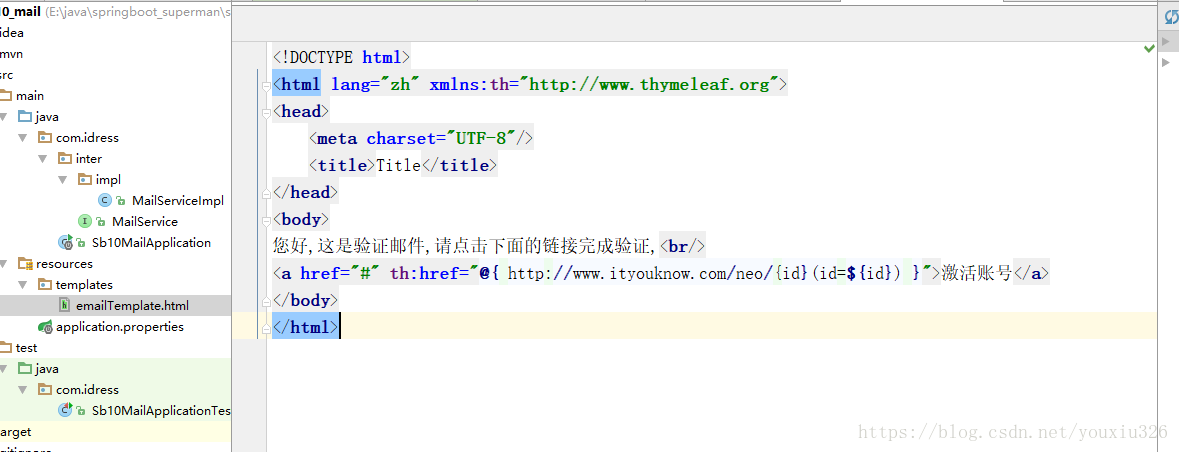
7.邮箱模板(thymeleaf)
转载http://www.ityouknow.com/springboot/2017/05/06/springboot-mail.html
一位大神 纯洁的微笑
springboot-mail发邮件,不需要邮件服务器的更多相关文章
- 关于java mail 发邮件的问题总结(转)
今天项目中有需要用到java mail发送邮件的功能,在网上找到相关代码,代码如下: import java.io.IOException; import java.util.Properties; ...
- 带着新人学springboot的应用10(springboot+定时任务+发邮件)
接上一节,环境一样,这次来说另外两个任务,一个是定时任务,一个是发邮件. 1.定时任务 定时任务可以设置精确到秒的准确时间去自动执行方法. 我要一个程序每一秒钟说一句:java小新人最帅 于是,我就写 ...
- spring boot(16)-mail发邮件
上一篇讲了如何处理异常,并且异常最终会写入日志.但是日志是写在服务器上的,我们无法及时知道.如果能够将异常发送到邮箱,我们可以在第一时间发现这个异常.当然,除此以外,还可以用来给用户发验证码以及各种离 ...
- shell中mail发邮件的问题
今天为了监控一下脚本,按照网上说的利用mail 发邮件,mail -s "error预警2" peien@1221.qq.com<'邮件内容',发现出现cc,不知道啥问题,也 ...
- Django的邮件发送以及云服务器上遇到的问题
邮件发送 首先我们的邮箱要开通smtp服务,然后就可以在settings中配置了 EMAIL_BACKEND = 'django.core.mail.backends.smtp.EmailBacken ...
- ios 设置亮度、声音;调用发短信、邮件、打电话
一,设置亮度 [[UIScreen mainScreen] setBrightness:0.5];//0.0~1.0 二,设置声音 1,添加 MediaPlayer.framework 框架 2,在需 ...
- IMAP(Internet Mail Access Protocol,Internet邮件访问协议)以前称作交互邮件访问协议(Interactive Mail Access Protocol)。
IMAP(Internet Mail Access Protocol,Internet邮件访问协议)以前称作交互邮件访问协议(Interactive Mail Access Protocol).IMA ...
- Springboot 系列(十三)使用邮件服务
在我们这个时代,邮件服务不管是对于工作上的交流,还是平时的各种邮件通知,都是一个十分重要的存在.Java 从很早时候就可以通过 Java mail 支持邮件服务.Spring 更是对 Java mai ...
- Android实例-打电话、发短信和邮件,取得手机IMEI号(XE8+小米2)
结果: 1.不提示发短信卡住,点击没有反映,我猜想,可能是因为我用的是小米手机吧. 2.接收短信报错,我猜想可能是我改了里面的方法吧(哪位大神了解,求指教). 3.project -->opti ...
- Linux出现You have new mail in /var/spool/mail/root提示,关闭邮件提示清理内容的解决方案
Linux出现You have new mail in /var/spool/mail/root提示,关闭邮件提示的解决方案 有的时候敲一下回车,就出来You have new mail in /va ...
随机推荐
- Map格式-joson格式
mapStr: {CHAR=UTF-8, DATA=eyJNRVJDSEFOVCI6IjEwMDEiLCJWRVJTSU9OIjoiMS4wLjAiLCJUUkFERSI6IjIwMTgwNjEyMT ...
- JZ-010-矩形覆盖
矩形覆盖 题目描述 我们可以用21的小矩形横着或者竖着去覆盖更大的矩形.请问用n个21的小矩形无重叠地覆盖一个2*n的大矩形,总共有多少种方法? 题目链接: 矩形覆盖 代码 /** * 标题:矩形覆盖 ...
- Linux下安装Apollo (Quick Start)
一.运行时环境 1.CentOS7 2.JDK1.8+ (安装JDK可参考 https://www.cnblogs.com/sportsky/p/15973713.html) 3.MySQL 5.6. ...
- i++ 反编译码
1.特点: 操作数栈,主要用于保存计算过程中的结果,同时作为集计算过程中变量临时的存储空间. 操作数栈就是JVM执行引擎的一个工作区,当方法执行开始,一个新栈帧也会随之被创建,这个方法的操作数栈是空的 ...
- ln -s 软链接知识总结
ln -s 软链接知识总结 1.软连建立:ln -s 源文件 软链接文件 2.误区:软链接是创建的,就意味着软链接文件不可以在创建之前存在 3.类比:win快捷方式 4.删除:rm就可以,但源文件 ...
- nginx配置负载均衡分发服务器笔记
记录学习搭建nginx负载均衡分发服务器的过程笔记 1.服务器IP:192.168.31.202(当前需要搭建nginx负载均衡分发的服务器)安装好nginx 2.在服务器IP:192.168.31. ...
- 大作业:开发一个精美的 Web 网站
大作业:开发一个精美的 Web 网站 实验目的: 掌握一个完整精美网页开发的基本方法 实验要求: 1.开发一个 Web 站点,至少有 3 个以上的页面: 2.采用 CSS 和 HTML 文件分开方法: ...
- python的matplotlib.pyplot绘制甘特图
博主本来就想简单地找一下代码,画一幅甘特图,结果百度之后发现甘特图的代码基本都不是用matplotlib库,但是像柱状图等统计图通常都是用这个库进行绘制的,所以博主就花了一些时间,自己敲了一份代码,简 ...
- AE功能扩展一
1.添加栅格影像 基本思路:声明栅格工作空间→创建栅格数据集对象→创建金字塔→声明图层对象→刷新地图控件 private void AddBaseMap(string filepath) { IWor ...
- [Java编程思想] 第二章 一切都是对象
第二章 一切都是对象 2.1 用引用操纵对象 创建一个String引用: String s; 这里所创建的只是引用,并不是对象. 创建一个引用的同时便初始化: String s = &qu ...