
Django日志器的使用
Logging Mudel
A quick logging primer
Django uses Python’s builtin logging module to perform system logging. The usage of this module is discussed in detail in Python’s own documentation. However, if you’ve never used Python’s logging framework (or even if you have), here’s a quick primer.
The cast of players
A Python logging configuration consists of four parts:
Loggers
A logger is the entry point into the logging system. Each logger is a named bucket to which messages can be written for processing.
A logger is configured to have a log level. This log level describes the severity of the messages that the logger will handle. Python defines the following log levels:
DEBUG: Low level system information for debugging purposes
INFO: General system information
WARNING: Information describing a minor problem that has occurred.
ERROR: Information describing a major problem that has occurred.
CRITICAL: Information describing a critical problem that has occurred.
Each message that is written to the logger is a Log Record. Each log record also has a log level indicating the severity of that specific message. A log record can also contain useful metadata that describes the event that is being logged. This can include details such as a stack trace or an error code.
When a message is given to the logger, the log level of the message is compared to the log level of the logger. If the log level of the message meets or exceeds the log level of the logger itself, the message will undergo further processing. If it doesn’t, the message will be ignored.
Once a logger has determined that a message needs to be processed, it is passed to a Handler.
Handlers
The handler is the engine that determines what happens to each message in a logger. It describes a particular logging behavior, such as writing a message to the screen, to a file, or to a network socket.
Like loggers, handlers also have a log level. If the log level of a log record doesn’t meet or exceed the level of the handler, the handler will ignore the message.
A logger can have multiple handlers, and each handler can have a different log level. In this way, it is possible to provide different forms of notification depending on the importance of a message. For example, you could install one handler that forwards ERROR and CRITICALmessages to a paging service, while a second handler logs all messages (including ERROR and CRITICAL messages) to a file for later analysis.
Filters
A filter is used to provide additional control over which log records are passed from logger to handler.
By default, any log message that meets log level requirements will be handled. However, by installing a filter, you can place additional criteria on the logging process. For example, you could install a filter that only allows ERROR messages from a particular source to be emitted.
Filters can also be used to modify the logging record prior to being emitted. For example, you could write a filter that downgrades ERROR log records to WARNING records if a particular set of criteria are met.
Filters can be installed on loggers or on handlers; multiple filters can be used in a chain to perform multiple filtering actions.
Formatters
Ultimately, a log record needs to be rendered as text. Formatters describe the exact format of that text. A formatter usually consists of a Python formatting string containing LogRecord attributes; however, you can also write custom formatters to implement specific formatting behavior.
源码示例:
LOGGING = {

    'version': 1,

    'disable_existing_loggers': False,

    'formatters': {

        'verbose': {

            'format': '%(levelname)s %(asctime)s %(module)s %(process)d %(thread)d %(message)s'

        },

        'simple': {

            'format': '%(levelname)s %(message)s'

        },

    },

    'filters': {

        'special': {

            '()': 'project.logging.SpecialFilter',

            'foo': 'bar',

        },

        'require_debug_true': {

            '()': 'django.utils.log.RequireDebugTrue',

        },

    },

    'handlers': {

        'console': {

            'level': 'INFO',

            'filters': ['require_debug_true'],

            'class': 'logging.StreamHandler',

            'formatter': 'simple'

        },

        'mail_admins': {

            'level': 'ERROR',

            'class': 'django.utils.log.AdminEmailHandler',

            'filters': ['special']

        }

    },

    'loggers': {

        'django': {

            'handlers': ['console'],

            'propagate': True,

        },

        'django.request': {

            'handlers': ['mail_admins'],

            'level': 'ERROR',

            'propagate': False,

        },

        'myproject.custom': {

            'handlers': ['console', 'mail_admins'],

            'level': 'INFO',

            'filters': ['special']

        }

    }

}
解析:
Identifies the configuration as being in ‘dictConfig version 1’ format. At present, this is the only dictConfig format version.

Defines two formatters:

simple, that just outputs the log level name (e.g., DEBUG) and the log message.

The format string is a normal Python formatting string describing the details that are to be output on each logging line. The full list of detail that can be output can be found in Formatter Objects.

verbose, that outputs the log level name, the log message, plus the time, process, thread and module that generate the log message.

Defines two filters:

project.logging.SpecialFilter, using the alias special. If this filter required additional arguments, they can be provided as additional keys in the filter configuration dictionary. In this case, the argument foo will be given a value of bar when instantiating SpecialFilter.

django.utils.log.RequireDebugTrue, which passes on records when DEBUG is True.

Defines two handlers:

console, a StreamHandler, which will print any INFO (or higher) message to stderr. This handler uses the simple output format.

mail_admins, an AdminEmailHandler, which will email any ERROR (or higher) message to the site admins. This handler uses the special filter.

Configures three loggers:

django, which passes all messages to the console handler.

django.request, which passes all ERROR messages to the mail_admins handler. In addition, this logger is marked to not propagate messages. This means that log messages written to django.request will not be handled by the django logger.

myproject.custom, which passes all messages at INFO or higher that also pass the special filter to two handlers – the console, and mail_admins. This means that all INFO level messages (or higher) will be printed to the console; ERROR and CRITICAL messages will also be output via email.
使用方式:
import logging

logger = logging.getLogger("django") # 为loggers中定义的名称

logger.info("some info...")
运行测试:
LOGGING = {

	'version': 1,

	'disable_existing_loggers': False,

	'formatters': {

		'standard': {

			'format': '%(asctime)s [%(threadName)s:%(thread)d] [%(name)s:%(lineno)d] [%(module)s:%(funcName)s] [%(levelname)s]- %(message)s'}

		# 日志格式

	},

	'filters': {

	},

	'handlers': {

		'default': {  # 默认

			'level': 'DEBUG',

			'class': 'logging.handlers.RotatingFileHandler',

			'filename': 'log/all.log',  # 日志输出文件

			'maxBytes': 1024 * 1024 * 5,  # 文件大小

			'backupCount': 5,  # 备份份数

			'formatter': 'standard',  # 使用哪种formatters日志格式

		},

		'error': {  # 错误

			'level': 'ERROR',

			'class': 'logging.handlers.RotatingFileHandler',

			'filename': 'log/error.log',

			'maxBytes': 1024 * 1024 * 5,

			'backupCount': 5,

			'formatter': 'standard',

		},

		'console': {  # 控制台

			'level': 'DEBUG',

			'class': 'logging.StreamHandler',

			'formatter': 'standard'

		},

		'mail_admins': {

			'level': 'ERROR',

			'class': 'django.utils.log.AdminEmailHandler',

			'include_html': True,

		},

		'request_handler': {  # request请求

			'level': 'DEBUG',

			'class': 'logging.handlers.RotatingFileHandler',

			'filename': 'log/script.log',

			'maxBytes': 1024 * 1024 * 5,

			'backupCount': 5,

			'formatter': 'standard',

		},

		'scprits_handler': {  # script请求

			'level': 'DEBUG',

			'class': 'logging.handlers.RotatingFileHandler',

			'filename': 'log/script.log',

			'maxBytes': 1024 * 1024 * 5,

			'backupCount': 5,

			'formatter': 'standard',

		}

	},

	'loggers': {

		'django': {

			'handlers': ['default', 'console'],

			'level': 'DEBUG',

			'propagate': False

		},

		'django.request': {

			'handlers': ['request_handler'],

			'level': 'DEBUG',

			'propagate': False,

		},

		'scripts': {

			'handlers': ['scprits_handler'],

			'level': 'INFO',

			'propagate': False

		},

		'blog.views': {

			'handlers': ['default', 'error','console'],

			'level': 'DEBUG',

			'propagate': True

		},

	}

}
views.py:
# -*- coding: utf-8 -*-

from django.shortcuts import render

import logging

logger = logging.getLogger('blog.views')  # 使用自定义的logger

def index(request):

	try:

		raise Exception

	except Exception as e:

		logger.debug('views.index()....')

	return render(request, 'index.html', {})
运行

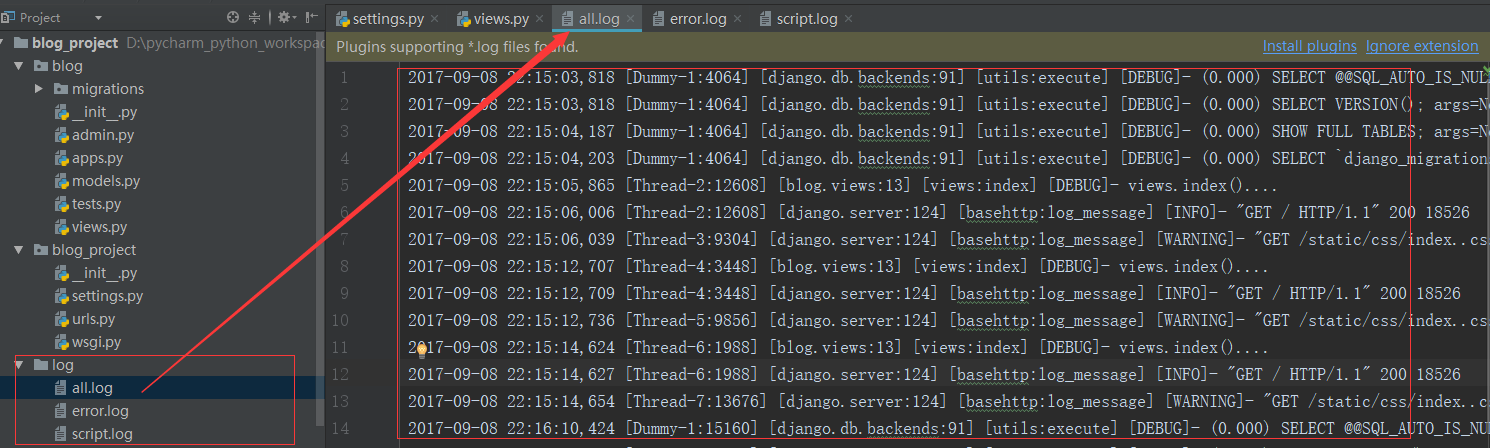
官方文档(https://docs.djangoproject.com/en/dev/topics/logging/#topic-logging-parts-loggers)
Django日志器的使用的更多相关文章
- django 开发之自定义日志器(二)
2016-08-24 需求 在我们的真实环境中当我们出现错误的时候我们要记录下来,便于我们分析差错. 关于日志的代码文件 # 自定义日志输出信息 LOGGING = { 'version': 1, ' ...
- django日志,django-crontab,django邮件模块
django 日志 四大块,格式器,过滤器,处理器,日志管理器 LOGGING = { 'version': 1, 'disable_existing_loggers': True, 'formatt ...
- Django日志系统
在Django中使用的日志系统是基于Python中的loggin模块. 首先简单介绍下logging. 一 Loggin模块简介 loggin模块主要包含以下四个部分: Loggers ...
- 18:django 日志系统
django使用python内建的logging模块去建造自己的系统日志的,如果你想详细了解这个模块的话,请自己去看python的说明文档,这里仅仅介绍django中的日志系统 日志配置包括四个部分: ...
- django日志的设置
关于django的日志设置详细可以看下官方文档:https://yiyibooks.cn/xx/Django_1.11.6/topics/logging.html 示例: # 日志文件配置 LOGGI ...
- 07.django日志配置
https://docs.djangoproject.com/en/3.0/topics/logging/ https://yiyibooks.cn/xx/python_352/library/log ...
- Django(37)配置django日志
前言 django框架的日志通过python内置的logging模块实现的,既可以记录自定义的一些信息描述,也可以记录系统运行中的一些对象数据,还可以记录包括堆栈跟踪.错误代码之类的详细信息. ...
- Django 日志配置
Django日志处理 settings配置 ########### # LOGGING # ########### BASE_LOG_DIR = os.path.join(os.path.dirnam ...
- django 日志logging的配置以及处理
django日志官方文档https://docs.djangoproject.com/en/1.11/topics/logging/ 本文摘自http://davidbj.blog.51cto.com ...
随机推荐
- c#中文字符串与byte数组互相转化
因为中文字符串一个字符占两个字节,所以不能用正常的方式与byte之间进行互相转化 中文字符串转成byte[] byte[] ping = Encoding.UTF8.GetBytes("你的 ...
- TypeScript基础知识
一. TypeScript是js的超集,可以应用所有js语法 二. 特点: 1. 优点 a. 可以在编译阶段就发现大部分错误,这总比在运行时候出错好 b. 同一目录下不同文件中,使用统一命名,会有命名 ...
- Linux下文件的管理
1.文件的创建(touch) xiaohuang@xiaohuang-virtual-machine:~/桌面$ touch myfile.txt xiaohuang@xiaohuang-virtua ...
- CISP/CISA 每日一题 八
CISA 每日一题(答)网关执行电子邮件格式转换 电子邮件安全——加密 大文件——对称加密 不可否认——非对称 哈希——完整性 电子银行主要风险: 战略.经营和声誉上的风险 双SSP每日一题 ...
- Android网络框架OkHttp之get请求(源码初识)
概括 OkHttp现在很火呀.于是上个星期就一直在学习OkHttp框架,虽然说起来已经有点晚上手了,貌似是2013年就推出了.但是现在它版本更加稳定了呀.这不,说着说着,OkHttp3.3版本在这几天 ...
- solr6.3+tomcat8报错HTTP Status 403 – Forbidden解决办法
注释掉tomcat下solr项目web.xml中的如下这段代码即可:
- [Angular] Update FormArray with patchValue
Currently, patchValue doesn't support update FormArray. The workarround is you need to empty the for ...
- Visual C# 2008 调试技巧
1,非中断模式下的调试. 利用系统“输出”窗口.(视图-输出)来打印调试信息.有Debug和Release两种版本,通过运行按钮右边的选项可以选择程序的运行方式.而对应的现实调试信息的方法也不同. ...
- python3 pygame 坦克自动移动
让坦克自动跑起来 这里需要一个坦克的图. 放到与脚本同一目录. 好,我们就让这个坦克自动跑. 下面上代码: # !/usr/bin/env python # -*- coding:utf-8 -*- ...
- HTML 5 中FileReader的使用
FileReader 接口主要用来把文件读入到内存中,而且读取文件里的数据.FileReader接口提供了一个异步API,使用该API能够在浏览器主线程中异步訪问文件系统 ,读取文件里的数据. Fil ...