
WPF 简单的绕圈进度条(无cs代码)
方案: 图标位置不变化的情况下设置透明度实现
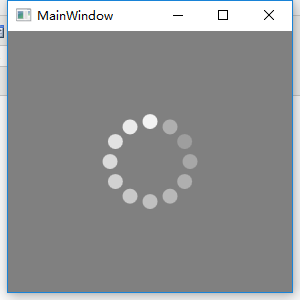
代码:
<Window
x:Class="WpfApp1.MainWindow"
xmlns="http://schemas.microsoft.com/winfx/2006/xaml/presentation"
xmlns:x="http://schemas.microsoft.com/winfx/2006/xaml"
xmlns:d="http://schemas.microsoft.com/expression/blend/2008"
xmlns:ec="http://schemas.microsoft.com/expression/2010/controls"
xmlns:local="clr-namespace:WpfApp1"
xmlns:mc="http://schemas.openxmlformats.org/markup-compatibility/2006"
Title="MainWindow"
Width="300"
Height="300"
mc:Ignorable="d"> <Window.Resources>
<Duration x:Key="AnimationTime">0:0:.84</Duration>
</Window.Resources>
<Grid Background="Gray">
<Ellipse
x:Name="ellipse"
Width="80"
Height="80"
RenderTransformOrigin="0.5,0.5" />
<ec:PathListBox HorizontalAlignment="Left" VerticalAlignment="Top">
<ec:PathListBox.LayoutPaths>
<ec:LayoutPath Distribution="Even" SourceElement="{Binding ElementName=ellipse}" />
</ec:PathListBox.LayoutPaths>
<Ellipse
Width="15"
Height="15"
Fill="White">
<Ellipse.Triggers>
<EventTrigger RoutedEvent="Window.Loaded">
<BeginStoryboard>
<Storyboard>
<DoubleAnimation
BeginTime="0:0:.770"
RepeatBehavior="Forever"
Storyboard.TargetProperty="Opacity"
From=".2"
To="1"
Duration="{StaticResource AnimationTime}" />
</Storyboard>
</BeginStoryboard>
</EventTrigger>
</Ellipse.Triggers>
</Ellipse>
<Ellipse
Width="15"
Height="15"
Fill="White">
<Ellipse.Triggers>
<EventTrigger RoutedEvent="Window.Loaded">
<BeginStoryboard>
<Storyboard>
<DoubleAnimation
BeginTime="0:0:.700"
RepeatBehavior="Forever"
Storyboard.TargetProperty="Opacity"
From=".2"
To="1"
Duration="{StaticResource AnimationTime}" />
</Storyboard>
</BeginStoryboard>
</EventTrigger>
</Ellipse.Triggers>
</Ellipse>
<Ellipse
Width="15"
Height="15"
Fill="White">
<Ellipse.Triggers>
<EventTrigger RoutedEvent="Window.Loaded">
<BeginStoryboard>
<Storyboard>
<DoubleAnimation
BeginTime="0:0:.630"
RepeatBehavior="Forever"
Storyboard.TargetProperty="Opacity"
From=".2"
To="1"
Duration="{StaticResource AnimationTime}" />
</Storyboard>
</BeginStoryboard>
</EventTrigger>
</Ellipse.Triggers>
</Ellipse>
<Ellipse
Width="15"
Height="15"
Fill="White">
<Ellipse.Triggers>
<EventTrigger RoutedEvent="Window.Loaded">
<BeginStoryboard>
<Storyboard>
<DoubleAnimation
BeginTime="0:0:.560"
RepeatBehavior="Forever"
Storyboard.TargetProperty="Opacity"
From=".2"
To="1"
Duration="{StaticResource AnimationTime}" />
</Storyboard>
</BeginStoryboard>
</EventTrigger>
</Ellipse.Triggers>
</Ellipse>
<Ellipse
Width="15"
Height="15"
Fill="White">
<Ellipse.Triggers>
<EventTrigger RoutedEvent="Window.Loaded">
<BeginStoryboard>
<Storyboard>
<DoubleAnimation
BeginTime="0:0:.490"
RepeatBehavior="Forever"
Storyboard.TargetProperty="Opacity"
From=".2"
To="1"
Duration="{StaticResource AnimationTime}" />
</Storyboard>
</BeginStoryboard>
</EventTrigger>
</Ellipse.Triggers>
</Ellipse>
<Ellipse
Width="15"
Height="15"
Fill="White">
<Ellipse.Triggers>
<EventTrigger RoutedEvent="Window.Loaded">
<BeginStoryboard>
<Storyboard>
<DoubleAnimation
BeginTime="0:0:.420"
RepeatBehavior="Forever"
Storyboard.TargetProperty="Opacity"
From=".2"
To="1"
Duration="{StaticResource AnimationTime}" />
</Storyboard>
</BeginStoryboard>
</EventTrigger>
</Ellipse.Triggers>
</Ellipse>
<Ellipse
Width="15"
Height="15"
Fill="White">
<Ellipse.Triggers>
<EventTrigger RoutedEvent="Window.Loaded">
<BeginStoryboard>
<Storyboard>
<DoubleAnimation
BeginTime="0:0:.350"
RepeatBehavior="Forever"
Storyboard.TargetProperty="Opacity"
From=".2"
To="1"
Duration="{StaticResource AnimationTime}" />
</Storyboard>
</BeginStoryboard>
</EventTrigger>
</Ellipse.Triggers>
</Ellipse>
<Ellipse
Width="15"
Height="15"
Fill="White">
<Ellipse.Triggers>
<EventTrigger RoutedEvent="Window.Loaded">
<BeginStoryboard>
<Storyboard>
<DoubleAnimation
BeginTime="0:0:0.280"
RepeatBehavior="Forever"
Storyboard.TargetProperty="Opacity"
From=".2"
To="1"
Duration="{StaticResource AnimationTime}" />
</Storyboard>
</BeginStoryboard>
</EventTrigger>
</Ellipse.Triggers>
</Ellipse>
<Ellipse
Width="15"
Height="15"
Fill="White">
<Ellipse.Triggers>
<EventTrigger RoutedEvent="Window.Loaded">
<BeginStoryboard>
<Storyboard>
<DoubleAnimation
BeginTime="0:0:0.210"
RepeatBehavior="Forever"
Storyboard.TargetProperty="Opacity"
From=".2"
To="1"
Duration="{StaticResource AnimationTime}" />
</Storyboard>
</BeginStoryboard>
</EventTrigger>
</Ellipse.Triggers>
</Ellipse>
<Ellipse
Width="15"
Height="15"
Fill="White">
<Ellipse.Triggers>
<EventTrigger RoutedEvent="Window.Loaded">
<BeginStoryboard>
<Storyboard>
<DoubleAnimation
BeginTime="0:0:0.140"
RepeatBehavior="Forever"
Storyboard.TargetProperty="Opacity"
From=".2"
To="1"
Duration="{StaticResource AnimationTime}" />
</Storyboard>
</BeginStoryboard>
</EventTrigger>
</Ellipse.Triggers>
</Ellipse>
<Ellipse
Width="15"
Height="15"
Fill="White">
<Ellipse.Triggers>
<EventTrigger RoutedEvent="Window.Loaded">
<BeginStoryboard>
<Storyboard>
<DoubleAnimation
BeginTime="0:0:0.7"
RepeatBehavior="Forever"
Storyboard.TargetProperty="Opacity"
From=".2"
To="1"
Duration="{StaticResource AnimationTime}" />
</Storyboard>
</BeginStoryboard>
</EventTrigger>
</Ellipse.Triggers>
</Ellipse>
<Ellipse
Width="15"
Height="15"
Fill="White">
<Ellipse.Triggers>
<EventTrigger RoutedEvent="Window.Loaded">
<BeginStoryboard>
<Storyboard>
<DoubleAnimation
BeginTime="0:0:0"
RepeatBehavior="Forever"
Storyboard.TargetProperty="Opacity"
From=".2"
To="1"
Duration="{StaticResource AnimationTime}" />
</Storyboard>
</BeginStoryboard>
</EventTrigger>
</Ellipse.Triggers>
</Ellipse>
</ec:PathListBox>
</Grid>
</Window>
WPF 简单的绕圈进度条(无cs代码)的更多相关文章
- WPF 绕圈进度条(二)
一 以前的方案 以前写过一个圆点绕圈的进度条,根据参数圆点个数和参数每次旋转角度,主要是在cs文件中动态添加圆点,通过后台定时器,动态设置角度后用正弦余弦计算(x,y)的位置. 此方案优点:动态添加L ...
- WPF 自定义绕圈进度条
在设计界面时,有时会遇到进度条,本次讲解如何设计自定义的绕圈进度条,直接上代码: 1.控件界面 <UserControl x:Class="ProgressBarControl&quo ...
- WPF 绕圈进度条(一)
在设计界面时,有时会遇到进度条,本次讲解如何设计自定义的绕圈进度条,直接上代码: 1.控件界面 <UserControl x:Class="ProgressBarControl&quo ...
- WPF 自定义绕圈进度条(转)
在设计界面时,有时会遇到进度条,本次讲解如何设计自定义的绕圈进度条,直接上代码: 1.控件界面 <UserControl x:Class="ProgressBarControl&quo ...
- WPF利用动画实现圆形进度条
原文:WPF利用动画实现圆形进度条 这是我的第一篇随笔,最近因为工作需要,开始学习WPF相关技术,自己想实现以下圆形进度条的效果,逛了园子发现基本都是很久以前的文章,实现方式一般都是GDI实现的,想到 ...
- C# WPF 解压缩7zip文件 带进度条 sevenzipsharp
vs2013附件 :http://download.csdn.net/detail/u012663700/7427461 C# WPF 解压缩7zip文件 带进度条 sevenzipsharp W ...
- 使用ajax实现简单的带百分比进度条
需求:当进行文件上传保存等操作时,能在页面显示一个带百分比的进度条,给用户一个好的交互体验 实现步骤 JSP页面 1.添加table标签 <table id="load" w ...
- 最简单的android自定义进度条样式
一.自定义圆形进度条样式 1.在安卓项目drawable目录下新建一个xml文件如下:<?xml version="1.0" encoding="utf-8&quo ...
- [WPF]有滑动效果的进度条
先给各位看看效果,可能不太完美,不过效果还是可行的. 我觉得,可能直接放个GIF图片上去会更好. 我这个不是用图片,而是用DrawingBrush画出来的.接着重做ProgressBar控件的模板,把 ...
随机推荐
- Android程序解析XML文件的方法及使用PULL解析XML案例
一.一般解析XML文件的方法有SAX和DOM.PULL (1)DOM(JAXP Crimson解析器) DOM是用与平台和语言无关的方式表示XML文档的官方W3C标准.DOM是以层次结构组织的节点或信 ...
- Android Material Design 5.0 PickerDialog
5.0系统下的时间选择器效果图: 该项目兼容到3.0下面所以用第三方开源项目:actionbarsherlock,动画效果兼容:nineoldandroids-2.4.0.jar,格式转换器:joda ...
- [NPM] Run npm scripts in parallel
In this lesson we will look at running several npm scripts in parallel. Sometimes you don’t need scr ...
- 百度UEditor上传图片-再总结一次
晚上,在继续开发BriefCMS,把百度UEditor上传图片的问题,给解决了,终于解决了. 公司极简版CMS.BriefCMS.个人官网,最近2个月,与百度UEditor厮杀了好久.最值得吐槽的,就 ...
- Opencv Sift和Surf特征实现图像无缝拼接生成全景图像
Sift和Surf算法实现两幅图像拼接的过程是一样的,主要分为4大部分: 1. 特征点提取和描述 2. 特征点配对,找到两幅图像中匹配点的位置 3. 通过配对点,生成变换矩阵,并对图像1应用变换矩阵生 ...
- iOS8.1 编译ffmpeg和集成第三方实现直播(监控类)
iOS8.1 编译ffmpeg和集成第三方实现直播(监控类) http://www.mamicode.com/info-detail-476094.html 一,下载并在终端中运行脚本编译ffmpeg ...
- 实际工程Quartz与Spring设计与实现一体化的热部署
1.需求说明 主要负责项目任务调度.使用Quartz.以Spring为辅助. 如今有这样一个需求:我们不知道管理员想设定过多厂时间运行主任务,须要在配置文件定义.在配置好后须要马上运行.实现热部署. ...
- tensorflow 的版本差异与变化
官方文档的说明,Transitioning to TensorFlow 1.0 1. 简单列举如下 变量 tf.VARIABLES ⇒ tf.GLOBAL_VARIABLES tf.all_varia ...
- TensorFlow 学习(十)—— 工具函数
1. 基本 tf.clip_by_value() 截断,常和对数函数结合使用 # 计算交叉熵 crose_ent = -tf.reduce_mean(tf.log(y_*tf.clip_by_valu ...
- scala map的常用操作
package cn.scala_base /** * map常用操作 */ object Map { def main(args: Array[String]): Unit = { //1.不可变m ...