
Android 底部按钮BottomNavigationView + Fragment + viewPager 的使用(一)
实现的效果,左右滑动,底部栏跟着滑动,中间加的是分帧的页面

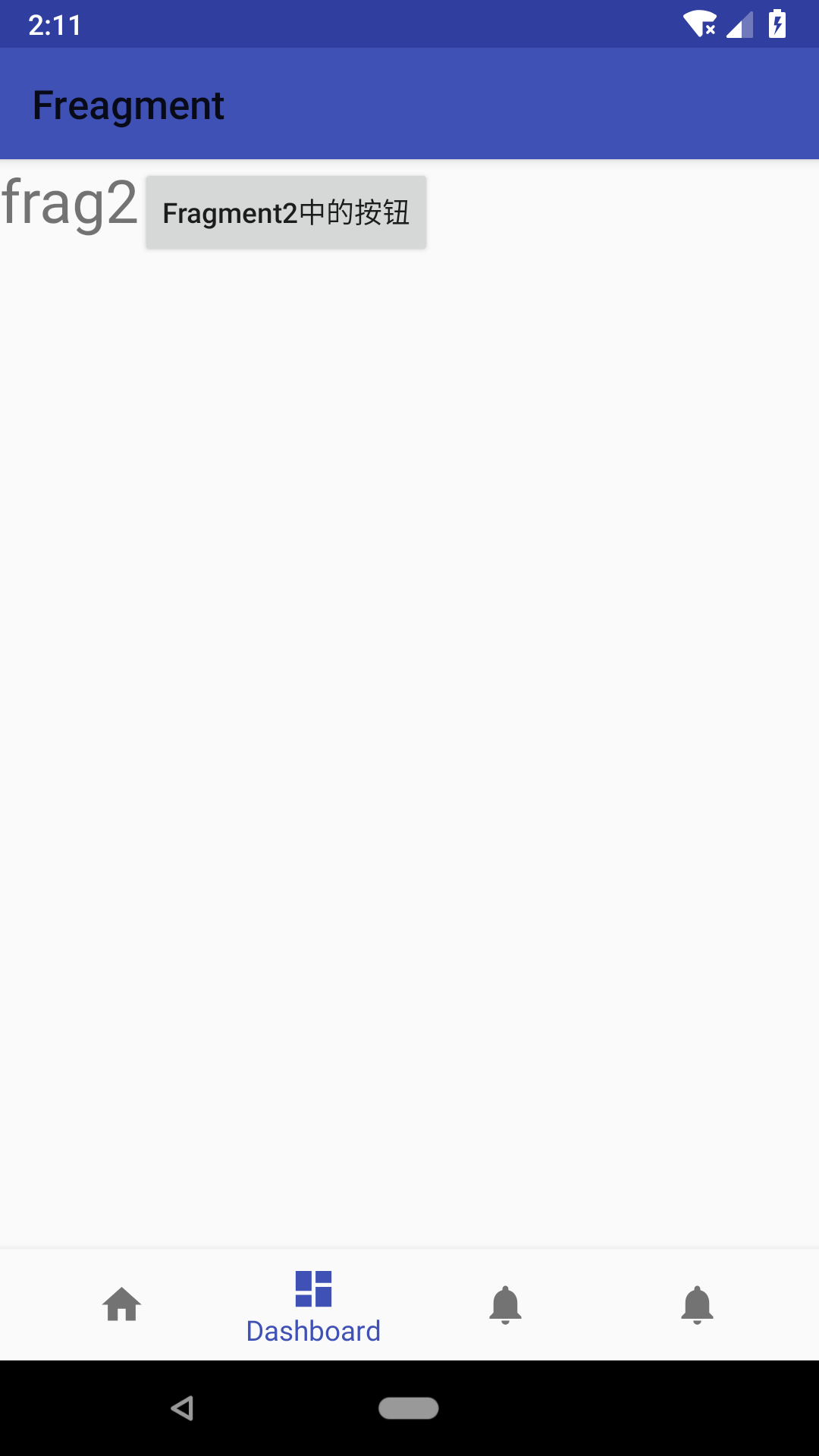
上代码:主页面activity_main.xml
<?xml version="1.0" encoding="utf-8"?>

<android.support.constraint.ConstraintLayout xmlns:android="http://schemas.android.com/apk/res/android"

    xmlns:app="http://schemas.android.com/apk/res-auto"

    xmlns:tools="http://schemas.android.com/tools"

    android:id="@+id/container"

    android:layout_width="match_parent"

    android:layout_height="match_parent"

    tools:context=".MainActivity">

    <android.support.v4.view.ViewPager

        android:id="@+id/view_pager"

        android:layout_width="match_parent"

        android:layout_weight="1"

        android:layout_height="0dp"/>

    <android.support.design.widget.BottomNavigationView

        android:id="@+id/navigation"

        android:layout_width="0dp"

        android:layout_height="wrap_content"

        android:layout_marginEnd="0dp"

        android:layout_marginStart="0dp"

        android:background="?android:attr/windowBackground"

        app:layout_constraintBottom_toBottomOf="parent"

        app:layout_constraintLeft_toLeftOf="parent"

        app:layout_constraintRight_toRightOf="parent"

        app:menu="@menu/navigation" />

</android.support.constraint.ConstraintLayout>
底部按钮栏代码:在menu 目录下,navigation.xml drawable 是图片。就不贴上去了,随便放个就行。
<?xml version="1.0" encoding="utf-8"?>

<menu xmlns:android="http://schemas.android.com/apk/res/android">

    <item

        android:id="@+id/navigation_home"

        android:icon="@drawable/ic_home_black_24dp"

        android:title="@string/title_home" />

    <item

        android:id="@+id/navigation_dashboard"

        android:icon="@drawable/ic_dashboard_black_24dp"

        android:title="@string/title_dashboard" />

    <item

        android:id="@+id/navigation_notifications"

        android:icon="@drawable/ic_notifications_black_24dp"

        android:title="@string/title_notifications" />

    <item

        android:id="@+id/navigation_setting"

        android:icon="@drawable/ic_notifications_black_24dp"

        android:title="@string/title_notifications" />

</menu>
然后是分帧里面的页面:page1.xml ,后面的复制前面的就行了 page2.xml page3.xml page4.xml
<?xml version="1.0" encoding="utf-8"?>

<LinearLayout

    xmlns:android="http://schemas.android.com/apk/res/android"

    android:layout_width="match_parent"

    android:layout_height="match_parent">

    <TextView

        android:layout_width="wrap_content"

        android:layout_height="wrap_content"

        android:text="frag1"

        android:textSize="30sp"/>

    <Button

        android:id="@+id/bt"

        android:layout_width="wrap_content"

        android:layout_height="wrap_content"

        android:text="Fragment中的按钮"

        android:textAllCaps="false"/>

</LinearLayout>
适配器代码:MyFragAdaptre.java
package action.sun.com.freagment;

import android.content.Context;

import android.support.v4.app.Fragment;

import android.support.v4.app.FragmentManager;

import android.support.v4.app.FragmentStatePagerAdapter;

import java.util.List;

public class MyFragAdapter extends FragmentStatePagerAdapter {

    Context context;

    List<Fragment> listFragment;

    public MyFragAdapter(FragmentManager fm, Context context, List<Fragment> listFragment) {

        super(fm);

        this.context = context;

        this.listFragment = listFragment;

    }

    @Override

    public Fragment getItem(int position) {

        return listFragment.get(position);

    }

    @Override

    public int getCount() {

        return listFragment.size();

    }

 }
分帧代码:
Fragment1.java 后面的复制就行 Fragment2.java Fragment3.java Fragment4.java
package action.sun.com.freagment;

import android.os.Bundle;

import android.support.annotation.Nullable;

import android.support.v4.app.Fragment;

import android.view.LayoutInflater;

import android.view.View;

import android.view.ViewGroup;

import android.widget.Button;

import android.widget.Toast;

public class Fragment1 extends Fragment {

    @Nullable

    @Override

    public View onCreateView(LayoutInflater inflater, @Nullable ViewGroup container, Bundle savedInstanceState) {

        View view = inflater.inflate(R.layout.page1, container, false);

        Button bt = (Button) view.findViewById(R.id.bt);

        bt.setOnClickListener(new View.OnClickListener() {

            @Override

            public void onClick(View v) {

                Toast.makeText(getActivity(), "Fragment1上的按钮被点击了", Toast.LENGTH_SHORT).show();

            }

        });

        return view;

    }

}
主页面的显示代码:MainActivity.java
package action.sun.com.freagment;

import android.os.Bundle;

import android.support.annotation.NonNull;

import android.support.design.widget.BottomNavigationView;

import android.support.v4.app.Fragment;

import android.support.v4.view.ViewPager;

import android.support.v7.app.AppCompatActivity;

import android.view.MenuItem;

import android.widget.TextView;

import java.util.ArrayList;

import java.util.List;

public class MainActivity extends AppCompatActivity {

    private TextView mTextMessage;

    private static final String TAG = "MainActivity";

    ViewPager viewPager;

    BottomNavigationView navigation;//底部导航栏对象

    List<Fragment> listFragment;//存储页面对象

    @Override

    protected void onCreate(Bundle savedInstanceState) {

        super.onCreate(savedInstanceState);

        setContentView(R.layout.activity_main);

        initView();//初始化

    }

    private void initView() {

        viewPager = (ViewPager) findViewById(R.id.view_pager);

        navigation = (BottomNavigationView) findViewById(R.id.navigation);

        //向ViewPager添加各页面

        listFragment = new ArrayList<>();

        listFragment.add(new Fragment1());

        listFragment.add(new Fragment2());

        listFragment.add(new Fragment3());

        listFragment.add(new Fragment4());

        MyFragAdapter myAdapter = new MyFragAdapter(getSupportFragmentManager(), this, listFragment);

        viewPager.setAdapter(myAdapter);

        //导航栏点击事件和ViewPager滑动事件,让两个控件相互关联

        navigation.setOnNavigationItemSelectedListener(new BottomNavigationView.OnNavigationItemSelectedListener() {

            @Override

            public boolean onNavigationItemSelected(@NonNull MenuItem item) {

                //这里设置为:当点击到某子项,ViewPager就滑动到对应位置

                switch (item.getItemId()) {

                    case R.id.navigation_home:

                        viewPager.setCurrentItem(0);

                        return true;

                    case R.id.navigation_dashboard:

                        viewPager.setCurrentItem(1);

                        return true;

                    case R.id.navigation_notifications:

                        viewPager.setCurrentItem(2);

                        return true;

                    case R.id.navigation_setting:

                        viewPager.setCurrentItem(3);

                        return true;

                    default:

                        break;

                }

                return false;

            }

        });

        viewPager.addOnPageChangeListener(new ViewPager.OnPageChangeListener() {

            @Override

            public void onPageScrolled(int position, float positionOffset, int positionOffsetPixels) {

                //注意这个方法滑动时会调用多次,下面是参数解释:

                //position当前所处页面索引,滑动调用的最后一次绝对是滑动停止所在页面

                //positionOffset:表示从位置的页面偏移的[0,1]的值。

                //positionOffsetPixels:以像素为单位的值,表示与位置的偏移

            }

            @Override

            public void onPageSelected(int position) {

                //该方法只在滑动停止时调用,position滑动停止所在页面位置

//                当滑动到某一位置,导航栏对应位置被按下

                navigation.getMenu().getItem(position).setChecked(true);

                //这里使用navigation.setSelectedItemId(position);无效,

                //setSelectedItemId(position)的官网原句:Set the selected

                // menu item ID. This behaves the same as tapping on an item

                //未找到原因

            }

            @Override

            public void onPageScrollStateChanged(int state) {

//这个方法在滑动是调用三次,分别对应下面三种状态

// 这个方法对于发现用户何时开始拖动,

// 何时寻呼机自动调整到当前页面,或何时完全停止/空闲非常有用。

//                state表示新的滑动状态,有三个值:

//                SCROLL_STATE_IDLE:开始滑动(空闲状态->滑动),实际值为0

//                SCROLL_STATE_DRAGGING:正在被拖动,实际值为1

//                SCROLL_STATE_SETTLING:拖动结束,实际值为2

            }

        });

    }

}
代码完毕,运行就可以看到效果了。

Android 底部按钮BottomNavigationView + Fragment + viewPager 的使用(一)的更多相关文章
- Android 底部按钮BottomNavigationView + Fragment 的使用(二)
这里来试验BottomNavigationView + Fragment 底部按钮通过点击底部选项,实现中间的Fragment进行页面的切换. 使用BottomNavigationView 控件,实现 ...
- Android底部导航栏创建——ViewPager + RadioGroup
原创文章,引用请注明出处:http://www.cnblogs.com/baipengzhan/p/6270201.html Android底部导航栏有多种实现方式,本文详解其中的ViewPager ...
- Android主页导航:fragment+viewpager
简单实现Fragment+ViewPager实现主页导航控制,效果如下: 一.activity_main.xml布局文件: <?xml version="1.0" encod ...
- Android控件Gridview实现仿支付宝首页,Fragment底部按钮切换和登录圆形头像
此案例主要讲的是Android控件Gridview(九宫格)完美实现仿支付宝首页,包含添加和删除功能:Fragment底部按钮切换的效果,包含四个模块,登录页面圆形头像等,一个小项目的初始布局. 效果 ...
- android: 结合BottomNavigationView、ViewPager和Fragment 实现左右滑动的效果
主界面:MainActivity package com.yongdaimi.android.androidapitest; import android.os.Bundle; import andr ...
- Android流行界面结构——Fragment通过ViewPager(带指示器)嵌套Fragment结构的创建方法详解
原创文章,转载请注明出处http://www.cnblogs.com/baipengzhan/p/6287213.html 当前Android流行界面结构的一种——Fragment通过ViewPage ...
- FragmentTabHost+ViewPager实现底部按钮
package com.example.fragmenttabdemo; import java.util.ArrayList; import java.util.List; import andro ...
- Android studio 基本布局-底部按钮
在使用Android studio 的时候,准备弄的基本的布局出来,底部按钮,按了中间会显示. 来上代码: 页面menu_main.xml 这里弄控件的浮动耗费了点我的时间.原因是因为对其各种问题, ...
- Android BottomSheet:底部弹出Fragment面板(4)
Android BottomSheet:底部弹出Fragment面板(4) BottomSheet不仅可以弹出轻量级的定制好的面板(见附录文章5,6,7),还可以弹出"重"的 ...
随机推荐
- mysql合并binlog
例如: PURGE MASTER LOGS BEFORE DATE_SUB( NOW( ), INTERVAL DAY);
- Oracle 12C -- native left outer join的加强
在11g中SQL> select count(*) 2 from emp a, dept b, bonus c 3 where a.deptno(+) = b.deptno 4 ...
- Sails入门指南
1.全局观:sails理念,框架结构 2.试用sails的scaffolding工具,创建model,创建controller, 3.启动server,试用blueprint, 4.进阶: 4.0 数 ...
- python ipython spyder
ipython usage: ipython qtconsole --pylab inline anacond usage: 1. spyder 1. source ~/anacond/bin/act ...
- XGB 调参基本方法
- xgboost 基本方法和默认参数 - 实战经验中调参方法 - 基于实例具体分析 在训练过程中主要用到两个方法:xgboost.train()和xgboost.cv(). xgboost.trai ...
- webstorm 设置js或者html文件自动缩进为4个空格不生效
设置 tab 和自动缩进为4个空格不生效,解决办法如下 设置代码缩进 1. 依次打开files —- settings —- Editor —- Code Style —- JavaScript 2. ...
- django -- 对模式进行调式(pay with the api)
在django中如果想对models进行调试.不用每次都要runserver 在web界面上点点点.django自己带了字符界面的调试功能 一.完成app的注册.与models的定义: 注册app: ...
- win7 安装mysql 5.7.9记录
-------------------------------------------------------------------------- 1. 将配置文件my.ini配置好,放到c:/wi ...
- [LintCode] N-Queens
N-Queens The n-queens puzzle is the problem of placing n queens on an n×n chessboard such that no tw ...
- [Unity3D]Unity3D游戏开发之跑酷游戏项目解说
大家好,我是秦元培.我參加了CSDN2014博客之星的评选,欢迎大家为我投票,同一时候希望在新的一年里大家能继续支持我的博客. 大家晚上好.我是秦元培,欢迎大家关注我的博客,我的博客地址是blog.c ...