
VTK中模型的旋转与平移
当从外界读入STL等三维模型时,其会按照它内部的坐标位置进行显示。因此它的位置和大小是确定的。但是在实际应用中,有可能需要人为地对这个模型在空间中进行旋转、平移或缩放等操作。VTK中有许多和旋转、平移相关的函数,下面一一进行测试。
- RotateX、RotateY、RotateZ(绕自身坐标轴旋转)
Rotate the Prop3D in degrees about the X/Y/Z axis using the right hand rule. The axis is the Prop3D's X/Y/Z axis, which can change as other rotations are performed. 即前一次的旋转会影响到后一次。
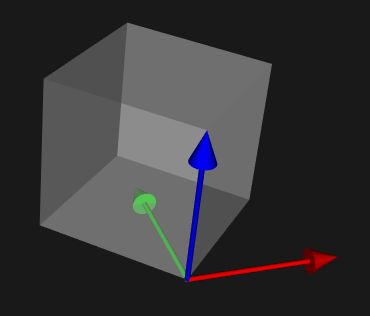
假设物体坐标系开始与世界坐标系重合,先后调用RotateZ(90)、RotateX(90)的结果如下图所示:

使用GetOrientation可以获取当前物体的姿态信息,结果为(90, 0, 90)。GetOrientation:Returns the orientation of the Prop3D as s vector of X,Y and Z rotation. The ordering in which these rotations must be done to generate the same matrix is RotateZ, RotateX, and finally RotateY. 即按照Z-X-Y的顺序将世界坐标系绕自身旋转即可得到当前姿态。
- RotateWXYZ(绕世界坐标系旋转)
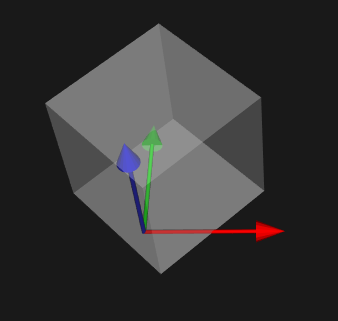
Rotate the Prop3D in degrees about an arbitrary axis specified by the last three arguments. The axis is specified in world coordinates. 该函数的后三个参数指定旋转方向(可以是任意方向,不一定非得是坐标轴方向)。如按世界坐标系的X轴旋转可写为RotateWXYZ(deg, 1, 0, 0),按世界坐标系的Z轴旋转可写为RotateWXYZ(deg, 0, 0, 1)。同样是先后调用RotateWXYZ(90,0,0,1)、RotateWXYZ(90,1,0,0)得到的结果如下:

此时调用GetOrientation返回值是:(0, -90, 90),即将世界坐标系先绕自身Z轴旋转90°,再绕X轴旋转0°,最后绕Y轴旋转-90°即可到达当前姿态。
- SetOrientation(x, y, z) —— 通过先绕Z轴,然后绕X轴,最后绕Y轴旋转,从而来确定Prop的方向。
- AddOrientation(a1, a2,a3) —— 在当前Prop方向增加a1, a2, a3增量。
- SetOrigin(设置旋转中心点)
Set the origin of the Prop3D. This is the point about which all rotations take place. 调用RotateX或RotateWXYZ等旋转函数时会默认旋转中心在原点,即会绕着(0, 0, 0)沿着某一方向旋转。通过调用SetOrigin函数可以改变旋转点的位置。例如一个长宽高都是100的立方体,绕自身Z轴旋转45°,下图左边是默认旋转中心在原点,右边是调用SetOrigin设置旋转中心在(50,0,0)的结果
- SetPosition、AddPosition(设置物体在世界坐标系中的位置)
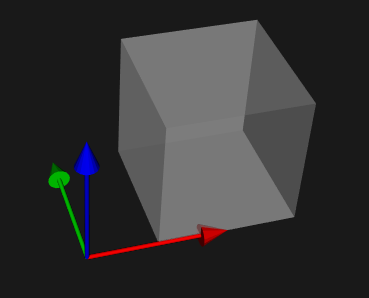
SetPosition(x, y, z)—— 指定vtkProp3D对象在世界坐标系中的位置。AddPosition(deltaX, deltaY, deltaZ) —— 用指定的X、Y、Z三个方向的增量来平移Prop。如下图中立方体开始在原点处,调用SetPosition(50,0,0)后其位置变为(50,0,0)。可以通过GetPosition函数查看物体在世界坐标系中的位置。
- SetUserTransform、GetUserTransform
The most important aspect to applying transformation matrices is to understand the order in which the transformations are applied. Most of the methods for manipulating this transformation, e.g. Translate, Rotate, and Concatenate, can operate in either PreMultiply (the default) or PostMultiply mode. In PreMultiply mode, the translation, concatenation, etc. will occur before any transformations which are represented by the current matrix. In PostMultiply mode, the additional transformation will occur after any transformations represented by the current matrix.
进行变换时的顺序非常重要,对于变换矩阵VTK里是用以下的顺序来应用这些变换的:
$$T_T=T(p_x+o_x,p_y+o_y,p_z+o_z)\cdot R_Z\cdot R_X\cdot R_Y\cdot S(s_x,s_y,s_z)\cdot T(-o_x,-o_y,-o_z)$$
1. 移动Prop到原点;
2. 缩放;
3. 绕Y轴旋转;
4. 绕X轴旋转;
5. 绕Z轴旋转;
6. 从原点中移动回原来的位置;
7. 平移。
因为默认是进行左乘所以进行变换时先调用的最后才变换(即逆序),下面的代码实现了公式中的变换:
vtkTransform *myTrans = vtkTransform::New ();

myTrans->Translate (position[],position[],position[]);

myTrans->Translate (origin[],origin[],origin[]);

myTrans->RotateZ (orientation[]);

myTrans->RotateX (orientation[]);

myTrans->RotateZ (orientation[];

myTrans->Scale (scale[],scale[],scale[]);

myTrans->Translate (-origin[],-origin[],-origin[]);

actor->SetUserTransform(myTrans);
vtkTransform::PreMultiply()用于设置左乘. Sets the internal state of the transform to PreMultiply. All subsequent operations will occur before those already represented in the current transformation. In homogeneous matrix notation, M = M*A where M is the current transformation matrix and A is the applied matrix. The default is PreMultiply.
vtkTransform::PostMultiply()用于设置右乘,Sets the internal state of the transform to PostMultiply. M = A*M where M is the current transformation matrix and A is the applied matrix.
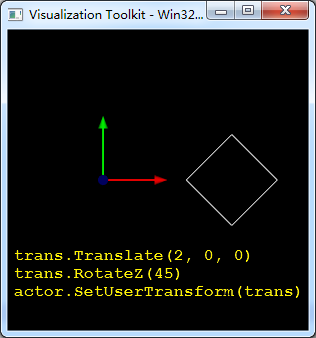
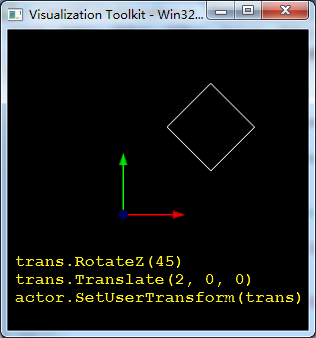
如下所示,左边平面先旋转45°再沿X轴正方向移动2个单位;右边平面先沿X轴正方向移动2个单位,然后旋转45°(旋转中心在原点)。可以看出函数调用顺序颠倒一下产生了截然不同的两种结果(We always specify transformations in the reverse order of their application)
- SetUserMatrix、GetUserMatrix
The UserMatrix can be used in place of UserTransform. Transformation matrices can be combined by matrix multiplication to achieve combinations of translation, rotation, and scaling. It is possible for a single transformation matrix to represent all types of transformation simultaneously.
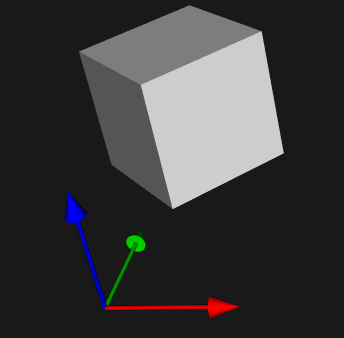
下面代码将物体绕Z轴旋转45°,并移动到(50, 50, 50)处
trans = [0.707107,  -0.707107,  0,   50,

         0.707107,   0.707107,  0,   50,

         0,          0,         1,   50,

         0,          0,         0,   1]

mat = vtk.vtkMatrix4x4()

mat.DeepCopy(trans)

actor.SetUserMatrix(mat)
- GetMatrix
UserMatrix is one you can assign yourself to an actor or a top-level composite assembly of actors. Matrix is computed automatically from any position, rotation or scale the actor may have, in addition to the UserMatrix. Calling GetMatrix should always give you the exact matrix applied to an actor to get it to from whatever its own "model space" is to VTK world space. UserMatrix is nullptr until you set it, or until the actor is added as part of an assembly, where the parent assembly may set user matrices directly for its constituent parts. You can't set the matrix directly, but you can set the UserMatrix directly.
GetMatrix与GetUserMatrix函数有很大区别:GetUserMatrix用来获取用户设置的变换矩阵,如果用户没有设置则会返回空,而GetMatrix则始终都会返回场景中物体相对世界坐标系的变换矩阵。
import vtk

# create a rendering window and renderer

ren = vtk.vtkRenderer()

renWin = vtk.vtkRenderWindow()

renWin.AddRenderer(ren)

# create a renderwindowinteractor

iren = vtk.vtkRenderWindowInteractor()

iren.SetRenderWindow(renWin)

# create plane source

plane = vtk.vtkPlaneSource()

plane.SetXResolution(1)

plane.SetYResolution(1)

plane.SetCenter(0,0,0)

plane.SetNormal(0,0,1)

# mapper

mapper = vtk.vtkPolyDataMapper()

mapper.SetInputConnection(plane.GetOutputPort())

# actor

actor = vtk.vtkActor()

actor.SetMapper(mapper)

actor.GetProperty().SetRepresentationToWireframe()

# assign actor to the renderer

ren.AddActor(actor)

# create coordinate axes in the render window

axes = vtk.vtkAxesActor()

axes.SetTotalLength(1, 1, 1)

axes.SetShaftType(0)

axes.SetAxisLabels(0)

axes.SetCylinderRadius(0.02)

ren.AddActor(axes)

style = vtk.vtkInteractorStyleTrackballCamera()

style.SetDefaultRenderer(ren)

iren.SetInteractorStyle(style)

actor.RotateZ(45)

actor.SetPosition(2,0,0)

print actor.GetMatrix()

print actor.GetUserMatrix()

print actor.GetUserTransform ()

print '---------------------------'

trans = vtk.vtkTransform()

trans.RotateZ(-45)

trans.Translate(-2, 0, 0)

actor.SetUserTransform(trans)

print actor.GetMatrix()

print actor.GetUserMatrix()

print actor.GetUserTransform ()

camera = vtk.vtkCamera()

camera.ParallelProjectionOn()

ren.SetActiveCamera(camera)

ren.ResetCamera()

# enable user interface interactor

iren.Initialize()

renWin.Render()

iren.Start()
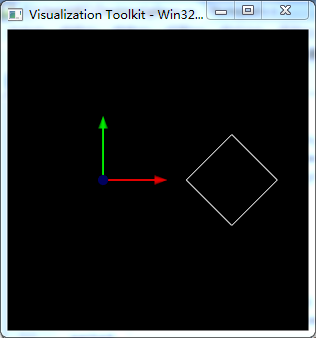
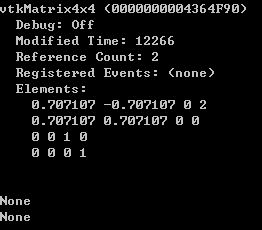
先将平面绕Z轴旋转45°,再移动到(2,0,0)位置,三个函数输出如下图所示。由于没有显式调用SetUserMatrix或SetUserTransform设置UserMatrix,因此GetUserMatrix和GetUserTransform函数返回均为None。
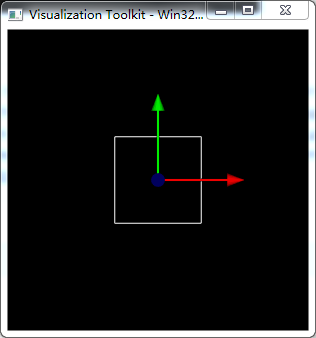
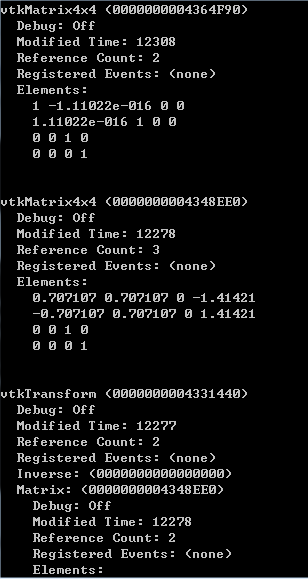
然后将平面沿X轴负方向平移2个单位,再绕Z轴旋转-45°,将平面变换回初始位置(如果想先旋转再平移将其变换回初始位置,则要重新设置旋转中心,否则旋转时会绕原点旋转)。从下图可以看出GetMatrix函数返回了单位矩阵,即现在平面的位置和姿态与世界坐标系一致。GetUerMatrix和GetUserTransform返回的变换矩阵一样:T=Rz(-45°)·T(-2, 0, 0),为平移和旋转所构成的变换矩阵。
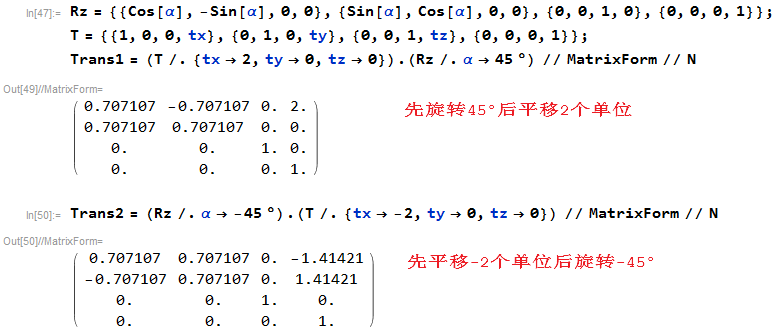
平面由初始位置变换到新位置再变换回去,两次操作互逆,因此变换矩阵互为逆矩阵。
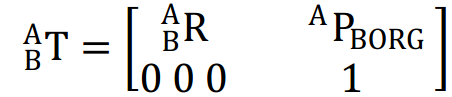
注意:已知B→A的齐次变换矩阵T,则A→B的齐次变换矩阵T-1如下:

参考:
Apply one transformation matrix to an other actor
VTK中模型的旋转与平移的更多相关文章
- 37 VTK中的坐标系系统
0 引言 在利用PCL的交互功能解决尺寸关联几何的指定问题时,涉及到一些显示上的操作.目前的需求是:将投影到注释平面上的点云,以与屏幕平齐的方式,显示在屏幕正中,这样方便用户进行操作.但是,在运用se ...
- VTK中获取STL模型点的坐标以及对其进行变换
VTK是一个基于面向对象的开源三维绘图软件包,和其它的的三维绘图引擎如OSG.OGRE不同之处在于,VTK可视化对象主要是各种数据,更加注重对数据分析处理后的可视化,可视化的内容是人们无法直接感受到的 ...
- OpenGL立方体在世界坐标系中_缩放_旋转_平移_顶点片源着色器_光照作用_棋盘纹理贴图
读取bmp等图片格式中的像素还有难度,就先用这个棋盘图象素来弄了 代码打错一个就一直First-chance exception ,貌似还有一个要用q或者Q才能成功退出,不知道缺少哪句,我用窗口红叉退 ...
- opencv 中affine函数实现旋转和平移
图像旋转和平移是图像处理中常用的一种操作,opencv2和opencv3中对图像的旋转和平移都是通过仿射变换函数cv::warpAffine()来实现的. 1.图像的旋转 图像的旋转具体实现分为两步: ...
- VTK中导入并显示STL、3DS文件
VTK(visualization toolkit)是一个开源的免费软件系统,主要用于三维计算机图形学.图像处理和科学计算可视化.VTK是在三维函数库OpenGL 的基础上采用面向对象的设计方法发展起 ...
- 【Java EE 学习 70 下】【数据采集系统第二天】【Action中User注入】【设计调查页面】【Action中模型赋值问题】【编辑调查】
一.Action中User注入问题 Action中可能会经常用到已经登陆的User对象,如果每次都从Session中拿会显得非常繁琐.可以想一种方法,当Action想要获取User对象的时候直接使用, ...
- Eigen库实现简单的旋转、平移操作
本来课程要求用GUI界面来实现Eigen的旋转.平移操作的,但是接触GUI编程时间太短,虽然要求很简单,但是做了几天还是没有完成.就把命令行下面的简单的贴一下吧. main.cpp #include ...
- 【转】如何在 Android 程序中禁止屏幕旋转和重启Activity
原文网址:http://www.cnblogs.com/bluestorm/p/3665890.html 禁止屏幕随手机旋转变化 有时候我们希望让一个程序的界面始终保持在一个方向,不随手机方向旋转而变 ...
- django中模型详解-字段类型与约束条件
这片博文来详细说明django模型的使用,涉及到django模型的创建,字段介绍,以及django模型的crud操作,以及一对一等操作. 在使用模型之前,我们首先设置数据库选项,django的默认数据 ...
随机推荐
- [Hook] 免root,自己进程内,binder hook (ClipboardManager)
cp from : http://weishu.me/2016/02/16/understand-plugin-framework-binder-hook/ Android系统通过Binder机制给应 ...
- 使用Logstash创建ES映射模版并进行数据默认的动态映射规则
本文配置为 ELK 即(Elasticsearch.Logstash.Kibana)5.5.1. Elasticsearch 能够自动检测字段的类型并进行映射,例如引号内的字段映射为 String,不 ...
- 安卓之上传文件,即HTTP提交表单
获取文件: public void Init() { noScrollgridview = (GridView) findViewById(R.id.noScrollgridvie ...
- vs2010使用svn--浅谈AnkhSvn
(1)建立本地的服务器版本.Subversion->Add to Subversion 此功能的作用是从将新创建的工程添加到svn服务器上 (2)从svn检出 Subversion->Op ...
- Springboot读取自定义配置文件的几种方法
一.读取核心配置文件 核心配置文件是指在resources根目录下的application.properties或application.yml配置文件,读取这两个配置文件的方法有两种,都比较简单. ...
- 手把手实现腾讯qq拖拽删去效果(一)
qq拖拽删除的效果,简单又好用,今天我就叫大家实现吧. 这个滑动效果,有何难点了,就是响应每行的点击事件了,为了完成这个任务,并且能够实现动画的效果了,我重写了一个slideview这个控件,这个控件 ...
- MFC剪贴板通信
1.建立一个基于对话框的应用程序,界面如下: 2.对两个按钮进行消息响应: void CChipBoardOperateDlg::OnBnClickedBtnCopycb() { // TODO: 在 ...
- fasttext使用笔记
http://blog.csdn.net/m0_37306360/article/details/72832606 这里记录使用fastText训练word vector笔记 github地址:htt ...
- Tensorflow进行POS词性标注NER实体识别 - 构建LSTM网络进行序列化标注
http://blog.csdn.net/rockingdingo/article/details/55653279 Github下载完整代码 https://github.com/rockingd ...
- [转]学习块格式化上下文(BlockFormattingContext)
原文:https://www.cnblogs.com/elcarim5efil/p/4745796.html 格式化上下文 格式化上下文( formatting contexts )├── 块级格 ...