
MySQL Crash Course #16# Chapter 24. Using Cursors + mysql 循环
mysql中游标的使用案例详解(学习笔记)这篇讲得相当直白好懂了。
索引:
cursor 基础讲解
cursor 有点类似于 JDBC 中的 ResultSet ,允许我们在执行 SELECT 之后,一行一行地 FETCH 数据。
它只能被用在存储过程中!如果把存储过程比作函数,cursor 只能在这个函数体中(存储过程的内部)定义、打开、关闭,一旦存储过程执行完毕,它将不再存在(可以把 cursor 理解为一个局部变量)。
定义一个 cursor ,这个时候并没有执行 SELECT 语句:
CREATE PROCEDURE processorders()

BEGIN

   DECLARE ordernumbers CURSOR

   FOR

   SELECT ordernum FROM orders;

END;
打开 cursor,SELECT 语句就是在这个时候被执行的,数据被缓存到 cursor 中,在这之后可以 FETCH 数据:
OPEN ordernumbers;
关闭 cursor ,释放 cursor 所占用的所有内存和资源, 当然,即便不手动关闭,在存储过程结束时(执行到 END) cursor 也会自动关闭:
CLOSE ordernumbers;
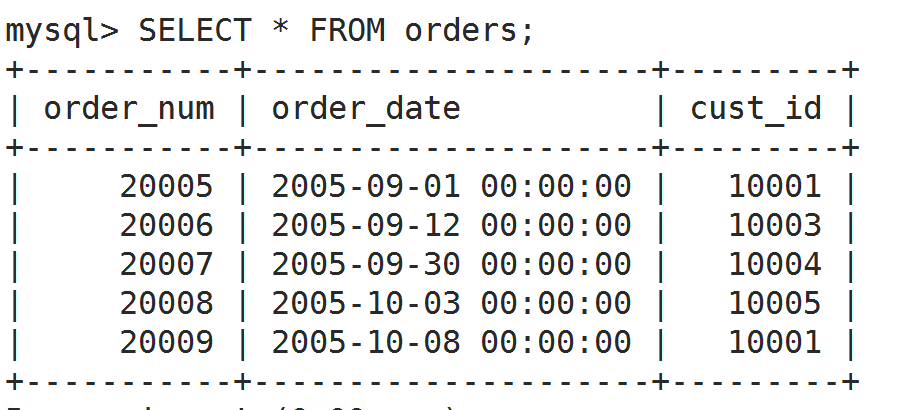
接下来就是 FETCH 数据了,每次 FETCH 一次都是下一行!可以结合上面几个知识点做个小实验,上面是实验用的表:
DROP PROCEDURE IF EXISTS hello;

DELIMITER //

CREATE PROCEDURE hello()

BEGIN

   -- 声明局部变量,用于临时存储 FETCH 结果

   DECLARE o INT;

   -- 声明游标

   DECLARE ordernumbers CURSOR

   FOR

   SELECT order_num FROM orders;

   -- 打开游标(执行SELECT,缓存数据)

   OPEN ordernumbers;

   -- 取出第一个订单号放到 o 里,并打印

   FETCH ordernumbers INTO o;

   SELECT o;

   -- 取出第二个订单号放到 o 里,并打印

   FETCH ordernumbers INTO o;

   SELECT o;

   -- 关闭游标(释放内存、资源)

   CLOSE ordernumbers;

   -- 重新打开游标(重新执行SELECT,缓存数据)

   OPEN ordernumbers;

   -- 取出第 ? 个订单号放到 o 里,并打印

   FETCH ordernumbers INTO o;

   SELECT o; -- 可以猜到,依然是第一个订单号

END //

DELIMITER ;

CALL hello();

mysql 循环
mySQL 本身的循环其实挺简单的,但是书上写的循环有点特殊。
基本循环示例:
while ↓
DROP PROCEDURE IF EXISTS hello;

DELIMITER //

CREATE PROCEDURE hello()

BEGIN

    DECLARE v1 INT DEFAULT 5;

    WHILE v1 > 0 DO

    SET v1 = v1 - 1;

    SELECT v1;

    END WHILE;

END //

DELIMITER ;

CALL hello();
repeat ↓
DROP PROCEDURE IF EXISTS hello;

DELIMITER //

CREATE PROCEDURE hello()

BEGIN

    DECLARE v1 INT DEFAULT 5;

    REPEAT

    SET v1 = v1 - 1;

    SELECT v1;

    UNTIL v1 = 0 END REPEAT;

END //

DELIMITER ;

CALL hello();
loop ↓
DROP PROCEDURE IF EXISTS hello;

DELIMITER //

CREATE PROCEDURE hello()

BEGIN

    DECLARE v1 INT DEFAULT 5;

    label1: LOOP

    SET v1 = v1 - 1;

    SELECT v1;

    IF v1 > 0 THEN

    ITERATE label1; -- 继续循环 相当于continue

    END IF;

    LEAVE label1; -- 相当于 break

    END LOOP;

END //

DELIMITER ;

CALL hello();
PS. 为了确保可以直接 COPY 到命令行执行,上面的代码缩进有点问题。。。
书上的循环示例:
CREATE PROCEDURE processorders()

BEGIN

   -- Declare local variables

   DECLARE done BOOLEAN DEFAULT 0;

   DECLARE o INT;

   -- Declare the cursor

   DECLARE ordernumbers CURSOR

   FOR

   SELECT order_num FROM orders;

   -- Declare continue handler

   DECLARE CONTINUE HANDLER FOR SQLSTATE '' SET done=1;

   -- Open the cursor

   OPEN ordernumbers;

   -- Loop through all rows

   REPEAT

      -- Get order number

      FETCH ordernumbers INTO o;

   -- End of loop

   UNTIL done END REPEAT;

   -- Close the cursor

   CLOSE ordernumbers;

END;
首先要看懂这句话
DECLARE CONTINUE HANDLER FOR SQLSTATE '02000' SET done=1;
意思就是出现 SQLSTATE '02000' 这句话时就执行 SET done=1
而 SQLSTATE '02000' 等价于 not found ,它是在 FETCH 不到数据的时候出现的,因此拿不到数据的时候 done 变为真就结束循环了。。。
书上的整合代码
CREATE PROCEDURE processorders()

BEGIN

   -- Declare local variables

   DECLARE done BOOLEAN DEFAULT 0;

   DECLARE o INT;

   DECLARE t DECIMAL(8,2);

   -- Declare the cursor

   DECLARE ordernumbers CURSOR

   FOR

   SELECT order_num FROM orders;

   -- Declare continue handler

   DECLARE CONTINUE HANDLER FOR SQLSTATE '' SET done=1;

   -- Create a table to store the results

   CREATE TABLE IF NOT EXISTS ordertotals

      (order_num INT, total DECIMAL(8,2));

   -- Open the cursor

   OPEN ordernumbers;

   -- Loop through all rows

   REPEAT

      -- Get order number

      FETCH ordernumbers INTO o;

      -- Get the total for this order

      CALL ordertotal(o, 1, t);

      -- Insert order and total into ordertotals

      INSERT INTO ordertotals(order_num, total)

      VALUES(o, t);

   -- End of loop

   UNTIL done END REPEAT;

   -- Close the cursor

   CLOSE ordernumbers;

END;
这些活到底谁来做好呢 ? 是上层应用程序 还是 数据库 ? 。 。。 待更新。。
MySQL Crash Course #16# Chapter 24. Using Cursors + mysql 循环的更多相关文章
- MySQL Crash Course #15# Chapter 23. Working with Stored Procedures
以前写过类似的东西,用来自动生成数据. 你可以将 Stored Procedure 理解为可以重复使用的批处理文件. Stored Procedure 非常有用,我们应该尽可能地去使用它. 那么,应用 ...
- MySQL Crash Course #06# Chapter 13. 14 GROUP BY. 子查询
索引 理解 GROUP BY 过滤数据 vs. 过滤分组 GROUP BY 与 ORDER BY 之不成文的规定 子查询 vs. 联表查询 相关子查询和不相关子查询. 增量构造复杂查询 Always ...
- MySQL Crash Course #05# Chapter 9. 10. 11. 12 正则.函数. API
索引 正则表达式:MySQL only supports a small subset of what is supported in most regular expression implemen ...
- MySQL Crash Course #02# Chapter 3. 4 通配符. 分页
索引 查看表.文档操作 检索必须知道的两件事 数据演示由谁负责 通配符.非必要不用 检索不同的行 限制结果集.分页查找 运用数据库.表全名 命令后加分号对于很多 DBMS 都不是必要的,但是加了也没有 ...
- MySQL Crash Course #08# Chapter 16. Using Different Join Types
记文档还是相当重要的! 索引 假名的三个用途 自交(Self Joins) 自然交(Natural Joins) Outer Joins Using Table Aliases Using alias ...
- MySQL Crash Course #13# Chapter 21. Creating and Manipulating Tables
之前 manipulate 表里的数据,现在则是 manipulate 表本身. INDEX 创建多列构成的主键 自动增长的规定 查看上一次插入的自增 id 尽量用默认值替代 NULL 外键不可以跨引 ...
- MySQL Crash Course #11# Chapter 20. Updating and Deleting Data
INDEX Updating Data The IGNORE Keyword Deleting Data Faster Deletes Guidelines for Updating and Dele ...
- MySQL Crash Course #10# Chapter 19. Inserting Data
INDEX BAD EXAMPLE Improving Overall Performance Inserting Multiple Rows INSTEAD OF Inserting a Singl ...
- MySQL Crash Course #04# Chapter 7. 8 AND. OR. IN. NOT. LIKE
索引 AND. OR 运算顺序 IN Operator VS. OR NOT 在 MySQL 中的表现 LIKE 之注意事项 运用通配符的技巧 Understanding Order of Evalu ...
随机推荐
- Nodejs express、html5实现拖拽上传
一.前言 文件上传是一个比较常见的功能,传统的选择方式的上传比较麻烦,需要先点击上传按钮,然后再找到文件的路径,然后上传.给用户体验带来很大问题.html5开始支持拖拽上传的需要的api.nodejs ...
- POJ-1456 Supermarket(贪心,并查集优化)
Supermarket Time Limit: 2000MS Memory Limit: 65536K Total Submissions: 10725 Accepted: 4688 Descript ...
- 专访msup创始人兼CEO刘付强:追求卓越是数据时代下企业和个人的生存之道
近些年,"信息化带动工业化"策略的深入人心,这为信息技术本身开辟了一个更加广阔的应用天地,在这样的大环境下国内IT培训市场得了飞速发展.那么在云计算.大数据时代,如何让企业的IT团 ...
- 多线程-interrupt(),isInterrupted(),interrupted()
背景 由于使用stop方法停止线程非常暴力,可能会导致一系列问题.因此,提出一种温和的方式:请求另外一个先不要在执行了,这就是中断方式. 此外有这样的场景:编写 一个程序,需要暂停一段时间,于是调用T ...
- 前端 HTML 简介
HTML HTML是一个网页的主体部分,也是一个网页的基础.因为一个网页可以没有样式,可以没有交互,但是必须要有网页需要呈现的内容.所以HTML部分是整个前端的基础. HTML,全称是超文本标记语言( ...
- linux命令之复制
版权声明:本文为博主原创文章.未经博主同意不得转载. https://blog.csdn.net/zkn_CS_DN_2013/article/details/24464547 语法:cp [选项] ...
- Spark2.x学习笔记:Spark SQL程序设计
1.RDD的局限性 RDD仅表示数据集,RDD没有元数据,也就是说没有字段语义定义. RDD需要用户自己优化程序,对程序员要求较高. 从不同数据源读取数据相对困难. 合并多个数据源中的数据也较困难. ...
- Andrew Ng-ML-第十九章-应用举例:照片OCR(光学字符识别)
1.问题描述与 OCR pipeline 图1.图像文字识别流水线 首先是输入图片->进行文字检测->字符分割->字符识别. 这些阶段分别需要1-5人这样子. 2.滑动窗口 主要讲滑 ...
- Git+Jenkins+FileGee 发布php应用
Git:做版本控制,回滚版本(coding.net) Jenkins:代码下载,提供webhook url FileGee:同步代码(一个国产同步.备份软件非常强大,而且便宜企业版只要498) jen ...
- git克隆代码
1.vs--team explorer-clone,或者team-connect to tfs-clone 2.1输入git的url,2输入本地放代码的文件夹,3点clone,克隆出4.双击4 3.点 ...