
Mybatis源码分析之Mapper执行SQL过程(三)
上两篇已经讲解了SqlSessionFactory的创建和SqlSession创建过程。今天我们来分析myabtis的sql是如何一步一步走到Excutor。
还是之前的demo
   public static void main(String[] args) throws Exception {

        SqlSessionFactory sessionFactory = null;

        String resource = "configuration.xml";

        sessionFactory = new SqlSessionFactoryBuilder().build(Resources.getResourceAsReader(resource));

        SqlSession sqlSession = sessionFactory.openSession();

        UserMapper userMapper = sqlSession.getMapper(UserMapper.class);

        System.out.println(userMapper.findUserById(1));

    }
我们想看下基本的时序图有个大致了解
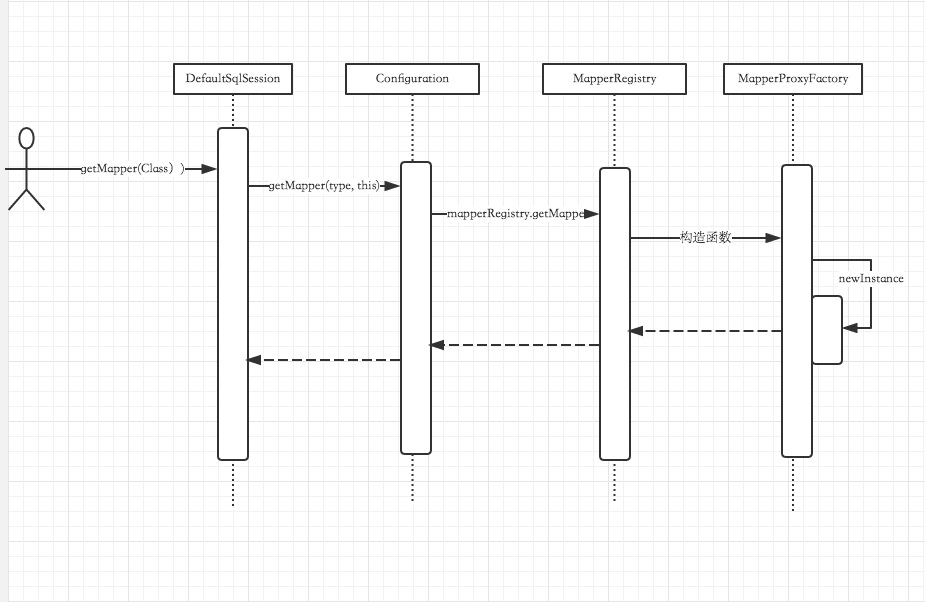
1:DefaultSqlSession获取getMapper
  @Override

  public  T getMapper(Class type) {

    return configuration.getMapper(type, this);

  }
2:Configuration获取getMapper
 public  T getMapper(Class type, SqlSession sqlSession) {

   return mapperRegistry.getMapper(type, sqlSession);

 }
Configuration和DefaultSqlSession什么都没有做,交给了MapperRegistry,我们看下MapperRegistry做了什么。
3:MapperRegistry获取getMapper
 @SuppressWarnings("unchecked")

  public  T getMapper(Class type, SqlSession sqlSession) {

    final MapperProxyFactory mapperProxyFactory = (MapperProxyFactory) knownMappers.get(type);

    if (mapperProxyFactory == null) {

      throw new BindingException("Type " + type + " is not known to the MapperRegistry.");

    }

    try {

      return mapperProxyFactory.newInstance(sqlSession);

    } catch (Exception e) {

      throw new BindingException("Error getting mapper instance. Cause: " + e, e);

    }

  }
通过knownMappers获取一个MapperProxyFactory,后然newInstance了一下,那么newInstance得到了什么东西呢?
4:MapperProxyFactory
  @SuppressWarnings("unchecked")

  protected T newInstance(MapperProxy mapperProxy) {

  //java代理

    return (T) Proxy.newProxyInstance(mapperInterface.getClassLoader(), new Class[] { mapperInterface }, mapperProxy);

  }
  public T newInstance(SqlSession sqlSession) {

    final MapperProxy mapperProxy = new MapperProxy(sqlSession, mapperInterface, methodCache);

    return newInstance(mapperProxy);

  }
通过以上的动态代理,咱们就可以方便地使用dao接口啦。到这里我们还没有看到任何执行sql有关的信息,或者说还没走到文章开始说的的Excutor, 我们看下MapperProxy代理类
MapperProxy
public class MapperProxy implements InvocationHandler, Serializable {

  private static final long serialVersionUID = -6424540398559729838L;

  private final SqlSession sqlSession;

  private final Class mapperInterface;

  private final Map methodCache;

  public MapperProxy(SqlSession sqlSession, Class mapperInterface, Map methodCache) {

    this.sqlSession = sqlSession;

    this.mapperInterface = mapperInterface;

    this.methodCache = methodCache;

  }

  @Override

  public Object invoke(Object proxy, Method method, Object[] args) throws Throwable {

    if (Object.class.equals(method.getDeclaringClass())) {

      try {

        return method.invoke(this, args);

      } catch (Throwable t) {

        throw ExceptionUtil.unwrapThrowable(t);

      }

    }

    final MapperMethod mapperMethod = cachedMapperMethod(method);

    return mapperMethod.execute(sqlSession, args);

  }

  private MapperMethod cachedMapperMethod(Method method) {

    MapperMethod mapperMethod = methodCache.get(method);

    if (mapperMethod == null) {

      mapperMethod = new MapperMethod(mapperInterface, method, sqlSession.getConfiguration());

      methodCache.put(method, mapperMethod);

    }

    return mapperMethod;

  }

}
代理类交给了mapperMethod.execute进行处理,到这里我们只是看到了execute字眼了,我们继续往下看。
  public Object execute(SqlSession sqlSession, Object[] args) {

    Object result;

    if (SqlCommandType.INSERT == command.getType()) {

      Object param = method.convertArgsToSqlCommandParam(args);

      result = rowCountResult(sqlSession.insert(command.getName(), param));

    } else if (SqlCommandType.UPDATE == command.getType()) {

      Object param = method.convertArgsToSqlCommandParam(args);

      result = rowCountResult(sqlSession.update(command.getName(), param));

    } else if (SqlCommandType.DELETE == command.getType()) {

      Object param = method.convertArgsToSqlCommandParam(args);

      result = rowCountResult(sqlSession.delete(command.getName(), param));

    } else if (SqlCommandType.SELECT == command.getType()) {

      if (method.returnsVoid() && method.hasResultHandler()) {

        executeWithResultHandler(sqlSession, args);

        result = null;

      } else if (method.returnsMany()) {

        result = executeForMany(sqlSession, args);

      } else if (method.returnsMap()) {

        result = executeForMap(sqlSession, args);

      } else if (method.returnsCursor()) {

        result = executeForCursor(sqlSession, args);

      } else {

        Object param = method.convertArgsToSqlCommandParam(args);

        result = sqlSession.selectOne(command.getName(), param);

      }

    } else if (SqlCommandType.FLUSH == command.getType()) {

        result = sqlSession.flushStatements();

    } else {

      throw new BindingException("Unknown execution method for: " + command.getName());

    }

    if (result == null && method.getReturnType().isPrimitive() && !method.returnsVoid()) {

      throw new BindingException("Mapper method '" + command.getName()

          + " attempted to return null from a method with a primitive return type (" + method.getReturnType() + ").");

    }

    return result;

  }
上面代码先是判断CRUD类型,然后根据类型去选择到底执行sqlSession中的哪个方法,我们现在是查询那么程序应该走到sqlSession.selectOne。
  @Override

  public  T selectOne(String statement, Object parameter) {

    // Popular vote was to return null on 0 results and throw exception on too many.

    List list = this.selectList(statement, parameter);

    if (list.size() == 1) {

      return list.get(0);

    } else if (list.size() > 1) {

      throw new TooManyResultsException("Expected one result (or null) to be returned by selectOne(), but found: " + list.size());

    } else {

      return null;

    }

  }
  @Override

  public  List selectList(String statement, Object parameter, RowBounds rowBounds) {

    try {

      MappedStatement ms = configuration.getMappedStatement(statement);

      //终于看到我们要找的executor接口了

      return executor.query(ms, wrapCollection(parameter), rowBounds, Executor.NO_RESULT_HANDLER);

    } catch (Exception e) {

      throw ExceptionFactory.wrapException("Error querying database.  Cause: " + e, e);

    } finally {

      ErrorContext.instance().reset();

    }

  }
我们终于看到executor类了, 调用了query方法,接下来的事情全部交给了executor处理了,
executor底层的分析已经在上一篇已经分享了。
我们代理执行sql的基本顺序是
MapperMethod.execute() --> DefaultSqlSession.selectOne --> BaseExecutor.query --> SimpleExecutor.doQuery --> SimpleStatementHandler.query --> DefaultResultSetHandler.handleResultSets(Statement stmt) 最终得到数据。
Mybatis源码分析之Mapper执行SQL过程(三)的更多相关文章
- 精尽 MyBatis 源码分析 - SqlSession 会话与 SQL 执行入口
该系列文档是本人在学习 Mybatis 的源码过程中总结下来的,可能对读者不太友好,请结合我的源码注释(Mybatis源码分析 GitHub 地址.Mybatis-Spring 源码分析 GitHub ...
- mybatis源码分析(五)------------SQL的执行过程
在对SQL的执行过程进行分析前,先看下测试demo: /** * @author chenyk * @date 2018年8月20日 */ public class GoodsDaoTest { pr ...
- Mybatis源码分析之Mapper的创建和获取
Mybatis我们一般都是和Spring一起使用的,它们是怎么融合到一起的,又各自发挥了什么作用? 就拿这个Mapper来说,我们定义了一个接口,声明了一个方法,然后对应的xml写了这个sql语句, ...
- LinqToDB 源码分析——生成与执行SQL语句
生成SQL语句的功能可以算是LinqToDB框架的最后一步.从上一章中我们可以知道处理完表达式树之后,相关生成SQL信息会被保存在一个叫SelectQuery类的实例.有了这个实例我们就可以生成对应的 ...
- Mybatis源码分析之Mapper文件解析
感觉CSDN对markdown的支持不够友好,总是伴随各种问题,很恼火! xxMapper.xml的解析主要由XMLMapperBuilder类完成,parse方法来完成解析: public void ...
- 精尽MyBatis源码分析 - 文章导读
该系列文档是本人在学习 Mybatis 的源码过程中总结下来的,可能对读者不太友好,请结合我的源码注释(Mybatis源码分析 GitHub 地址.Mybatis-Spring 源码分析 GitHub ...
- MyBatis源码分析-SQL语句执行的完整流程
MyBatis 是支持定制化 SQL.存储过程以及高级映射的优秀的持久层框架.MyBatis 避免了几乎所有的 JDBC 代码和手动设置参数以及获取结果集.MyBatis 可以对配置和原生Map使用简 ...
- 精尽MyBatis源码分析 - SQL执行过程(二)之 StatementHandler
该系列文档是本人在学习 Mybatis 的源码过程中总结下来的,可能对读者不太友好,请结合我的源码注释(Mybatis源码分析 GitHub 地址.Mybatis-Spring 源码分析 GitHub ...
- 精尽MyBatis源码分析 - MyBatis 的 SQL 执行过程(一)之 Executor
该系列文档是本人在学习 Mybatis 的源码过程中总结下来的,可能对读者不太友好,请结合我的源码注释(Mybatis源码分析 GitHub 地址.Mybatis-Spring 源码分析 GitHub ...
随机推荐
- mexHttpBinding协议 【发布元数据终结点】
我们需要知道很多东西才能使用微软通信基础架构(WCF)来开发应用程序.尽管这本书已经试着囊括普通开发人员需要了解的WCF所有内容,也还是有一些内容没有讨论到.附录的主要目的是填充这些罅隙. 发布元数据 ...
- leetcode第一刷_Unique Binary Search Trees
这道题事实上跟二叉搜索树没有什么关系,给定n个节点,让你求有多少棵二叉树也是全然一样的做法.思想是什么呢,给定一个节点数x.求f(x),f(x)跟什么有关系呢,当然是跟他的左右子树都有关系.所以能够利 ...
- nil coalescing operator
nil coalescing operator ?? 就是 optional和 三元运算符?:的简写形式. 比如一个optional String类型的变量 var a:String? // prin ...
- C++ 实践总结
对于一个应用程序而言,静态链接库可能被载入多次,而动态链接库仅仅会被载入一次. Gameloft面试之错误一 Event: 面试官说例如以下程序是能够链接通过的. class Base { Pu ...
- spring-boot项目在eclipse中指定配置文件启动
原文:https://blog.csdn.net/ztx114/article/details/80076339 如下图我的项目有三个配置文件,假如我向指定用application-test.yml启 ...
- Ubuntu 14.04 用户如何安装 VLC 2.2.0
http://www.linuxidc.com/Linux/2014-03/98913.htm http://www.videolan.org/vlc/#download VLC 是一款自由开源.跨平 ...
- Reflector_8.3.0.93_安装文件及破解工具
Reflector_8.3.0.93_安装文件及破解工具 下载地址:http://pan.baidu.com/s/1jGwsYYM 约 8.9MB
- JAVA 解压压缩包中指定文件或实现压缩文件的预览及下载单个或多个指定的文件
业务逻辑中还要判读用户是否有此文件的防问权限 2017-04-20 新增文件与文件夹图标显示及过滤高亮显示功能: 2017-05-20 新增搜索向前及向后.及更新下载功能.更新文件路径显示: 测试地址 ...
- linux dig命令 转
dig 命令主要用来从 DNS 域名服务器查询主机地址信息. 查询单个域名的 DNS 信息 dig 命令最典型的用法就是查询单个主机的信息. $ dig baidu.com dig 命令默认的输出信息 ...
- java高分局之jstat命令使用(转)
转自:http://blog.csdn.net/h_025/article/details/52813817 java高分局之jstat命令使用 jstat命令可以查看堆内存各部分的使用量,以及加载类 ...