
C# xml 常规 保护 方法总结
一 使用xsd模式文件验证xml文件:
xml文件:
<?xml version="1.0" encoding="utf-8" ?>

<Books>

  <Book>

    <Title>ExampleTitle</Title>

    <Author>John Smith</Author>

    <Pages>500</Pages>

  </Book>

<Book>

    <Title>Another Title</Title>

    <Author>John Doe</Author>

    <Pages>250</Pages>

  </Book>

</Books>
xsd文件:
<?xml version="1.0" encoding="utf-8"?>

<xs:schema attributeFormDefault="unqualified" elementFormDefault="qualified" xmlns:xs="http://www.w3.org/2001/XMLSchema">

  <xs:element name="Books">

    <xs:complexType>

      <xs:sequence>

        <xs:element maxOccurs="unbounded" name="Book">

          <xs:complexType>

            <xs:sequence>

              <xs:element name="Title" type="xs:string" minOccurs="1" maxOccurs="1" />

              <xs:element name="Author" type="xs:string" />

              <xs:element name="Pages" type="xs:unsignedShort" minOccurs="1" maxOccurs="1" />

            </xs:sequence>

          </xs:complexType>

        </xs:element>

      </xs:sequence>

    </xs:complexType>

  </xs:element>

</xs:schema>
验证代码:
   static bool XmlValidate(string xmlPath, string xsdPath, out string message)

        {

            bool isXmlValid = true;

            string errorMessage = string.Empty;

            XmlReaderSettings settings = new XmlReaderSettings()

            {

                ValidationType = ValidationType.Schema,

                ValidationFlags = XmlSchemaValidationFlags.ReportValidationWarnings

            };

            settings.ValidationEventHandler += (o, e) =>

            {

                isXmlValid = false;

                errorMessage = e.Message;

            };

            XmlSchema schema = XmlSchema.Read(new StreamReader(xsdPath), null);

            settings.Schemas.Add(schema);

            XmlDocument xmlDocument = new XmlDocument();

            XmlReader xmlReader = XmlReader.Create(xmlPath, settings);

            xmlDocument.Load(xmlReader);

            message = errorMessage;

            return isXmlValid;

        }
调用代码:
string xmlPath = "books.xml";
string xsd = "books.xsd";
string message = string.Empty;
bool validate = XmlValidate(xmlPath, xsd, out message);
二xml查询时需要注意XQuery注入(XPath注入),通常xPath语句如下:
static string GetBookTitle(string author, int page)

        {

            XmlDocument xmlDocument = new XmlDocument();

            xmlDocument.Load("books.xml");

            XPathNavigator navigator = xmlDocument.CreateNavigator();

            string xquery = string.Format("string(//Book[Author/text()='{0}' and Pages/text()={1}]/Title/text())", author, page.ToString());

            XPathExpression expression = navigator.Compile(xquery);

            return navigator.Evaluate(expression).ToString();

        }
但是这样的代码很容易遭到攻击,这里我们用Mvp.xml(开源库http://mvpxml.codeplex.com/)来实现参数化查询,防止xquery注入。
修改后的代码:
   static string GetBookTitle(string author, int page)

        {

            XmlDocument xmlDocument = new XmlDocument();

            xmlDocument.Load("books.xml");

            string xquery = "string(//Book[Author/text()=$author and Pages/text()=$page]/Title/text())";

            XPathNavigator navigator = xmlDocument.CreateNavigator();

            XPathExpression expression = DynamicContext.Compile(xquery);

            DynamicContext ctx = new DynamicContext();

            ctx.AddVariable("author", author);

            ctx.AddVariable("page",page.ToString());

            expression.SetContext(ctx);

            return navigator.Evaluate(expression).ToString();

        }
采用对称加密,加密xml节点新建xml文件如下:
<?xml version="1.0" encoding="utf-8" ?>

<envelope>

  <to>ma.jiang@wipro.com</to>

  <from>gavin_ma@vfc.com</from>

  <message>You have just been paid.</message>

</envelope>
加密和解密代码如下:
  static void Encrypt(XmlDocument document, string elementNameToEntrypt, SymmetricAlgorithm algorithm)

        {

            if (document == null)

                throw new ArgumentNullException("document");

            if (elementNameToEntrypt == null)

                throw new ArgumentNullException("elementNameToEntrypt");

            if (algorithm == null)

                throw new ArgumentNullException("key");

            XmlElement elementToEncrypt = document.GetElementsByTagName(elementNameToEntrypt)[0] as XmlElement;

            if (elementToEncrypt == null)

                throw new XmlException("The specified element was not found");

            EncryptedXml exml = new EncryptedXml();

            byte[] encryptedElement = exml.EncryptData(elementToEncrypt, algorithm, false);

            EncryptedData encryptedData = new EncryptedData { Type = EncryptedXml.XmlEncElementUrl };

            string encryptionMethod = string.Empty;

            if (algorithm is TripleDES)

                encryptionMethod = EncryptedXml.XmlEncTripleDESUrl;

            else if (algorithm is DES)

                encryptionMethod = EncryptedXml.XmlEncDESUrl;

            else if (algorithm is Rijndael)

            {

                switch (algorithm.KeySize)

                {

                    case 128:

                        encryptionMethod = EncryptedXml.XmlEncAES128Url;

                        break;

                    case 192:

                        encryptionMethod = EncryptedXml.XmlEncAES192Url;

                        break;

                    case 256:

                        encryptionMethod = EncryptedXml.XmlEncAES256Url;

                        break;

                }

            }

            else

            {

                throw new CryptographicException("Specificed algorithm is not supported");

            }

            encryptedData.EncryptionMethod = new EncryptionMethod(encryptionMethod);

            encryptedData.CipherData.CipherValue = encryptedElement;

            EncryptedXml.ReplaceElement(elementToEncrypt, encryptedData, false);

        }

        static void Decrypt(XmlDocument document, SymmetricAlgorithm algorithm)

        {

            if (document == null)

                throw new ArgumentNullException("document");

            if (algorithm == null)

                throw new ArgumentNullException("key");

            XmlElement encryptedElement = document.GetElementsByTagName("EncryptedData")[0] as XmlElement;

            if (encryptedElement == null)

                throw new XmlException("No encrypted element was found.");

            EncryptedData encryptedData = new EncryptedData();

            encryptedData.LoadXml(encryptedElement);

            EncryptedXml encryptedXml = new EncryptedXml();

            byte[] rgbOutput = encryptedXml.DecryptData(encryptedData, algorithm);

            encryptedXml.ReplaceData(encryptedElement,rgbOutput);

        }
调用方法如下:
string xmlPath = "encrypt.xml";
XmlDocument document = new XmlDocument();
document.Load(xmlPath);
RijndaelManaged rijndael = new RijndaelManaged();
Encrypt(document, "message", rijndael);
Decrypt(document, rijndael);
加密后的数据如图:

采用非对成加密技术,加密xml节点
加密和解密代码如下:
  public static void Encrypt(XmlDocument Doc, string ElementToEncrypt, string EncryptionElementID, RSA Alg, string KeyName)

        {

            // Check the arguments.

            if (Doc == null)

                throw new ArgumentNullException("Doc");

            if (ElementToEncrypt == null)

                throw new ArgumentNullException("ElementToEncrypt");

            if (EncryptionElementID == null)

                throw new ArgumentNullException("EncryptionElementID");

            if (Alg == null)

                throw new ArgumentNullException("Alg");

            if (KeyName == null)

                throw new ArgumentNullException("KeyName");

            ////////////////////////////////////////////////

            // Find the specified element in the XmlDocument

            // object and create a new XmlElemnt object.

            ////////////////////////////////////////////////

            XmlElement elementToEncrypt = Doc.GetElementsByTagName(ElementToEncrypt)[0] as XmlElement;

            // Throw an XmlException if the element was not found.

            if (elementToEncrypt == null)

            {

                throw new XmlException("The specified element was not found");

            }

            RijndaelManaged sessionKey = null;

            try

            {

                //////////////////////////////////////////////////

                // Create a new instance of the EncryptedXml class

                // and use it to encrypt the XmlElement with the

                // a new random symmetric key.

                //////////////////////////////////////////////////

                // Create a 256 bit Rijndael key.

                sessionKey = new RijndaelManaged();

                sessionKey.KeySize = 256;

                EncryptedXml eXml = new EncryptedXml();

                byte[] encryptedElement = eXml.EncryptData(elementToEncrypt, sessionKey, false);

                ////////////////////////////////////////////////

                // Construct an EncryptedData object and populate

                // it with the desired encryption information.

                ////////////////////////////////////////////////

                EncryptedData edElement = new EncryptedData();

                edElement.Type = EncryptedXml.XmlEncElementUrl;

                edElement.Id = EncryptionElementID;

                // Create an EncryptionMethod element so that the

                // receiver knows which algorithm to use for decryption.

                edElement.EncryptionMethod = new EncryptionMethod(EncryptedXml.XmlEncAES256Url);

                // Encrypt the session key and add it to an EncryptedKey element.

                EncryptedKey ek = new EncryptedKey();

                byte[] encryptedKey = EncryptedXml.EncryptKey(sessionKey.Key, Alg, false);

                ek.CipherData = new CipherData(encryptedKey);

                ek.EncryptionMethod = new EncryptionMethod(EncryptedXml.XmlEncRSA15Url);

                // Create a new DataReference element

                // for the KeyInfo element.  This optional

                // element specifies which EncryptedData

                // uses this key.  An XML document can have

                // multiple EncryptedData elements that use

                // different keys.

                DataReference dRef = new DataReference();

                // Specify the EncryptedData URI.

                dRef.Uri = "#" + EncryptionElementID;

                // Add the DataReference to the EncryptedKey.

                ek.AddReference(dRef);

                // Add the encrypted key to the

                // EncryptedData object.

                edElement.KeyInfo.AddClause(new KeyInfoEncryptedKey(ek));

                // Set the KeyInfo element to specify the

                // name of the RSA key.

                // Create a new KeyInfoName element.

                KeyInfoName kin = new KeyInfoName();

                // Specify a name for the key.

                kin.Value = KeyName;

                // Add the KeyInfoName element to the

                // EncryptedKey object.

                ek.KeyInfo.AddClause(kin);

                // Add the encrypted element data to the

                // EncryptedData object.

                edElement.CipherData.CipherValue = encryptedElement;

                ////////////////////////////////////////////////////

                // Replace the element from the original XmlDocument

                // object with the EncryptedData element.

                ////////////////////////////////////////////////////

                EncryptedXml.ReplaceElement(elementToEncrypt, edElement, false);

            }

            catch (Exception e)

            {

                // re-throw the exception.

                throw e;

            }

            finally

            {

                if (sessionKey != null)

                {

                    sessionKey.Clear();

                }

            }

        }

        public static void Decrypt(XmlDocument Doc, RSA Alg, string KeyName)

        {

            // Check the arguments.

            if (Doc == null)

                throw new ArgumentNullException("Doc");

            if (Alg == null)

                throw new ArgumentNullException("Alg");

            if (KeyName == null)

                throw new ArgumentNullException("KeyName");

            // Create a new EncryptedXml object.

            EncryptedXml exml = new EncryptedXml(Doc);

            // Add a key-name mapping.

            // This method can only decrypt documents

            // that present the specified key name.

            exml.AddKeyNameMapping(KeyName, Alg);

            // Decrypt the element.

            exml.DecryptDocument();

        }
代码调用如下:
string xmlPath = "encrypt.xml";
XmlDocument document = new XmlDocument();
document.PreserveWhitespace = true;
document.Load(xmlPath);
UnicodeEncoding ByteConverter = new UnicodeEncoding();
CspParameters cspParams = new CspParameters { KeyContainerName = "XML_ENC_RSA_KEY" };
using ( RSACryptoServiceProvider rsaKey = new RSACryptoServiceProvider(cspParams))
{
Encrypt(document, "message", "EncryptedElementID", rsaKey, "rsaKey");
// document.Save("test.xml");
Decrypt(document, rsaKey, "rsaKey");
};
运行结果如图:

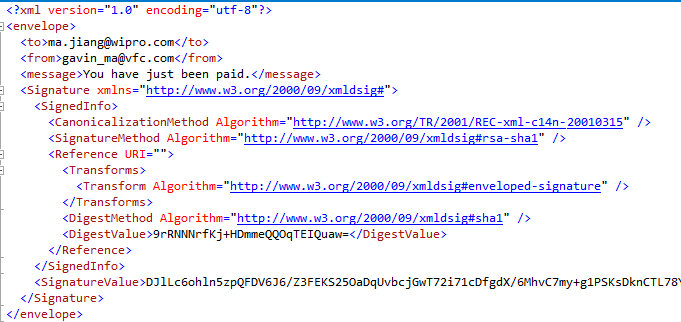
用非对称密钥签名xml
实现代码如下:
  static void SignXml(XmlDocument document, RSA algorithm)

        {

            SignedXml signxml = new SignedXml(document) { SigningKey = algorithm };

            Reference reference = new Reference { Uri = string.Empty };

            XmlDsigEnvelopedSignatureTransform env = new XmlDsigEnvelopedSignatureTransform();

            reference.AddTransform(env);

            signxml.AddReference(reference);

            signxml.ComputeSignature();

            XmlElement xmlDigitalSignature = signxml.GetXml();

            document.DocumentElement.AppendChild(document.ImportNode(xmlDigitalSignature,true));

        }

        static bool IsSignedXmlValid(XmlDocument document, RSA algorithm)

        {

            SignedXml signxml = new SignedXml(document);

            XmlNodeList nodelist = document.GetElementsByTagName("Signature");

            if (nodelist.Count < )

            {

                throw new CryptographicException("No signature found");

            }

            signxml.LoadXml((XmlElement)nodelist[]);

            return signxml.CheckSignature(algorithm);

        }
调用代码如下:
string xmlPath = "encrypt.xml";
XmlDocument document = new XmlDocument();
document.PreserveWhitespace = true;
document.Load(xmlPath);
RSACryptoServiceProvider rsa = new RSACryptoServiceProvider();
SignXml(document, rsa);
IsSignedXmlValid(document, rsa);
运行结果如图:
个人认为证书在xml中使用情况不常见,并且也比较简单,这里就省略了。
总结一下:
在使用xml之前,必须使用严格的架构(模式文件)来验证,尽可能使用架构的本地副本,以便缓存解析器来缓存他们。
选择一个合适的加密算法,如果应用程序需要加密和解密相同的应用程序,那么选择对称加密;应用程序需要和外部系统进行交流,那么选择非对称加密。
如果需要确保数据没有被更改,就需要始终使用数字签名
C# xml 常规 保护 方法总结的更多相关文章
- C#中常用的几种读取XML文件的方法
1.C#中常用的几种读取XML文件的方法:http://blog.csdn.net/tiemufeng1122/article/details/6723764/
- 八、Android学习第七天——XML文件解析方法(转)
(转自:http://wenku.baidu.com/view/af39b3164431b90d6c85c72f.html) 八.Android学习第七天——XML文件解析方法 XML文件:exten ...
- 解析Xml四种方法
关键字:Java解析xml.解析xml四种方法.DOM.SAX.JDOM.DOM4j.XPath [引言] 目前在Java中用于解析XML的技术很多,主流的有DOM.SAX.JDOM.DOM4j,下文 ...
- C#中经常使用的几种读取XML文件的方法
XML文件是一种经常使用的文件格式,比如WinForm里面的app.config以及Web程序中的web.config文件,还有很多重要的场所都有它的身影.Xml是Internet环境中跨平台的,依赖 ...
- Flex中操作XML的E4X方法
用于处理 XML 的 E4X 方法 Flash Player 9 和更高版本,Adobe AIR 1.0 和更高版本 ECMAScript for XML 规范定义了一组用于使用 XML 数据的类 ...
- Spring保护方法
Spring保护方法 一.使用注解保护方法 1.@Secured 由Spring Security提供,首先需要启用基于注解的方法安全性: @EnableGlobalMethodSecurity(se ...
- 微软BI 之SSIS 系列 - 两种将 SQL Server 数据库数据输出成 XML 文件的方法
开篇介绍 在 SSIS 中并没有直接提供从数据源到 XML 的转换输出,Destination 的输出对象有 Excel File, Flat File, Database 等,但是并没有直接提供 X ...
- 【重要】U3D存放本地游戏存档——不同平台载入XML文件的方法——IOS MAC Android
在PC上和IOS上读取XML文件的方式略有差别,经测试,IOS上不支持如下方法载入XML文件: XmlDocument xmlDoc = new XmlDocument(); xmlDoc.Load( ...
- (转)U3D不同平台载入XML文件的方法——IOS MAC Android
自:http://www.cnblogs.com/sifenkesi/archive/2012/03/12/2391330.html 在PC上和IOS上读取XML文件的方式略有差别,经测试,IOS上不 ...
随机推荐
- 初识thinkphp(5)
这次主要内容是模型的基本操作 0x01:什么是模型 通过手册的阅览,笼统的说就是,把打开数据库等操作在另一个php文件中进行 以及对变量的规则具体细节,查询,取值等操作进行定义,方便在控制器中直接使用 ...
- Liunx 部署环境常用命令
在Linux环境中部署web项目中常用到一些命令,在此记录已做备用: 1. 查看当前工作目录: pwd [选项] 常用参数: pwd -P 显示出实际路径,而非使用连接(link)路径. 2. 列出目 ...
- vue组件之间通信传值
原文链接:https://blog.csdn.net/lander_xiong/article/details/79018737 我认为这位博主的这篇文章写的非常详细,通俗易懂, 我们这次的vue项目 ...
- python中的*和**参数传递机制
python的参数传递机制具有值传递(int.float等值数据类型)和引用传递(以字典.列表等非值对象数据类型为代表)两种基本机制以及方便的关键字传递特性(直接使用函数的形参名指定实参的传递目标,如 ...
- Linux驱动之USB(个人)
USB概述 <USB简介> a:背景 USB是Universal Serial Bus的缩写,是一种全新的,双向同步传输的,支持热插拔的 ...
- 【WIN10】WIN2D——圖像處理
源碼下載:http://yunpan.cn/c3iNuHFFAcr8h 访问密码 8e48 還是先來看下截圖: 實現了幾個效果:放大.縮小.旋轉.左右翻轉.上下翻轉,亮度變化.灰度圖.對比度.高斯模 ...
- 【BZOJ 1005】 1005: [HNOI2008]明明的烦恼 (prufer数列+高精度)
1005: [HNOI2008]明明的烦恼 Time Limit: 1 Sec Memory Limit: 162 MBSubmit: 4981 Solved: 1941 Description ...
- VMware安装MikroTik RouterOS chr
简单步骤: 1.官网下载ova镜像 2.导入到vmware即可.
- [原创]Fitnesse测试工具介绍及安装
1 Fitnesse简介 Fitnesse是一款开源的验收测试框架,完全有java语言编写完成,支持多语言软件产品的测试,包括(java,c,c++,python,php),在Fitnesse框架中, ...
- AES Test vectors
Table of content List of test vectors for AES/ECB encryption mode AES ECB 128-bit encryption mode AE ...