
Maven项目POM文件错误,提示“Plugin execution not covered by lifecycle configuration”的解决方案
一. 问题

Plugin execution not covered by lifecycle configuration: org.apache.maven.plugins:maven-dependency-plugin:2.10:copy (execution: copy, phase: test-compile)
二. 产生问题原因
基于maven的项目,使用各种maven plugin来完成开发中的各种工作,例如编译代码,打包,部署等等…
每个plugin包含许多的goal,用来做特定的事情。典型的基于java的maven项目就有 clean compile test package
deploy等goal要执行。除了这些比较常见的goal之外,项目中还可以使用大量的第三方的plugin,甚至自己动手开发的plugin。
随之而来的问题是,在eclipse中编辑maven项目的时候,eclipse并不知道这些goal要做什么,通用的goal还好说,特殊用途的goal就没有办法了。所以m2eclipse这个集成maven到eclipse的plugin就提供了开发extra的能力,eclipse利用这些extra来完成本来在maven plugin要干的活。
如果eclipse没有办法知道某个goal要干什么,那么通常就会看到如下的错误信息:
- Plugin execution not covered by lifecycle configuration:
- org.apache.maven.plugins:maven-dependency-plugin:2.6:copy (execution:default, phase: validate)
三. 我的解决办法
第一步:
eclipse->preference->maven->lifecycle mappings中
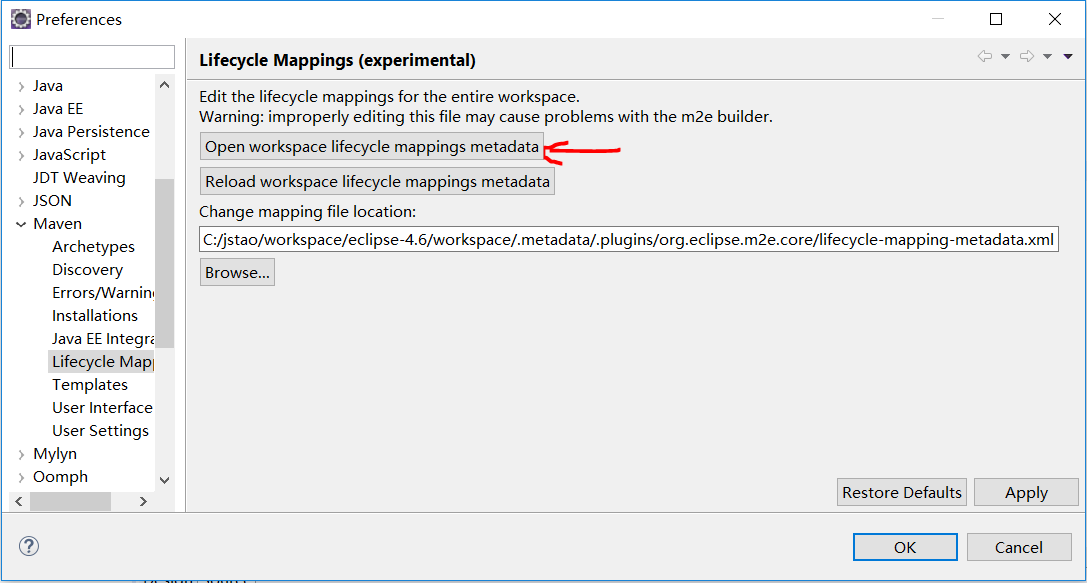
第二步:填入以下代码,保存。注意:<groupId>、<artifactId>、<goal>、<versionRange>标签的值要对应报错信息填写!
<?xml version="1.0" encoding="UTF-8"?>

<lifecycleMappingMetadata>

    <pluginExecutions>

        <pluginExecution>

            <pluginExecutionFilter>

                <groupId>org.apache.maven.plugins</groupId>

                <artifactId>maven-dependency-plugin</artifactId>

                <goals>

                    <goal>copy</goal>

                </goals>

                <versionRange>[2.10,)</versionRange>

            </pluginExecutionFilter>

            <action>

                <ignore />

            </action>

        </pluginExecution>

    </pluginExecutions>

</lifecycleMappingMetadata>
第三步:
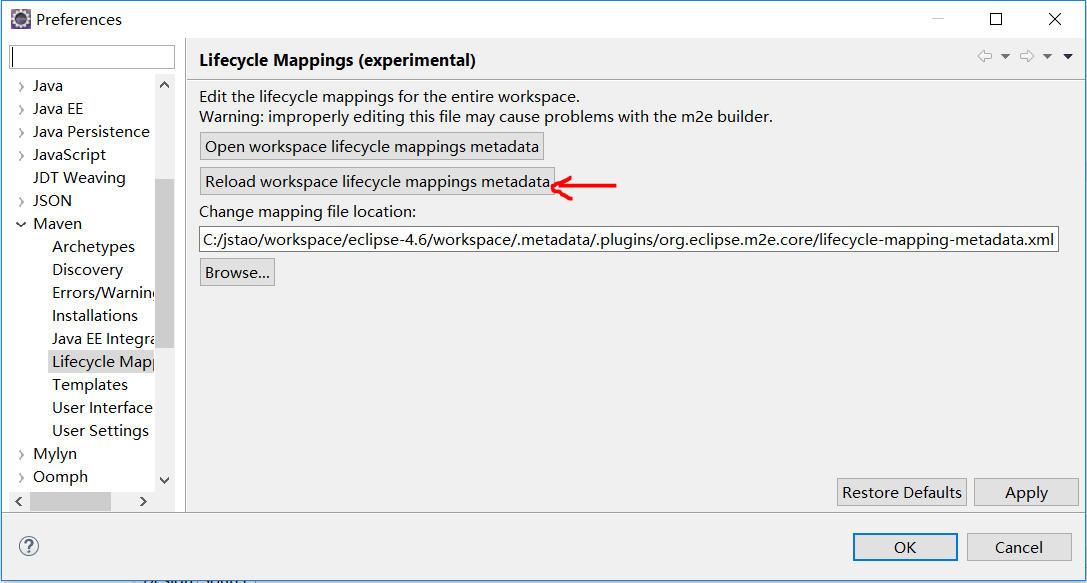
点下ok。
第四步:修改完成后,选中项目右键----Maven----Update Project... 问题解决!
-----------------------------------------------------------------------------------------------------------------------------------------------------------------------------------------------------------
参考如下博文:
地址:https://blog.csdn.net/xyr05288/article/details/79569183
一. 问题产生原因
Plugin execution not covered by lifecycle configuration: org.apache.maven.plugins:maven-dependency-plugin:2.7:copy...在eclipse->preference->maven->lifecycle mappings中,myeclipse的话Maven4MyEclipse->Lifecycle mappings,想上面所示进行配置,保存更新project。未试过eclipse下情况如何,MyEclipse默认配置路径是没有lifecycle-mapping-metadata.xml这个文件的,只有<项目名>.lifecyclemapping一系列这样的文件,但提供一个按钮“Open workspacelifecycle mappings metadata”里进行编辑。或者Change mapping file location。
好吧,这样也许是最应该的处理的方式,但让每个开发人员都改下ide配置,还不如直接改下pom.xml文件的配置,最终采用了修改pom.xml文件的方式。
好吧,最终还是将出错原因和解决思路抄一下:
基于maven的项目,使用各种maven plugin来完成开发中的各种工作,例如编译代码,打包,部署等等…
每个plugin包含许多的goal,用来做特定的事情。典型的基于java的maven项目就有 clean compile test package
deploy等goal要执行。除了这些比较常见的goal之外,项目中还可以使用大量的第三方的plugin,甚至自己动手开发的plugin。
随之而来的问题是,在eclipse中编辑maven项目的时候,eclipse并不知道这些goal要做什么,通用的goal还好说,特殊用途的goal就没有办法了。所以m2eclipse这个集成maven到eclipse的plugin就提供了开发extra的能力,eclipse利用这些extra来完成本来在maven plugin要干的活。
如果eclipse没有办法知道某个goal要干什么,那么通常就会看到如下的错误信息:
- Plugin execution not covered by lifecycle configuration:
- org.apache.maven.plugins:maven-dependency-plugin:2.6:copy (execution:default, phase: validate)
由于我个人更倾向于在命令行下让maven干活,而eclipse更多的只是充当编辑器的角色,所以我要的只是让eclipse忽略掉这些goal就好了。
参考这里http://wiki.eclipse.org/M2E_plugin_execution_not_covered 之后,要做的就是告诉eclipse要忽略的goal.
二. 解决方案
查阅各种资料,折腾好久,这表示m2e在其执行maven的生命周期管理时没有定义该插件,所以提示出错,其实m2e对此是提供了扩展机制的,我们可以通过如下操作来消除这个出错提示:
1. 进入Window—>Preferences—>Maven配置,进入Lifecycle Mapping设置项,如下图:
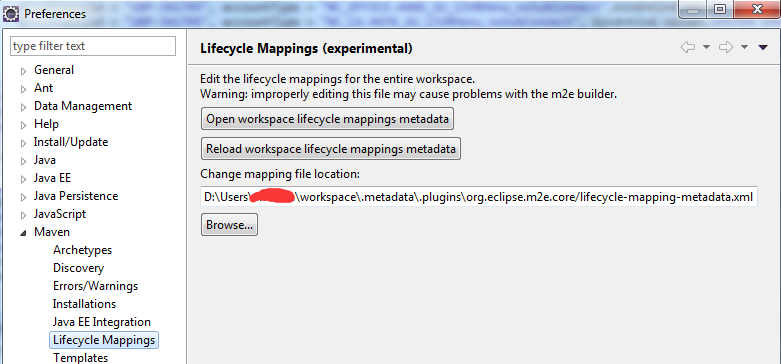
从上图可以看出m2e管理maven生命周期的文件名是lifecycle-mapping-metadata.xml,以及该文件的存放路径
2. 下一步我们就要去相应路径修改lifecycle-mapping-metadata.xml文件,但会发现这个文件在上图中提示的位置并不存在,那么此时就
以到eclipse的安装目录下的plugins下的org.eclipse.m2e.lifecyclemapping.defaults_xxxxxx.jar文件中找到该文件(如下图):
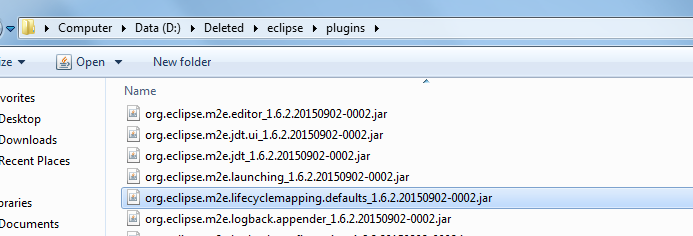
解压后可以发现lifecycle-mapping-metadata.xml文件的确在jar包中
把它从jar包中解压出来并放置到步骤1图中所示的路径下
3. 打开lifecycle-mapping-metadata.xml文件,把未识别的插件在文件中加入即可:
Plugin execution not covered by lifecycle configuration:org.apache.maven.plugins:maven-source-plugin:3.1:compile (execution: default-compile, phase: compile)
由提示可知缺少的是org.apache.maven.plugins:maven-source-plugin 版本为3.1的插件,阶段是compile
<pluginExecution>
<pluginExecutionFilter>
<groupId>org.apache.maven.plugins</groupId>
<artifactId>maven-source-plugin</artifactId>
<versionRange>[3.1,)</versionRange>
<goals>
<goal>testCompile</goal>
<goal>compile</goal>
</goals>
</pluginExecutionFilter>
<action>
<ignore/>
</action>
</pluginExecution>
4、修改完成后,需在m2e配置处把“Update Maven projects on startup”选项勾上,并重启eclipse即可消除出错提示。
同理Plugin execution not covered by lifecycle configuration:org.codehaus.mojo:aspectj-maven-plugin:1.7:compile (execution: default-compile, phase: test-compile)
后续出现Plugin execution not covered by lifecycle configuration:此类错误均可尝试此方式解决
参考文献:http://www.cnblogs.com/hzhuxin/archive/2012/06/17/2552998.html
三.特别说明
其实eclipse提示有解决方法,前两个方法都可以的,第一个方法是把插件ignore的配置放到pom.xml中,第二个方法是把插件ignore的配置放到上述提到的lifecycle-mapping-metadata.xml中
Maven项目POM文件错误,提示“Plugin execution not covered by lifecycle configuration”的解决方案的更多相关文章
- Java-Maven(十一):Maven 项目出现pom.xml错误:Plugin execution not covered by lifecycle configuration: org.apache.maven.plugins:maven-compiler-plugin
Maven项目出现ERROR: eclipse更新了Maven插件后,让后就出现了以下错误: Description Resource Path Location Type Conflicting l ...
- Plugin execution not covered by lifecycle configuration的解决方案
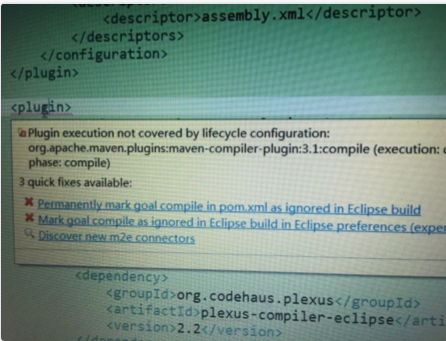
pom配置文件中,提示错误:Plugin execution not covered by lifecycle configuration. 如图: 这表示m2e在其执行maven的生命周期管理时没有 ...
- 在POM配置Maven plugin提示错误“Plugin execution not covered by lifecycle configuration”的解决方案
eclipse在其POM文件的一处提示出错如下: Plugin execution not covered by lifecycle configuration: org.apache.maven.p ...
- Maven-pom.xml文件报错 Plugin execution not covered by lifecycle configuration
问题: Eclipse中新导入的项目pom.xml文件报错: Plugin execution not covered by lifecycle configuration: org.jacoco:j ...
- 利用mybatis-generator自动生成代码,发生:Plugin execution not covered by lifecycle configuration后解决方案
1,报错信息 Plugin execution not covered by lifecycle configuration: org.mybatis.generator:mybatis-genera ...
- MAVEN “Plugin execution not covered by lifecycle configuration”
pom文件中报错提示: Plugin execution not covered by lifecycle configuration: net.alchim31.maven:yuicompresso ...
- 【技巧】“Plugin execution not covered by lifecycle configuration...“异常的处理
问题现象: 在Eclipse(JEE mars)中新建maven project,选择archetype为:maven-archetype-plugin,结果生成的project存在错误:“Plugi ...
- 修复 Plugin execution not covered by lifecycle configuration: org.codehaus.mojo:build-helper-maven-plugin:1.8:add-source (execution: add-source, phase: generate-sources)
在maven项目中使用add-source时,pom.xml报如下错误: Plugin execution not covered by lifecycle configuration: org.co ...
- Plugin execution not covered by lifecycle configuration: aspectj-maven-plugin:1.8
现象: eclipse导入existing maven project,(父项目包含很多子项目),子项目的pom.xml报错: Plugin execution not covered by life ...
随机推荐
- Springboot 拦截器 依赖注入失败
解决方案2种. ====1 https://blog.csdn.net/shunhua19881987/article/details/78084679 ====2 https://www.cnblo ...
- gdbserver移植到DM368板子上的过程 以及segment fault problem
问题描述 我在PC机上安装了gdbserver,但是移植到板子上后却出现了问题.运行不了,显示错误:"segment fault". 决定重新在另一台虚拟机上gdbserver. ...
- Linux下CenOS系统 安装Mysql-5.7.19
1.输入网址https://www.mysql.com/downloads/,进入downloads,选择Community 2.选择对应的版本和系统: 输入命令:wget https://cdn.m ...
- C++的结构体指针传参
typedef struct node{int n;node *left;}*tnode; 传参的时候注意用** void init(node **nn);int main(){tnode nna;i ...
- nova boot from volume代码分析
首先要创建一个bootable volume curl -i http://16.158.166.197:8776/v1/c24c59846a7f44538d958e7548cc74a3/volume ...
- 逆天的 GRUB
参考资料 GRUB 的文档在这里:https://www.gnu.org/software/grub/manual/grub/ Linux 的启动过程和 GRUB 的地位 Linux 系统启动的过程是 ...
- NeuChar 平台使用及开发教程(一):开始使用 NeuChar
如果您还不知道什么是 NeuChar,或者我们为什么要做 NeuChar,请看这里. 角色 NeuChar 打通了从开发者到终端用户的完整的上下游链路,了解 NeuChar 之前,先要明确两个角色身份 ...
- 十几分钟让你学会MySQL布尔和延迟盲注手工操作
作者:Max老白Gān丶链接:http://www.lofter.com/lpost/1fefbc76_12d25dc31来源:LOFTER 注入常用到的几个函数 1 mid(str,1,3) 字 ...
- linux 完全关闭tomcat
由于直接调用tomcat的 shutdown.sh 有时无法完全关闭掉tomcat,使用 ps -ef | grep tomcat 查找发现tomcat依然还存在,并未完全关掉.在 catalina. ...
- [Swift]LeetCode303. 区域和检索 - 数组不可变 | Range Sum Query - Immutable
Given an integer array nums, find the sum of the elements between indices i and j (i ≤ j), inclusive ...