
WPF中利用控件的DataContext属性为多个TextBox绑定数据
工作上需要从给定的接口获取数据,然后显示在界面的编辑框中,以往肯定会一个一个的去赋值,但这样太麻烦而且效率很低,不利于维护,于是想到了数据绑定这一方法,数据绑定主要利用INotifyPropertyChanged这一接口去监听属性是否发生改变。下面是我写的一个demo,主要是利用控件的DataContext属性绑定数据
1.数据源
using System;

using System.Collections.Generic;

using System.ComponentModel;

using System.Linq;

using System.Text;

using System.Threading.Tasks;

namespace DataBinding

{

    public class DataSource:INotifyPropertyChanged

    {

        public event PropertyChangedEventHandler PropertyChanged;

        /// <summary>

        /// 姓名

        /// </summary>

        private string _name;

        public string Name

        {

            get { return _name; }

            set

            {

                _name = value;

                if(PropertyChanged != null)

                {

                    PropertyChanged(this, new PropertyChangedEventArgs("Name"));

                }

            }

        }

        /// <summary>

        /// 年龄

        /// </summary>

        private int _age;

        public int Age

        {

            get { return _age; }

            set

            {

                _age = value;

                if(PropertyChanged != null)

                {

                    PropertyChanged(this, new PropertyChangedEventArgs("Age"));

                }

            }

        }

        /// <summary>

        /// 性别

        /// </summary>

        private string _gender;

        public string Gender

        {

            get { return _gender; }

            set

            {

                _gender = value;

                if(PropertyChanged != null)

                {

                    PropertyChanged(this, new PropertyChangedEventArgs("Gender"));

                }

            }

        }

        /// <summary>

        /// 身高

        /// </summary>

        private int _height;

        public int Height

        {

            get { return _height; }

            set

            {

                _height = value;

                if(PropertyChanged != null)

                {

                    PropertyChanged(this, new PropertyChangedEventArgs("Gender"));

                }

            }

        }

        private static DataSource _instance = null;

        public static DataSource GetInstance()

        {

            if(null == _instance)

            {

                _instance = new DataSource();

            }

            return _instance;

        }

        private DataSource()

        {

            _name = "张三";

            _age = ;

            _gender = "男";

            _height = ;

        }

    }

}
2.界面布局
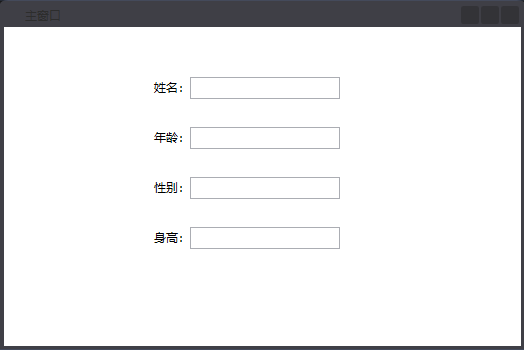
<Window x:Class="DataBinding.MainWindow"

        xmlns="http://schemas.microsoft.com/winfx/2006/xaml/presentation"

        xmlns:x="http://schemas.microsoft.com/winfx/2006/xaml"

        Title="主窗口" Height="350" Width="525" WindowStartupLocation="CenterScreen">

    <Grid x:Name="grid_DataInfo">

        <Grid.ColumnDefinitions>

            <ColumnDefinition Width="20"/>

            <ColumnDefinition Width="*"/>

            <ColumnDefinition Width="20"/>

        </Grid.ColumnDefinitions>

        <Grid.RowDefinitions>

            <RowDefinition Height="20"/>

            <RowDefinition Height="*"/>

            <RowDefinition Height="20"/>

        </Grid.RowDefinitions>

        <StackPanel Orientation="Horizontal" HorizontalAlignment="Left" VerticalAlignment="Top" Grid.Row="1" Grid.Column="1" Margin="130,30,0,0">

            <TextBlock Text="姓名:" Margin="0,3,0,0"/>

            <TextBox x:Name="txt_Name" Text="{Binding Path=Name}" FontSize="16" VerticalContentAlignment="Center" Width="150"/>

        </StackPanel>

        <StackPanel Orientation="Horizontal" HorizontalAlignment="Left" VerticalAlignment="Top" Grid.Row="1" Grid.Column="1" Margin="130,80,0,0">

            <TextBlock Text="年龄:" Margin="0,3,0,0"/>

            <TextBox x:Name="txt_Age" Text="{Binding Path=Age}" FontSize="16" VerticalContentAlignment="Center" Width="150"/>

        </StackPanel>

        <StackPanel Orientation="Horizontal" HorizontalAlignment="Left" VerticalAlignment="Top" Grid.Row="1" Grid.Column="1" Margin="130,130,0,0">

            <TextBlock Text="性别:" Margin="0,3,0,0"/>

            <TextBox x:Name="txt_Gender" Text="{Binding Path=Gender}" FontSize="16" VerticalContentAlignment="Center" Width="150"/>

        </StackPanel>

        <StackPanel Orientation="Horizontal" HorizontalAlignment="Left" VerticalAlignment="Top" Grid.Row="1" Grid.Column="1" Margin="130,180,0,0">

            <TextBlock Text="身高:" Margin="0,3,0,0"/>

            <TextBox x:Name="txt_Height" Text="{Binding Path=Height}" FontSize="16" VerticalContentAlignment="Center" Width="150"/>

        </StackPanel>

    </Grid>

</Window>
3.实例操作
namespace DataBinding

{

    /// <summary>

    /// MainWindow.xaml 的交互逻辑

    /// </summary>

    public partial class MainWindow : Window

    {

        public MainWindow()

        {

            InitializeComponent();

            //绑定数据源

            grid_DataInfo.DataContext = DataSource.GetInstance();

        }

    }

}
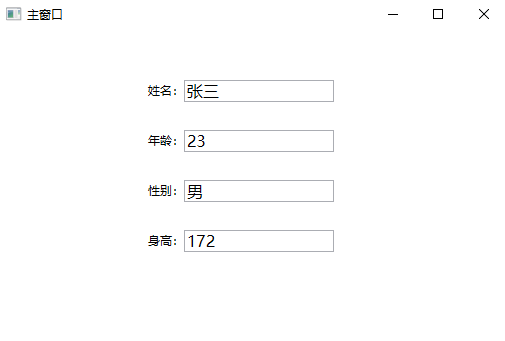
4.效果显示
WPF中利用控件的DataContext属性为多个TextBox绑定数据的更多相关文章
- WPF中PasswordBox控件的Password属性的数据绑定
原文:WPF中PasswordBox控件的Password属性的数据绑定 英文原文:http://www.wpftutorial.net/PasswordBox.html 中文原文:http://bl ...
- WPF中Image控件的Source属性
原文:WPF中Image控件的Source属性 imgBook 是一个Image控件,在后台代码中我想给它指定Source的属性.我先如下方式进行: Uri uri = new Uri(strImag ...
- 【转】WPF中PasswordBox控件的Password属性的数据绑定
英文原文:http://www.wpftutorial.net/PasswordBox.html 中文原文:http://blog.csdn.net/oyi319/article/details/65 ...
- WPF中DataGrid控件内Button的Command和CommandParameter的绑定
场景:视频上传功能,上传列表使用DataGrid控件,视频有不同的状态对应不同的操作,DataGrid中最后一列为操作列,里面是Button控件.希望点击Button后执行对应的操作,但是设置Butt ...
- WPF中Image控件的Source属性的设置
1.直接关联到文件,关联后不能删除此图片,因为图片正在使用. imageEditImage.Source = new BitmapImage(new Uri(strImagePath, UriKind ...
- WPF中PasswordBox控件无法绑定Password属性解决办法
在WPF中,默认的Password控件的Password属性是不允许为之绑定的,下面是一个解决绑定Password的方法的代码: 1.前台代码 <Window x:Class="Pas ...
- WPF中TreeView控件数据绑定和后台动态添加数据(二)
写在前面:在(一)中,介绍了TreeView控件MVVM模式下数据绑定的方法.在这篇文章中,将总结给节点添加事件的方法,这样说有些不对,总之实现的效果就是点击某个节点,将出现对应于该节点的页面或者数据 ...
- WPF中TreeView控件数据绑定和后台动态添加数据(一)
数据绑定: 更新内容:补充在MVVM模式上的TreeView控件数据绑定的代码. xaml代码: <TreeView Name="syntaxTree" ItemsSourc ...
- C# winform项目中ListView控件使用CheckBoxes属性实现单选功能
C# winform项目中ListView控件使用CheckBoxes属性实现单选功能 在做项目时需要使用ListView控件的CheckBoxes属性显示,还要在点击行时自动选中CheckBoxes ...
随机推荐
- [我还会回来的]asp.net core再战iris
废话不多说,直接开干! 硬件配置 处理器: Intel(R) Core(TM) i5-4690k CPU @3.90GHz 内存容量: 8.00 GB 软件版本 OS: Microsoft Windo ...
- [Linux] memache打印所有的key
1.在使用memcache的时候 , 经常需要查看下里面存储的值 , 前提是要先知道key是啥,memcache没有redis的keys命令 2.下面两个命令的结合,可以查看到key stats it ...
- Mybatis框架基础支持层——反射工具箱之泛型解析工具TypeParameterResolver(4)
简介:TypeParameterResolver是一个工具类,提供一系列的静态方法,去解析类中的字段.方法返回值.方法参数的类型. 在正式介绍TypeParameterResolver之前,先介绍一个 ...
- 微信小程序解密得到unoinid和手机号 (开放数据的校验和解密 获取手机号)
实际测试 两种方法都可以: 第一种方法: public static string DecodeUserInfo(string encryptedData, string iv, string cod ...
- 【代码笔记】Web-CSS-CSS Float(浮动)
一, 效果图. 二,代码. <!DOCTYPE html> <html> <head> <meta charset="utf-8"> ...
- css中“~”和“>”
css中“~” element1~element2 选择器匹配 出现在 element1 后面的 element2 .element1 和 element2 这两种元素必须具有相同的父元 ...
- Dynamics 365中配置和使用文件夹级别的跟踪(folder-level tracking)
本人微信和易信公众号:微软动态CRM专家罗勇 ,回复274或者20180630可方便获取本文,同时可以在第一间得到我发布的最新的博文信息,follow me!我的网站是 www.luoyong.me ...
- word表格转html后去除冗余代码
word可以另存为html文件,通过这个功能,可以快速实现网页展示word内容,特别是表格的编辑,它包含tr.td.th.rowspan.colspan等内容,直接写比较繁琐. 但word转换过来的h ...
- 命令行以及Python交互模式下python程序的编写
一.命令行模式 在Windows开始菜单选择“命令提示符”,就进入到命令行模式,它的提示符类似C:\>: 二.Python交互模式 在命令行模式下敲命令python,就看到类似如下的一堆文本输出 ...
- Android 技能图谱学习路线
这里是在网上找到的一片Android学习路线,希望记录下来供以后学习 1Java 基础 Java Object类方法 HashMap原理,Hash冲突,并发集合,线程安全集合及实现原理 HashMap ...