
WPF中利用控件的DataContext属性为多个TextBox绑定数据
工作上需要从给定的接口获取数据,然后显示在界面的编辑框中,以往肯定会一个一个的去赋值,但这样太麻烦而且效率很低,不利于维护,于是想到了数据绑定这一方法,数据绑定主要利用INotifyPropertyChanged这一接口去监听属性是否发生改变。下面是我写的一个demo,主要是利用控件的DataContext属性绑定数据
1.数据源
using System;

using System.Collections.Generic;

using System.ComponentModel;

using System.Linq;

using System.Text;

using System.Threading.Tasks;

namespace DataBinding

{

    public class DataSource:INotifyPropertyChanged

    {

        public event PropertyChangedEventHandler PropertyChanged;

        /// <summary>

        /// 姓名

        /// </summary>

        private string _name;

        public string Name

        {

            get { return _name; }

            set

            {

                _name = value;

                if(PropertyChanged != null)

                {

                    PropertyChanged(this, new PropertyChangedEventArgs("Name"));

                }

            }

        }

        /// <summary>

        /// 年龄

        /// </summary>

        private int _age;

        public int Age

        {

            get { return _age; }

            set

            {

                _age = value;

                if(PropertyChanged != null)

                {

                    PropertyChanged(this, new PropertyChangedEventArgs("Age"));

                }

            }

        }

        /// <summary>

        /// 性别

        /// </summary>

        private string _gender;

        public string Gender

        {

            get { return _gender; }

            set

            {

                _gender = value;

                if(PropertyChanged != null)

                {

                    PropertyChanged(this, new PropertyChangedEventArgs("Gender"));

                }

            }

        }

        /// <summary>

        /// 身高

        /// </summary>

        private int _height;

        public int Height

        {

            get { return _height; }

            set

            {

                _height = value;

                if(PropertyChanged != null)

                {

                    PropertyChanged(this, new PropertyChangedEventArgs("Gender"));

                }

            }

        }

        private static DataSource _instance = null;

        public static DataSource GetInstance()

        {

            if(null == _instance)

            {

                _instance = new DataSource();

            }

            return _instance;

        }

        private DataSource()

        {

            _name = "张三";

            _age = ;

            _gender = "男";

            _height = ;

        }

    }

}
2.界面布局
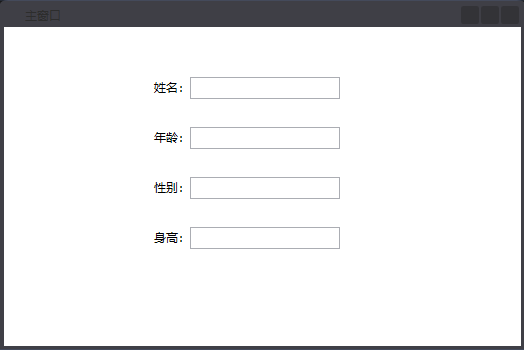
<Window x:Class="DataBinding.MainWindow"

        xmlns="http://schemas.microsoft.com/winfx/2006/xaml/presentation"

        xmlns:x="http://schemas.microsoft.com/winfx/2006/xaml"

        Title="主窗口" Height="350" Width="525" WindowStartupLocation="CenterScreen">

    <Grid x:Name="grid_DataInfo">

        <Grid.ColumnDefinitions>

            <ColumnDefinition Width="20"/>

            <ColumnDefinition Width="*"/>

            <ColumnDefinition Width="20"/>

        </Grid.ColumnDefinitions>

        <Grid.RowDefinitions>

            <RowDefinition Height="20"/>

            <RowDefinition Height="*"/>

            <RowDefinition Height="20"/>

        </Grid.RowDefinitions>

        <StackPanel Orientation="Horizontal" HorizontalAlignment="Left" VerticalAlignment="Top" Grid.Row="1" Grid.Column="1" Margin="130,30,0,0">

            <TextBlock Text="姓名:" Margin="0,3,0,0"/>

            <TextBox x:Name="txt_Name" Text="{Binding Path=Name}" FontSize="16" VerticalContentAlignment="Center" Width="150"/>

        </StackPanel>

        <StackPanel Orientation="Horizontal" HorizontalAlignment="Left" VerticalAlignment="Top" Grid.Row="1" Grid.Column="1" Margin="130,80,0,0">

            <TextBlock Text="年龄:" Margin="0,3,0,0"/>

            <TextBox x:Name="txt_Age" Text="{Binding Path=Age}" FontSize="16" VerticalContentAlignment="Center" Width="150"/>

        </StackPanel>

        <StackPanel Orientation="Horizontal" HorizontalAlignment="Left" VerticalAlignment="Top" Grid.Row="1" Grid.Column="1" Margin="130,130,0,0">

            <TextBlock Text="性别:" Margin="0,3,0,0"/>

            <TextBox x:Name="txt_Gender" Text="{Binding Path=Gender}" FontSize="16" VerticalContentAlignment="Center" Width="150"/>

        </StackPanel>

        <StackPanel Orientation="Horizontal" HorizontalAlignment="Left" VerticalAlignment="Top" Grid.Row="1" Grid.Column="1" Margin="130,180,0,0">

            <TextBlock Text="身高:" Margin="0,3,0,0"/>

            <TextBox x:Name="txt_Height" Text="{Binding Path=Height}" FontSize="16" VerticalContentAlignment="Center" Width="150"/>

        </StackPanel>

    </Grid>

</Window>
3.实例操作
namespace DataBinding

{

    /// <summary>

    /// MainWindow.xaml 的交互逻辑

    /// </summary>

    public partial class MainWindow : Window

    {

        public MainWindow()

        {

            InitializeComponent();

            //绑定数据源

            grid_DataInfo.DataContext = DataSource.GetInstance();

        }

    }

}
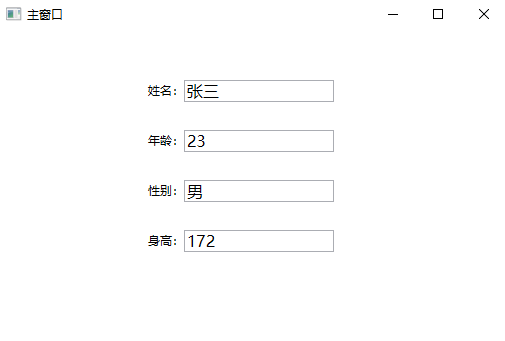
4.效果显示
WPF中利用控件的DataContext属性为多个TextBox绑定数据的更多相关文章
- WPF中PasswordBox控件的Password属性的数据绑定
原文:WPF中PasswordBox控件的Password属性的数据绑定 英文原文:http://www.wpftutorial.net/PasswordBox.html 中文原文:http://bl ...
- WPF中Image控件的Source属性
原文:WPF中Image控件的Source属性 imgBook 是一个Image控件,在后台代码中我想给它指定Source的属性.我先如下方式进行: Uri uri = new Uri(strImag ...
- 【转】WPF中PasswordBox控件的Password属性的数据绑定
英文原文:http://www.wpftutorial.net/PasswordBox.html 中文原文:http://blog.csdn.net/oyi319/article/details/65 ...
- WPF中DataGrid控件内Button的Command和CommandParameter的绑定
场景:视频上传功能,上传列表使用DataGrid控件,视频有不同的状态对应不同的操作,DataGrid中最后一列为操作列,里面是Button控件.希望点击Button后执行对应的操作,但是设置Butt ...
- WPF中Image控件的Source属性的设置
1.直接关联到文件,关联后不能删除此图片,因为图片正在使用. imageEditImage.Source = new BitmapImage(new Uri(strImagePath, UriKind ...
- WPF中PasswordBox控件无法绑定Password属性解决办法
在WPF中,默认的Password控件的Password属性是不允许为之绑定的,下面是一个解决绑定Password的方法的代码: 1.前台代码 <Window x:Class="Pas ...
- WPF中TreeView控件数据绑定和后台动态添加数据(二)
写在前面:在(一)中,介绍了TreeView控件MVVM模式下数据绑定的方法.在这篇文章中,将总结给节点添加事件的方法,这样说有些不对,总之实现的效果就是点击某个节点,将出现对应于该节点的页面或者数据 ...
- WPF中TreeView控件数据绑定和后台动态添加数据(一)
数据绑定: 更新内容:补充在MVVM模式上的TreeView控件数据绑定的代码. xaml代码: <TreeView Name="syntaxTree" ItemsSourc ...
- C# winform项目中ListView控件使用CheckBoxes属性实现单选功能
C# winform项目中ListView控件使用CheckBoxes属性实现单选功能 在做项目时需要使用ListView控件的CheckBoxes属性显示,还要在点击行时自动选中CheckBoxes ...
随机推荐
- 强大的数据库工具 dbForge Studio ForMySql
优点: 1.可以将MySql数据库操作仿 sqlserver 的操作方式,便于操作 2.强大的比较拷贝能力.菜单栏上的 Comparison 的功能,可以比较两个数据库的差别,同时可以将数据库Copy ...
- haroopad 預覽區樣式
body { color:red; font-family:'Microsoft YaHei'; } html,body{ font-family: "微軟雅黑" !importa ...
- 微信小程序支付接入注意点
一.微信支付后台服务器部署 服务器采用ubuntu16.04 + php7.0 + apache2.0. 微信支付后台服务使用了curl 和 samplexml ,因此php.ini配置中必须开启这两 ...
- asp.net引用System.Speech实现语音提示
using System; using System.Speech.Synthesis; namespace testvoice { class Program { static void Main( ...
- Python中文词频统计
以下是关于小说的中文词频统计 这里有三个文件,分别为novel.txt.punctuation.txt.meaningless.txt. 这三个是小说文本.特殊符号和无意义词 Python代码统计词频 ...
- 监控工具之zabbix server3.4 部署配置
[root@localhost src]# cat /etc/redhat-release CentOS Linux release 7.5.1804 (Core) [root@localhost s ...
- Android连续点击多次事件的实现
有时候我们需要实现这样的场景,类似进入开发者模式,即多次点击后执行操作. 首先我们先看一个方法: System提供的一个静态方法arraycopy(),我们可以使用它来实现数组之间的复制. publi ...
- Android Studio撤销与SVN的关联
为何会记录这一个问题,主要是在做项目的过程中出现了一个奇怪的现象,就是直接在文件目录下使用svn上传文件的话,可以看到该目录是与SVN相关联的,可是到了用Android Studio上传代码的时候却发 ...
- web.xml设置过滤直接访问
<security-constraint> <web-resource-collection> <web-resource-name>JSPs</web-re ...
- Oracle——DQL、DML、DDL、DCL
1.DQL:数据查询语言 基本结构:由select.from.where组成 子句组成的查询块: SELECT <字段名表> FROM <表或视图名> WHE ...