
Scrapy命令行详解
官方文档:https://doc.scrapy.org/en/latest/
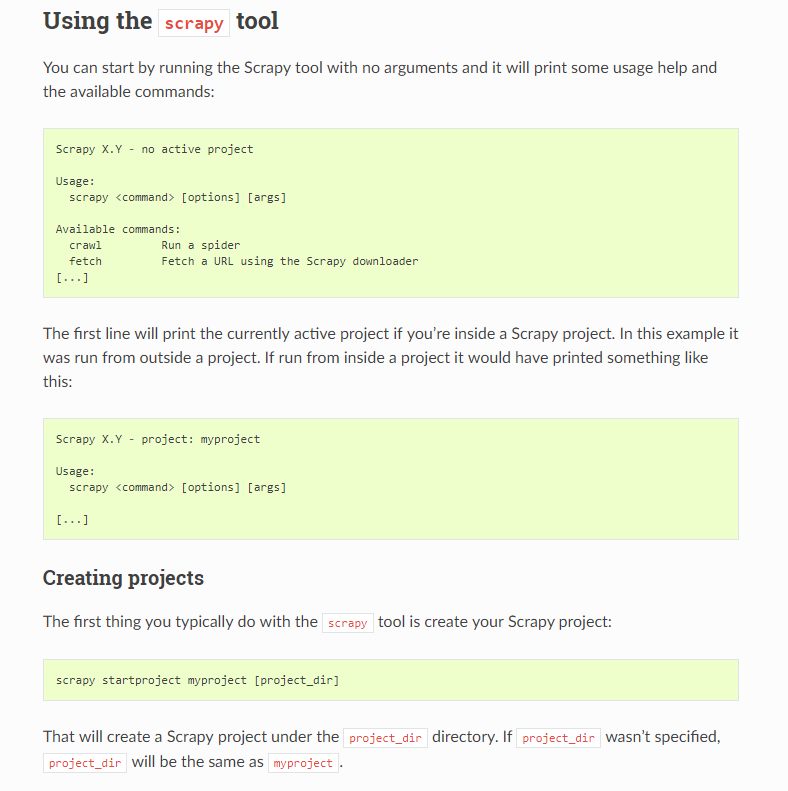
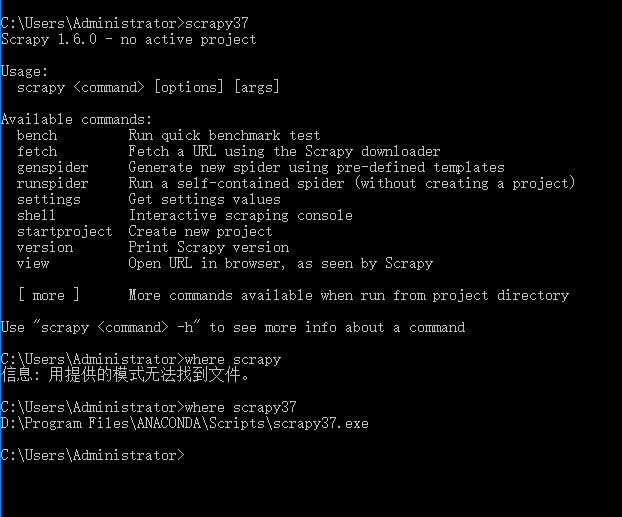
Global commands:
Project-only commands: 在项目目录下才可以执行
startproject
- Syntax:
scrapy startproject <project_name> [project_dir] - Requires project: no
Creates a new Scrapy project named project_name, under the project_dir directory. If project_dir wasn’t specified, project_dirwill be the same as project_name.
Usage example:
$ scrapy startproject myproject
genspider
- Syntax:
scrapy genspider [-t template] <name> <domain> - Requires project: no
Create a new spider in the current folder or in the current project’s spiders folder, if called from inside a project. The <name> parameter is set as the spider’s name, while <domain> is used to generate the allowed_domains and start_urls spider’s attributes.
Usage example:
$ scrapy genspider -l

Available templates:

  basic

  crawl

  csvfeed

  xmlfeed

$ scrapy genspider example example.com

Created spider 'example' using template 'basic'

$ scrapy genspider -t crawl scrapyorg scrapy.org

Created spider 'scrapyorg' using template 'crawl'
This is just a convenience shortcut command for creating spiders based on pre-defined templates, but certainly not the only way to create spiders. You can just create the spider source code files yourself, instead of using this command.
crawl
- Syntax:
scrapy crawl <spider> - Requires project: yes
Start crawling using a spider.
Usage examples:
$ scrapy crawl myspider

[ ... myspider starts crawling ... ]
check
- Syntax:
scrapy check [-l] <spider> - Requires project: yes
Run contract checks.
Usage examples:
$ scrapy check -l

first_spider

  * parse

  * parse_item

second_spider

  * parse

  * parse_item

$ scrapy check

[FAILED] first_spider:parse_item

>>> 'RetailPricex' field is missing

[FAILED] first_spider:parse

>>> Returned 92 requests, expected 0..4
list
- Syntax:
scrapy list - Requires project: yes
List all available spiders in the current project. The output is one spider per line.
Usage example:
$ scrapy list

spider1

spider2
edit
- Syntax:
scrapy edit <spider> - Requires project: yes
Edit the given spider using the editor defined in the EDITORenvironment variable or (if unset) the EDITOR setting.
This command is provided only as a convenience shortcut for the most common case, the developer is of course free to choose any tool or IDE to write and debug spiders.
Usage example:
$ scrapy edit spider1
fetch
- Syntax:
scrapy fetch <url> - Requires project: no
Downloads the given URL using the Scrapy downloader and writes the contents to standard output.
The interesting thing about this command is that it fetches the page how the spider would download it. For example, if the spider has a USER_AGENT attribute which overrides the User Agent, it will use that one.
So this command can be used to “see” how your spider would fetch a certain page.
If used outside a project, no particular per-spider behaviour would be applied and it will just use the default Scrapy downloader settings.
Supported options:
--spider=SPIDER: bypass spider autodetection and force use of specific spider--headers: print the response’s HTTP headers instead of the response’s body--no-redirect: do not follow HTTP 3xx redirects (default is to follow them) #有重定向的连接时候使用这个参数
Usage examples:
$ scrapy fetch --nolog http://www.example.com/some/page.html

[ ... html content here ... ]

$ scrapy fetch --nolog --headers http://www.example.com/

{'Accept-Ranges': ['bytes'],

 'Age': ['1263   '],

 'Connection': ['close     '],

 'Content-Length': ['596'],

 'Content-Type': ['text/html; charset=UTF-8'],

 'Date': ['Wed, 18 Aug 2010 23:59:46 GMT'],

 'Etag': ['"573c1-254-48c9c87349680"'],

 'Last-Modified': ['Fri, 30 Jul 2010 15:30:18 GMT'],

 'Server': ['Apache/2.2.3 (CentOS)']}
view
- Syntax:
scrapy view <url> - Requires project: no
Opens the given URL in a browser, as your Scrapy spider would “see” it. Sometimes spiders see pages differently from regular users, so this can be used to check what the spider “sees” and confirm it’s what you expect.
Supported options:
--spider=SPIDER: bypass spider autodetection and force use of specific spider--no-redirect: do not follow HTTP 3xx redirects (default is to follow them)
Usage example:
$ scrapy view http://www.example.com/some/page.html

[ ... browser starts ... ]
shell
- Syntax:
scrapy shell [url] - Requires project: no
Starts the Scrapy shell for the given URL (if given) or empty if no URL is given. Also supports UNIX-style local file paths, either relative with ./ or ../ prefixes or absolute file paths. See Scrapy shell for more info.
Supported options:
--spider=SPIDER: bypass spider autodetection and force use of specific spider-c code: evaluate the code in the shell, print the result and exit--no-redirect: do not follow HTTP 3xx redirects (default is to follow them); this only affects the URL you may pass as argument on the command line; once you are inside the shell,fetch(url)will still follow HTTP redirects by default.
Usage example:
$ scrapy shell http://www.example.com/some/page.html

[ ... scrapy shell starts ... ]

$ scrapy shell --nolog http://www.example.com/ -c '(response.status, response.url)'

(200, 'http://www.example.com/')

# shell follows HTTP redirects by default

$ scrapy shell --nolog http://httpbin.org/redirect-to?url=http%3A%2F%2Fexample.com%2F -c '(response.status, response.url)'

(200, 'http://example.com/')

# you can disable this with --no-redirect

# (only for the URL passed as command line argument)

$ scrapy shell --no-redirect --nolog http://httpbin.org/redirect-to?url=http%3A%2F%2Fexample.com%2F -c '(response.status, response.url)'

(302, 'http://httpbin.org/redirect-to?url=http%3A%2F%2Fexample.com%2F')
parse
- Syntax:
scrapy parse <url> [options] - Requires project: yes
Fetches the given URL and parses it with the spider that handles it, using the method passed with the --callback option, or parse if not given.
Supported options:
--spider=SPIDER: bypass spider autodetection and force use of specific spider--a NAME=VALUE: set spider argument (may be repeated)--callbackor-c: spider method to use as callback for parsing the response--metaor-m: additional request meta that will be passed to the callback request. This must be a valid json string. Example: –meta=’{“foo” : “bar”}’--pipelines: process items through pipelines--rulesor-r: useCrawlSpiderrules to discover the callback (i.e. spider method) to use for parsing the response--noitems: don’t show scraped items--nolinks: don’t show extracted links--nocolour: avoid using pygments to colorize the output--depthor-d: depth level for which the requests should be followed recursively (default: 1)--verboseor-v: display information for each depth level
Usage example:
$ scrapy parse http://www.example.com/ -c parse_item

[ ... scrapy log lines crawling example.com spider ... ]

>>> STATUS DEPTH LEVEL 1 <<<

# Scraped Items  ------------------------------------------------------------

[{'name': 'Example item',

 'category': 'Furniture',

 'length': '12 cm'}]

# Requests  -----------------------------------------------------------------

[]
settings
- Syntax:
scrapy settings [options] - Requires project: no
Get the value of a Scrapy setting.
If used inside a project it’ll show the project setting value, otherwise it’ll show the default Scrapy value for that setting.
Example usage:
$ scrapy settings --get BOT_NAME

scrapybot

$ scrapy settings --get DOWNLOAD_DELAY

0



runspider
- Syntax:
scrapy runspider <spider_file.py> - Requires project: no #全局执行
Run a spider self-contained in a Python file, without having to create a project.
Example usage:
$ scrapy runspider myspider.py

[ ... spider starts crawling ... ]

version
- Syntax:
scrapy version [-v] - Requires project: no
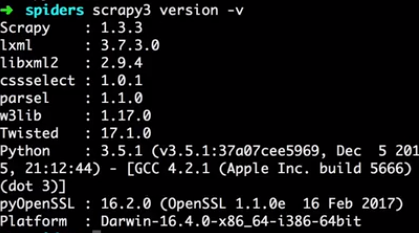
Prints the Scrapy version. If used with -v it also prints Python, Twisted and Platform info, which is useful for bug reports.

bench
New in version 0.17.
- Syntax:
scrapy bench - Requires project: no
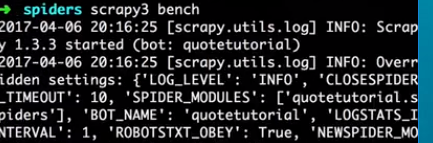
Run a quick benchmark test. Benchmarking.

Scrapy命令行详解的更多相关文章
- 爬虫(十):scrapy命令行详解
建爬虫项目 scrapy startproject 项目名例子如下: localhost:spider zhaofan$ scrapy startproject test1 New Scrapy pr ...
- Scrapy框架的命令行详解【转】
Scrapy框架的命令行详解 请给作者点赞 --> 原文链接 这篇文章主要是对的scrapy命令行使用的一个介绍 创建爬虫项目 scrapy startproject 项目名例子如下: loca ...
- [转载]OpenSSL中文手册之命令行详解(未完待续)
声明:OpenSSL之命令行详解是根据卢队长发布在https://blog.csdn.net/as3luyuan123/article/details/16105475的系列文章整理修改而成,我自己 ...
- 7Z命令行详解
7z.exe在CMD窗口的使用说明如下: 7-Zip (A) 4.57 Copyright (c) 1999-2007 Igor Pavlov 2007-12-06 Usage: 7za <co ...
- 7-zip命令行详解
一.简介 7z,全称7-Zip, 是一款开源软件.是目前公认的压缩比例最大的压缩解压软件. 主要特征: # 全新的LZMA算法加大了7z格式的压缩比 # 支持格式: * 压缩 / 解压缩:7z, XZ ...
- Python爬虫从入门到放弃(十三)之 Scrapy框架的命令行详解
这篇文章主要是对的scrapy命令行使用的一个介绍 创建爬虫项目 scrapy startproject 项目名例子如下: localhost:spider zhaofan$ scrapy start ...
- Python之爬虫(十五) Scrapy框架的命令行详解
这篇文章主要是对的scrapy命令行使用的一个介绍 创建爬虫项目 scrapy startproject 项目名例子如下: localhost:spider zhaofan$ scrapy start ...
- gcc命令行详解
介绍] ----------------------------------------- 常见用法: GCC 选项 GCC 有超过100个的编译选项可用. 这些选项中的许多你可能永远都不会用到, 但 ...
- [转]TFS常用的命令行详解
本文转自:http://blchen.com/tfs-common-commands/ 微软的TFS和Visual Studio整合的非常好,但是在开发过程中,很多时候只用GUI图形界面就会发现一些复 ...
随机推荐
- 【Java入门提高篇】Day25 史上最详细的HashMap红黑树解析
当当当当当当当,好久不见,最近又是换工作,又是换房子,忙的不可开交,断更了一小段时间,最重要的一篇迟迟出不来,每次都犹抱琵琶半遮面,想要把它用通俗易懂的方式进行说明,确实有一定的难度,可愁煞我也,但自 ...
- Ubuntu中安装 mercurial – TortoiseHG
sudo add-apt-repository ppa:tortoisehg-ppa/releases sudo add-apt-repository ppa:mercurial-ppa/releas ...
- Centos7-yum部署配置LAMP-之LAMP及php-fpm实现反代动态资源
一.简介 LAMP:linux+apache+mysql(这里用mariadb)+php(perl,python) LAMMP:memcached缓存的 CGI:Common Gateway Inte ...
- Spring Boot入门-快速搭建web项目
Spring Boot 概述: Spring Boot makes it easy to create stand-alone, production-grade Spring based Appli ...
- Java开发笔记(五十六)利用枚举类型实现高级常量
前面介绍了联合利用final和static可实现常量的定义,该方式用于简单的常量倒还凑合,要是用于复杂的.安全性高的常量,那就力不从心了.例如以下几种情况,final结合static的方式便缺乏应对之 ...
- Java开发笔记(八十)利用反射技术操作私有方法
前面介绍了如何利用反射技术读写私有属性,不单是私有属性,就连私有方法也能通过反射技术来调用.为了演示反射的逆天功能,首先给Chicken鸡类增加下列几个私有方法,简单起见弄来了set***/get** ...
- Django的urls.py加载静态资源图片,TypeError: view must be a callable or a list/tuple in the case of include().
Django的urls.py加载静态资源图片,TypeError: view must be a callable or a list/tuple in the case of include(). ...
- linux c ---raise 使用范例的代码
把做工程过程中比较好的代码片段收藏起来,下面代码内容是关于linux c ---raise 使用范例的代码,希望对各位有所用途. #include <sys/types.h> #inclu ...
- Android Studio 代码无提示,无颜色区分
一.问题 ①java代码没有颜色区分,统一黑色 ②代码不会联想提示,原来打前几个字母便会联想到后面的内容 二.解决 打开File,将Power save Mode的勾勾去掉
- SQL 创建分区表
(以项目中实际使用的GNSS库为例) 背景:数据量巨大,定时创建月表存放数据,月表中数据存放在不同的文件组中来提高查询效率 一.创建数据库,添加文件组 除了逻辑文件和物理文件的分离之外,SQL S ...