
xampp——apache服务启动问题(端口占用)
Apache启动提示
20:39:02 [Apache] Error: Apache shutdown unexpectedly.
20:39:02 [Apache] This may be due to a blocked port, missing dependencies,
20:39:02 [Apache] improper privileges, a crash, or a shutdown by another method.
20:39:02 [Apache] Press the Logs button to view error logs and check
20:39:02 [Apache] the Windows Event Viewer for more clues
20:39:02 [Apache] If you need more help, copy and post this
20:39:02 [Apache] entire log window on the forums
20:46:47 [Apache] Problem detected!
20:46:47 [Apache] Port 443 in use by ""D:\Program Files (x86)\VMware\VMware Workstation\vmware-hostd.exe" -u "C:\ProgramData\VMware\hostd\config.xml"" with PID 9168!
20:46:47 [Apache] Apache WILL NOT start without the configured ports free!
20:46:47 [Apache] You need to uninstall/disable/reconfigure the blocking application
20:46:47 [Apache] or reconfigure Apache and the Control Panel to listen on a different port
上面说明VMware占用了443端口
以下通过修改配置文件来修改默认端口(当没有安装VMware不会占用端口)
2.httpd-ssl.conf(修改无效)
3.修改properties.ini
右键记事本打开或notepad++打开properties.ini
[General]
installdir=D:\xampp
base_stack_name=XAMPP
base_stack_version=1.8.3-1
base_stack_platform=windows
require_root_privileges=1
[Apache]
apache_server_port=80
apache_server_ssl_port=443
apache_root_directory=/xampp/apache
apache_htdocs_directory=D:\xampp/htdocs
apache_domainname=127.0.0.1
apache_configuration_directory=D:\xampp/apache/conf
apache_unique_service_name=
[MySQL]
mysql_port=3306
mysql_host=localhost
mysql_root_directory=D:\xampp\mysql
mysql_binary_directory=D:\xampp\mysql\bin
mysql_data_directory=D:\xampp\mysql\data
mysql_arguments=-u root -P3306
mysql_unique_service_name=
[PHP]
php_binary_directory=D:\xampp\php
php_configuration_directory=D:\xampp\php
修改成(默认除apache,禁止修改其他内容,如悉例外)
apache_server_port=8080
apache_server_ssl_port=4433
ctrl+S保存
star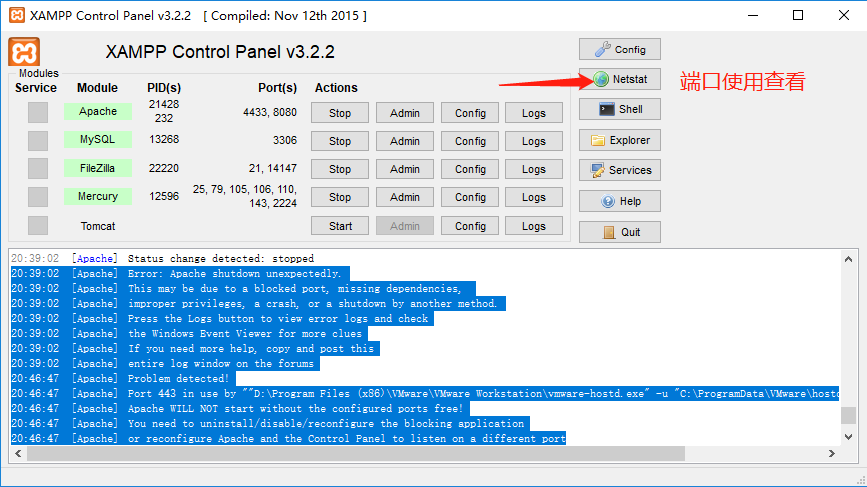
当然也有其他方法,只是有些方法效率不高则不做修改方法
xampp——apache服务启动问题(端口占用)的更多相关文章
- Apache -- XAMPP Apache 无法启动原因及解决方法
XAMPP Apache 无法启动原因1(缺少VC运行库): 这个就是我遇到的问题原因,下载安装的XAMPP版本是xampp-win32-1.7.7-VC9,而现有的Windows XP系统又没有安装 ...
- 关于XAMPP Apache无法启动问题解决方案
安装好XAMPP后,启动Apache服务启动失败,然后从xampp安装目录下执行apache_start.bat文件,如下图 显示443端口被占用. 解决方法: 启动cmd,输入netstat -a ...
- Windows下Apache服务多个端口反向代理配置
修改\Apache24\conf\httpd.conf: 1.修改安装包地址: Define SRVROOT "/Apache24" 修改为: Define SRVROOT &qu ...
- bitnami-redmine Apache服务启动不起来
方法一: 通过 netstat -a -o 查看端口占用情况,关闭调用相关端口的进程. c:\> netstat -a -o Active Connections Proto Local ...
- 关于centOS 7的服务启动,端口查询,防火墙管理
端口的查询与开启 CentOS 7 默认没有使用iptables,所以通过编辑iptables的配置文件来开启80端口是不可以的CentOS 7 采用了 firewalld 防火墙 如要查询是否开启8 ...
- Myeclipse 自带Tomcat启动8080端口占用
在启动Myeclipse自带的Tomcat发现报错,显示8080端口被占用 第一步:window+r 组合键,调出命令窗口. 第二步:输出命令:netstat -ano|findstr 8080 ...
- tomcat启动项目 端口占用
转自:https://blog.csdn.net/u010427935/article/details/77297529 有时候电脑比较卡,项目比较大的情况下,eclipse没有完全停止tomcat的 ...
- tomcat启动时端口占用的问题怎么解决
PS:web项目在启动的时候,一般会报Address already in use: bind,常规的处理思路为:删除任务管理器中的javaw.exe进程即可:当删除仍然解决不了时,一般处理思路如下, ...
- mysql服务启动 但端口未监听
mysql 启动了,用 localhost 可以连接,但是用 127.0.0.1 不能连接.可能的原因是 1. mysql为了增强安全性而跳过了端口监听,查看方法: 用mysql> SHOW V ...
随机推荐
- ELK之使用packetbeat分析网络包流量
介绍 packbeat是一个开源的实时网络抓包与分析框架,内置了很多常见的协议捕获及解析,如HTTP.MySQL.Redis等.在实际使用中,通常和Elasticsearch以及kibana联合使用, ...
- Jmeter响应数据中文乱码
在用Jmeter测试的时候吸纳供应数据如果出现中文乱码解决方法: 1.如下图在Content encoding输入框内输入 UTF-8
- Linux 的 date 日期的使用
解决的问题有: 1:查看当前日期和时间 2:查看前几天的日期,或者后几天的日期. 3:查看上周几的日期,或者下周几的日期. 4:查看前后几小时,分钟.时间 编写一个简单的shell: 输出下个星期二的 ...
- JL MTK 安防网关的 wifi 吞吐测试
基本配置: 删除桥接中的 eth3 : brctl delif br0 eth3 设置eth3的ip: ifconfig eth3 192.168.1.100 开启数据转发: ech ...
- [Day24]IO(转换流、缓冲流)
1. 转换流 1.1 OutputStreamWriter类-字符流通向字节流的桥梁,可使用指定的字符编码表,将要写入流中的字符编码成字节. 1.2 InputStreamReader类-字节流通向字 ...
- 找出sql脚本中需要创建的表空间名称和数据库用户名
测试的工作中,经常会遇到项目交接或者搭建一个新的测试环境,而创建oracle数据库用户及表空间时,需要提前找出脚本中的 数据库用户名和表空间名,所以自己写了一个python脚本,自动找出sql脚本中的 ...
- Vue.js中使用select选择下拉框
在Vue.js中使用select选择下拉框有两种方法: 第一种: Add.html: <select v-model="sysNotice.noticeType" id=&q ...
- 如何查看正在执行sql的语句及其父语句调用?如何查看正在执行SQL的具体参数值与执行计划?
---SQL Server查询正在执行的SQL语句及执行计划 select ds.session_id,dr.start_time,db_name(dr.database_id),dr.blockin ...
- selenium的
1.简介 selenium可以认为是反反爬虫的最佳利器,它基本可以等同于真实的浏览器访问,用它可以加载到动态数据,也省去了cookie的操作,但是用这个有一个重大的效率问题.所以selenium可以用 ...
- Linux命令行基础
常用命令 命令 功能 pwd 打开当前所在的文件目录 ls 查看当前文件夹下的文件(不包括隐藏文件) ls -a 查看当前文件夹下的文件(包括隐藏文件) ls -al 查看当前文件夹下的文件(包括隐藏 ...