
QEMU KVM Libvirt手册(8): 半虚拟化设备virtio
KVM本身并不提供半虚拟化功能,是通过virtio来实现的
The benefits of virtio drivers are of lower overhead and higher performance.
Memory Ballooning (virtio_balloon)
memory ballooning可以动态调整guest的内存的大小
如果有-m参数,则向更大的内存调整时无效的,但是可以往小的里面调整
我们首先ssh到guest里面
ip netns exec qrouter-26a45e0e-a58a-443b-a972-d62c0c5a1323 ssh -i openstack.pem ubuntu@192.168.0.35
在虚拟机里面看内存的大小
ubuntu@testinject19:~$ free
total used free shared buffers cached
Mem: 2051748 478276 1573472 0 46620 345908
-/+ buffers/cache: 85748 1966000
Swap: 0 0 0
在Monitor上看balloon的大小
root:/home/cliu8# virsh qemu-monitor-command instance-00000024 --hmp "info balloon"
balloon: actual=2048
我们试图往大里调整
root:/home/cliu8# virsh qemu-monitor-command instance-00000024 --hmp "balloon 4096"
发现无效
root:/home/cliu8# virsh qemu-monitor-command instance-00000024 --hmp "info balloon"
balloon: actual=2048
ubuntu@testinject19:~$ free
total used free shared buffers cached
Mem: 2051748 478276 1573472 0 46628 345920
-/+ buffers/cache: 85728 1966020
Swap: 0 0 0
我们往小里调整内存
root:/home/cliu8# virsh qemu-monitor-command instance-00000024 --hmp "balloon 1024"
发现生效了
root:/home/cliu8# virsh qemu-monitor-command instance-00000024 --hmp "info balloon"
balloon: actual=1024
ubuntu@testinject19:~$ free
total used free shared buffers cached
Mem: 1003172 470796 532376 0 46636 345920
-/+ buffers/cache: 78240 924932
Swap: 0 0 0
有了balloon,如果guest需要更多的RAM,则可以给它增加一些内存。如果guest不需要那么多内存,可以通过balloon从中拿出一部分内存。这个过程,不需要启停虚拟机。
balloon driver像是一个特殊的process,运行在guest机器上,它可以扩大自己的内存,使得其他的应用程序的内存减少,也可以缩小内存,使得其他的应用程序内存增加。
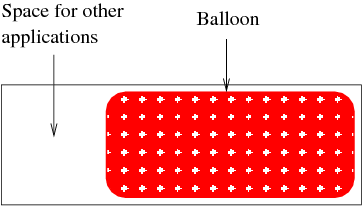
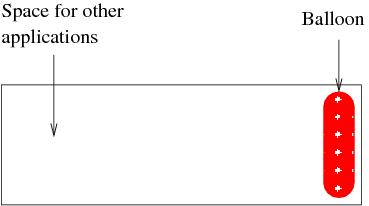
guest中的balloon driver通过virtio channel和host进行交互,接收host发来的命令,比如发来的命令式减少内存,则balloon driver就扩大它的内存占有量。
然后balloon driver将自己占有的内存交回给host,使得host有了更多的内存。

对于libvirt而言,有currentMemory和maxMemory两种概念,maxMemory就是-m参数设定的,currentMemory就是balloon设定的。
Para-virtualized network interface cards (virtio_net)
-netdev tap,fd=32,id=hostnet0,vhost=on,vhostfd=37
-device virtio-net-pci,netdev=hostnet0,id=net0,mac=fa:16:3e:d1:2d:99,bus=pci.0,addr=0x3
Para-virtualized block devices (virtio_blk)
-drive file=/var/lib/nova/instances/1f8e6f7e-5a70-4780-89c1-464dc0e7f308/disk,if=none,id=drive-virtio-disk0,format=qcow2,cache=none
-device virtio-blk-pci,scsi=off,bus=pci.0,addr=0x4,drive=drive-virtio-disk0,id=virtio-disk0,bootindex=1
QEMU KVM Libvirt手册(8): 半虚拟化设备virtio的更多相关文章
- QEMU KVM Libvirt手册(7): 硬件虚拟化
在openstack中,如果我们启动一个虚拟机,我们会看到非常复杂的参数 qemu-system-x86_64 -enable-kvm -name instance-00000024 -S -mach ...
- QEMU KVM Libvirt手册(11): Managing Storage
When managing a VM Guest on the VM Host Server itself, it is possible to access the complete file sy ...
- QEMU KVM Libvirt手册(10):Managing Virtual Machines with libvirt
libvirt is a library that provides a common API for managing popular virtualization solutions, among ...
- QEMU KVM libvirt 手册(1): 安装
安装 对虚拟化的支持通常在BIOS中是禁掉的,必须开启才可以. 对于Intel CPU,我们可以通过下面的命令查看是否支持虚拟化. # grep "vmx" /proc/cpuin ...
- QEMU KVM libvirt手册(4) – images
RAW raw是默认的格式,格式简单,容易转换为其他的格式.需要文件系统的支持才能支持sparse file 创建image # qemu-img create -f raw flat.img 10G ...
- QEMU KVM libvirt 手册(3) - Storage Media
访问Hard Drive 使用-hda –hdb qemu-system-x86_64 -enable-kvm -name ubuntutest -m 2048 -hda ubuntutest.im ...
- QEMU KVM Libvirt手册(10): KVM的各种限制
Overcommits KVM allows for both memory and disk space overcommit. However, hard errors resulting fro ...
- QEMU KVM Libvirt手册(5) – snapshots
前面讲了QEMU的qcow2格式的internal snapshot和external snapshot,这都是虚拟机文件格式的功能. 这是文件级别的. 还可以是文件系统级别的,比如很多文件系统支持s ...
- QEMU KVM libvirt手册(2): monitor
Administrating Virtual Machines with QEMU Monitor When QEMU is running, a monitor console is provide ...
随机推荐
- JavaBean与xml互转的方法详解
本文实例讲述了Jaxb2实现JavaBean与xml互转的方法.分享给大家供大家参考,具体如下: 一.简介 JAXB(Java Architecture for XML Binding) 是一个业界的 ...
- VUE 滚动插件(better-scroll)
1. 概述 1.1 说明 better-scroll是一款重点解决移动端(已支持PC)各种滚动场景需求的插件.例如淘宝聚划算中的类型选择(女装/家纺/生鲜美食等),没有滚动条显示却实现了滚动功能. 1 ...
- tensorflow--交叉熵
学而不思则罔,思而不学则怠. 最近在看<TensorFlow 实战Google深度学习框架第二版>这本书.从头开始学习深度学习,对于细节方面进行探究.相当于重新拾起来这门”手艺“. 这篇随 ...
- axios 拦截器统一在接口增加时间戳参数,防止走缓存。
request.interceptors.request.use( config => { if (config.method == 'post') { config.data = { ...c ...
- 初识中间件Kafka
初识中间件Kafka Author:SimplelWu 什么是消息中间件? 非底层操作系统软件,非业务应用软件,不是直接给最终用户使用的,不能直接给客户带来价值的软件统称为中间件 关注于数据的发送和接 ...
- sql 随笔更新
SELECT DISTINCT(p.`id`), p.`id` , v.`full_name` , CONCAT(LEFT(v.mobile, 7), '****') , DATE_FORMAT(DA ...
- UNIX哲理名言(中英文对照)
UNIX 的特点: Everything (including hardware) is a file.所有的事物(甚至硬件本身)都是一个的文件. Configuration data stored ...
- JDBC 连接
转载至:https://www.liyongzhen.com/ 在这一小节,我们将学习DriverManager对象和connection对象. DriverManager对象用于从驱动里获取一个co ...
- 15 个 Eclipse 常用开发快捷键使用技巧
15 个 Eclipse 常用开发快捷键使用技巧 1.alt+? 或 alt+/:自动补全代码或者提示代码 2.ctrl+o:快速outline视图 3.ctrl+shift+r:打开资源列表 4.c ...
- [3]第二章 C++编程简介
(本资料均从 internet 上进行收录整理,若要转载,请与原作者联系) 2.1 机器语言.汇编语言和高级语言 程序员用各种编程语言编写指令,有些是计算机直接理解的,有些则需要中间翻译(tranl ...