
UI组件--element-ui--全部引入和按需引入
主要就是一句话, 如果用到的组件少, 要按需引入, 如果用到的组件很多,就全部引入, 因为按需引入全部的, 和全部引入效果一样
完整引入
在 main.js 中写入以下内容:
import Vue from 'vue';

import ElementUI from 'element-ui';

import 'element-ui/lib/theme-chalk/index.css';

import App from './App.vue';

Vue.use(ElementUI);

new Vue({

  el: '#app',

  render: h => h(App)

});
以上代码便完成了 Element 的引入。需要注意的是,样式文件需要单独引入, 如果自定义主题, 则引入自定义主题.
按需引入
借助 babel-plugin-component,我们可以只引入需要的组件,以达到减小项目体积的目的。
首先,安装 babel-plugin-component:
npm install babel-plugin-component -D

或者

yarn add babel-plugin-component --dev
然后,将 .babelrc 修改为:
{

  "presets": [["es2015", { "modules": false }]],

  "plugins": [

    [

      "component",

      {

        "libraryName": "element-ui",

        "styleLibraryName": "theme-chalk"

      }

    ]

  ]

}

根据原来的模板文件, 我的改为了:

{

  "presets": [

    ["env", {

      "modules": false,

      "targets": {

        "browsers": ["> 1%", "last 2 versions", "not ie <= 8"]

      }

    }],

    "stage-2"

  ],

  "plugins": [

    "transform-vue-jsx", "transform-runtime",

    [

      "component",

      {

        "libraryName": "element-ui",

        "styleLibraryName": "~theme"

      }

    ]

  ]

}
接下来,如果你只希望引入部分组件,比如 Button 和 Select,那么需要在 main.js 中写入以下内容:
import Vue from 'vue';

import { Button, Select } from 'element-ui';

import App from './App.vue';

Vue.component(Button.name, Button);

Vue.component(Select.name, Select);

/* 或写为

 * Vue.use(Button)

 * Vue.use(Select)

 */

new Vue({

  el: '#app',

  render: h => h(App)

});
完整组件列表和引入方式(完整组件列表以 components.json 为准)
import Vue from 'vue';

import {

  Pagination,

  Dialog,

  Autocomplete,

  Dropdown,

  DropdownMenu,

  DropdownItem,

  Menu,

  Submenu,

  MenuItem,

  MenuItemGroup,

  Input,

  InputNumber,

  Radio,

  RadioGroup,

  RadioButton,

  Checkbox,

  CheckboxButton,

  CheckboxGroup,

  Switch,

  Select,

  Option,

  OptionGroup,

  Button,

  ButtonGroup,

  Table,

  TableColumn,

  DatePicker,

  TimeSelect,

  TimePicker,

  Popover,

  Tooltip,

  Breadcrumb,

  BreadcrumbItem,

  Form,

  FormItem,

  Tabs,

  TabPane,

  Tag,

  Tree,

  Alert,

  Slider,

  Icon,

  Row,

  Col,

  Upload,

  Progress,

  Badge,

  Card,

  Rate,

  Steps,

  Step,

  Carousel,

  CarouselItem,

  Collapse,

  CollapseItem,

  Cascader,

  ColorPicker,

  Transfer,

  Container,

  Header,

  Aside,

  Main,

  Footer,

  Loading,

  MessageBox,

  Message,

  Notification

} from 'element-ui';

Vue.use(Pagination);

Vue.use(Dialog);

Vue.use(Autocomplete);

Vue.use(Dropdown);

Vue.use(DropdownMenu);

Vue.use(DropdownItem);

Vue.use(Menu);

Vue.use(Submenu);

Vue.use(MenuItem);

Vue.use(MenuItemGroup);

Vue.use(Input);

Vue.use(InputNumber);

Vue.use(Radio);

Vue.use(RadioGroup);

Vue.use(RadioButton);

Vue.use(Checkbox);

Vue.use(CheckboxButton);

Vue.use(CheckboxGroup);

Vue.use(Switch);

Vue.use(Select);

Vue.use(Option);

Vue.use(OptionGroup);

Vue.use(Button);

Vue.use(ButtonGroup);

Vue.use(Table);

Vue.use(TableColumn);

Vue.use(DatePicker);

Vue.use(TimeSelect);

Vue.use(TimePicker);

Vue.use(Popover);

Vue.use(Tooltip);

Vue.use(Breadcrumb);

Vue.use(BreadcrumbItem);

Vue.use(Form);

Vue.use(FormItem);

Vue.use(Tabs);

Vue.use(TabPane);

Vue.use(Tag);

Vue.use(Tree);

Vue.use(Alert);

Vue.use(Slider);

Vue.use(Icon);

Vue.use(Row);

Vue.use(Col);

Vue.use(Upload);

Vue.use(Progress);

Vue.use(Badge);

Vue.use(Card);

Vue.use(Rate);

Vue.use(Steps);

Vue.use(Step);

Vue.use(Carousel);

Vue.use(CarouselItem);

Vue.use(Collapse);

Vue.use(CollapseItem);

Vue.use(Cascader);

Vue.use(ColorPicker);

Vue.use(Transfer);

Vue.use(Container);

Vue.use(Header);

Vue.use(Aside);

Vue.use(Main);

Vue.use(Footer);

Vue.use(Loading.directive);

Vue.prototype.$loading = Loading.service;

Vue.prototype.$msgbox = MessageBox;

Vue.prototype.$alert = MessageBox.alert;

Vue.prototype.$confirm = MessageBox.confirm;

Vue.prototype.$prompt = MessageBox.prompt;

Vue.prototype.$notify = Notification;

Vue.prototype.$message = Message;
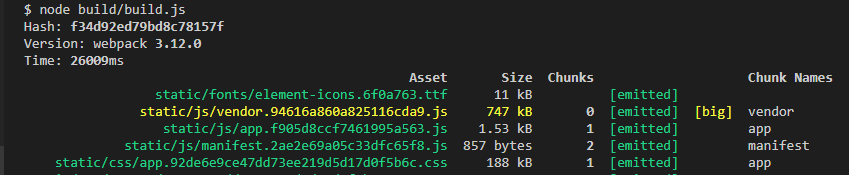
全部引入:
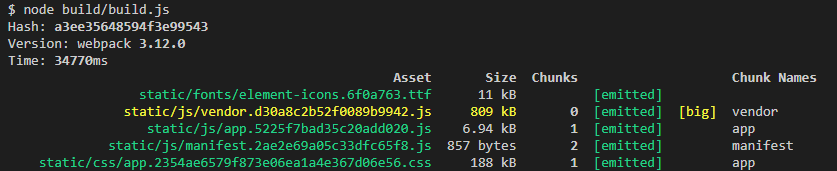
按需全部引入:
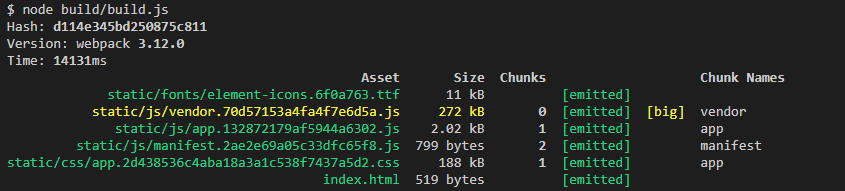
按需引入了5个组件....:
UI组件--element-ui--全部引入和按需引入的更多相关文章
- 微信小程序UI组件--Lin UI
地址:http://doc.mini.7yue.pro/ Lin UI 是基于 微信小程序原生语法 实现的组件库
- vue项目中引入mint-ui的方式(全部引入与按需引入)
参考哦 https://blog.csdn.net/qq_36742720/article/details/83620584 https://jingyan.baidu.com/article/c1a ...
- Element UI——本地引入iconfont不显示
前言 前面因为本地引入Element UI导致了iconfont不显示,所以只好再去Element UI官网去扒下iconfot 步骤 进入官网 组件 | Element UI F12进入控制台,找到 ...
- uni-app开发微信小程序引入UI组件库(Vant-weapp)步骤
uni-app开发微信小程序引入UI组件库(Vant-weapp)步骤 这里以vant-weapp为例 uni-app官方文档介绍引入组件的方法 1. 新建相关目录 根目录下创建 wxcomponen ...
- vue按需引入Element UI的方法
在我们的实际项目开发中,多数是采用按需引入的模式来进行开发的,那么具体应该如何操作呢,可能会有许多新人傻傻分不清楚,具体将在下文讲到. 首先我们先vue create demo创建一个项目出来此时我们 ...
- vue配合UI组件
bootstrap 创建项目 首先使用脚手架搭出项目基本框架,具体方法可以参考前面的文章. 1,执行命令创建项目:vue init webpack-simple vue-bootstrap 2,下载相 ...
- 有关常用的UI组件
前段时间想看看大家都用什么UI组件,下面是在网上搜集的,记录在这里方便自己使用和其他小伙伴使用 1:WeUI 小程序–使用教程 https://weui.io/ 官方介绍:WeUI 是一套同微信原生视 ...
- vue.js相关UI组件收集
内容 UI组件 开发框架 实用库 服务端 辅助工具 应用实例 Demo示例 ###UI组件 element ★9689 - 饿了么出品的Vue2的web UI工具套件 Vux ★6927 - 基于Vu ...
- nuxt按需引入 element-UI、自定义主题色(终极按需引入)
首先你要知道 nuxt.js怎么引入第三方插件 : 不多BB. 一.按需引入element-UI 第一步:安装 babel-plugin-component: npm install babel-pl ...
随机推荐
- windows下复制文件报错“文件名对目标文件夹可能过长 。您可以缩短文件名并重试,或者......”
我将一个路径下文件夹复制到另一个路径下时,出现了报错,报错图片如下: 然后查资料发现: 1.文件名长度最大为255个英文字符,其中包括文件扩展名在内.一个汉字相当于两个英文字符.2.文件的全路径名长度 ...
- MySQL保留字 ERROR 1064 (42000)
在MySQL(5.7.18)数据库中建表 CREATE TABLE SA_ACT_ITEM ( ITEMID ) NOT NULL, REGION ), ACTIONID ), ITEMNAME ), ...
- 使用rsync在linux(客户端)拉取windows(服务端)数据
windows 服务端ip:172.18.18.70 Linux客服端ip: 172.18.54.11 1.windows服务端下载cwRsync Server , 地址:https://www.ba ...
- 用HTML5+原生js实现的推箱子游戏
<!DOCTYPE html> <html> <head> <meta charset="UTF-8"> <title> ...
- 2019春下载的sublime text都无法自动安装package control:解决办法
之前电脑的原因卸载了,于是重新安装sublime text3. 发现问题了.Package Control无法自动安装. 于是一通常用操作. 1.copy 安装码(你知道的)到control安装,失败 ...
- 寻找U2OS中表达的基因及其promoter并用于后续annotation
方法1.RNA-seq得到不同表达程度基因 方法2. 直接download U2OS_gene.csv https://cancer.sanger.ac.uk/cell_lines/download ...
- qemu到kvm的处理,再到vm的运行
1.QEMU创建虚拟机发起:kvm_ioctl(s, KVM_CREATE_VM, type); KVM中kvm_dev_ioctl判断参数->kvm_dev_ioctl_create_vm-& ...
- python基础_格式化输出(%用法和format用法)
目录 %用法 format用法 %用法 1.整数的输出 %o —— oct 八进制%d —— dec 十进制%x —— hex 十六进制 1 >>> print('%o' % 2 ...
- Java中的String为什么是不可变的? -- String源码分析
众所周知, 在Java中, String类是不可变的.那么到底什么是不可变的对象呢? 可以这样认为:如果一个对象,在它创建完成之后,不能再改变它的状态,那么这个对象就是不可变的.不能改变状态的意思是, ...
- 010 Editor Mac安装教程
010 Editor mac版是mac上一款非常强大的十六进制编辑器,可以帮助用户进行编辑十六进制和二进制,可选择自己需要的进制进行编辑,还可对任何的文件进行编辑:软件内置了强大的模块.脚本操作,只需 ...