
python 发送邮件短信封装
发送邮件
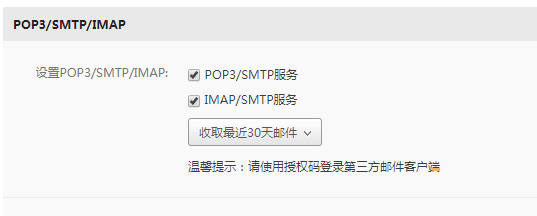
需要开启163的smtp服务
 import smtplib

 from email.mime.text import MIMEText

 class MailSender():

     def __init__(self,sender,recever,content,password,subject="",server="smtp.163.com",port=994):

         """

         :param sender: 发送方邮箱

         :param recever: 接收方邮箱 ,字符串存储 ','分割

         :param content: 发送正文

         :param password: 发送方授权码

         :param subject: 主题可以为空

         :param server: 邮件服务器地址

         :param port: 邮件服务器端口

         """

         self.subject = subject

         self.content = content

         self.sender = sender

         self.password = password

         self.server = server

         self.port = port

         self.message = MIMEText(content, "plain", "utf-8")

         self.message["Subject"] = subject

         self.message["From"] = sender

         self.message["To"] = recever

     def send(self):

         smtp = smtplib.SMTP_SSL("smtp.163.com", 465)

         smtp.login(sender, password)

         try:

             smtp.sendmail(sender, recever.split(","), self.message.as_string())

         except Exception as e:

             print(e)

         finally:

             if smtp:

                 smtp.close()

 if __name__ == '__main__':

     subject = "李青"

     content = """双眼失明从来不影响我"""

     sender = "1503760xxxx@163.com"

     # 解决554 DT:SPM错误,把自己的邮箱加入里面

     recever = "1503760xxxx@163.com,2533636371@qq.com,318750798@qq.com"

     password = "xxxx"

     mailsend = MailSender(sender=sender,recever=recever,password=password,content=content)

     mailsend.send()
发送手机验证码
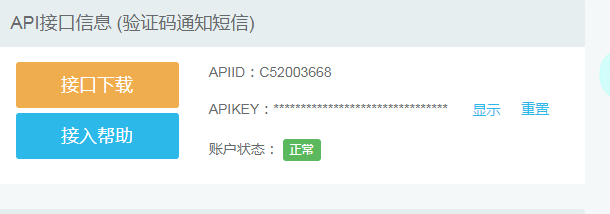
需要在https://user.ihuyi.com/index.html注册,使用APIID和APIKEY发送
 import requests #pip install requests

 url = "http://106.ihuyi.com/webservice/sms.php?method=Submit" #来自于文档

 #APIID

 account = ""

 #APIkey

 password = ""

 mobile = "1503760xxxxx" # 接收手机号

 content = "您的验证码是:135279。请不要把验证码泄露给其他人。"

 headers = {

     "Content-type": "application/x-www-form-urlencoded",

     "Accept": "text/plain"

 }

 #构建发送参数

 data = {

     "account": account,

     "password": password,

     "mobile": mobile,

     "content": content,

 }

 #开始发送

 response = requests.post(url,headers = headers,data=data)

     #url 请求接口路由

     #headers 请求头部

     #data 请求的内容

 print(response.content.decode())
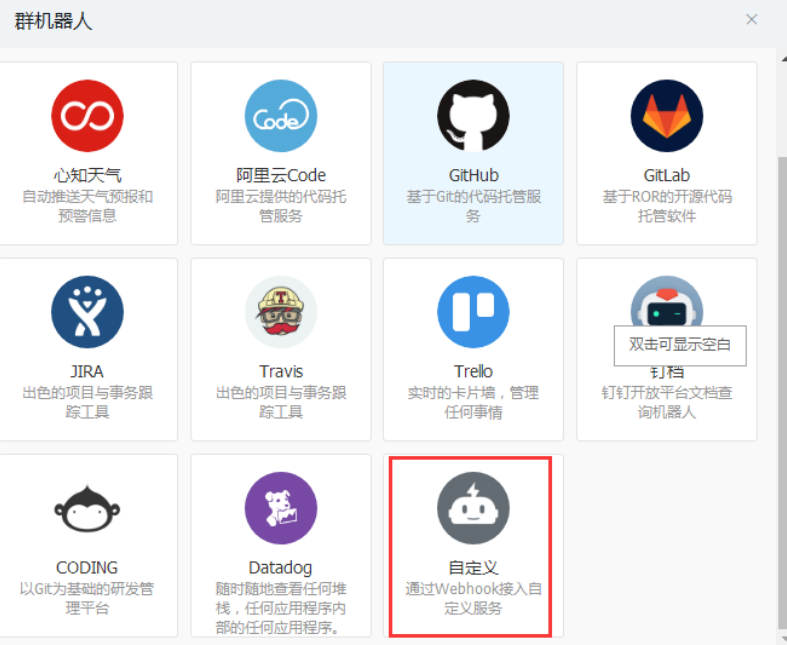
钉钉发送群机器人发送,DING_URL为webhook
 import random

 # 随机生成验证码

 def random_code(len=4):

     string = "".join([str(i) for i in range(0,10)])+"".join([chr(i)+chr(i).lower() for i in range(65,90)])

     return "".join([random.choice(string) for i in range(len)])

 import json

 import requests

 # to 接收方

 def sendDing(content,to=""):

     DING_URL = """https://oapi.dingtalk.com/robot/send?access_token=90b5894a1615f70278806be3dd9ce6cd7e959bc1093df9a3b2845e22ede24279"""

     headers = {

         "Content-Type": "application/json",

         "Charset": "utf-8"

     }

     requests_data = {

         "msgtype": "text",

         "text": {

             "content": content

         },

         "at": {

             "atMobiles": [

             ],

             "isAtAll": True

         }

     }

     if to:

         requests_data["at"]["atMobiles"].append(to)

         requests_data["at"]["isAtAll"] = False

     else:

         requests_data["at"]["atMobiles"].clear()

         requests_data["at"]["isAtAll"] = True

     sendData = json.dumps(requests_data)

     response = requests.post(url=DING_URL, headers=headers, data=sendData)

     content = response.json()

     return content

 if __name__ == '__main__':

     print(random_code())
python 发送邮件短信封装的更多相关文章
- Python发送短信提醒
Python发送短信可借助腾讯云平台提供的短信服务 发送短信需要的及格参数: 1.SDK_AppID和SDK_Key 2.签名: 3.模板ID 下面贴出源码DEMO: from qcloudsms_p ...
- 使用python进行短信轰炸
本文作者:i春秋作家——Hacker1ee 大家好,我是1ee(因为在作家群,就不加Hacker这个前缀了,怕被大佬打..) 刚加入i春秋作家组希望大家多多关照,也欢迎大家找我交流 今天我来讲讲我最近 ...
- python发送短信和发送邮件
先注册好 发短信脚本内容 #接口类型:互亿无线触发短信接口,支持发送验证码短信.订单通知短信等. #账户注册:请通过该地址开通账户http://sms.ihuyi.com/register.html ...
- 使用python实现短信PDU编码
前几天入手一个3G模块,便倒腾了一下.需要发送中英文混合短信,所以采用PDU模式(不了解google ^_^). 最大问题当然就是拼接PDU编码(python这么强大,说不定有模块),果不其然找到一个 ...
- DAY3 python群发短信
手机轰炸,burpsuit 抓取注册页面输入的手机号,然后每点击一次forword ,都开开始放行,发短信.也可以发到repeat 里面进行 ,重复发送短信. import requests impo ...
- python发送短信验证码
业务: 手机端点击发送验证码,请求发送到python端,由python调用第三方平台(我们使用的是榛子云短信http://smsow.zhenzikj.com)的短信接口,生成验证码并发送. SDK下 ...
- python twilio 短信群发 知识留存
1. win7 32位系统,傻瓜安装Anaconda2(python 2.7) 2. 打开cmd, 输入命令pip install twilio,在线安装twilio 3. 打开Anaconda2的S ...
- 使用 Python 发送短信?
上回食行生鲜签到,我们说到怎么把签到结果发出来,于是就找到了 Twilio. Twilio 是一个位于加利福尼亚的云通信(PaaS)公司,致力于为开发者提供通讯模块的 API.由于 Twilio 为试 ...
- ThreadPoolTaskExecutor异步的处理报警发送邮件短信比较耗时的东东
package com.elong.ihotel.util; import org.springframework.beans.factory.DisposableBean; import org.s ...
随机推荐
- layui相关用法总结
1.关闭当前弹出层 parent.layer.close(parent.layer.getFrameIndex(window.name));
- activeMQ消息队列安装配置
1. 下载 到官网下载最新版本,有windows版本和linux版本的. http://activemq.apache.org/download.html 2. windows下部署 Activ ...
- 【JZOJ3337】wyl8899的TLE
description wyl8899今天也很刻苦的在做老师布置下来的题目! 这一天老师布置的题目是这样的: 给出两个仅含小写字母的字符串A和B,输出最大的k,使得A[1..k]是B的子串. A和B的 ...
- SCOI2015
这周各种头疼,一直睡觉+发呆,啥子都没干. 就补一下之前的东西. d1t1小凸玩矩阵 传送门 一开始脑子抽写了最小费用最大流,不知道自己怎么想的. 第k大最小,明显的二分,又是二分图,二分第k大值,把 ...
- System.Web.Mvc.ModelValidationResult.cs
ylbtech-System.Web.Mvc.ModelValidationResult.cs 1.程序集 System.Web.Mvc, Version=5.2.3.0, Culture=neutr ...
- 北京信息科技大学校赛 题解 | AK记录贴
比赛链接:https://ac.nowcoder.com/acm/contest/940#question 花了一天时间全部解决,题目不难,全是基础题+模板题. A - kotori和糖果 链接:ht ...
- 运行第一个python程序,python 变量,常量,注释
一.运行第一个python程序: print('Hello,world') 保存为.py文件 在cmd窗口: python3x:python py文件路径 回车 python2x:python p ...
- My solutions to the exercises in "The Boost C++ Libraries"
I like books with excercises, but I also want solutions to see if I got it right. When working throu ...
- INI文件读写类
public class INIClass { public string inipath; [DllImport("kernel32")] private static exte ...
- 如何做系列(2)- XML转义字符
< < 小于号 > > 大于号 & & 和 ' ' 单引号 " " 双引号 也可以使用<![CDATA[ ]]> ...