
OpenCASCADE(一) VS2017+OpenCASCADE+MFC 下载配置安装运行单文档程序画个基本图形
原文作者:aircraft
原文链接:https://www.cnblogs.com/DOMLX/p/12368154.html
一.下载OpenCASCADE
官网下载是: http://www.opencascade.org/getocc/download/loadocc/
我的百度云已经下载好的是:
链接:https://pan.baidu.com/s/1D-fw8vspKTOZ8GmAGBSVGw
提取码:mzp3
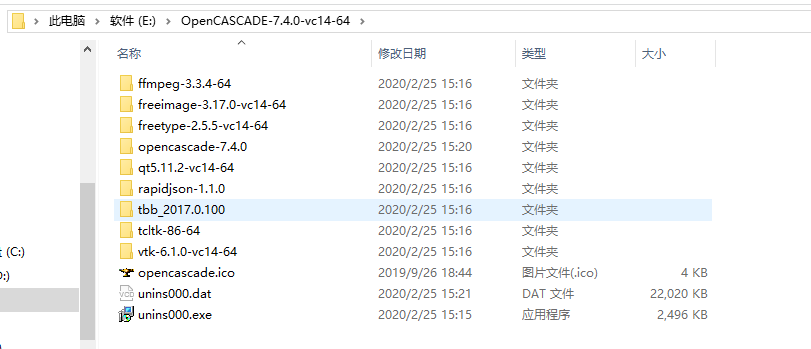
下载后运行完毕就是这样:
二.VS2017 MFC单文档配置OpenCASCADE 环境
先将每个文件夹里的bin文件夹都添加到系统的环境变量里
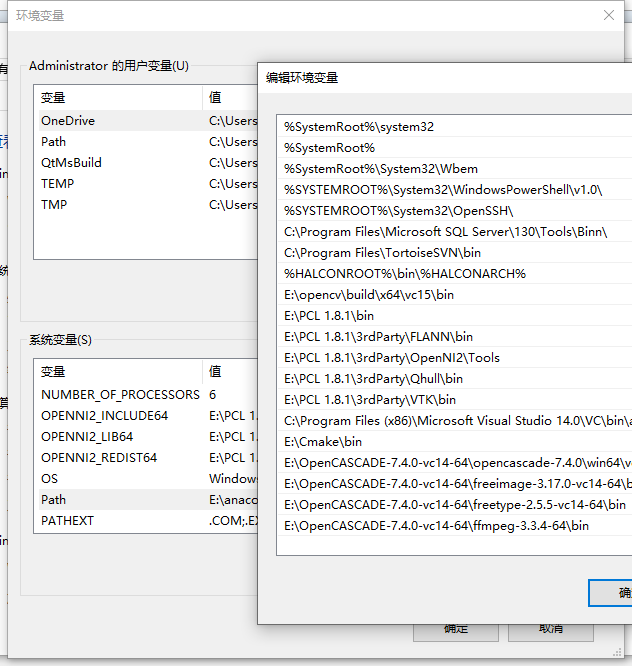
然后在将bin文件夹内的dll文件全部复制一份放在C:\Windows\SysWOW64里(注意我这里是64位的)你们32就放32里
在VS2017中创建一个单文档MFC项目,我的命名是OCCmfc
然后在项目属性里:
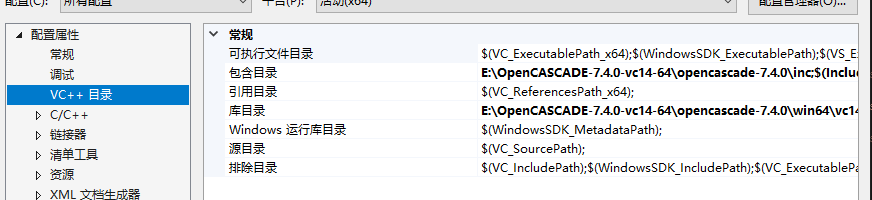
将你们自己路径下的!!包含目录,和库目录都添加上去(看图!!)
我的包含目录是:E:\OpenCASCADE-7.4.0-vc14-64\opencascade-7.4.0\inc
我的库目录是:E:\OpenCASCADE-7.4.0-vc14-64\opencascade-7.4.0\win64\vc14\lib
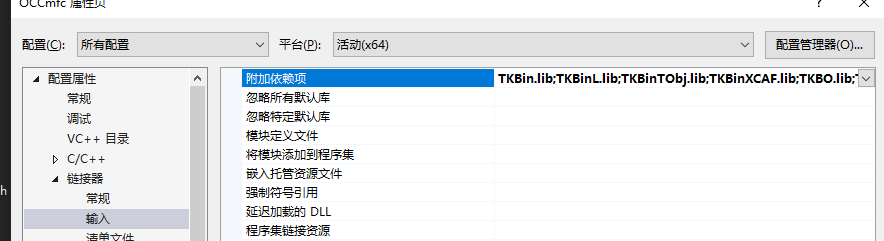
然后在连接器-》输入-》附加依赖项里添加下面这些Lib文件名:
TKBin.lib

TKBinL.lib

TKBinTObj.lib

TKBinXCAF.lib

TKBO.lib

TKBool.lib

TKBRep.lib

TKCAF.lib

TKCDF.lib

TKD3DHost.lib

TKDCAF.lib

TKDFBrowser.lib

TKDraw.lib

TKernel.lib

TKFeat.lib

TKFillet.lib

TKG2d.lib

TKG3d.lib

TKGeomAlgo.lib

TKGeomBase.lib

TKHLR.lib

TKIGES.lib

TKIVtk.lib

TKIVtkDraw.lib

TKLCAF.lib

TKMath.lib

TKMesh.lib

TKMeshVS.lib

TKOffset.lib

TKOpenGl.lib

TKPrim.lib

TKQADraw.lib

TKRWMesh.lib

TKService.lib

TKShapeView.lib

TKShHealing.lib

TKStd.lib

TKStdL.lib

TKSTEP.lib

TKSTEP209.lib

TKSTEPAttr.lib

TKSTEPBase.lib

TKSTL.lib

TKTInspector.lib

TKTInspectorAPI.lib

TKTObj.lib

TKTObjDRAW.lib

TKToolsDraw.lib

TKTopAlgo.lib

TKTopTest.lib

TKTreeModel.lib

TKV3d.lib

TKVCAF.lib

TKView.lib

TKViewerTest.lib

TKVInspector.lib

TKVRML.lib

TKXCAF.lib

TKXDEDRAW.lib

TKXDEIGES.lib

TKXDESTEP.lib

TKXMesh.lib

TKXml.lib

TKXmlL.lib

TKXmlTObj.lib

TKXmlXCAF.lib

TKXSBase.lib

TKXSDRAW.lib
如果你们版本跟我的不一样 那么可以在cmd里打开到这个文件夹然后输入命令 dir /b>libName.txt
然后打开这个文件,复制lib的名字就行了
然后打开项目后在stdafx.h中添加这些要用到的头文件:
#include <BRepTools.hxx>

#include <Standard_DefineHandle.hxx>

#include <DsgPrs_LengthPresentation.hxx>

#include <GCPnts_TangentialDeflection.hxx>

#include <Geom_Axis2Placement.hxx>

#include <Geom_CartesianPoint.hxx>

#include <Geom_Line.hxx>

#include <Geom_Surface.hxx>

#include <BRepAdaptor_Surface.hxx>

#include <GeomAbs_CurveType.hxx>

#include <GeomAdaptor_Curve.hxx>

#include <GeomTools_Curve2dSet.hxx>

#include <gp_Vec.hxx>

#include <Graphic3d_NameOfMaterial.hxx>

#include <MMgt_TShared.hxx>

#include <OSD_Environment.hxx>

#include <Precision.hxx>

#include <Prs3d_IsoAspect.hxx>

#include <Prs3d_LineAspect.hxx>

#include <Prs3d_Projector.hxx>

#include <Prs3d_Text.hxx>

#include <Quantity_Factor.hxx>

#include <Quantity_Length.hxx>

#include <Quantity_NameOfColor.hxx>

#include <Quantity_PhysicalQuantity.hxx>

#include <Quantity_PlaneAngle.hxx>

#include <Quantity_TypeOfColor.hxx>

#include <SelectMgr_EntityOwner.hxx>

#include <SelectMgr_SelectableObject.hxx>

#include <SelectMgr_Selection.hxx>

#include <SelectMgr_SelectionManager.hxx>

#include <SelectMgr_ListOfFilter.hxx>

#include <SelectMgr_Filter.hxx>

#include <StdSelect_EdgeFilter.hxx>

#include <StdSelect_ShapeTypeFilter.hxx>

#include <Standard_Boolean.hxx>

#include <Standard_CString.hxx>

#include <Standard_ErrorHandler.hxx>

#include <Standard_Integer.hxx>

#include <Standard_IStream.hxx>

#include <Standard_Macro.hxx>

#include <Standard_NotImplemented.hxx>

#include <Standard_OStream.hxx>

#include <Standard_Real.hxx>

#include <StdPrs_Curve.hxx>

#include <StdPrs_Point.hxx>

#include <StdPrs_PoleCurve.hxx>

#include <TCollection_AsciiString.hxx>

#include <TColgp_Array1OfPnt2d.hxx>

#include <TColgp_HArray1OfPnt2d.hxx>

#include <TCollection_AsciiString.hxx>

#include <TColStd_HSequenceOfTransient.hxx>

#include <TColStd_MapIteratorOfMapOfTransient.hxx>

#include <TColStd_MapOfTransient.hxx>

#include <TopExp_Explorer.hxx>

#include <TopoDS.hxx>

#include <TopoDS_Compound.hxx>

#include <TopoDS_Shape.hxx>

#include <TopoDS_Solid.hxx>

#include <TopoDS_Vertex.hxx>

#include <TopExp.hxx>

#include <TopTools_HSequenceOfShape.hxx>

#include <UnitsAPI.hxx>

#include <V3d_View.hxx>

#include <V3d_Viewer.hxx>

#include <WNT_Window.hxx>

#include <Prs3d_PointAspect.hxx>

#include <AIS_Point.hxx>

#include <AIS_InteractiveContext.hxx>

#include <AIS_Shape.hxx>

#include <BRep_Tool.hxx>

#include <BRepAlgoAPI_Fuse.hxx>

#include <BRepBuilderAPI_MakeEdge.hxx>

#include <BRepBuilderAPI_MakeFace.hxx>

#include <BRepBuilderAPI_MakeWire.hxx>

#include <BRepBuilderAPI_MakeVertex.hxx>

#include <BRepBuilderAPI_Transform.hxx>

#include <BRepPrimAPI_MakeCone.hxx>

#include <BRepPrimAPI_MakeRevol.hxx>

#include <BRepFilletAPI_MakeFillet.hxx>

#include <BRepBuilderAPI_Copy.hxx>

#include <BRepBuilderAPI_MakePolygon.hxx>

#include <BRepLib.hxx>

#include <BRepOffsetAPI_MakeThickSolid.hxx>

#include <BRepOffsetAPI_ThruSections.hxx>

#include <BRepPrimAPI_MakeCylinder.hxx>

#include <BRepPrimAPI_MakePrism.hxx>

#include <BRepPrimAPI_MakeTorus.hxx>

#include <BRepAlgoAPI_Section.hxx>

#include <BRepPrimAPI_MakeSphere.hxx>

#include <BRepFeat_SplitShape.hxx>

#include <TColgp_HArray1OfPnt.hxx>

#include <GeomAPI_Interpolate.hxx>

#include <GC_MakeArcOfCircle.hxx>

#include <GC_MakeSegment.hxx>

#include <GC_MakeCircle.hxx>

#include <GCE2d_MakeSegment.hxx>

#include <gp.hxx>

#include <gp_Ax1.hxx>

#include <gp_Ax2.hxx>

#include <gp_Ax2d.hxx>

#include <gp_Dir.hxx>

#include <gp_Dir2d.hxx>

#include <gp_Pnt.hxx>

#include <gp_Pnt2d.hxx>

#include <gp_Trsf.hxx>

#include <gp_Vec.hxx>

#include <Geom_CylindricalSurface.hxx>

#include <Geom_Plane.hxx>

#include <Geom_Surface.hxx>

#include <Geom_TrimmedCurve.hxx>

#include <Geom2d_Ellipse.hxx>

#include <Geom2d_TrimmedCurve.hxx>

#include <TopExp_Explorer.hxx>

#include <TopoDS.hxx>

#include <TopoDS_Edge.hxx>

#include <TopoDS_Face.hxx>

#include <TopoDS_Wire.hxx>

#include <TopoDS_Shape.hxx>

#include <TopoDS_Compound.hxx>

#include <GCPnts_AbscissaPoint.hxx>

#include <BRepAdaptor_Curve.hxx>

#include <GeomLib.hxx>

#include <GeomConvert_CompCurveToBSplineCurve.hxx>

#include <TopTools_ListOfShape.hxx>

#include <TopTools_ListIteratorOfListOfShape.hxx>

#include <TopTools_DataMapOfShapeInteger.hxx>

#include <TopTools_DataMapOfShapeReal.hxx>

#include <TopTools_IndexedDataMapOfShapeAddress.hxx>

#include <V3d_PositionalLight.hxx>

#include <V3d_DirectionalLight.hxx>

#include <V3d_AmbientLight.hxx>

#include <IGESControl_Controller.hxx>

#include <IGESControl_Writer.hxx>

#include <Interface_Static.hxx>

#include <OpenGl_GraphicDriver.hxx>

#include <Graphic3d_GraphicDriver.hxx>
然后在OCCmfc.h文件的类里添加:
Handle(Graphic3d_GraphicDriver) m_GraphicDriver;

Handle(Graphic3d_GraphicDriver) GetGraphicDriver() { return m_GraphicDriver; }
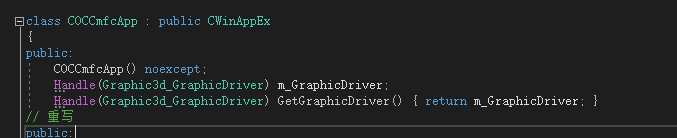
和头文件
#include <Standard_Macro.hxx>
#include <Graphic3d_GraphicDriver.hxx>
在OCCmfc.cpp的构造函数里加上:
try {

        Handle(Aspect_DisplayConnection) aDisplayConnection;

        m_GraphicDriver = new OpenGl_GraphicDriver(aDisplayConnection);

    }

    catch (Standard_Failure) {

        AfxMessageBox(L"(Error Ocured in Initializing the Opencascade graphic variable.)");

    }
注意!!!如果new字符报错,那么是因为opencascade对new进行了重载,我们将每个new报错文件顶部的:
#ifdef _DEBUG

#define new DEBUG_NEW

#endif
这几行代码注释就行了
接着在OCCmfcDoc.h文件类里添加:
Handle(AIS_InteractiveContext) myAISContext;

Handle(V3d_Viewer) myViewer;

Handle(V3d_Viewer) GetViewer(void) {return myViewer;}

接着去实现文档OCCmfcDoc.cpp中类的构造函数中添加:
Handle(Graphic3d_GraphicDriver) theGraphicDriver = ((CmOCCTApp*)AfxGetApp())->GetGraphicDriver();

    myViewer = new V3d_Viewer(theGraphicDriver);

    myViewer->SetDefaultLights();

    myViewer->SetLightOn();

    myAISContext = new AIS_InteractiveContext(myViewer);

    myAISContext->SetDisplayMode(AIS_Shaded,true);

    myAISContext->SetAutomaticHilight(Standard_False);
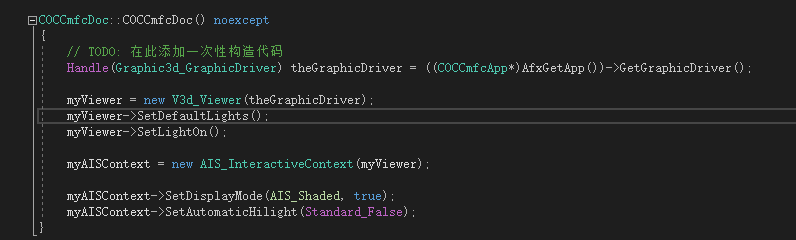
然后去去OCCmfcView.h定义类里添加:
Handle(V3d_View) myView;
和添加要重写的这个函数:
virtual void OnInitialUpdate();
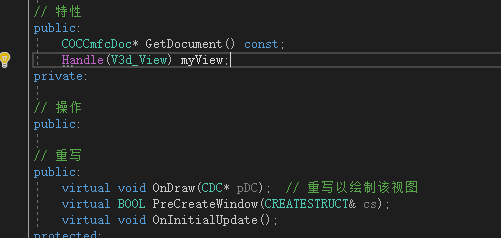
然后去OCCmfcView.cpp文件里添加下面这个实现函数(随便添加在哪里):
void COCCmfcView::OnInitialUpdate()

{

    CView::OnInitialUpdate();

    myView = GetDocument()->GetViewer()->CreateView();

    myView->SetShadingModel(V3d_GOURAUD);

    Handle(Graphic3d_GraphicDriver) theGraphicDriver = ((COCCmfcApp*)AfxGetApp())->GetGraphicDriver();

    Aspect_Handle aWindowHandle = (Aspect_Handle)GetSafeHwnd();

    Handle(WNT_Window) aWntWindow = new WNT_Window(GetSafeHwnd());

    myView->SetWindow(aWntWindow);

    if (!aWntWindow->IsMapped()) {

        aWntWindow->Map();

    }

    Standard_Integer w = ;

    Standard_Integer h = ;

    aWntWindow->Size(w, h);

    ::PostMessage(GetSafeHwnd(), WM_SIZE, SIZE_RESTORED, w + h * );

    myView->FitAll();

    myView->ZBufferTriedronSetup(Quantity_NOC_RED, Quantity_NOC_GREEN, Quantity_NOC_BLUE1, 0.8, 0.05, );

    myView->TriedronDisplay(Aspect_TOTP_LEFT_LOWER, Quantity_NOC_WHITE, 0.2, V3d_ZBUFFER);

}
然后在这个文件中的OnDraw()函数中添加:
myView->MustBeResized();

myView->Update();
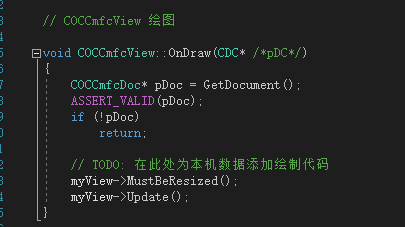
编译运行:
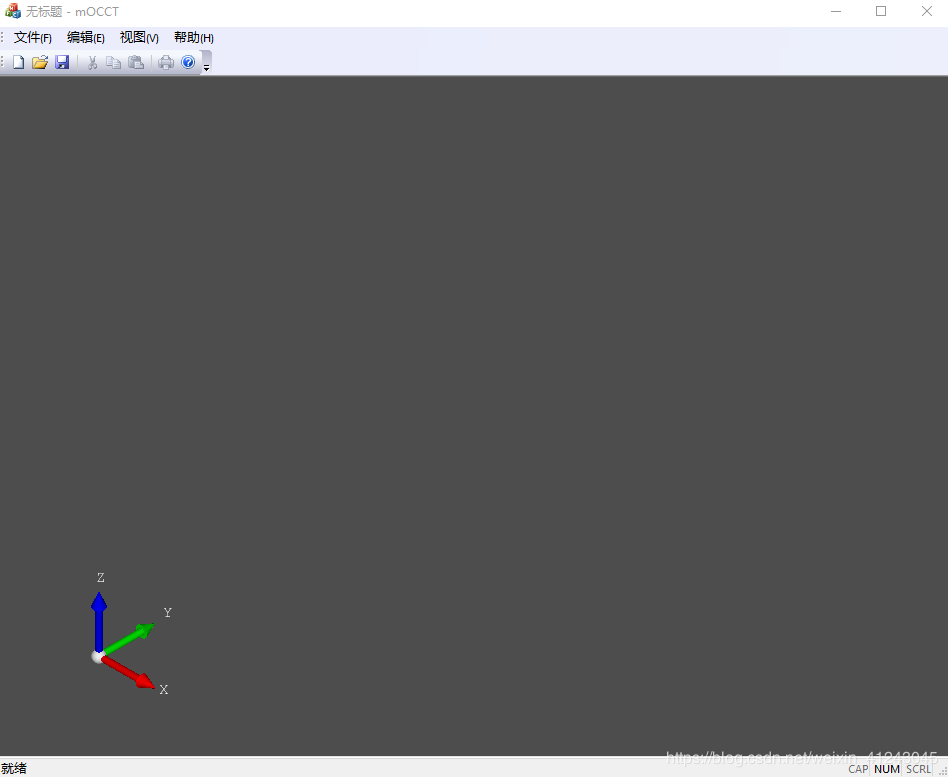
三.绘制图形
在OCCmfcDoc.h中添加
void DrawSphere(double Radius);
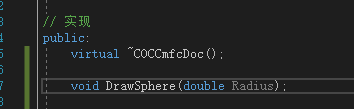
在OCCmfcDoc.cpp中添加函数(随便放哪):
void COCCmfcDoc::DrawSphere(double Radius)

{

    BRepPrimAPI_MakeSphere mkSphere(Radius);

    TopoDS_Shape Sphere = mkSphere.Shape();

    Handle(AIS_Shape) myAISSphere = new AIS_Shape(Sphere);

    myAISContext->Display(myAISSphere, Standard_False);

    CMDIFrameWnd *pFrame = (CMDIFrameWnd*)AfxGetApp()->m_pMainWnd;

    CMDIChildWnd *pChild = (CMDIChildWnd *)pFrame->GetActiveFrame();

    COCCmfcView *pView = (COCCmfcView *)pChild->GetActiveView();

    pView->FitAll();

}
然后在OCCmfcView.h中添加:
void FitAll() { if (!myView.IsNull()) myView->FitAll(); myView->ZFitAll(); };

最后在OCCmfcView.cpp文件里的OnDraw()函数里添加:
pDoc->DrawSphere();

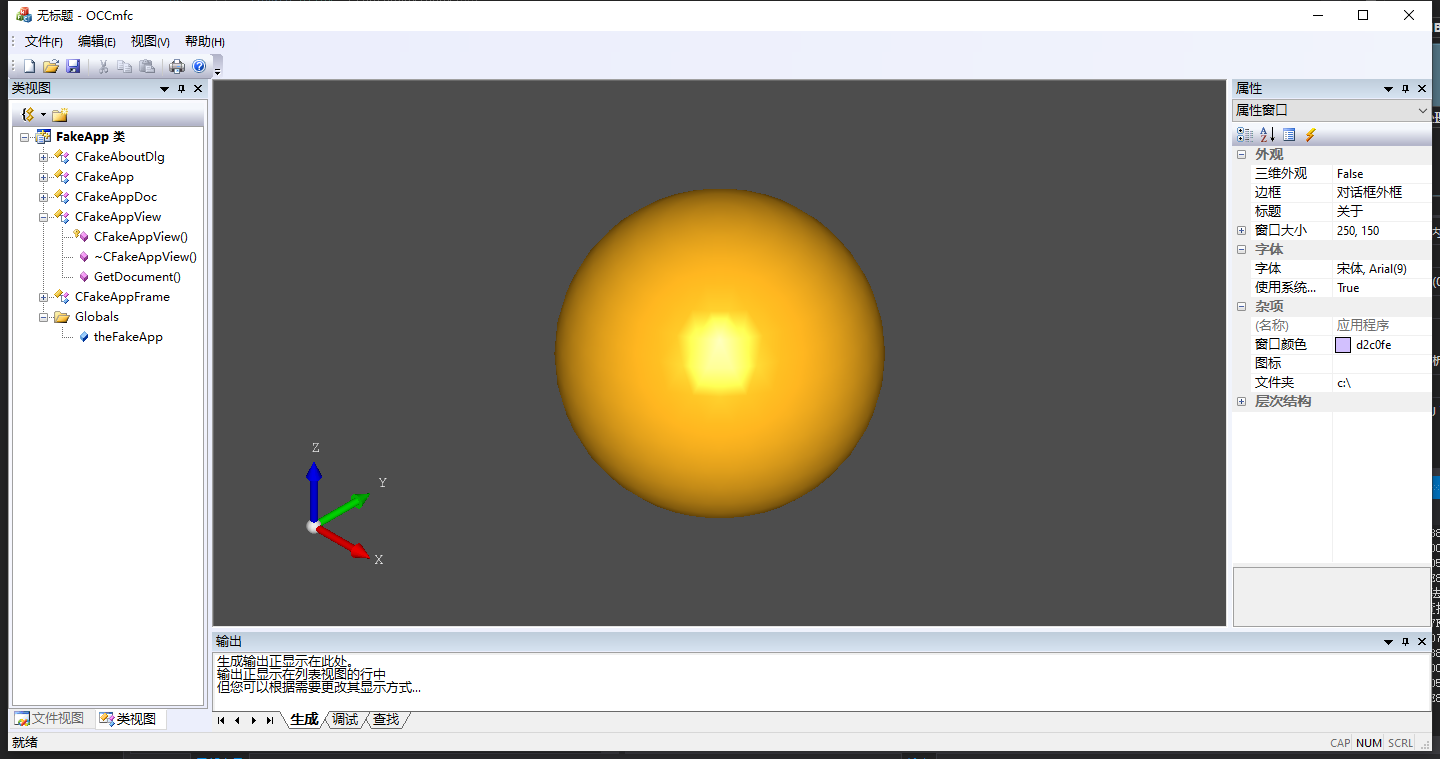
然后运行如下所示 画了一个图形出来:
完整代码项目可以关注公众号发送添加小编微信发送文章标题获取。
若有兴趣交流分享技术,可关注本人公众号,里面会不定期的分享各种编程教程,和共享源码,诸如研究分享关于c/c++,python,前端,后端,opencv,halcon,opengl,机器学习深度学习之类有关于基础编程,图像处理和机器视觉开发的知识

OpenCASCADE(一) VS2017+OpenCASCADE+MFC 下载配置安装运行单文档程序画个基本图形的更多相关文章
- MFC学习(七) 单文档程序
1 MFC单文档程序的主要类 (1)文档类(Document) 即应用程序处理的数据对象,文档一般从 MFC 中 CDocument 中派生.CDocument 类用于相应数据文件的读取以及存储 Cv ...
- MFC单文档程序结构
MFC单文档程序结构三方面: Doc MainFrame View
- VC-基础:MFC单文档程序架构解析
MFC单文档程序架构解析 这里我以科院杨老师的单文档程序来分析一下MFC单文档的程序架构,纯属个人见解,不当之处烦请指教! 首先我们了解到的是 图(一) theApp 是唯一一个在程序形成的时候就存在 ...
- MFC单文档程序架构解析
MFC单文档程序架构解析 MFC单文档程序架构解析 这里我以科院杨老师的单文档程序来分析一下MFC单文档的程序架构,纯属个人见解,不当之处烦请指教! 首先我们了解到的是 图(一) theApp 是唯一 ...
- MFC:“Debug Assertion Failed!” ——自动生成的单文档程序项目编译运行就有错误
今天照着孙鑫老师的VC++教程学习文件的操作,VS2010,单文档应用程序,项目文件命名为File,也就有了自动生成的CFileDoc.CFileView等类,一进去就编译运行(就是最初自动生成的项目 ...
- MFC单文档程序添加HTML帮助支持
1.在App类 构造函数中添加 EnableHtmlHelp(); 2.在Frame类中,添加消息影射: ON_COMMAND(ID_HELP_FINDER, CFrameWnd::OnHelpFin ...
- MFC单文档
一.创建并运行MFC单文档程序 1.创建单文档程序 这里使用的是VS2017.首先,打开VS2017,选择文件->新建->项目,然后选择Visual C++ -> MFC /ATL& ...
- MFC设置单文档保存格式以及标题
在使用MFC编写单文档程序时,有时候需要将编辑的内容序列化为文件,使该文件可以直接以自己的程序打开,这时候需要在保存时将文件后缀改为我们想要的格式. 步骤 打开String Table,找到IDR_M ...
- VS2010/MFC编程入门之四十(文档、视图和框架:各对象之间的关系)
前面一节中鸡啄米进行了文档.视图和框架的概述,本节主要讲解文档.视图.框架结构中各对象之间的关系. 各个对象之间的关系 文档.视图.框架结构中涉及到的对象主要有:应用程序对象.文档模板对象.文档对象. ...
随机推荐
- [校内训练20_01_22]ABC
1.给出序列A,求序列B,使得bi|ai,lcm(b1,b2,...,bn)=lcm(a1,a2,...,an)且字典序最小. 可以发现,对于某个质数p,它有一个最大的次数k,将pk放在尽可能靠后且能 ...
- CF572_Div2_D2
题意 http://codeforces.com/contest/1189/problem/D2 思考 显然地,如果出现度数为2且两条出边边权不相同的情况,是无法构造合法方案的. 下面考虑缩边后的树, ...
- 自定义BeanDefinitionRegistryPostProcessor
自定义BeanDefinitionRegistryPostProcessor 概述 BeanDefinitionRegistryPostProcessor继承自BeanFactoryPostProce ...
- http--->http缓存机制系统梳理
http缓存 HTTP请求的过程 从在浏览器地址栏敲入域名-DNS解析-实际IP-(中间可能多个代理服务器分发)- 源服务器,请求抵达源服务器后,在服务器上找到请求的资源,再通过代理服务器一层层的返回 ...
- 牛客网在线编程_有序矩阵中第K小的元素
Leetcode378原题,所以一样没有数据范围...( log(max-min)二分答案,然后NlogN二分每一行求出小于答案的元素个数,为了保证二分的答案在矩阵中,二分写的要和平常不太一样,最后输 ...
- (.text+0x18): undefined reference to `main'
在将VS中的程序移植到ubuntu中出现的一个问题,主要原因是在vs中默认的主函数写成int _tmain(), 而在gcc编译时要找的是int main().改过来就可以了.
- 百度MP3音乐API接口及应用
当你在百度去搜索一首歌时,你会发现有种更简单的方法. http://box.zhangmen.baidu.com/x?op=12&count=1&title=歌名$$作者$$$$ 例如 ...
- SpringMVC基础(二)_文件上传、异常处理、拦截器
实现文件上传 实现文件上传,需要借助以下两个第三方 jar 包对上传的二进制文件进行解析: commons-fileupload commons-io form表单的 enctype 取值必须为:mu ...
- 时序数据库 Apache-IoTDB 源码解析之文件索引块(五)
上一章聊到 TsFile 的文件组成,以及数据块的详细介绍.详情请见: 时序数据库 Apache-IoTDB 源码解析之文件数据块(四) 打一波广告,欢迎大家访问IoTDB 仓库,求一波 Star. ...
- 如何利用开源解码项目开发js视频解码的web应用 系列
介绍web上开发视频业务相关程序的技术演变历程 https://www.cnblogs.com/maoliangwu/articles/12046495.html 介绍ffmpeg asm.js we ...