
MapReduce第一个项目 WordCount
参考自林子雨大数据教学: http://dblab.xmu.edu.cn/blog/hadoop-build-project-using-eclipse/
- 创建一个文件夹;放入一个文本文件;填入数据
导入数据如下
10181 1000481 2010-04-04 16:54:31

20001 1001597 2010-04-07 15:07:52

20001 1001560 2010-04-07 15:08:27

20042 1001368 2010-04-08 08:20:30

20067 1002061 2010-04-08 16:45:33

20056 1003289 2010-04-12 10:50:55

20056 1003290 2010-04-12 11:57:35

20056 1003292 2010-04-12 12:05:29

20054 1002420 2010-04-14 15:24:12

20055 1001679 2010-04-14 19:46:04

20054 1010675 2010-04-14 15:23:53

20054 1002429 2010-04-14 17:52:45

20076 1002427 2010-04-14 19:35:39

20054 1003326 2010-04-20 12:54:44

20056 1002420 2010-04-15 11:24:49

20064 1002422 2010-04-15 11:35:54

20056 1003066 2010-04-15 11:43:01

20056 1003055 2010-04-15 11:43:06

20056 1010183 2010-04-15 11:45:24

20056 1002422 2010-04-15 11:45:49

20056 1003100 2010-04-15 11:45:54

20056 1003094 2010-04-15 11:45:57

20056 1003064 2010-04-15 11:46:04

20056 1010178 2010-04-15 16:15:20

20076 1003101 2010-04-15 16:37:27

20076 1003103 2010-04-15 16:37:05

20076 1003100 2010-04-15 16:37:18

20076 1003066 2010-04-15 16:37:31

20054 1003103 2010-04-15 16:40:14

20054 1003100 2010-04-15 16:40:16
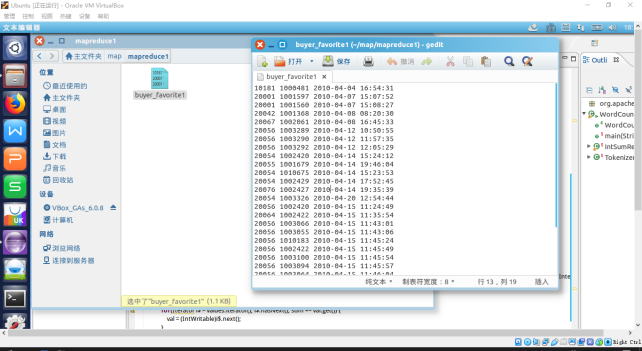
- 将linux的文件上传到HDFS/mymapreduce1/in的目录下


- 配置
将 release 中的 hadoop-eclipse-kepler-plugin-2.6.0.jar 复制到 Eclipse 安装目录的 plugins 文件夹中运行 eclipse -clean

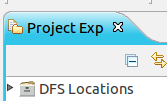
启动 Eclipse 后就可以在左侧的Project Explorer中看到 DFS Locations
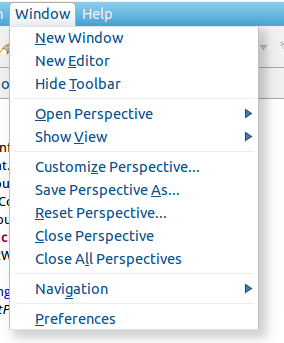
第一步:选择 Window 菜单下的 Preference。
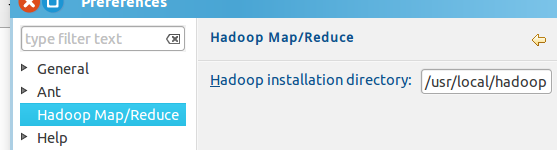
窗体的左侧会多出 Hadoop Map/Reduce 选项,点击此选项,选择 Hadoop 的安装目录
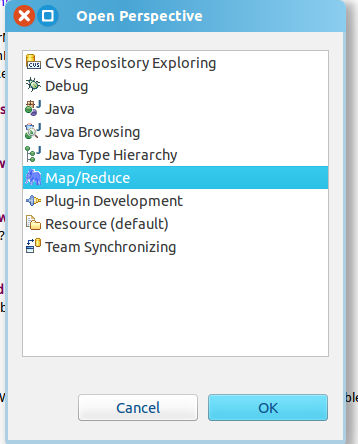
第二步:切换 Map/Reduce 开发视图,选择 Window 菜单下选择 Open Perspective -> Other(CentOS 是 Window -> Perspective -> Open Perspective -> Other),弹出一个窗体,从中选择 Map/Reduce 选项即可进行切换。
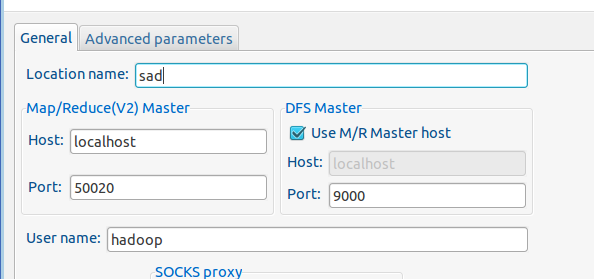
第三步:建立与 Hadoop 集群的连接,点击 Eclipse软件右下角的 Map/Reduce Locations 面板,在面板中单击右键,选择 New Hadoop Location。
Location name 随便起一个名字
- 运行测试代码WordCount
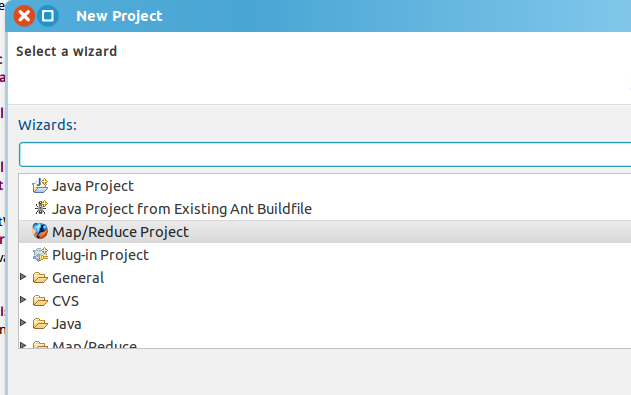
新建项目
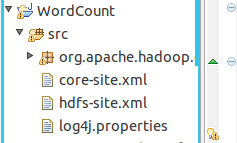
在src文件夹下将hadoop安装目录中的配置文件复制过来
core-site.xml hdfs-site.xml log4j.properties
右击项目刷新(refresh)出现以下文件
代码:创建Demo类
package org.apache.hadoop.examples;

import java.io.IOException;

import java.util.StringTokenizer;

import org.apache.hadoop.fs.Path;

import org.apache.hadoop.io.IntWritable;

import org.apache.hadoop.io.Text;

import org.apache.hadoop.mapreduce.Job;

import org.apache.hadoop.mapreduce.Mapper;

import org.apache.hadoop.mapreduce.Reducer;

import org.apache.hadoop.mapreduce.lib.input.FileInputFormat;

import org.apache.hadoop.mapreduce.lib.output.FileOutputFormat;

public class Demo {

public static void main(String[] args) throws IOException,ClassNotFoundException,InterruptedException {

Job job = Job.getInstance();

job.setJobName("WordCount");

job.setJarByClass(WordCount.class);

job.setMapperClass(doMapper.class);

job.setReducerClass(doReducer.class);

job.setOutputKeyClass(Text.class);

job.setOutputValueClass(IntWritable.class);

Path in = new Path("hdfs://localhost:9000/mymapreduce1/in/buyer_favorite1");

Path out = new Path("hdfs://localhost:9000/mymapreduce1/out");

FileInputFormat.addInputPath(job,in);

FileOutputFormat.setOutputPath(job,out);

System.exit(job.waitForCompletion(true)?0:1);

}

public static class doMapper extends Mapper<Object,Text,Text,IntWritable>{

public static final IntWritable one = new IntWritable(1);

public static Text word = new Text();

@Override

protected void map(Object key, Text value, Context context)

throws IOException,InterruptedException {

StringTokenizer tokenizer = new StringTokenizer(value.toString(),"  ");

word.set(tokenizer.nextToken());

context.write(word,one);

            }

}

public static class doReducer extends Reducer<Text,IntWritable,Text,IntWritable>

    {

private IntWritable result = new IntWritable();

@Override

protected void reduce(Text key,Iterable<IntWritable> values,Context context)

throws IOException,InterruptedException

    {

int sum = 0;

for (IntWritable value : values)

            {

sum += value.get();

            }

result.set(sum);

context.write(key,result);

        }

    }

}
运行截图:

MapReduce第一个项目 WordCount的更多相关文章
- hadoop笔记之MapReduce的应用案例(WordCount单词计数)
MapReduce的应用案例(WordCount单词计数) MapReduce的应用案例(WordCount单词计数) 1. WordCount单词计数 作用: 计算文件中出现每个单词的频数 输入结果 ...
- hadoop第一个例子WordCount
hadoop查看自己空间 http://127.0.0.1:50070/dfshealth.jsp import java.io.IOException; import java.util.Strin ...
- hadoop第一个程序WordCount
hadoop第一个程序WordCount package test; import org.apache.hadoop.mapreduce.Job; import java.io.IOExceptio ...
- 个人项目WordCount(C++/QT)
个人项目WordCount(C++/QT) GitHub项目地址:https://github.com/Nova-cjp/Word-Count 百度云链接:https://pan.baidu.com/ ...
- Surprise团队第一周项目总结
Surprise团队第一周项目总结 团队项目 基本内容 五子棋(Gobang)的开发与应用 利用Android Studio设计一款五子棋游戏,并丰富其内涵 预期目标 实现人人模式:2个用户可以在同一 ...
- [Asp.net MVC]Asp.net MVC5系列——第一个项目
目录 概述 创建第一个项目 添加控制器 总结 概述 本教程是个人一步一步学习的总结,希望能帮到正在进入ASP.Net MVC5方向的朋友,个人也是准备进入ASP.NET MVC5领域,虽然艰辛,但是乐 ...
- AndroidStudio第一个项目HelloWorld
实验内容 在Android Studio中创建项目 创建并启动Android模拟器 项目的编译和运行 实验要求 在安装好的AndroidStudio上建立第一个工程 创建并启动Android模拟器 编 ...
- 自我总结(六)---(学习j2ee+j2ee第一阶段项目)
自我完善的过程就是在不断的自我总结不断的改进. 学习了Struts2 Spring Hibernate. 十天前结束了这个课程.也考试了.这次考试老师说机试考的还不错.其实就是一个简单的用户登录,进行 ...
- Django 创建第一个项目(转)
转自(http://www.runoob.com/django/django-first-app.html) 前面写了不少python程序,由于之前都是作为工具用,所以命令行就足够了,最近写的测试用例 ...
随机推荐
- RT-Thread can - STM32F103ZET6
SDK版本v4.0.2 目前,RT-Thread Studio还不能够自定义添加can设备.下面介绍手动添加过程: 使用RT-Thread Studio创建一个简单工程 使用RT-Thread env ...
- Resnet——深度残差网络(一)
我们都知道随着神经网络深度的加深,训练过程中会很容易产生误差的积累,从而出现梯度爆炸和梯度消散的问题,这是由于随着网络层数的增多,在网络中反向传播的梯度会随着连乘变得不稳定(特别大或特别小),出现最多 ...
- SqlServer视图查询效率测试
一. 测试背景开发一个项目,数据库用的是sqlserver.帐号表数据有一两百万,不算大,也不算小.在考虑是否要使用视图,担心效率,百度了下资料,众说纷纭,好吧,实践是最好的证明,那么我们就来测试吧 ...
- HTML(多行)文本超过部分隐藏,末尾显示(...)
HTML(多行)文本超过部分隐藏,末尾显示(...) <!DOCTYPE html> <html> <head> <meta charset="ut ...
- MySQL优化、锁
1. MySQL优化-查看执行记录 MySQL 提供了一个 EXPLAIN 命令, 它可以对 SELECT 语句进行分析, 并输出 SELECT 执行的详细信息, 以供开发人员针对性优化. 使用ex ...
- c#日期时间段判断
select * from 表名 where (case when ISDATE(字段名)=1 then CONVERT(varchar(100),cast(字段名 as datetime),23) ...
- 吴裕雄--天生自然 R数据分析:2014年美国人时间使用调查(ATUS)饮食与健康模块文件分析
# libraries we'll need library(car) # for avplots library(tidyverse) # for general utility functions ...
- CentOS7防火墙设置常用命令
目录 开/关/重启防火墙 查看所有开启的端口号 CentOS7环境下防火墙常用命令 开/关/重启防火墙 查看防火墙状态 firewall-cmd --state 启动防火墙 systemctl sta ...
- 如何在IDEA中使用GitHub
第一步:在GitHub网站中注册自己的账号 地址:https://github.com/ 第二步:下载Git客户端 地址:https://git-scm.com/ 第三步:在GitBash中配置用户名 ...
- arguments.callee实现深拷贝
最近正在看一个腾讯课堂里面的学习视频中的js知识点,然后有一个深拷贝的题,于是就做了一下,使用arguments.callee实现深拷贝. <script type="text/jav ...