
androd hook acitivity 启动流程,替换启动的activity(Android Instrumentation)
前言:如果程序想要知道有activity启动,如果想要拦截activity,然后跳转到指定的activity怎么办?
我们看下ActivityThread 里面:
   private Activity performLaunchActivity(ActivityClientRecord r, Intent customIntent) {

        // System.out.println("##### [" + System.currentTimeMillis() + "] ActivityThread.performLaunchActivity(" + r + ")");

        ActivityInfo aInfo = r.activityInfo;

        if (r.packageInfo == null) {

            r.packageInfo = getPackageInfo(aInfo.applicationInfo, r.compatInfo,

                    Context.CONTEXT_INCLUDE_CODE);

        }

        ComponentName component = r.intent.getComponent();

        if (component == null) {

            component = r.intent.resolveActivity(

                mInitialApplication.getPackageManager());

            r.intent.setComponent(component);

        }

        if (r.activityInfo.targetActivity != null) {

            component = new ComponentName(r.activityInfo.packageName,

                    r.activityInfo.targetActivity);

        }

        ContextImpl appContext = createBaseContextForActivity(r);

        Activity activity = null;

        try {

            java.lang.ClassLoader cl = appContext.getClassLoader();

            activity = mInstrumentation.newActivity(

                    cl, component.getClassName(), r.intent);

            StrictMode.incrementExpectedActivityCount(activity.getClass());

            r.intent.setExtrasClassLoader(cl);

            r.intent.prepareToEnterProcess();

            if (r.state != null) {

                r.state.setClassLoader(cl);

            }

        } catch (Exception e) {

            if (!mInstrumentation.onException(activity, e)) {

                throw new RuntimeException(

                    "Unable to instantiate activity " + component

                    + ": " + e.toString(), e);

            }

        }

....

           if (activity != null) {

                CharSequence title = r.activityInfo.loadLabel(appContext.getPackageManager());

                Configuration config = new Configuration(mCompatConfiguration);

                if (r.overrideConfig != null) {

                    config.updateFrom(r.overrideConfig);

                }

                if (DEBUG_CONFIGURATION) Slog.v(TAG, "Launching activity "

                        + r.activityInfo.name + " with config " + config);

                Window window = null;

                if (r.mPendingRemoveWindow != null && r.mPreserveWindow) {

                    window = r.mPendingRemoveWindow;

                    r.mPendingRemoveWindow = null;

                    r.mPendingRemoveWindowManager = null;

                }

                appContext.setOuterContext(activity);

                activity.attach(appContext, this, getInstrumentation(), r.token,

                        r.ident, app, r.intent, r.activityInfo, title, r.parent,

                        r.embeddedID, r.lastNonConfigurationInstances, config,

                        r.referrer, r.voiceInteractor, window, r.configCallback);

                if (customIntent != null) {

                    activity.mIntent = customIntent;

                }
可以看到,执行启动activity的时候,
activity = mInstrumentation.newActivity(

                    cl, component.getClassName(), r.intent);

            StrictMode.incrementExpectedActivityCount(activity.getClass());
那么我们是不是可以在这个时候拦截一下返回的activity呢?
OK,我们继承Instrumentation,并且重写里面的方法。
package com.****r.app;

import android.app.Activity;

import android.app.Instrumentation;

import android.content.Intent;

import com.*****.ActivityAbout;

/**

 * =======================================================================================

 * 作    者:caoxinyu

 * 创建日期:2019/2/19.

 * 类的作用:

 * 修订历史:

 * =======================================================================================

 */

public class MyInstrumentation extends Instrumentation {

    private Instrumentation base;

    public MyInstrumentation(Instrumentation base) {

        this.base = base;

    }

    @Override

    public Activity newActivity(ClassLoader cl, String className, Intent intent) throws InstantiationException, IllegalAccessException, ClassNotFoundException {

        try {

            //这里需要setExtrasClassLoader 不然的话,getParecleable 对象可能会拿不到

            //很多hook Instrumentation的人都不知道。

            // 这里try catch 是防止恶意攻击  导致android.os.BadParcelableException: ClassNotFoundException when unmarshalling

            intent.setExtrasClassLoader(cl);

            intent.getBooleanExtra("a",false);

        }catch (Exception e){

        }

        if (intent.getBooleanExtra("ActivityAbout",false)) {

            return super.newActivity(cl, ActivityAbout.class.getName(), intent);

        }

        return super.newActivity(cl,className, intent);

    }

}
那么怎么使我们重写的类生效呢?
package com.***;

import android.app.Instrumentation;

import java.lang.reflect.Field;

import java.lang.reflect.Method;

public class Hooker {

    private static final String TAG = "Hooker";

    public static void hookInstrumentation() {

        Class<?> activityThread = null;

        try {

            activityThread = Class.forName("android.app.ActivityThread");

            Method sCurrentActivityThread = activityThread.getDeclaredMethod("currentActivityThread");

            sCurrentActivityThread.setAccessible(true);

            //获取ActivityThread 对象

            Object activityThreadObject = sCurrentActivityThread.invoke(activityThread);

            //获取 Instrumentation 对象

            Field mInstrumentation = activityThread.getDeclaredField("mInstrumentation");

            mInstrumentation.setAccessible(true);

            Instrumentation instrumentation = (Instrumentation) mInstrumentation.get(activityThreadObject);

            MyInstrumentation customInstrumentation = new MyInstrumentation(instrumentation);

            //将我们的 customInstrumentation 设置进去

            mInstrumentation.set(activityThreadObject, customInstrumentation);

        } catch (Exception e) {

            e.printStackTrace();

        }

    }

}
上面这些代码是通过反射,把自己的Instrumentation 设置进去。
然后在程序初始化的时候,调用下面的代码即可。
Hooker.hookInstrumentation();
我们启动一个A activity,如果intent.getBooleanExtra(“ActivityAbout”,false),那么你的A activity 将被拦截成ActivityAbout。
那么还有一个问题,为什么要设置ClassLoader?
intent.setExtrasClassLoader(cl);
因为如果不设置的话,getParecleable 对象可能会拿不到。在8.0以前的手机,直接崩溃:android.os.BadParcelableException: ClassNotFoundException when unmarshalling。在8.0以上的话,系统会catch 住这个崩溃,但是你的数据全都会被清空。
具体分析如下:
简单try catch,在低版本上没有问题。但是在android8.0以上,会有问题。
在Android8.0以上,如果getBooleanExt 方法里面失败了,系统会catch BadParcelableException,并把intent 里面的数据清空。具体可见下面的截图,
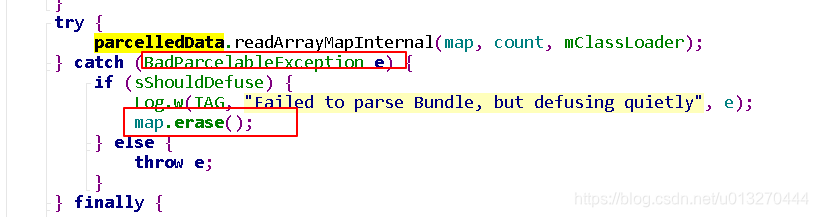
这就导致简单try catch 之后的代码,运行在8.0以上手机,收不到intent里面的数据,因为Intent 里面的跳转数据被清空了。
还是要查清楚为什么会出现ClassNotFoundException when unmarshalling
根据源码,在这里getBooleanExt 会出问题是因为系统在这一步还没有设置解析Parcelable 的classLoader。如下图
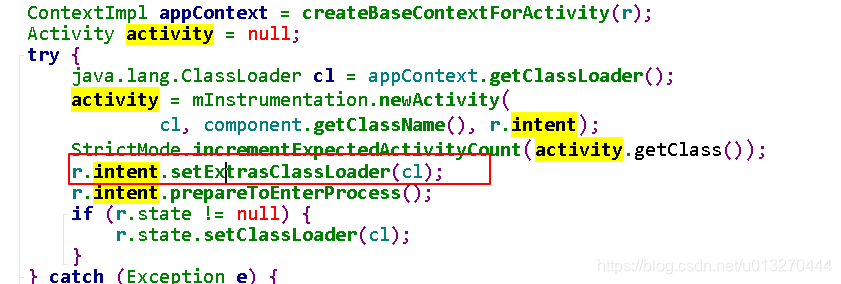
所以,有问题的代码需要这样改下。
系统是在调用了 mInstrumentation.newActivity之后设置了classLoader r.intent.setExtrasClassLoader(cl), 所以hook 在newActivity 这一步get Parcelable 数据是有问题的。
不然会有下面这种错误:
java.lang.RuntimeException: Unable to instantiate activity ComponentInfo{com.aaa./.WelcomeActivity}: android.os.BadParcelableException: ClassNotFoundException when unmarshalling: com.nearme.mcs.entity.MessageEntity

        at android.app.ActivityThread.performLaunchActivity(ActivityThread.java:2492)

        at android.app.ActivityThread.handleLaunchActivity(ActivityThread.java:2678)

        at android.app.ActivityThread.access$900(ActivityThread.java:187)

        at android.app.ActivityThread$H.handleMessage(ActivityThread.java:1523)

        at android.os.Handler.dispatchMessage(Handler.java:111)

        at android.os.Looper.loop(Looper.java:210)

        at android.app.ActivityThread.main(ActivityThread.java:5809)

        at java.lang.reflect.Method.invoke(Native Method)

        at java.lang.reflect.Method.invoke(Method.java:372)

        at com.android.internal.os.ZygoteInit$MethodAndArgsCaller.run(ZygoteInit.java:1113)

        at com.android.internal.os.ZygoteInit.main(ZygoteInit.java:879)

     Caused by: android.os.BadParcelableException: ClassNotFoundException when unmarshalling: com.nearme.mcs.entity.MessageEntity

        at android.os.Parcel.readParcelableCreator(Parcel.java:2305)

        at android.os.Parcel.readParcelable(Parcel.java:2255)

        at android.os.Parcel.readValue(Parcel.java:2162)

        at android.os.Parcel.readArrayMapInternal(Parcel.java:2495)

        at android.os.BaseBundle.unparcel(BaseBundle.java:221)

        at android.os.BaseBundle.getBoolean(BaseBundle.java:658)

        at android.content.Intent.getBooleanExtra(Intent.java:5129)

        at com.nearme.game.sdk.y.o_a(SourceFile:46)

        at com.nearme.game.sdk.y.newActivity(SourceFile:28)

        at android.app.ActivityThread.performLaunchActivity(ActivityThread.java:2469)

        at android.app.ActivityThread.handleLaunchActivity(ActivityThread.java:2678)

        at android.app.ActivityThread.access$900(ActivityThread.java:187)

        at android.app.ActivityThread$H.handleMessage(ActivityThread.java:1523)

        at android.os.Handler.dispatchMessage(Handler.java:111)

        at android.os.Looper.loop(Looper.java:210)

        at android.app.ActivityThread.main(ActivityThread.java:5809)

        at java.lang.reflect.Method.invoke(Native Method)

        at java.lang.reflect.Method.invoke(Method.java:372)

        at com.android.internal.os.ZygoteInit$MethodAndArgsCaller.run(ZygoteInit.java:1113)

        at com.android.internal.os.ZygoteInit.main(ZygoteInit.java:879)
加油,自己学会了使用Source Insight 看源码。开始慢慢的去学习技术的原理。加油!
androd hook acitivity 启动流程,替换启动的activity(Android Instrumentation)的更多相关文章
- iOS应用程序工程文件以及启动流程
转载请标明出处: http://blog.csdn.net/xmxkf/article/details/51351188 本文出自:[openXu的博客] iOS程序启动流程 完整启动流程 UIApp ...
- Activity的启动流程分析
Activity是Android应用程序的四大组件之中的一个,负责管理Android应用程序的用户界面,一般一个应用程序中包括非常多个Activity,他们可能执行在一个进程中.也可能执行在不同的进程 ...
- Flask应用启动流程
目录 flask应用启动流程 WSGI 启动流程 flask应用启动流程 WSGI 所有的 python web 框架都要遵循 WSGI 协议 在这里还是要简单回顾一下 WSGI 的核心概念. WSG ...
- 【转】linux-系统启动流程详解
第二十章.启动流程.模块管理与 Loader 最近升级日期:2009/09/14 1. Linux 的启动流程分析 1.1 启动流程一览 1.2 BIOS, boot loader 与 kernel ...
- lk启动流程详细分析
转载请注明来源:cuixiaolei的技术博客 这篇文章是lk启动流程分析(以高通为例),将会详细介绍下面的内容: 1).正常开机引导流程 2).recovery引导流程 3).fastboot引导流 ...
- centOS 6启动流程
centOS6启动流程 centOS6启动流程 linux内核组成 centos6启动大致流程 1.post加电自检 2.Boot Sequence 3.MBR引导 4.Grub启动 制作init ...
- centOS7服务管理与启动流程
centOS7服务管理与启动流程 centOS7启动流程 systemd简介 unit对象 unit类型 特性 service unit文件格式 service unit file文件通常由三部分组成 ...
- 高通msm8994启动流程简介
处理器信息 8994包含如下子系统: 子系统 处理器 含义 APSS 4*Cortex-A53 应用子系统 APSS 4*Cortex-A57 应用子系统 LPASS QDSP6 v5.5A(Hexa ...
- Tiny4412 Linux 内核启动流程
Linux内核的启动分为压缩内核和非压缩内核两种,这里我们以压缩内核为例.压缩内核运行时,将运行一段解压缩程序,得到真正的内核镜像,然后跳转到内核镜像运行.此时,Linux进入非压缩内核入口,在非压缩 ...
随机推荐
- sql 获取每个分组的前N条记录的写法
SELECT * FROM ( --根据 tb表的name进行分组,根据年龄排序 SELECT * , ROW_NUMBER() OVER ( PARTITION BY name ORDER BY a ...
- oracle 日期常用函數sysdate
SYSDATE 2 --◎ 可得到目前系統的時間 3 4 ex. 5 select sysdate from dual; 6 ...
- BZOJ2434:[NOI2011]阿狸的打字机(AC自动机,线段树)
Description 阿狸喜欢收藏各种稀奇古怪的东西,最近他淘到一台老式的打字机.打字机上只有28个按键,分别印有26个小写英文字母和'B'.'P'两个字母. 经阿狸研究发现,这个打字机是这样工作的 ...
- 什么是Apache Isis
这个页面展示了一个现代的 Apache Isis 应用程序的外观. 下边是Isis 插件里的 todoapp 示例 (非 ASF)截图,你可以随意使用. 界面里对应的领域类可以在这里找到. 这个 to ...
- 如何查看Windows下端口占用情况
开始---->运行---->cmd,或者是window+R组合键,调出命令窗口 输入命令:netstat -ano,列出所有端口的情况.在列表中我们观察被占用的端口,比如是49157,首 ...
- 在CentOS7上安装MySQL5.7-YUM源方式
获取RPM包 # wget https://dev.mysql.com/get/mysql57-community-release-el7-11.noarch.rpm 列出RPM包里都有哪些文件 # ...
- forEach for...in for...of
forEach orEach 方法为数组中含有有效值的每一项执行一次 callback 函数,那些已删除(使用 delete 方法等情况)或者从未赋值的项将被跳过(不包括那些值为 undefined ...
- SpringMVC——笔记
使用 @RequestMapping 映射请求 Spring MVC 使用@RequestMapping 注解为控制器指定可以处理那些URL请求. 在控制器的类定义及方法定义处都可以标注 @Reque ...
- android软件开发之TextView控件常用属性
TextView控件 text属性,设置显示的文本 textColor:设置文本颜色 textSize:设置文本字体大小 autoLink:设置文本为电话,URL连接等的时候是否显示为可点击的链接 c ...
- Mysql 之 MERGE 存储引擎
MERGE 存储引擎把一组 MyISAM 数据表当做一个逻辑单元来对待,让我们可以同时对他们进行查询.构成一个 MERGE 数据表结构的各成员 MyISAM 数据表必须具有完全一样的表结构.每一个成员 ...