
[elk]logstash&filebeat常用语句
filebeat安装dashboard
参考: https://www.elastic.co/guide/en/beats/filebeat/current/filebeat-getting-started.html
发现安装时候报错
./filebeat setup --dashboards

./filebeat -e --modules nginx

./filebeat -e --modules system,nginx,mysql
解决: vim filebeat.yaml 仅仅写入下面内容后再执行. es和kiban的dashboard自动导入,kibana会自动创建filebeat-*索引.
output.elasticsearch:

    hosts: ["http://192.168.x.x:9200"]

    setup.dashboards.enabled: true

    template.enabled: true

    template.path: "filebeat.template.json"

    template.overwrite: true

dashboards.enabled: true
logstash file模块时间参数设置
logstash综合案例参考:
http://blog.csdn.net/qq1032355091/article/details/52953837
input {

    file {

        type => "tradelog"

        path => "/var/log/maotai.log*"

        discover_interval => 5

        start_position => "beginning"

        sincedb_path => "/home/elk/myconf/maotai.txt"

        sincedb_write_interval => 15

        codec => plain { charset => "GB2312" }

    }

}
input file参数说明:
- start_position:设置beginning保证从文件开头读取数据。
- path:填入文件路径。
- type:自定义类型为tradelog,由用户任意填写。
- codec:设置读取文件的编码为GB2312,用户也可以设置为UTF-8等等
- discover_interval:每隔多久去检查一次被监听的 path 下是否有新文件,默认值是15秒
- sincedb_path:设置记录源文件读取位置的文件,默认为文件所在位置的隐藏文件。
- sincedb_write_interval:每隔15秒记录一下文件读取位置
logstash ua和geoip插件使用
ua参考:
https://www.cnblogs.com/Orgliny/p/5755384.html
if [message] !~ "^127\.|^192\.168\.|^172\.1[6-9]\.|^172\.2[0-9]\.|^172\.3[01]\.|^10\." {    #排除私网地址

  geoip {

    source => "message"    #设置解析IP地址的字段

    target => "geoip"    #将geoip数据保存到一个字段内

    database => "/usr/share/GeoIP/GeoLite2-City.mmdb"    #IP地址数据库

  }

}
start_position参数,begging默认从sincedb记录点开始读
start_position默认end,即从文件尾开始读.
如果设置为beginning,每次启动从文件(sincedb记录点)开始读取
$ cat pipline-startposition.conf

input {

    file{

        path => "/tmp/a.txt"

        start_position => 'beginning'

        codec => "json"

    }

}

output {

    stdout { codec => rubydebug }

}

rm -f data/plugins/inputs/file/.sincedb_*

bin/logstash -f pipline-startposition.conf
pipline-logstash-simple.conf
参考: https://www.kancloud.cn/hanxt/elk/155901
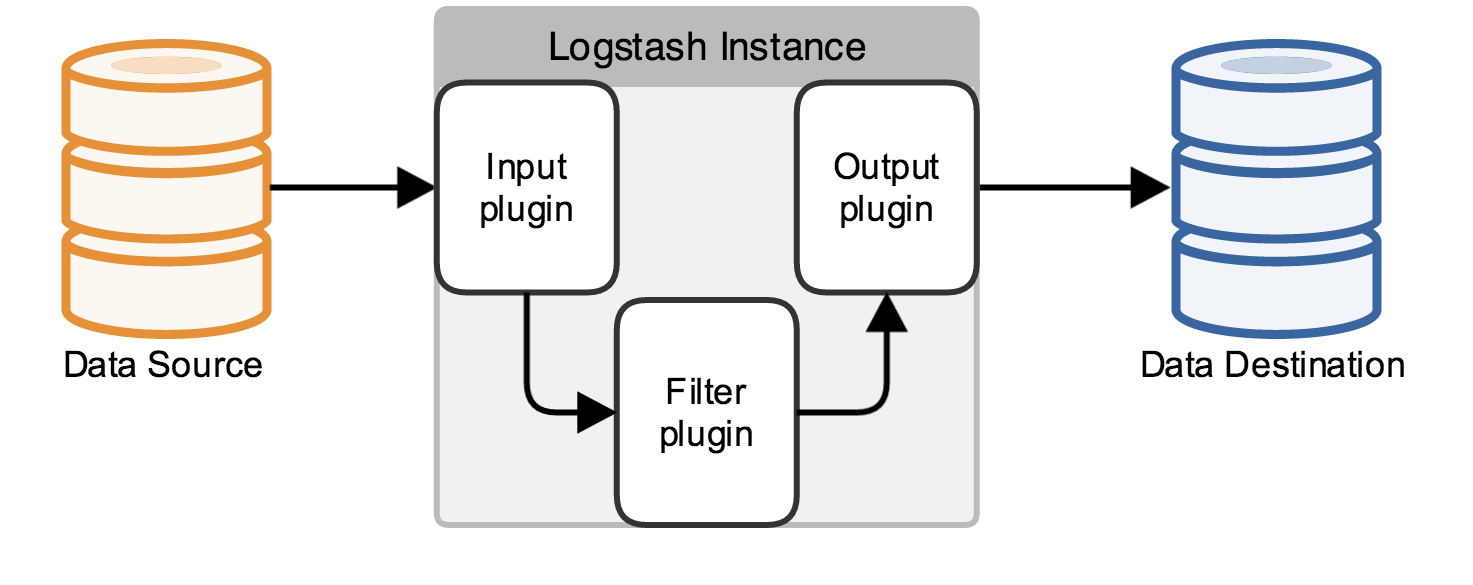
input { stdin { } }

output {

  elasticsearch { hosts => ["localhost:9200"] }

  stdout { codec => rubydebug }

}
logstash例子
参考: https://www.elastic.co/guide/en/logstash/current/configuration.html
$ cat first-pipeline.conf

input {

    beats {

        port => "5043"

    }

    file{

        path => "/var/log/nginx/access.log"

        start_position => 'beginning'

        codec => "json"

    }

}

# The filter part of this file is commented out to indicate that it is

# optional.

# filter {

#

# }

output {

    stdout { codec => rubydebug }

    elasticsearch {

        hosts => [ "localhost:9200" ]

    }

}
filebeat的一个语法
filebeat:

  prospectors:

    - input_type: log

      paths:

        - "/tmp/a.txt"

      document_type: a-txt

    - input_type: log

      paths:

         - "/tmp/b.txt"

         - "/tmp/c.txt"

      document_type: bc-txt

output:

  logstash:

    enabled: true

    hosts: ["192.168.6.103:5001"]

    index: logstash
logstash exec输入输出
参考: https://www.elastic.co/guide/en/logstash/current/first-event.html
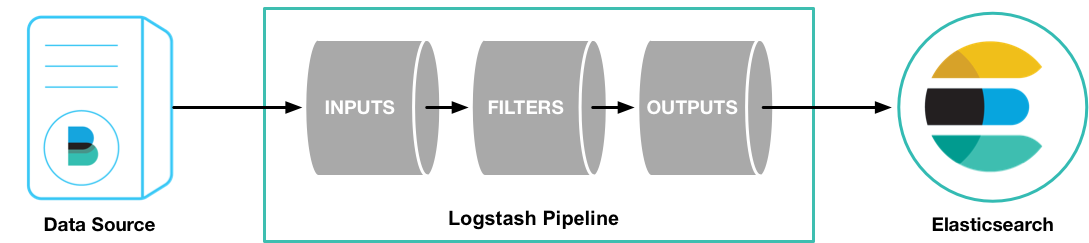
bin/logstash -e 'input { stdin { } } stdout { codec => rubydebug } }'
遇到这个问题:
2016-05-09T23:27:31.810Z %{host} %{message}

因为之前写成了这样,所以报错

bin/logstash -e 'input { stdin { } } output { stdout {} }'
logstash file模块,处理user_agent字段
input{

    file{

        path => ["/var/log/test1.log"]

        codec => "json"

        type => "node1"

        start_position => "beginning"

    }

    file{

        path => ["/var/log/test2.log"]

        codec => "json"

        type => "node2"

        start_position => "beginning"

    }

}

filter{

    if [user_agent] != "-" {                 ## 类似于es的这个模块 ingest-user-agent,不过直接logstash配合es,即使es安装了这个模块user_agent字段也不帮我解析,es这个模块是配合filebeat的

        useragent {

            target => "ua"

            source => "User-Agent"

        }

    }

}

output{

    if [type] == "node1"{

        elasticsearch{

            hosts => ["192.168.x.x:9200"]

            index => "node1-%{+YYYY.MM.dd}"

        }

    }

    if [type] == "node2"{

        elasticsearch{

            hosts => ["192.168.x.x:9200"]

            index => "node2-%{+YYYY.MM.dd}"

        }

    }

}
这部分绘图参考见: http://www.cnblogs.com/iiiiher/p/7903262.html
es的两个插件(配合filebeat用)
我使用filebeat nignx模块的时候会用到
bin/elasticsearch-plugin install ingest-user-agent

bin/elasticsearch-plugin install ingest-geoip
搜集syslog+messages+nginx+es日志入库到es
input{

    syslog{

        type => "system-syslog"

        host => "192.168.x.x"

        port => "514"

    }

    file{

        path => ["/var/log/messages"]

        type => "system"

        start_position => "beginning"

    }

    file{

        path => ["/var/log/nginx/access.log"]

        codec => "json"

        type => "nginx-log"

        start_position => "beginning"

    }

    file{

        path => ["/var/log/elasticsearch/es.log"]

        type => "es-error"

        start_position => "beginning"

        codec => multiline{

            pattern => "^\["

            negate => true

            what => "previous"

        }

    }

}

output{

    if [type] == "system-syslog"{

        elasticsearch{

            hosts => ["192.168.x.x:9200"]

            index => "system-syslog-%{+YYYY.MM.dd}"

        }

    }

    if [type] == "system"{

        elasticsearch{

            hosts => ["192.168.x.x:9200"]

            index => "system-%{+YYYY.MM.dd}"

        }

    }

    if [type]  == "nginx-log"{

        elasticsearch{

            hosts => ["192.168.x.x:9200"]

            index => "nginx-log-%{+YYYY.MM.dd}"

        }

    }

    if [type]  == "es-error"{

        elasticsearch{

            hosts => ["192.168.x.x:9200"]

            index => "es-error-%{+YYYY.MM.dd}"

        }

    }

}
logstash入库到redis
input {

  stdin{}

}

output{

    redis{

        host => "192.168.x.x"

        port => "6379"

        db => "6"             #会自动在redis里建库

        data_type => "list"

        key => "system-syslog"

    }

}
es从redis读日志
input{

    redis{

        host => "192.168.x.x"

        port => "6379"

        db => "6"

        data_type => "list"

        key => "demo"

    }

}

output{

    elasticsearch{

        hosts => ["192.168.x.x:9200"]

        index => "redis-demo-%{+YYYY.MM.dd}"

    }

}
redis操作
yum install redis -y

$ grep '^[a-z]' /etc/redis.conf

daemonize yes

pidfile /var/run/redis/redis.pid

port 6379

bind 192.168.14.136

/etc/init.d/redis start

redis-cli -h 192.168.x.x

info

INFO

SELECT 6

KEYS *

LINDEX demo -1

LLEN demo

/usr/local/bin/redis-cli -h 127.0.0.1 -p 52833 -a 362bcadfbb0bfa33
logstash接收tcp端口过来的数据
$ cat tcp.conf

input{

    tcp{

        host => "192.168.x.x"

        port => "6666"

    }

}

output{

    stdout{

      codec => "rubydebug"

    }

}

客户端发数据到服务端的6666

yum install nc -y

nc 192.168.x.x 6666 < /etc/resolv.conf

echo "hello jeffery" |nc 192.168.x.x 6666

或者:echo "hello lanny" > /dev/tcp/192.168.x.x/6666

客户端数据:

$ cat /etc/resolv.conf

; generated by /sbin/dhclient-script

search localdomain example.com

nameserver 114.114.114.114

服务器效果

$ ./logstash/bin/logstash -f tcp.conf

Settings: Default pipeline workers: 1

Pipeline main started

{

       "message" => "; generated by /sbin/dhclient-script",

      "@version" => "1",

    "@timestamp" => "2016-10-09T16:08:46.585Z",

          "host" => "192.168.x.x",

          "port" => 35274

}

{

       "message" => "search localdomain example.com",

      "@version" => "1",

    "@timestamp" => "2016-10-09T16:08:46.587Z",

          "host" => "192.168.x.x",

          "port" => 35274

}

{

       "message" => "nameserver 114.114.114.114",

      "@version" => "1",

    "@timestamp" => "2016-10-09T16:08:46.587Z",

          "host" => "192.168.x.x",

          "port" => 35274

}

{

       "message" => "hello jeffery",

      "@version" => "1",

    "@timestamp" => "2016-10-09T16:08:47.467Z",

          "host" => "192.168.x.x",

          "port" => 35275

}
logstash处理syslog日志
客户端:

cat -n /etc/rsyslog.conf

…

79	*.* @@192.168.x.x:514

…

服务端:

$ cat syslog.conf

input{

    syslog{

        type => "system-syslog"

        host => "192.168.x.x"

        port => "514"

    }

}

output{

    stdout{

        codec => "rubydebug"

    }

}
logstash处理nginx日志
    log_format json '{"@timestamp": "$time_iso8601",'

           '"@version": "1",'

           '"client": "$remote_addr",'

		   '"url": "$uri", '

		   '"status": "$status", '

		   '"domain": "$host", '

		   '"host": "$server_addr",'

		   '"size":"$body_bytes_sent", '

		   '"response_time": "$request_time", '

		   '"referer": "$http_referer", '

           '"http_x_forwarded_for": "$http_x_forwarded_for", '

           '"user_agent": "$http_user_agent" } ';
$ cat nginx_access.conf

input{

    file{

        path => ["/app/logs/www1_access.log"]

        codec => "json"

   }

}

output{

    stdout{

        codec => "rubydebug"

    }

}

输入到es

$ cat nginx_access.conf

input{

    file{

        path => ["/app/logs/www1_access.log"]

        codec => "json"

   }

}

output{

    elasticsearch{

            hosts => ["192.168.x.x:9200"]

            index => "nginx-www-access-%{+YYYY.MM.dd}"

        }

}
logstash multiline插件
处理一些不规则的日志
遇到 [ 开头,即截断一条日志

$ cat multiline.conf

input{

    stdin{

        codec => multiline{

            pattern => "^\["

            negate => true

            what => "previous"

        }

    }

}

output{

    stdout{

        codec => "rubydebug"

    }

}
举个例子
kjhjk

jkjk

[fasdfasd

[

这是一条

kjhjk

jkjk

这是另一条

fasdfasd
[elk]logstash&filebeat常用语句的更多相关文章
- filebeat+ELK配置及常用操作
背景介绍 最近工作涉及几台新服务器的日志需要接入ELK系统,配置思路如下: 使用Filebeat收集本地日志数据,Filebeat监视日志目录或特定的日志文件,再发送到消息队列到kafka,然后log ...
- ELK + Kafka + Filebeat
ELK + Kafka + Filebeat学习 https://blog.csdn.net/qq_21383435/article/details/79463832 https://blog.csd ...
- ELK——Logstash 2.2 date 插件【翻译+实践】
官网地址 本文内容 语法 测试数据 可配置选项 参考资料 date 插件是日期插件,这个插件,常用而重要. 如果不用 date 插件,那么 Logstash 将处理时间作为时间戳.时间戳字段是 Log ...
- SQL server 常用语句
SQL Server中常用的SQL语句 1.概述 2.查询概述 3.单表查询 4.连接查询 5.带有exists的相关子查询 6.SQL的集合操作 7.插入操作 8.删除操作 9.修改操作 10. ...
- mysql常用语句总结
1.创建语句 CREATE DATABASE database_name //创建数据库 //删表 DROP TABLE IF EXISTS `t_social_user_extend`; //建表C ...
- JS常用语句
JavaScript常用语句 1.document.write(""); 输出语句 2.JS中的注释为 // 3.传统的HTML文档顺序是: document-& ...
- velocity常用语句速查表
velocity常用语句 * 变量定义 #set($directoryRoot = "www" ) * #if($!list.size() != 0) //判断list不为空 #f ...
- MySQL 常用语句 (汇集)
原文地址:MySql常用语句作者:wuyanle 一.mysql常用语句 创建,删除和最基本查询: 显示数据库 mysql->show databases; 创建数据库 mysql-> ...
- mysql数据库常用语句2
关于mysql常用语句的整理,上一篇涉及到ddl.dml以及一些简单的查询语句. 1:mysql分页查询 select * from table_name limit 5,10; 从下标为5元素查 ...
随机推荐
- tcpreplay工具使用
参考:http://www.cnblogs.com/jiayy/p/3447047.html 速率控制算法的大体思路就是,通过适当的sleep,增加包发送的时间,从而减小算出来的速率,以达到用户设 ...
- Android Studio断点调试
Android Studio断点调试 Android Studio包含一个debugger程序,可以帮助你在模拟器和真机上调试你的android应用.通过Android Studio的debugger ...
- Linux的进程间通信-文件和文件锁
前言 使用文件进行进程间通信应该是最先学会的一种IPC方式.任何编程语言中,文件IO都是很重要的知识,所以使用文件进行进程间通信就成了很自然被学会的一种手段.考虑到系统对文件本身存在缓存机制,使用文件 ...
- flask restful修改头部信息
有两种方式,第一种是使用make_response from flask import make_response def test(): resp = make_response('test', c ...
- Eclipse通过Spket增加JQuery提示的方法
Eclipse通过Spket增加JQuery提示的方法 1.增加在线更新源:Help->Install New Software...->Add...->Name: "Sp ...
- [转]JQuery - Sizzle选择器引擎原理分析
原文: https://segmentfault.com/a/1190000003933990 ---------------------------------------------------- ...
- java运行shell命令,chmod 777 xxx,改变权限无效的解决的方法。
在java程序中运行shell命令,改变文件的权限.能够在命令行中运行 chmod 777 <span style="font-family: Arial, Helvetica, sa ...
- 树莓派学习笔记——GPIO功能学习
0.前言 树莓派现在越来越火,网上树莓派的资料也越来越多.树莓派的学习可以分为linux系统学习和linux驱动学习,利用树莓派制作LED流水灯应该算是驱动学习吧.树莓派来自国外,国外嵌入式开 ...
- ffmpeg对rtmp的基本操作[转]
ffplay和ffmpeg调用的库是一样的.我刚才试了一下,是可以播的.ffplay "rtmp://tsl.s1979.cutv.com:1935/cutvChannelLive/AxeF ...
- 使用gradle构建Android时 版本号versionName中嵌入git提交信息
为什么要这么做 在应用开发的版本迭代过程中,通过版本号并不能快速定位到所对应的代码,导致在后面分析问题追溯对应版本的代码时比较麻烦. 如果代码是通过git来管理的,git的commit id等 ...