
绘制播放音乐时的音波图形的View
绘制播放音乐时的音波图形的View
这个效果类似于这个哦:

效果如下:

源码:
MusicView.h 与 MusicView.m
//

//  MusicView.h

//  Music

//

//  Copyright (c) 2014年 Y.X. All rights reserved.

//

#import <UIKit/UIKit.h>

@interface MusicView : UIView

@property (nonatomic, assign) CGFloat  progress;      // 进程百分比,取值为[0,1]

@property (nonatomic, assign) CGFloat  timeInterval;  // 时间间隔

@end
//

//  MusicView.m

//  Music

//

//  Copyright (c) 2014年 Y.X. All rights reserved.

//

#import "MusicView.h"

@interface MusicView ()

@property (nonatomic, assign) CGRect  baseRect; // 备份原始的frame值

@end

@implementation MusicView

- (id)initWithFrame:(CGRect)frame

{

    self = [super initWithFrame:frame];

    if (self) {

        _baseRect = frame;

    }

    return self;

}

@synthesize progress = _progress;

- (void)setProgress:(CGFloat)progress

{

    if (progress <= ) {

        _progress = ;

    } else if (progress >= ) {

        _progress = ;

    } else {

        _progress = progress;

    }

    [UIView animateWithDuration:(_timeInterval >  ? _timeInterval : 0.99) animations:^{

        CGRect rect       = _baseRect;

        rect.size.height *=  _progress;

        self.frame        = rect;

    }];

}

- (CGFloat)progress

{

    return _progress;

}

@end
使用时的情形:
//

//  RootViewController.m

//  Music

//

//  Copyright (c) 2014年 Y.X. All rights reserved.

//

#import "RootViewController.h"

#import "MusicView.h"

@interface RootViewController ()

@property (nonatomic, strong) NSTimer    *timer;

@property (nonatomic, strong) MusicView  *musicViewLine1;

@property (nonatomic, strong) MusicView  *musicViewLine2;

@property (nonatomic, strong) MusicView  *musicViewLine3;

@end

@implementation RootViewController

- (void)viewDidLoad

{

    [super viewDidLoad];

    // 线条1

    _musicViewLine1 = [[MusicView alloc] initWithFrame:CGRectMake(, , , )];

    _musicViewLine1.backgroundColor = [UIColor redColor];

    _musicViewLine1.timeInterval    = 0.5f;

    [self.view addSubview:_musicViewLine1];

    // 线条2

    _musicViewLine2 = [[MusicView alloc] initWithFrame:CGRectMake(, , , )];

    _musicViewLine2.backgroundColor = [UIColor redColor];

    _musicViewLine2.timeInterval    = 0.5f;

    [self.view addSubview:_musicViewLine2];

    // 线条3

    _musicViewLine3 = [[MusicView alloc] initWithFrame:CGRectMake(, , , )];

    _musicViewLine3.backgroundColor = [UIColor redColor];

    _musicViewLine3.timeInterval    = 0.5f;

    [self.view addSubview:_musicViewLine3];

    _timer = [NSTimer scheduledTimerWithTimeInterval:0.5f

                                              target:self

                                            selector:@selector(timerEvent)

                                            userInfo:nil

                                             repeats:YES];

}

- (void)timerEvent

{

    _musicViewLine1.progress = arc4random()%/.f;

    _musicViewLine2.progress = arc4random()%/.f;

    _musicViewLine3.progress = arc4random()%/.f;

}

@end
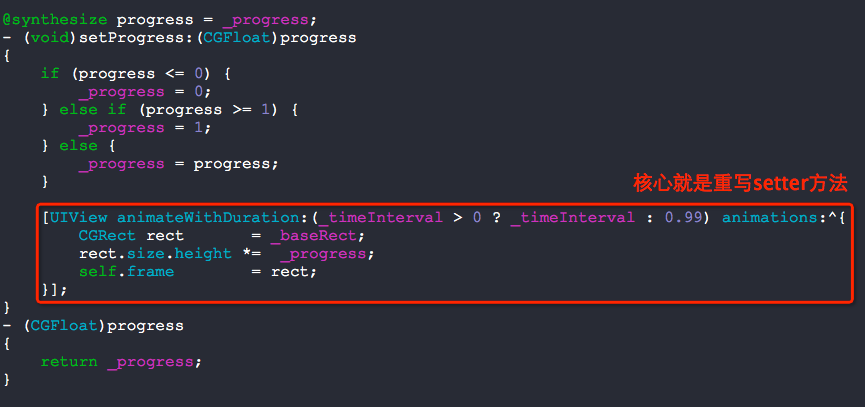
以下是核心代码:
绘制播放音乐时的音波图形的View的更多相关文章
- Android播放音乐时跳动的屏谱demo
Android实现播放音频时的跳动频谱,并实现可以调节的均衡器. Main.java package com.wjq.audiofx; import android.app.Activity; imp ...
- 关于Windows 8使用WMP播放音乐时WUDFHost跑CPU和硬盘的问题解决
Windows 8使用Windows Media Player播放音乐的时候.事实上有一个这种情况,WMP和某个什么名字看起来非常屌的进程跑CPU非常高,这个跑非常高视你插入的SD卡内的文件数或者移动 ...
- Linux版网易云音乐播放音乐时无限显示“网络错误”的解决办法
安装 gstreamer0.10-plugins-good debian类系统: -plugins-good
- 【分享】4412开发板ubuntu 12.0.4播放音乐没有声音解决方法
转自迅为论坛:http://bbs.topeetboard.com 准备工作 1.下载 vim 在命令行上输入 apt-get install vim 下载 vim 2.输入 vim /etc/hos ...
- android 播放音乐-进度条
今天学渣研究了一下使用MediaPlayer播放音乐时加入进度条,进度条如今用的是android自带的seekbar,后期会跟换UI的,在之前可以播放音乐的基础上,如今加入的主要功能有两个: 1实时显 ...
- MUI---IOS切换到后台继续播放音乐
应用切换到后台继续音乐播放HBuilder默认生成的应用在iOS是不支持后台音乐播放的,当应用切换到后台时音乐将暂停播放,下次切换到前台继续播放.如果要支持应用切换到后台后继续播放音乐功能需要进行额外 ...
- Inno调用dll --- 实现背景播放音乐
Inno 播放音乐可以调用系统api函数mciSendString来实现,而mciSendString函数存在C:\Windows\System32\winmm.dll中,因此最终只要成功从该dll文 ...
- iOS开发系列--扩展--播放音乐库中的音乐
众所周知音乐是iOS的重要组成播放,无论是iPod.iTouch.iPhone还是iPad都可以在iTunes购买音乐或添加本地音乐到音乐 库中同步到你的iOS设备.在MediaPlayer.fram ...
- iPhone播放音乐
来源:http://blog.csdn.net/htttw/article/details/7842295 iPhone播放音乐 今天我们简要介绍如何在iPhone中播放音乐: 强烈建议你参考官方文档 ...
随机推荐
- UGUI优化总结
1.动静分离 canvas下元素变化时,会使整个canvas重新绘制.因此将ui经常改变和不怎么改变的部分分离,分别使用不同的canvas. 2.图集优化 不同界面的ui,可以打包成不同的图集,一些公 ...
- APP开发的三种技术对比
目前来说主流的App开发方式有三种:Native App .Web App.Hybird App.下面我们来分析一下这三种App开发方式的优劣对比: 一 :Native App 即 原生App开发 优 ...
- 彻底解决matplotlib中文乱码问题(转)
彻底解决matplotlib中文乱码问题 1.环境查看a.系统版本查看[hadoop@p168 ~]$ cat /etc/redhat-releaseCentOS Linux release 7.2. ...
- 012-MD5Utils工具类模板
package ${enclosing_package}; import java.math.BigInteger; import java.security.MessageDigest; impor ...
- Vim改装成一个IDE编程环境
1 写在前面 Linux下编程一直被诟病的一点是: 没有一个好用的IDE, 但是听说Linux牛人, 黑客之类的也都不用IDE. 但是对我等从Windows平台转移过来的Coder来说, 一个 ...
- jquery metadata 详解
1.0的版本是这样的$.meta 2.0的版本是这样的$.metadata 很多插件的编写都用到了这个插件,个人感觉这个东西应该是jquery官方的.推荐使用2.0的版本, 因为现在官方上就是2.0的 ...
- Linux 命令 -- chown
chown命令改变某个文件或目录的所有者和所属的组,该命令可以向某个用户授权,使该用户变成指定文件的所有者或者改变文件所属的组.用户可以是用户或者是用户D,用户组可以是组名或组id.文件名可以使由空格 ...
- iostat命令——监控系统设备的IO负载情况
iostat命令的安装 #yum install sysstat iostat常见选项 -t 输出数据时打印搜集数据的时间 -m 输出的数据以MB为单位 -d 显示磁盘的统计信息 # iost ...
- NOPI 导出 Excel 2007
代码: public static void ThisTo<T>( List<T> source, string[] colums, Func<T, object[]&g ...
- ASP.NET MVC4 新手入门教程之九 ---9.查询详情和删除方法
在本教程的这一部分,您会检查自动生成的Details和Delete方法. 检查详细信息和删除方法 打开Movie控制器并检查的Details的方法. public ActionResult Detai ...