
python_day1学习笔记
一、Python 2.7.x 和 3.x 版本的区别小结
- print函数
1、python2
 import platform

 print ‘Python’, platform.python_version()

 print ‘Hello, World!’

 print(“Hello,World!’)

 print "text", ; print 'print more text on the same line'
输出结果:
1 Python 2.7.6

 Hello, World!

 Hello, World!

 text print more text on the same line
2、python3
 import platform

 print('Python', platform.python_version())

 print('Hello, World!')

 print("some text,", end="")

 print(' print more text on the same line')
结果输出:

1 Python 3.5.1

2 Hello, World!

3 some text, print more text on the same line
 >>> print 'Hello,World!'

   File "<stdin>", line 1

     print 'Hello,World!'

                        ^

 SyntaxError: Missing parentheses in call to 'print'
注意:
在Python 2中使用额外的括号也是可以的。但反过来在Python 3中想以Python2的形式不带括号调用print函数时,会触发SyntaxError。
- 整数除法
1、python2
 print '3 / 2 =', 3 / 2

 print '3 // 2 =', 3 // 2

 print '3 / 2.0 =', 3 / 2.0

 print '3 // 2.0 =', 3 // 2.0
结果输出:
1 3 / 2 = 1

 3 // 2 = 1

 3 / 2.0 = 1.5

 3 // 2.0 = 1.0
2、python3
 print('3 / 2 =', 3 / 2)

 print('3 // 2 =', 3 // 2)

 print('3 / 2.0 =', 3 / 2.0)

 print('3 // 2.0 =', 3 // 2.0)
结果输出:
1 3 / 2 = 1.5

 3 // 2 = 1

 3 / 2.0 = 1.5

 3 // 2.0 = 1.0
- 触发异常
1、python2
Python 2支持新旧两种异常触发语法,而Python 3只接受带括号的的语法(不然会触发SyntaxError):
 >>> raise IOError, "file error"

 Traceback (most recent call last):

   File "<stdin>", line 1, in <module>

 IOError: file error
 >>> raise IOError("file error")

 Traceback (most recent call last):

   File "<stdin>", line 1, in <module>

 IOError: file error
2、python3
 >>> raise IOError, "file error"

   File "<stdin>", line 1

     raise IOError, "file error"

                  ^

 SyntaxError: invalid syntax
 >>> raise IOError("file error")

 Traceback (most recent call last):

   File "<stdin>", line 1, in <module>

 OSError: file error
- 异常处理
1、python2
 try:

     let_us_cause_a_NameError

 except NameError, err:

     print err, '--> our error message'
结果输出:
1 name 'let_us_cause_a_NameError' is not defined --> our error message
2、python3
 try:

     let_us_cause_a_NameError

 except NameError as err:

     print(err, '--> our error message')
结果输出:
1 name 'let_us_cause_a_NameError' is not defined --> our error message
Python 3中的异常处理也发生了一点变化。在Python 3中必须使用“as”关键字。
input()解析用户的输入
Python 3改进了input()函数,这样该函数就会总是将用户的输入存储为str对象。在Python 2中,为了避免读取非字符串类型会发生的一些危险行为,不得不使用raw_input()代替input()。
1、python2
 >>> my_input = input('enter a number: ')

 enter a number: 123

 >>> type(my_input)

 <type 'int'>

 >>> my_input = raw_input('enter a number: ')

 enter a number: 123

 >>> type(my_input)

 <type 'str'>
2、python3
 >>> my_input = input('enter a number: ')

 enter a number: 123

 >>> type(my_input)

 <class 'str'>
返回可迭代对象
1、python2
 print range(3)

 print type(range(3))
结果输出:
1 [0, 1, 2]

 <type 'list'>
2、python3
 print(range(3))

 print(type(range(3)))

 print(list(range(3)))
结果输出:
1 range(0, 3)

 <class 'range'>

 [0, 1, 2]
二、用户输入
 #!/usr/bin/env python

 # -*- coding: utf-8 -*-

 # 将用户输入的内容赋值给 name 变量

 name = raw_input("请输入用户名:")

 # 打印输入的内容

 print name
结果输出:
1 >>> name = raw_input("请输入用户名:")

 请输入用户名:yinjia

 >>> print name

 yinjia
输入密码时,如果想要不可见,需要利用getpass 模块中的 getpass方法,即:
 #!/usr/bin/env python

 # -*- coding: utf-8 -*-

 import getpass

 # 将用户输入的内容赋值给 name 变量

 pwd = getpass.getpass("请输入密码:")

 # 打印输入的内容

 print pwd
结果输出:
1 >>> import getpass

 >>> pwd = getpass.getpass("请输入密码:")

 请输入密码:

 >>> print pwd

 123456
三、while循环
- 基本循环
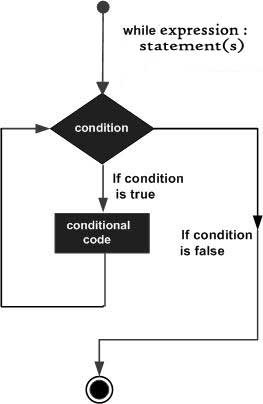
Python 编程中 while 语句用于循环执行程序,即在某条件下,循环执行某段程序,以处理需要重复处理的相同任务。其基本形式为:
while 判断条件:

    执行语句……
执行语句可以是单个语句或语句块。判断条件可以是任何表达式,任何非零、或非空(null)的值均为true。
当判断条件假false时,循环结束。
执行流程图如下:
 #!/usr/bin/env python

 count = 0

 while (count < 9):

    print 'The count is:', count

    count = count + 1

 print "Good bye!"
 结果输出:
 1 The count is: 0

 The count is: 1

 The count is: 2

 The count is: 3

 The count is: 4

 The count is: 5

 The count is: 6

 The count is: 7

 The count is: 8

 Good bye!
- break
break用于退出所有循环
 #!/usr/bin/env python

 sum = 0

 number = 0

 while number < 20:

       number += 1

       sum += number

       if sum >= 100:

             break

 print("The number is", number)

 print("The sum is", sum)
结果输出:
1 The number is 14

 The sum is 105
- continue
continue用于退出当前循环,继续下一次循环。
 #!/usr/bin/env python

 sum = 0

 number = 0

 while number < 20:

     number += 1

     if number == 10 or number == 11:

           continue

     sum += number

 print("The sum is", sum)
结果输出:
1 The sum is 189
python_day1学习笔记的更多相关文章
- js学习笔记:webpack基础入门(一)
之前听说过webpack,今天想正式的接触一下,先跟着webpack的官方用户指南走: 在这里有: 如何安装webpack 如何使用webpack 如何使用loader 如何使用webpack的开发者 ...
- PHP-自定义模板-学习笔记
1. 开始 这几天,看了李炎恢老师的<PHP第二季度视频>中的“章节7:创建TPL自定义模板”,做一个学习笔记,通过绘制架构图.UML类图和思维导图,来对加深理解. 2. 整体架构图 ...
- PHP-会员登录与注册例子解析-学习笔记
1.开始 最近开始学习李炎恢老师的<PHP第二季度视频>中的“章节5:使用OOP注册会员”,做一个学习笔记,通过绘制基本页面流程和UML类图,来对加深理解. 2.基本页面流程 3.通过UM ...
- 2014年暑假c#学习笔记目录
2014年暑假c#学习笔记 一.C#编程基础 1. c#编程基础之枚举 2. c#编程基础之函数可变参数 3. c#编程基础之字符串基础 4. c#编程基础之字符串函数 5.c#编程基础之ref.ou ...
- JAVA GUI编程学习笔记目录
2014年暑假JAVA GUI编程学习笔记目录 1.JAVA之GUI编程概述 2.JAVA之GUI编程布局 3.JAVA之GUI编程Frame窗口 4.JAVA之GUI编程事件监听机制 5.JAVA之 ...
- seaJs学习笔记2 – seaJs组建库的使用
原文地址:seaJs学习笔记2 – seaJs组建库的使用 我觉得学习新东西并不是会使用它就够了的,会使用仅仅代表你看懂了,理解了,二不代表你深入了,彻悟了它的精髓. 所以不断的学习将是源源不断. 最 ...
- CSS学习笔记
CSS学习笔记 2016年12月15日整理 CSS基础 Chapter1 在console输入escape("宋体") ENTER 就会出现unicode编码 显示"%u ...
- HTML学习笔记
HTML学习笔记 2016年12月15日整理 Chapter1 URL(scheme://host.domain:port/path/filename) scheme: 定义因特网服务的类型,常见的为 ...
- DirectX Graphics Infrastructure(DXGI):最佳范例 学习笔记
今天要学习的这篇文章写的算是比较早的了,大概在DX11时代就写好了,当时龙书11版看得很潦草,并没有注意这篇文章,现在看12,觉得是跳不过去的一篇文章,地址如下: https://msdn.micro ...
随机推荐
- BZOJ4896 [Thu Summer Camp2016]补退选 【trie树】
题目链接 BZOJ4896 题解 \(thu\)怎么那么喜欢出\(trie\)树的题... 我们当然可以按题意模拟建\(trie\) 询问的时候,由于存在删除操作,不满足单调性,不能直接二分答案 我们 ...
- bzoj2165: 大楼(倍增floyd)
题目大意:一个有向图,n(<=100)个点求一条长度>=m(<=10^18)的路径最少经过几条边. 一开始以为是矩乘,蓝鹅当时还没开始写,所以好像给CYC安利错了嘿嘿嘿QWQ 第一眼 ...
- UVA:11183:Teen Girl Squad (有向图的最小生成树)
Teen Girl Squad Description: You are part of a group of n teenage girls armed with cellphones. You h ...
- 如何通过反射来创建对象?getConstructor()和getDeclaredConstructor()区别?
1. 通过类对象调用newInstance()方法,适用于无参构造方法: 例如:String.class.newInstance() public class Solution { public st ...
- 远端WEB服务器上存在/robots.txt文件
解决方案: 1. 可直接删除(可参考:http://zh.wikipedia.org/wiki/Robots.txt) ,但不利于SEO等 2. 修改Web服务器配置 可以通过Web服务器(如Apac ...
- 获取文件名称 basename 用法
<?phpheader('Content-type:text/html;charset=utf8'); $str = '2390230.png';$str_arr = explode('.',$ ...
- 使用freemarker生成word、html时图片显示问题
使用freemarker生成word.html时图片显示问题 博客分类: Java 使用freemarker生成word时图片显示问题使用freemarker生成html时图片显示问题使用iText生 ...
- Fixed: The Windows Process Activation Service service terminated with the following error: The system cannot find the file specified
I'm not yet clear what I did, but I'm blogging it so it can be found if someone else has this issue. ...
- JS如何判断是不是iphoneX
function isIphoneX(){ return /iphone/gi.test(navigator.userAgent) && (screen.height == 812 & ...
- nodejs formidable混合表单提交
废话不多说,直接上代码: 前端页面: <!DOCTYPE html><html><head><link rel=’stylesheet’ href=’/sty ...