
WakaTime Readme Stats-开源项目翻译
寻找不同语言和地区的翻译 #23
Readme中添加了功能标志的开发指标
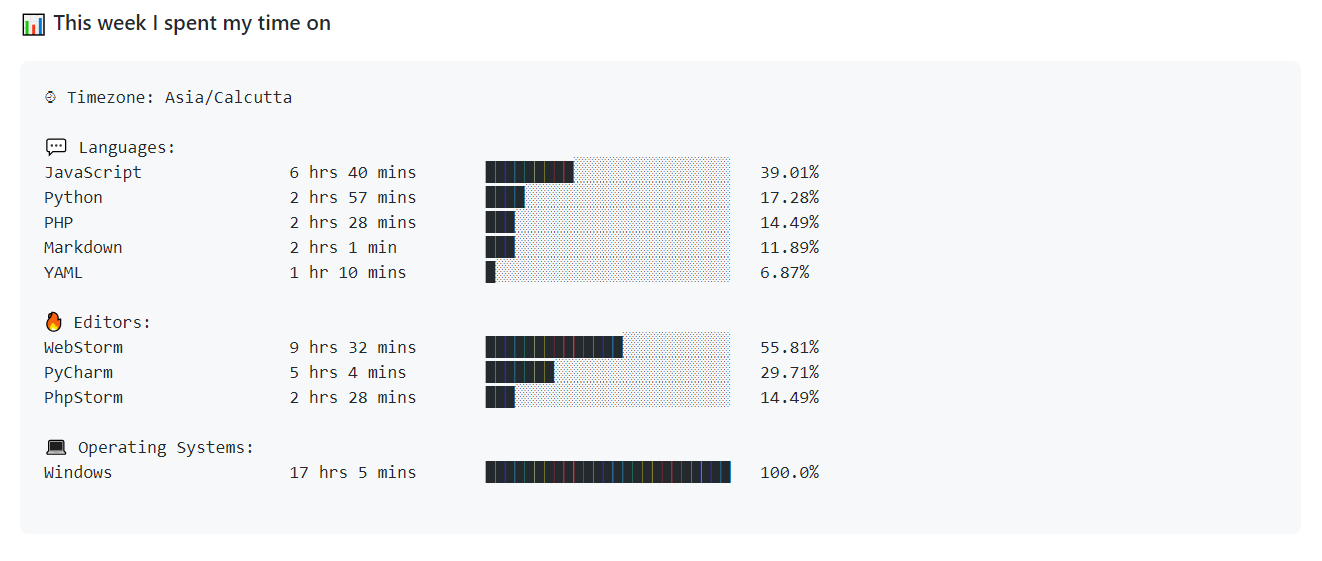
眼前一亮的Readme统计数据



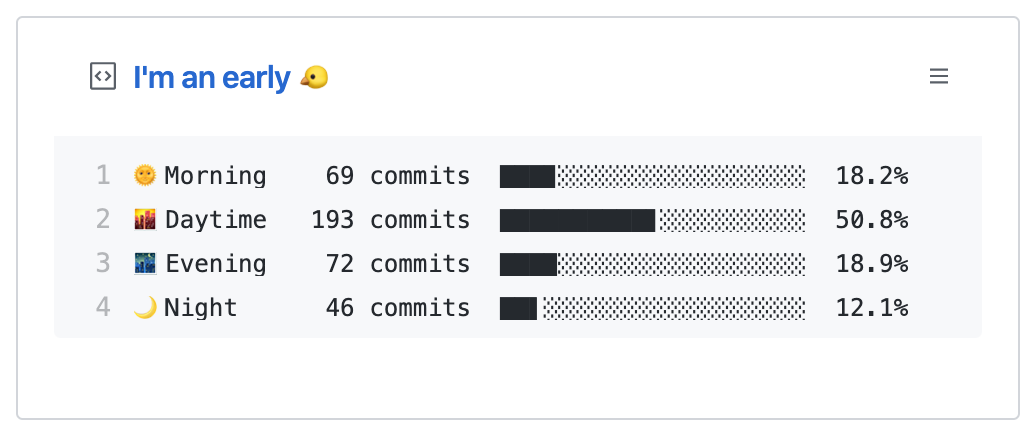
你是早起的还是夜间的?
你一天中什么时候工作效率最高?
你用什么语言编写代码?
让我们在你的个人资料中查看一下readme!
准备工作
您需要用2条注释更新markdown文件(.md)。您可以参考这里进行更新
您需要WakaTime API密钥。您可以从WakaTime帐户设置中获得
- 如果你是WakaTime的新手,你可以参考这里
如果您正在运行操作以获取提交指标,则需要具有repo和用户范围的GitHub API令牌
启用存储库范围似乎很危险
但此 GitHub 操作仅访问您的提交时间戳以及您贡献的存储库中添加或删除的代码- 你可以用这个例子来计算
您需要将WakaTime API密钥和GitHub API令牌保存在存储库机密中。您可以在存储库的“设置”中找到它。请确保将其保存为以下内容
- WakaTime API密钥为
WAKATIME_API_KEY=<你的wakatime API密钥> - GitHub个人访问令牌为
GH_TOKEN=<你的github access token>
- WakaTime API密钥为
您可以根据要求启用和禁用功能标志
此操作将在印度标准时间的每天0点进行
更新你的 Readme 文件
在你的README.md中添加注释,如下所示:
<!--START_SECTION:waka-->

<!--END_SECTION:waka-->
根据(可用标志部分)[#flags-available],waka可以被SECTION_NAME 标志中指定的任何字符串取代
这些行将是我们 Dev Metrics 的入口点
新加入WakaTime的人
WakaTime让你知道你真正花在编码上的时间。这有助于提高您的生产力和竞争优势
- 前往https://wakatime.com并创建一个帐户
- 从WakaTime的账户设置中获取你的WakaTime API密钥
- 在你喜欢的 编辑器/集成开发环境 中安装WakaTime插件
- 粘贴你的API密钥以开始分析
个人主页仓库
你需要获得一个带有 repo 和用户范围的 GitHub 访问令牌,并将其保存在 Repo Secrets 中 GH_TOKEN = <Your GitHub Access Token>
以下是运行它的示例工作流文件:
name: Waka Readme

on:

  schedule:

    # Runs at 12am IST

    - cron: '30 18 * * *'

  workflow_dispatch:

jobs:

  update-readme:

    name: Update Readme with Metrics

    runs-on: ubuntu-latest

    steps:

      - uses: anmol098/waka-readme-stats@master

        with:

          WAKATIME_API_KEY: ${{ secrets.WAKATIME_API_KEY }}

          GH_TOKEN: ${{ secrets.GH_TOKEN }}
- 现在你可以提交并等待自动运行,但你也可以触发运行它来查看结果。只需进入Repo中的Actions,选择你的Profile Readme Development Stats工作流,然后点击运行工作流。现在等待一两分钟,你就可以看到你的变化了
额外补充
- 如果你想把其他信息添加到你的统计中,你可以在你的工作流程文件中添加多个
FLAGS,默认情况下,所有标志都是启用的
由于执行了繁重的操作而导致的代码标志行除外
- uses: anmol098/waka-readme-stats@master

  with:

      WAKATIME_API_KEY: ${{ secrets.WAKATIME_API_KEY }}

      GH_TOKEN: ${{ secrets.GH_TOKEN }}

      SHOW_OS: "False"

      SHOW_PROJECTS: "False"
可用的 Flags
LOCALE 这个标志可以用来在你的语言中显示统计信息,默认是英语,使用Locale Short Hand来传递标志变量,最终结果的例子可以在这里找到
SECTION_NAME 标志可以设置为任何字符串,它将是readme中要替换的部分的名称
COMMIT_BY_ME 标志可以设置为True,以使用你的名字和电子邮件提交代码
COMMIT_MASSAGE 标志可以设置为消息提交,默认为 "用开发指标更新"
COMMIT_USERNAME标志可以设置为username以提交代码,默认为“readme-bot”
COMMIT_EMAIL 标志可设置为提交代码的电子邮件,默认为 "41898282+github-actions[bot]@users.noreply.github.com"
SHOW_UPDATE_DATE 标志可以被设置为 “True”,以便在段落末尾显示更新的日期
UPDATE_DATE_FORMAT 可以设置标志以将更新的日期转换为一种格式,默认为 "%d/%m/%Y %H:%M:%S"
SHOW_LINES_OF_CODE 标志可以被设置为 "True",以显示迄今为止所写的代码行数
SHOW_TOTAL_CODE_TIME 标志可以设置为 False 以隐藏代码时间
SHOW_PROFILE_VIEWS 标志可以设置为 False 以隐藏个人主页访问量
SHOW_COMMIT 标志可以设置为 False,以隐藏提交统计信息
I'm an early
 Morning    95 commits     ███████░░░░░░░░░░░░░░░░░░   30.55%

 Daytime    78 commits     ██████░░░░░░░░░░░░░░░░░░░   25.08%

 Evening    112 commits    █████████░░░░░░░░░░░░░░░░   36.01%

 Night      26 commits     ██░░░░░░░░░░░░░░░░░░░░░░░   8.36%
SHOW_DAYS_OF_WEEK 标志可以设置为 False,以隐藏一周中不同日期的提交
I'm Most Productive on Sundays
Monday       50 commits     ███░░░░░░░░░░░░░░░░░░░░░░   13.19%

Tuesday      85 commits     █████░░░░░░░░░░░░░░░░░░░░   22.43%

Wednesday    56 commits     ███░░░░░░░░░░░░░░░░░░░░░░   14.78%

Thursday     44 commits     ███░░░░░░░░░░░░░░░░░░░░░░   11.61%

Friday       28 commits     █░░░░░░░░░░░░░░░░░░░░░░░░   7.39%

Saturday     30 commits     ██░░░░░░░░░░░░░░░░░░░░░░░   7.92%

Sunday       86 commits     █████░░░░░░░░░░░░░░░░░░░░   22.69%
SHOW_LANGUAGE 标志可以设置为 False 来隐藏你使用的编程语言
 Languages:

JavaScript               5 hrs 26 mins       ███████████████░░░░░░░░░░   61.97%

PHP                      1 hr 35 mins        ████░░░░░░░░░░░░░░░░░░░░░   18.07%

Markdown                 1 hr 9 mins         ███░░░░░░░░░░░░░░░░░░░░░░   13.3%

Python                   22 mins             █░░░░░░░░░░░░░░░░░░░░░░░░   4.32%

XML                      8 mins              ░░░░░░░░░░░░░░░░░░░░░░░░░   1.62%
SHOW_OS 标志可以被设置为 False,以隐藏使用操作系统的详细信息
 Operating Systems:

Windows                  8 hrs 46 mins       █████████████████████████   100.0%
SHOW_PROJECTS 标志可以设置为 False 以隐藏正在处理的项目
Projects:
ctx_connector 4 hrs 3 mins ███████████░░░░░░░░░░░░░░ 46.33%
NetSuite-Connector 1 hr 31 mins ████░░░░░░░░░░░░░░░░░░░░░ 17.29%
mango-web-master 1 hr 12 mins ███░░░░░░░░░░░░░░░░░░░░░░ 13.77%
cable 54 mins ██░░░░░░░░░░░░░░░░░░░░░░░ 10.41%
denAPI 40 mins ██░░░░░░░░░░░░░░░░░░░░░░░ 7.66%
SHOW_TIMEZONE 标志可以设置为 False 以隐藏您所在的时区
︎ Timezone: Asia/Calcutta
SHOW_EDITORS 标志可以设置为 False 以隐藏使用的代码编辑器列表
 Editors:

WebStorm                 6 hrs 47 mins       ███████████████████░░░░░░   77.43%

PhpStorm                 1 hr 35 mins        ████░░░░░░░░░░░░░░░░░░░░░   18.07%

PyCharm                  23 mins             █░░░░░░░░░░░░░░░░░░░░░░░░   4.49%
SHOW_LANGUAGE_PER_REPO 标志可以设置为 False 以隐藏不同语言和框架中的存储库数量
I mostly code in Vue
Vue          8 repos        ██████░░░░░░░░░░░░░░░░░░░   25.0%

Java         6 repos        ████░░░░░░░░░░░░░░░░░░░░░   18.75%

JavaScript   6 repos        ████░░░░░░░░░░░░░░░░░░░░░   18.75%

PHP          3 repos        ██░░░░░░░░░░░░░░░░░░░░░░░   9.38%

Python       2 repos        █░░░░░░░░░░░░░░░░░░░░░░░░   6.25%

Dart         2 repos        █░░░░░░░░░░░░░░░░░░░░░░░░   6.25%

CSS          2 repos        █░░░░░░░░░░░░░░░░░░░░░░░░   6.25%
SHOW_SHORT_INFO 标志可以设置为 False 以隐藏用户的简短有趣事实信息
这一部分需要有用户许可的个人访问令牌,否则这里显示的数据将是不正确的
My GitHub Data
433 Contributions in year 2020
Used 292.3 kB in GitHub's Storage
Opted to Hire
25 Public Repository
15 Owned Private Repository
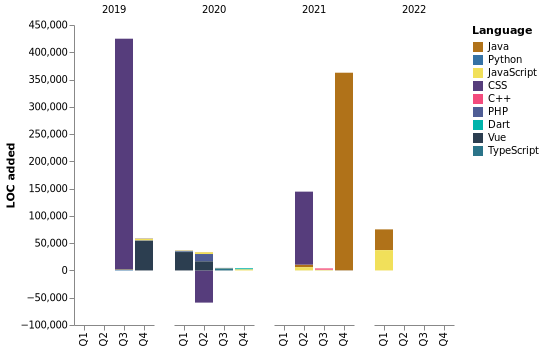
SHOW_LOC_CHART 标志可以设置为 "False",以隐藏在不同年份不同季度编写的代码行
IGNORED_REPOS 标志可以设置为"waka-readme-stats, my-first-repo"(只是一个例子),以忽略一些你不希望被计算在内的repos
SYMBOL_VERSION 标志可以为进度条设置符号(默认:1)
| Version | Done block | Empty block |
|---|---|---|
| 1 | █ | ░ |
| 2 | ⣿ | ⣀ |
| 3 | ||
DEBUG_LOGGING 可以设置标志以增加操作输出的详细程度,默认情况下等于内部运行程序调试属性 |
Timeline
支持这个项目
我开源了几乎所有我能开源的东西,并试图回复每个使用这些项目需要帮助的人。显然,这需要时间。你可以免费使用这项服务
但是,如果您正在使用这个项目并且对它感到满意,或者只是想鼓励我继续创作东西,那么您可以通过几种方式做到这一点:
- 当你在你的自述中使用这个Action时,请给予适当的赞誉,并链接到它:D
- 为项目加星标和分享(俗话说就是点点star)
 你可以通过PayPal进行一次性捐款。我可能会买一杯啤酒葡萄酒
非常感谢!
贡献
欢迎投稿!!请分享任何功能,并添加单元测试!使用拉动请求和问题系统来贡献
部分贡献者
- Anmol Pratap Singh: Maintainer
- Alexander Sergeev: Maintainer
- Aravind V. Nair: Maintainer
- Prabhat Singh: For code timeline graph #18
- Hedy Li: For Pull Request #34 and #23
- Pedro Torres: For Pull Request #29
- Aaron Meese: For Pull Request #45
- Arnav Jindal: For Pull Request #48
- Daniel Rowe: For Pull Request #57
- Ss5h: For adding support for natural sentence writing for translation #136
特别要提到的是那些目前正在使他们的个人资料readme更棒的人
- [Stanislas](https://github.com/angristan)
- [Pratik Kumar](https://github.com/pr2tik1)
- [Vladimir](https://github.com/sergeev-vn)
- [Pedro Torres](https://github.com/Corfucinas)
- [leverglowh](https://github.com/leverglowh)
- [patdc](https://github.com/patdc)
- [极客挖掘机](https://github.com/meteor1993)
- [Fan()](https://github.com/Fanduzi)
- [Miller Camilo Vega](https://github.com/minoveaz)
- [XLor](https://github.com/yjl9903)
- [Jesse Okeya](https://github.com/jesseokeya)
- [anaiel](https://github.com/anaiel)
- [Dipto Mondal](https://github.com/diptomondal007)
- [Jerry F. Zhang](https://github.com/JerryFZhang)
- [Karan Singh](https://github.com/karan06126)
- [Erwin Lejeune](https://github.com/guilyx)
- [Manuel Cepeda](https://github.com/mecm1993)
- [Jonathan S](https://github.com/TGTGamer)
- [Tsotne Gvadzabia](https://github.com/RockiRider)
- [Miray](https://github.com/MirayXS)
- [Varad Patil](https://github.com/varadp2000)
- [Prabhat Singh](https://github.com/prabhatdev)
- [Nikhil](https://github.com/nikhilgorantla)
- [大白](https://github.com/2720851545)
- [Du Yizhuo](https://github.com/dyzdyz010)
- [Manas Talukdar](https://github.com/manastalukdar)
- [Simranjeet Singh](https://github.com/smrnjeet222)
- [Aaron Meese](https://github.com/ajmeese7)
- [Prasad Narkhede](https://github.com/p014ri5)
- [Manish Kushwaha](https://github.com/tzmanish)
- [Hedy Li](https://github.com/hedythedev)
- [SHIMIZU Taku](https://github.com/takuan-osho)
- [Jude Wilson](https://github.com/mr-winson)
- [Daniel Rowe](https://github.com/DanRowe)
- [Muhammad Hassan Ahmed](https://github.com/hassan11196)
- [Alessandro Maggio](https://github.com/Tkd-Alex)
- [Siddharth Gupta](https://github.com/siddg97)
- [Dev-Mehta](https://github.com/Dev-Mehta/)
- [> EdgyCoder ](https://github.com/edgycoder)
- [Korel Kashri](https://github.com/korelkashri)
- [Gustavo Barbosa](https://github.com/gusbdev)
- [eagleanurag](https://github.com/eagleanurag)
- [Aravind V. Nair](https://github.com/aravindvnair99)
- [Raman Preet Singh](https://github.com/raman08)
- [Hayat Tamboli](https://github.com/hayat-tamboli)
- [Henry Boisdequin](https://github.com/henryboisdequin)
- [Raman Preet Singh](https://github.com/raman08)
- [Aadit Kamat](https://github.com/aaditkamat)
- [Subhalingam D](https://github.com/subhalingamd)
- [Adil Akhmetov](https://github.com/weeebdev)
- [Isaac Maldonado](https://github.com/einjunge99)
- [Syed Faateh Sultan Kazmi](https://github.com/faatehsultan)
- [Shreyam Maity](https://github.com/ShreyamMaity)
- [Sufiane](https://github.com/sufiane)
- [Muhammad Bilal](https://github.com/BilalJaved15)
- [Waterdev](https://github.com/UnrealValentin)
- [Aditya Prasad S](https://github.com/adityaprasad502)
- [C. Vinicius Santos](https://github.com/c-viniciussantos)
- [James Tufarelli](https://github.com/Minituff)
- [Muhammad Bilal](https://github.com/BilalJaved15)
- [Wyatt Walsh](https://www.github.com/wyattowalsh)
- [Nithin Balaji](https://github.com/thenithinbalaji)
- 还有你!如果你现在正在使用它,而你不在名单上,请通过发送特别提及问题告诉我们,我们很高兴将你加入名单
使用 和 Python 制作
灵感来源
这个项目需要你的和
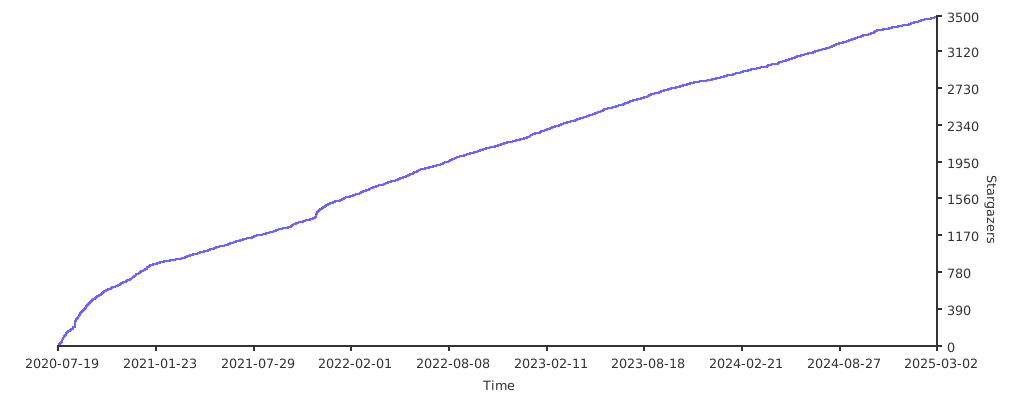
随着时间推移的Star图
WakaTime Readme Stats-开源项目翻译的更多相关文章
- Golang优秀开源项目汇总, 10大流行Go语言开源项目, golang 开源项目全集(golang/go/wiki/Projects), GitHub上优秀的Go开源项目
Golang优秀开源项目汇总(持续更新...)我把这个汇总放在github上了, 后面更新也会在github上更新. https://github.com/hackstoic/golang-open- ...
- Github上关于iOS的各种开源项目集合(强烈建议大家收藏,查看,总有一款你需要)
下拉刷新 EGOTableViewPullRefresh - 最早的下拉刷新控件. SVPullToRefresh - 下拉刷新控件. MJRefresh - 仅需一行代码就可以为UITableVie ...
- 如何参与一个 GitHub 开源项目?
最近一年开源项目特别的热,很多技术大会或论坛都以开源项目作为主题进行探讨,可见这是一种趋势.而Github作为开源项目的著名托管地,可谓无 人不知,越来越多的个人和公司纷纷加入到Github的大家族里 ...
- iOS、mac开源项目及库汇总
原文地址:http://blog.csdn.net/qq_26359763/article/details/51076499 iOS每日一记------------之 中级完美大整理 iOS.m ...
- 如何参与一个GitHub开源项目
Github作为开源项目的著名托管地,可谓无人不知,越来越多的个人和公司纷纷加入到Github的大家族里来,为开源尽一份绵薄之力.对于个人来讲,你把自己的项目托管到Github上并不表示你参与了Git ...
- 开源项目Material Calendar View 学习记录 (一)
开源项目Material Calendar View 学习记录 Github: https://github.com/prolificinteractive/material-calendarview ...
- 怎样在Github参与一个开源项目
转载:http://www.csdn.net/article/2014-04-14/2819293-Contributing-to-Open-Source-on-GitHub 最近一年开源项目特别的热 ...
- golang开源项目qor快速搭建网站qor-example运行实践
最近想找几个基于Go语言开发的简单的开源项目学习下,分享给大家,github上有心人的收集的awesome-go项目集锦:github地址 发现一个Qor项目: Qor 是基于 Golang 开发的的 ...
- github上关于iOS的各种开源项目集合(转)
UI 下拉刷新 EGOTableViewPullRefresh - 最早的下拉刷新控件. SVPullToRefresh - 下拉刷新控件. MJRefresh - 仅需一行代码就可以为UITable ...
- iOS -- 开源项目和库
TimLiu-iOS 目录 UI 下拉刷新 模糊效果 AutoLayout 富文本 图表 表相关与Tabbar 隐藏与显示 HUD与Toast 对话框 其他UI 动画 侧滑与右滑返回手势 gif动画 ...
随机推荐
- Carla 自动驾驶仿真平台的安装与配置指南
简介 Carla 是一款基于 Python 编写和 UE(虚幻引擎)的开源仿真器,用于模拟自动驾驶车辆在不同场景下的行为和决策.它提供了高度可定制和可扩展的驾驶环境,包括城市.高速公路和农村道路等.C ...
- win10环境下 VMware Workstation Pro 安装centos7无法上网
一.安装centos7 网上类似的教程太多了,我就不一一写了,提供两个网址,先按照教程安装 VMware Workstation Pro ,秘钥在第二个链接里面(亲测可用), 安装完VMware在根据 ...
- 归并排序c++(逆序对)
归并排序c++(逆序对) 目录 题目链接 思路 算法 分离数组 合并 代码 目录 归并排序(Merge Sort)是建立在归并操作上的一种既有效又稳定的排序算法,该算法是采用分治法(Divide an ...
- C# 组合键判断
e.KeyboardDevice.Modifiers 同时按下了Ctrl + H键(H要最后按,因为判断了此次事件的e.Key)修饰键只能按下Ctrl,如果还同时按下了其他修饰键,则不会进入 1 pr ...
- [C++基础入门] 1、C++初识
文章目录 1 C++初识 1.1 第一个C++程序 1.1.1 创建项目 1.1.2 创建文件 1.1.3 编写代码 1.1.4 运行程序 1.2 注释 1.3 变量 1.4 常量 1.5 关键字 1 ...
- vue处理图片路径出问题时显示默认图片
<img :src="item.url? item.url: '' " alt :onerror="defaultImg" /> 这里一定要判断sr ...
- 2022-11-23: 分数排名。输出结果和表的sql如下。请写出输出结果的sql语句? +-------+------+ | score | rank | +-------+------+ | 4.
2022-11-23: 分数排名.输出结果和表的sql如下.请写出输出结果的sql语句? ±------±-----+ | score | rank | ±------±-----+ | 4.00 | ...
- vue全家桶进阶之路32:Vue3 WatchEffect和watch 监听
在 Vue 3 中,watchEffect 是一个用于监听响应式数据变化的 API.它可以在函数内部自动跟踪数据的依赖,并在依赖变化时重新运行函数. watchEffect 的作用以及各个参数的功能讲 ...
- vue全家桶进阶之路27:Vue.js 3.0的下载和安装
使用脚手架vue-cli创建vue3项目,创建前需要准备以下: 1.node.js环境 见:https://www.cnblogs.com/beichengshiqiao/p/17251233.htm ...
- 使用 Django 集成 vue 到一个服务器上,还是 Django 和 vue 分开部署
Django+Vue 的项目,实际部署的时候,使用 Django 集成 vue 到一个服务器上,还是 Django 和 vue 分开部署? 目前在架构选择,基本上定了 Django + Vue 但是实 ...