
在WebForm中实现购物车思路
关于网站购物车的实现的思考
写在前面的话:刚来公司的的时候,老大安排了一个任务,企业站,但是需要实现购物车的功能,以前没做过,所有就向周围的人请教了一下如何实现购物车,自己也在网上搜了一下,有了些自己的认识,于是写了下来
1、实现思路:
在网上查了一下资料,以及向身边请教之后发现,对于网站购物车的实现大体分为三种方法:Session实现、Cookie实现、数据库实现,其实这三种实现,指的只是如何跟踪用户的操作,即用户购买物品,加入购物车,加入了什么物品,加入了多少物品等信息的暂时保存。
这三种方法的不同之处就在于保存用户操作的方式不同,其中Session现在用的不多,由于Session的生命周期,在浏览器关闭时会失效,所以容易使数据丢失,如果用户在浏览网站是不小心关闭了浏览器,当用户再次打开时,加入购物车的物品就会丢失,所以不可取。
Cookie的实现方式是在用户点击加入购物车之后将数据以Cookie的形式存储的客户端,每次用户登录该网站时,首先从Cookie中读取数据出来,这种方式数据库不易丢失,读取速度也快。
数据库的实现方式是最安全的,但是这种方式也是最占用服务器资源的,而且当数据量较大时,会影响服务器响应速度。
2、我选择的方式:
我初步设想是在物品展示页面中做成类似淘宝网、当当网的那种展示页面,在每个物品下面放置一个加入购物车按钮,希望在用户浏览该页面时,点击该按钮将自己喜欢的物品加入购物车。
页面组成:ProductList.aspx、ProductShow.aspx、ShoppingCart.aspx
ProductList.aspx.cs文件
public partial class ProductList : System.Web.UI.Page

{

    protected void Page_Load(object sender, EventArgs e)

    {

        // 绑定数据源到Repeater控件

        Bind();

    }

    public void Bind()

    {

        string sqlStr = "select * from product";

        rptProductList.DataSource = new BLL().GetDataSet(sqlStr);

        rptProductList.DataBind();

    }

    protected void btnGoCart_Click(object sender, EventArgs e)

    {

        Response.Redirect("ShoppingCart.aspx");

    }

}

public partial class ProductList : System.Web.UI.Page

{

    protected void Page_Load(object sender, EventArgs e)

    {

        // 绑定数据源到Repeater控件

        Bind();

    }

    public void Bind()

    {

        string sqlStr = "select * from product";

        rptProductList.DataSource = new BLL().GetDataSet(sqlStr);

        rptProductList.DataBind();

    }

    protected void btnGoCart_Click(object sender, EventArgs e)

    {

        Response.Redirect("ShoppingCart.aspx");

    }

}
此页面的功能是:从后台将数据库已有的商品取出来,并绑定到服务器控件上,展示出来,当用户看到自己喜欢的物品时,点击图片,将会跳转到物品详情页,即ProductShow.aspx页面。
由于自己只是做个测试,所以就用自己最喜欢的动漫人物来做图片了,页面运行效果如图:

ProductShow.aspx.cs文件
public partial class ProductShow : System.Web.UI.Page

{

    public string id = "";

    public string picture = "";

    public string name = "";

    private Product product = new Product();

    protected void Page_Load(object sender, EventArgs e)

    {

        id = Request.QueryString["id"].ToString();

        picture = Request.QueryString["picture"].ToString();

        product.Id = this.id;

        product.Name = this.name;

        product.Picture = this.picture;

    }

    /// <summary>

    /// 添加数据到cookies

    /// </summary>

    /// <param name="sender"></param>

    /// <param name="e"></param>

    protected void btnAddCart_Click(object sender, EventArgs e)

    {

        Cart cart = new Cart();

        cart.WriteCookies(product);

        Response.Redirect("ShoppingCart.aspx");

    }

}
public partial class ProductShow : System.Web.UI.Page

{

    public string id = "";

    public string picture = "";

    public string name = "";

    private Product product = new Product();

    protected void Page_Load(object sender, EventArgs e)

    {

        id = Request.QueryString["id"].ToString();

        picture = Request.QueryString["picture"].ToString();

        product.Id = this.id;

        product.Name = this.name;

        product.Picture = this.picture;

    }

    /// <summary>

    /// 添加数据到cookies

    /// </summary>

    /// <param name="sender"></param>

    /// <param name="e"></param>

    protected void btnAddCart_Click(object sender, EventArgs e)

    {

        Cart cart = new Cart();

        cart.WriteCookies(product);

        Response.Redirect("ShoppingCart.aspx");

    }

}
此页面的功能是:首先读取从物品展示页面传过来的物品Id和图片地址,之后便将该物品详情展示在页面中,由于只是测试,所以只传了Id和图片地址,我在考虑是如果需要想当当那样的物品详情页那样展示很多信息的话,是该在此页面根据Id从数据库读取呢,还是应该从物品展示页面传过来呢?如果有知道的,还请留言告诉我,先谢过了。
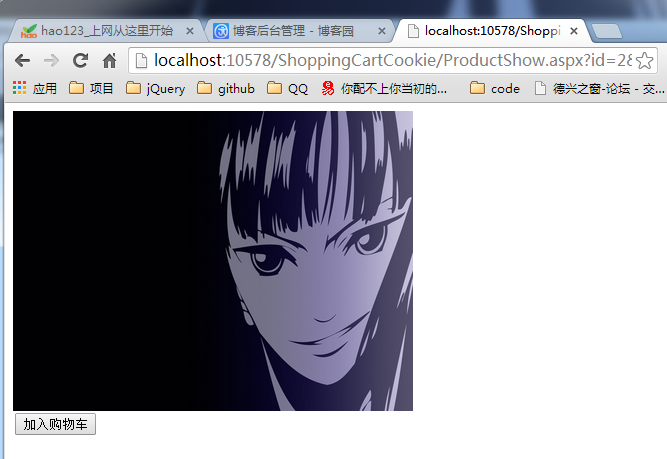
在此页面中有一个加入购物车按钮,当点击该按钮时,会将该物品加入购物车,在此实现是写入Cookie,写入的规则是,购物车是否存在,存在则再先查看Cookie中是否已有该物品,如果有则增加数量即可,如果没有,则在Cookie中新建一个键值对存入Cookie,如果购物车不存在,则先创建购物车即可,下面是购物车类的WriteCookies代码:
#region 写入cookie

    /// <summary>

    /// 写入cookie

    /// </summary>

    /// <param name="product">商品</param>

    /// <param name="num">个数</param>

    /// <param name="expires">有效期</param>

    public void WriteCookies(Product product, int num = 1, int expires = 15)

    {

        if (System.Web.HttpContext.Current.Request.Cookies["Cart"] != null)

        {

            string cookieValue = System.Web.HttpContext.Current.Request.Cookies["Cart"].Value;

            // 商品不存在

            if (System.Web.HttpContext.Current.Request.Cookies["Cart"].Values[product.Id.ToString()] == null)

            {

                cookieValue = cookieValue + "&" + product.Id + "=" + num.ToString();

            }

            // 商品存在

            else

            {

                int num1 = int.Parse(System.Web.HttpContext.Current.Request.Cookies["Cart"].Values[product.Id.ToString()].ToString()) + num;

                System.Web.HttpContext.Current.Request.Cookies["Cart"].Values[product.Id.ToString()] = num1.ToString();

                cookieValue = System.Web.HttpContext.Current.Request.Cookies["Cart"].Value;

            }

            HttpCookie cookie = new System.Web.HttpCookie("Cart", cookieValue);

            System.Web.HttpContext.Current.Response.AppendCookie(cookie);

        }

        // 创建购物车

        else

        {

            HttpCookie cookie = new HttpCookie("Cart");

            cookie.Values[product.Id.ToString()] = num.ToString();

            System.Web.HttpContext.Current.Response.Cookies.Add(cookie);

            System.Web.HttpContext.Current.Response.AppendCookie(cookie);

        }

    }

    #endregion
#region 写入cookie

    /// <summary>

    /// 写入cookie

    /// </summary>

    /// <param name="product">商品</param>

    /// <param name="num">个数</param>

    /// <param name="expires">有效期</param>

    public void WriteCookies(Product product, int num = 1, int expires = 15)

    {

        if (System.Web.HttpContext.Current.Request.Cookies["Cart"] != null)

        {

            string cookieValue = System.Web.HttpContext.Current.Request.Cookies["Cart"].Value;

            // 商品不存在

            if (System.Web.HttpContext.Current.Request.Cookies["Cart"].Values[product.Id.ToString()] == null)

            {

                cookieValue = cookieValue + "&" + product.Id + "=" + num.ToString();

            }

            // 商品存在

            else

            {

                int num1 = int.Parse(System.Web.HttpContext.Current.Request.Cookies["Cart"].Values[product.Id.ToString()].ToString()) + num;

                System.Web.HttpContext.Current.Request.Cookies["Cart"].Values[product.Id.ToString()] = num1.ToString();

                cookieValue = System.Web.HttpContext.Current.Request.Cookies["Cart"].Value;

            }

            HttpCookie cookie = new System.Web.HttpCookie("Cart", cookieValue);

            System.Web.HttpContext.Current.Response.AppendCookie(cookie);

        }

        // 创建购物车

        else

        {

            HttpCookie cookie = new HttpCookie("Cart");

            cookie.Values[product.Id.ToString()] = num.ToString();

            System.Web.HttpContext.Current.Response.Cookies.Add(cookie);

            System.Web.HttpContext.Current.Response.AppendCookie(cookie);

        }

    }

    #endregion
当点击加入购物车以后,会写入Cookie,并跳转到购物车页面
ShoppingCart.aspx.cs文件
public partial class ShoppingCart : System.Web.UI.Page

{

    protected void Page_Load(object sender, EventArgs e)

    {

        Bind();

        this.DataBind();

    }

    protected void Bind()

    {

        Cart cart = new Cart();

        rptCart.DataSource = cart.ReadCookies();

    }

}
public partial class ShoppingCart : System.Web.UI.Page

{

    protected void Page_Load(object sender, EventArgs e)

    {

        Bind();

        this.DataBind();

    }

    protected void Bind()

    {

        Cart cart = new Cart();

        rptCart.DataSource = cart.ReadCookies();

    }

}
public partial class ShoppingCart : System.Web.UI.Page

{

    protected void Page_Load(object sender, EventArgs e)

    {

        Bind();

        this.DataBind();

    }

    protected void Bind()

    {

        Cart cart = new Cart();

        rptCart.DataSource = cart.ReadCookies();

    }

}
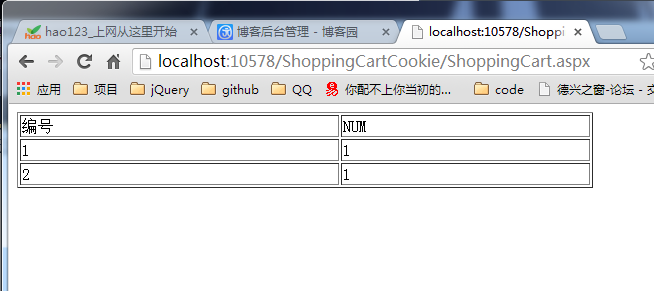
此页面的功能只是简单的从Cookie中读取已有数据,并显示在页面上,由于只是简单侧说,所以没有实现从购物车取消购买功能,只是简单的罗列。
运行页面如下:
3、总结:
本文就是简单的描述一下自己对于购物车实现的想法,如果有不对的,还请各位多多指教,由于自己最近才开始练习使用三层架构,因此这个小例子也使用了三层,这样做确实使代码的层次结构很容易理解了。
我简单介绍一下这三个层,是传统的BLL、DAL、Model三层,DAL用来从数据库读取数据,BLL其实没有什么作用,只是为了成为三层,因为这个小例子太简单,没有什么业务逻辑可以处理(不知道自己这样使用三层会不会太生拉硬套了,反正就是想让自己从小例子开始习惯使用三层吧),Model层定义了一个Product类来表示商品,最后定义了一个Cart类,它只是实现了将数据写入CooKie和从Cookie读去数据的功能。到此这个小例子就完全结束了。
写在后面的话:当我思考了许久,才想出购物车的实现思路,结构最后才发现,组长给我的任务是在企业站中实现购物车,而企业站中实现购物的功能大都是以留言的方式是实现的,所以自己的这个方案也没有用上;不过,我也从中学到了很多,学到了面对问题,应该首先自己去思考如何解决问题。
在WebForm中实现购物车思路的更多相关文章
- FPS中受伤UI在VR游戏中的实现思路
FPS中受伤UI在VR游戏中的实现思路 希望实现的效果 这几天一直在尝试各种解决方案,现在算是不完美的解决啦,记录一下心路历程,思路有了算法都比较简单. V_1 玩家胶囊体指向的方向作为正方向,计算出 ...
- webform 中使用ajax
常用的方式有 js –> WebService , js->*.ashx, js->WebAPI, js->MVC Controller->Action. 前两种就不说 ...
- webform中使用webapi,并且使用autofac
private void AutofacIoCRegister() { HttpConfiguration config = GlobalConfiguration.Configuration; if ...
- 【Ext.Net学习笔记】01:在ASP.NET WebForm中使用Ext.Net
Ext.NET是基于跨浏览器的ExtJS库和.NET Framework的一套支持ASP.NET AJAX的开源Web控件,包含有丰富的Ajax运用,其前身是Coolite. 下载地址:http:// ...
- 在ASP.NET非MVC环境中(WebForm中)构造MVC的URL参数
目前项目中有个需求,需要在WebForm中去构造MVC的URL信息,这里写了一个帮助类可以在ASP.NET非MVC环境中(WebForm中)构造MVC的URL信息,主要就是借助当前Http上下文去构造 ...
- Ext.Net学习笔记01:在ASP.NET WebForm中使用Ext.Net
Ext.Net是一个对ExtJS进行封装了的.net控件库,可以在ASP.NET WebForm和MVC中使用.从今天开始记录我的学习笔记,这是第一篇,今天学习了如何在WebForm中使用Ext.Ne ...
- ASP.NET WebForm中前台代码如何绑定后台变量
转载自 http://www.cnblogs.com/lerit/archive/2010/10/22/1858007.html 经常会碰到在前台代码中要使用(或绑定)后台代码中变量值的问题.一般有& ...
- 返璞归真 asp.net mvc (11) - asp.net mvc 4.0 新特性之自宿主 Web API, 在 WebForm 中提供 Web API, 通过 Web API 上传文件, .net 4.5 带来的更方便的异步操作
原文:返璞归真 asp.net mvc (11) - asp.net mvc 4.0 新特性之自宿主 Web API, 在 WebForm 中提供 Web API, 通过 Web API 上传文件, ...
- 输出单个文件中的前 N 个最常出现的英语单词,并将结果输入到文本文件中。程序设计思路。
将文件内容读取后存入StringBuffer中. 利用函数将段落分割成字符串,按(“,”,“.”,“!”,“空格”,“回车”)分割,然后存入数组中. 遍历数组,并统计每个单词及其出现的次数. 要求出文 ...
随机推荐
- 大数据开发 | MapReduce介绍
1. MapReduce 介绍 1.1MapReduce的作用 假设有一个计算文件中单词个数的需求,文件比较多也比较大,在单击运行的时候机器的内存受限,磁盘受限,运算能力受限,而一旦将单机版程序扩展 ...
- Java历程-初学篇 Day02变量,数据类型和运算符
一,数据类型 1,基础数据类型 整型 byte short int long 浮点型 float double 字符型 char 布尔类型 boolean 2,引用类型 String 字符串型 二,变 ...
- DAO与DTO
DAO叫数据访问对象(data access object) DTO是数据传输对象(data transfer object) DAO通常是将非对象数据(如关系数据库中的数据)以对象的方式操纵.(即一 ...
- web应用程序 前段部分调优
1. 使用瀑布图初步诊断网站性能瓶颈 一般来说,打开一个网页的速度会受到以下几项的影响: 1) 服务器花了太长的时间将.aspx页面的内容转化为html. 2) .aspx页面花了太长的时间从服务器端 ...
- 第四章 MySQL高级查询(二)
第四章 MySQL高级查询(二) 一.EXISTS子查询 在执行create 或drop语句之前,可以使用exists语句判断该数据库对像是否存在,返回值是true或false.除此之外,exists ...
- DevOps之归纳总结
唠叨话 关于德语关我屁事的知识点,仅提供精华汇总,具体知识点细节,参考教程网址,如需帮助,请留言. DevOps归纳总结 <DevOps功能与性能>浏览器(饼干Cookie.会话Sessi ...
- Ubuntu安装Java8和Java9
前言 系统:Ubuntu 16.04 软件: Java8, Java9 Tips: Java 9 的代码由于提供了新特性,所以有些代码并不支持向后兼容.也就是说,用 Java 9 写的代码,有可能在 ...
- Extjs6(四)——侧边栏导航根据路由跳转页面
本文基于ext-6.0.0 之前做的时候这个侧边栏导航是通过tab切换来切换页面的,但是总感觉不太对劲,现在终于发现怎么通过路由跳转了,分享给大家,可能有些不完善的地方,望大家读后可以给些指点.欢迎留 ...
- centos安装SWFtools服务(pdf2swf)
第一步:下载swftools-0.9.2.tar.gz 第二步:swftools tar -xzvf swftools-0.9.2.tar.gz cd swftools-0.9.2 ./configu ...
- LINUX 笔记-find 命令常用用法
命令格式: find path -option [-print] [-exec -ok] -print:find 命令将匹配的文件输出到标准输出 -exec:find 命令对匹配的文件执行该参数所给出 ...