
【Spring】BeanFactory解析bean详解
package bean;
public class TestBean {
    private String beanName = "beanName";
    public String getBeanName() {
        return beanName;
    }
    public void setBeanName(String beanName) {
        this.beanName = beanName;
    }
}
<?xml version="1.0" encoding="UTF-8"?>
<beans xmlns="http://www.springframework.org/schema/beans"
    xmlns:xsi="http://www.w3.org/2001/XMLSchema-instance"
    xsi:schemaLocation="http://www.springframework.org/schema/beans
      http://www.springframework.org/schema/beans/spring-beans-4.1.xsd">

    <bean id="testBean" class="bean.TestBean">
</beans>
public class BeanTest {

    private static final java.util.logging.Logger logger = LoggerFactory.getLogger(BeanTest.class);

    @Test
    public void getBeanTest() {
        BeanFactory factory = new XmlBeanFactory(new ClassPathResource("root.xml"));
        TestBean bean = factory.getBean("testBean");
        logger.info(bean.getBeanName);
    }
}
public class XmlBeanFactory extends DefaultListableBeanFactory {

   private final XmlBeanDefinitionReader reader = new XmlBeanDefinitionReader(this);

   public XmlBeanFactory(Resource resource) throws BeansException {
       this(resource, null);
   }

   public XmlBeanFactory(Resource resource, BeanFactory parentBeanFactory) throws BeansException {
       super(parentBeanFactory);
       this.reader.loadBeanDefinitions(resource);
   }
}
public class XmlBeanDefinitionReader extends AbstractBeanDefinitionReader {

    private Class<?> documentReaderClass = DefaultBeanDefinitionDocumentReader.class;

    private ProblemReporter problemReporter = new FailFastProblemReporter();

    private ReaderEventListener eventListener = new EmptyReaderEventListener();

    private SourceExtractor sourceExtractor = new NullSourceExtractor();

    private NamespaceHandlerResolver namespaceHandlerResolver;

    private DocumentLoader documentLoader = new DefaultDocumentLoader();

    private EntityResolver entityResolver;

    private ErrorHandler errorHandler = new SimpleSaxErrorHandler(logger);
}
public abstract class AbstractBeanDefinitionReader implements EnvironmentCapable, BeanDefinitionReader {

    protected final Log logger = LogFactory.getLog(getClass());

    private final BeanDefinitionRegistry registry;

    private ResourceLoader resourceLoader;

    private ClassLoader beanClassLoader;

    private Environment environment;

    private BeanNameGenerator beanNameGenerator = new DefaultBeanNameGenerator();
}
BeanFactory factory = new XmlBeanFactory(new ClassPathResource("root.xml"));
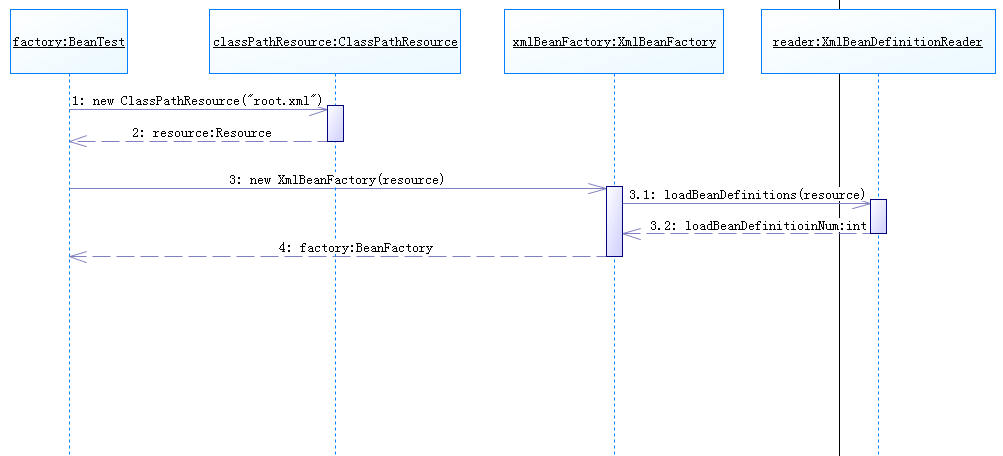
public XmlBeanFactory(Resource resource) throws BeansException {
     this(resource, null);
}

public XmlBeanFactory(Resource resource, BeanFactory parentBeanFactory) throws BeansException {
     super(parentBeanFactory);
     this.reader.loadBeanDefinitions(resource);
}
public class XmlBeanDefinitionReader extends AbstractBeanDefinitionReader {

    @Override
    public int loadBeanDefinitions(Resource resource) throws BeanDefinitionStoreException {
        return loadBeanDefinitions(new EncodedResource(resource));
    }
}
public int loadBeanDefinitions(EncodedResource encodedResource) throws BeanDefinitionStoreException {
    Assert.notNull(encodedResource, "EncodedResource must not be null");
    if (logger.isInfoEnabled()) {
        logger.info("Loading XML bean definitions from " + encodedResource.getResource());
    }

    // 通过属性记录已加载的资源
    Set<EncodedResource> currentResources = this.resourcesCurrentlyBeingLoaded.get();
    if (currentResources == null) {
        currentResources = new HashSet<EncodedResource>(4);
        this.resourcesCurrentlyBeingLoaded.set(currentResources);
    }
    if (!currentResources.add(encodedResource)) {
        throw new BeanDefinitionStoreException(
                "Detected cyclic loading of " + encodedResource + " - check your import definitions!");
    }
    try {
        // 从resource中获取对应的InputStream,用于下面构造InputSource
        InputStream inputStream = encodedResource.getResource().getInputStream();
        try {
            InputSource inputSource = new InputSource(inputStream);
            if (encodedResource.getEncoding() != null) {
                inputSource.setEncoding(encodedResource.getEncoding());
            }
            // 调用doLoadBeanDefinitions方法
            return doLoadBeanDefinitions(inputSource, encodedResource.getResource());
        }
        finally {
            inputStream.close();
        }
    }
    catch (IOException ex) {
        throw new BeanDefinitionStoreException(
                "IOException parsing XML document from " + encodedResource.getResource(), ex);
    }
    finally {
        currentResources.remove(encodedResource);
        if (currentResources.isEmpty()) {
            this.resourcesCurrentlyBeingLoaded.remove();
        }
    }
}
protected int doLoadBeanDefinitions(InputSource inputSource, Resource resource)
        throws BeanDefinitionStoreException {
    try {
        Document doc = doLoadDocument(inputSource, resource);
        return registerBeanDefinitions(doc, resource);
    }
    /* 省略一堆catch */
}
protected Document doLoadDocument(InputSource inputSource, Resource resource) throws Exception {
    return this.documentLoader.loadDocument(inputSource, getEntityResolver(), this.errorHandler,
            getValidationModeForResource(resource), isNamespaceAware());
}
public class DefaultDocumentLoader implements DocumentLoader {

    @Override
    public Document loadDocument(InputSource inputSource, EntityResolver entityResolver,
            ErrorHandler errorHandler, int validationMode, boolean namespaceAware) throws Exception {

        DocumentBuilderFactory factory = createDocumentBuilderFactory(validationMode, namespaceAware);
        if (logger.isDebugEnabled()) {
            logger.debug("Using JAXP provider [" + factory.getClass().getName() + "]");
        }
        DocumentBuilder builder = createDocumentBuilder(factory, entityResolver, errorHandler);
        return builder.parse(inputSource);
    }
}
public int registerBeanDefinitions(Document doc, Resource resource) throws BeanDefinitionStoreException {
    BeanDefinitionDocumentReader documentReader = createBeanDefinitionDocumentReader();
    documentReader.setEnvironment(getEnvironment());
    // 还没注册bean前的BeanDefinition加载个数
    int countBefore = getRegistry().getBeanDefinitionCount();
    // 加载注册bean
    documentReader.registerBeanDefinitions(doc, createReaderContext(resource));
    // 本次加载注册的BeanDefinition个数
    return getRegistry().getBeanDefinitionCount() - countBefore;
}
@Override
public void registerBeanDefinitions(Document doc, XmlReaderContext readerContext) {
    this.readerContext = readerContext;
    logger.debug("Loading bean definitions");
    Element root = doc.getDocumentElement();
    doRegisterBeanDefinitions(root);
}
protected void doRegisterBeanDefinitions(Element root) {
    BeanDefinitionParserDelegate parent = this.delegate;
    this.delegate = createDelegate(getReaderContext(), root, parent);

    if (this.delegate.isDefaultNamespace(root)) {
        String profileSpec = root.getAttribute(PROFILE_ATTRIBUTE);
        if (StringUtils.hasText(profileSpec)) {
            String[] specifiedProfiles = StringUtils.tokenizeToStringArray(
                    profileSpec, BeanDefinitionParserDelegate.MULTI_VALUE_ATTRIBUTE_DELIMITERS);
            if (!getReaderContext().getEnvironment().acceptsProfiles(specifiedProfiles)) {
                return;
            }
        }
    }

    preProcessXml(root);
    parseBeanDefinitions(root, this.delegate);
    postProcessXml(root);

    this.delegate = parent;
}
protected void parseBeanDefinitions(Element root, BeanDefinitionParserDelegate delegate) {
    if (delegate.isDefaultNamespace(root)) {
        NodeList nl = root.getChildNodes();
        for (int i = 0; i < nl.getLength(); i++) {
            Node node = nl.item(i);
            if (node instanceof Element) {
                Element ele = (Element) node;
                // 下面对bean进行处理
                if (delegate.isDefaultNamespace(ele)) {
                    parseDefaultElement(ele, delegate);
                }
                else {
                    delegate.parseCustomElement(ele);
                }
            }
        }
    }
    else {
        delegate.parseCustomElement(root);
    }
}
<bean id="testBean" class="bean.TestBean">
<tx:annotation-driven />
XmlBeanFactory加载bean的整个过程基本就讲解到这里了。
【Spring】BeanFactory解析bean详解的更多相关文章
- Spring自动装配Bean详解
1. Auto-Wiring ‘no’ 2. Auto-Wiring ‘byName’ 3. Auto-Wiring ‘byType 4. Auto-Wirin ...
- Spring二 Bean详解
Bean详解 Spring框架的本质其实是:通过XML配置来驱动Java代码,这样就可以把原本由java代码管理的耦合关系,提取到XML配置文件中管理.这样就实现了系统中各组件的解耦,有利于后期的升级 ...
- Spring框架系列(8) - Spring IOC实现原理详解之Bean实例化(生命周期,循环依赖等)
上文,我们看了IOC设计要点和设计结构:以及Spring如何实现将资源配置(以xml配置为例)通过加载,解析,生成BeanDefination并注册到IoC容器中的:容器中存放的是Bean的定义即Be ...
- spring在IoC容器中装配Bean详解
1.Spring配置概述 1.1.概述 Spring容器从xml配置.java注解.spring注解中读取bean配置信息,形成bean定义注册表: 根据bean定义注册表实例化bean: 将bean ...
- Spring Bean 详解
Spring Bean 详解 Ioc实例化Bean的三种方式 1 创建Bean 1 使用无参构造函数 这也是我们常用的一种.在默认情况下,它会通过反射调⽤⽆参构造函数来创建对象.如果类中没有⽆参构造函 ...
- (转)java之Spring(IOC)注解装配Bean详解
java之Spring(IOC)注解装配Bean详解 在这里我们要详细说明一下利用Annotation-注解来装配Bean. 因为如果你学会了注解,你就再也不愿意去手动配置xml文件了,下面就看看 ...
- Spring IoC @Autowired 注解详解
前言 本系列全部基于 Spring 5.2.2.BUILD-SNAPSHOT 版本.因为 Spring 整个体系太过于庞大,所以只会进行关键部分的源码解析. 我们平时使用 Spring 时,想要 依赖 ...
- Spring IoC 公共注解详解
前言 本系列全部基于 Spring 5.2.2.BUILD-SNAPSHOT 版本.因为 Spring 整个体系太过于庞大,所以只会进行关键部分的源码解析. 什么是公共注解?公共注解就是常见的Java ...
- Spring框架系列(6) - Spring IOC实现原理详解之IOC体系结构设计
在对IoC有了初步的认知后,我们开始对IOC的实现原理进行深入理解.本文将帮助你站在设计者的角度去看IOC最顶层的结构设计.@pdai Spring框架系列(6) - Spring IOC实现原理详解 ...
随机推荐
- VSCode从非根目录编译golang程序
1.问题提出 "习惯在项目目录里建src放源码文件,根目录里放配置文件或者别的什么,在交付时直接忽视掉src目录就行了,但vscode好像不能这样愉快的玩耍..."??? 要实现把 ...
- 解决Ubuntu不能连接xshell
首先,判断Ubuntu是否安装了ssh服务: 1.ps -e |grep ssh 如果服务已经启动,则可以同时看到“ssh-agent”和“sshd”,否则表示没有安装服务,或没有开机启动 2.安装s ...
- c++动态库与静态库
windows下: 在进行库创建的时候会用到导出符号,在函数,类的声明处直接指出. 静态库:用的时候通常将 #pagram (lib,"name"),包含头文件,可以使用任何导出类 ...
- linux-网络数据包抓取-tcpdump
用法格式: tcpdump [-i 网卡] [选项] '表达式' 选项说明如下: -i:interface 监听的网卡. -nn:表示以ip和port的方式显示来源主机和目的主机,而不是用主机名和 ...
- jQuery写选项卡
<!DOCTYPE html> <htmllang="en"> <head> <metacharset="UTF-8" ...
- C# Windows 异步线程
Task t = new Task(new Action(() => { //推送产品 ...
- Java设计模式之《桥接模式》及应用场景
摘要: 原创作品,可以转载,但是请标注出处地址http://www.cnblogs.com/V1haoge/p/6497919.html 这里摘抄一份他处的概念,你可以不必理会,先看下面得讲解与实例, ...
- Swift 包管理器命令行使用
1.swift -version //swift 版本查看 2.swift build //swift工程编译 3.swift package generate-xcodeproj //创建Xcode ...
- smarty模板做人员表信息删除,修改 里面的性别单选按钮民族下拉,另外登录进去可以显示姓名
首先登录进去可以显示姓名 smarty模板做人员表信息删除,删除的时候有提示框确定删除吗. 修改 里面的性别单选按钮,要修改谁有默认选中,用了变量调节器 民族位置做下拉,用<{foreach}& ...
- LeetCode 笔记总结
前言 之前把一些LeetCode题目的思路写在了本子上,现在把这些全都放到博客上,以后翻阅比较方便. 题目 99.Recover Binary Search Tree 题意 Two elements ...