
NET MVC中使用FluentValidation
ASP.NET MVC中使用FluentValidation验证实体
1、FluentValidation介绍
FluentValidation是与ASP.NET DataAnnotataion Attribute验证实体不同的数据验证组件,提供了将实体与验证分离开来的验证方式,同时FluentValidation还提供了表达式链式语法。
2、安装FluentValidation
FluentValidation地址:http://fluentvalidation.codeplex.com/
使用Visual Studio的管理NuGet程序包安装FluentValidation及FluentValidation.Mvc
3、通过ModelState使用FluentValidation验证
项目解决方案结构图:
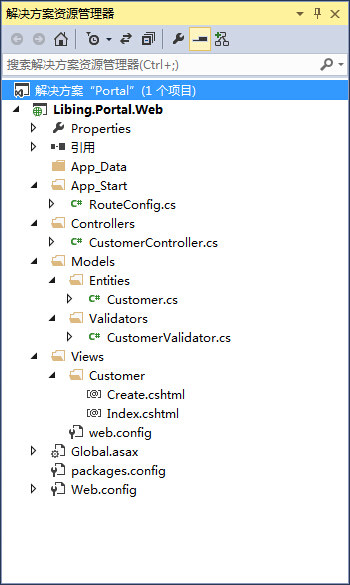
实体类Customer.cs:

using System;

using System.Collections.Generic;

using System.Linq;

using System.Web;

namespace Libing.Portal.Web.Models.Entities

{

    public class Customer

    {

        public int CustomerID { get; set; }

        public string CustomerName { get; set; }

        public string Email { get; set; }

        public string Address { get; set; }

        public string Postcode { get; set; }

        public float? Discount { get; set; }

        public bool HasDiscount { get; set; }

    }

}
数据验证类CustomerValidator.cs:
using System;

using System.Collections.Generic;

using System.Linq;

using System.Web;

using FluentValidation;

using Libing.Portal.Web.Models.Entities;

namespace Libing.Portal.Web.Models.Validators

{

    public class CustomerValidator : AbstractValidator<Customer>

    {

        public CustomerValidator()

        {

            RuleFor(customer => customer.CustomerName).NotNull().WithMessage("客户名称不能为空");

            RuleFor(customer => customer.Email)

                .NotEmpty().WithMessage("邮箱不能为空")

                .EmailAddress().WithMessage("邮箱格式不正确");

            RuleFor(customer => customer.Discount)

                .NotEqual(0)

                .When(customer => customer.HasDiscount);

            RuleFor(customer => customer.Address)

                .NotEmpty()

                .WithMessage("地址不能为空")

                .Length(20, 50)

                .WithMessage("地址长度范围为20-50字节");

        }

    }

}
控制器类CustomerController.cs:
using System;

using System.Collections.Generic;

using System.Linq;

using System.Web;

using System.Web.Mvc;

using FluentValidation.Results;

using Libing.Portal.Web.Models.Entities;

using Libing.Portal.Web.Models.Validators;

namespace Libing.Portal.Web.Controllers

{

    public class CustomerController : Controller

    {

        public ActionResult Index()

        {

            return View();

        }

        public ActionResult Create()

        {

            return View();

        }

        [HttpPost]

        public ActionResult Create(Customer customer)

        {

            CustomerValidator validator = new CustomerValidator();

            ValidationResult result = validator.Validate(customer);

            if (!result.IsValid)

            {

                result.Errors.ToList().ForEach(error =>

                {

                    ModelState.AddModelError(error.PropertyName, error.ErrorMessage);

                });

            }

            if (ModelState.IsValid)

            {

                return RedirectToAction("Index");

            }

            return View(customer);

        }

    }

}
View页面Create.cshtml,该页面为在添加View时选择Create模板自动生成:
@model Libing.Portal.Web.Models.Entities.Customer

@{

    Layout = null;

}

<!DOCTYPE html>

<html>

<head>

    <meta name="viewport" content="width=device-width" />

    <title>Create</title>

</head>

<body>

    @using (Html.BeginForm())

    {

        @Html.AntiForgeryToken()

        <div class="form-horizontal">

            <h4>Customer</h4>

            <hr />

            @Html.ValidationSummary(true)

            <div class="form-group">

                @Html.LabelFor(model => model.CustomerName, new { @class = "control-label col-md-2" })

                <div class="col-md-10">

                    @Html.EditorFor(model => model.CustomerName)

                    @Html.ValidationMessageFor(model => model.CustomerName)

                </div>

            </div>

            <div class="form-group">

                @Html.LabelFor(model => model.Email, new { @class = "control-label col-md-2" })

                <div class="col-md-10">

                    @Html.EditorFor(model => model.Email)

                    @Html.ValidationMessageFor(model => model.Email)

                </div>

            </div>

            <div class="form-group">

                @Html.LabelFor(model => model.Address, new { @class = "control-label col-md-2" })

                <div class="col-md-10">

                    @Html.EditorFor(model => model.Address)

                    @Html.ValidationMessageFor(model => model.Address)

                </div>

            </div>

            <div class="form-group">

                @Html.LabelFor(model => model.Postcode, new { @class = "control-label col-md-2" })

                <div class="col-md-10">

                    @Html.EditorFor(model => model.Postcode)

                    @Html.ValidationMessageFor(model => model.Postcode)

                </div>

            </div>

            <div class="form-group">

                @Html.LabelFor(model => model.Discount, new { @class = "control-label col-md-2" })

                <div class="col-md-10">

                    @Html.EditorFor(model => model.Discount)

                    @Html.ValidationMessageFor(model => model.Discount)

                </div>

            </div>

            <div class="form-group">

                @Html.LabelFor(model => model.HasDiscount, new { @class = "control-label col-md-2" })

                <div class="col-md-10">

                    @Html.EditorFor(model => model.HasDiscount)

                    @Html.ValidationMessageFor(model => model.HasDiscount)

                </div>

            </div>

            <div class="form-group">

                <div class="col-md-offset-2 col-md-10">

                    <input type="submit" value="Create" class="btn btn-default" />

                </div>

            </div>

        </div>

    }

</body>

</html>
运行效果:

4、通过设置实体类Attribute与验证类进行验证
修改实体类Customer.cs:
using System;

using System.Collections.Generic;

using System.Linq;

using System.Web;

using FluentValidation.Attributes;

using Libing.Portal.Web.Models.Validators;

namespace Libing.Portal.Web.Models.Entities

{

    [Validator(typeof(CustomerValidator))]

    public class Customer

    {

        public int CustomerID { get; set; }

        public string CustomerName { get; set; }

        public string Email { get; set; }

        public string Address { get; set; }

        public string Postcode { get; set; }

        public float? Discount { get; set; }

        public bool HasDiscount { get; set; }

    }

}
修改Global.asax.cs:
using System;

using System.Collections.Generic;

using System.Linq;

using System.Web;

using System.Web.Mvc;

using System.Web.Routing;

using FluentValidation.Attributes;

using FluentValidation.Mvc;

namespace Libing.Portal.Web

{

    public class MvcApplication : System.Web.HttpApplication

    {

        protected void Application_Start()

        {

            AreaRegistration.RegisterAllAreas();

            RouteConfig.RegisterRoutes(RouteTable.Routes);

            // FluentValidation设置

            DataAnnotationsModelValidatorProvider.AddImplicitRequiredAttributeForValueTypes = false;

            ModelValidatorProviders.Providers.Add(new FluentValidationModelValidatorProvider(new AttributedValidatorFactory()));

        }

    }

}
NET MVC中使用FluentValidation的更多相关文章
- ASP.NET MVC中使用FluentValidation验证实体
1.FluentValidation介绍 FluentValidation是与ASP.NET DataAnnotataion Attribute验证实体不同的数据验证组件,提供了将实体与验证分离开来的 ...
- ASP.NET MVC中使用FluentValidation验证实体(转载)
1.FluentValidation介绍 FluentValidation是与ASP.NET DataAnnotataion Attribute验证实体不同的数据验证组件,提供了将实体与验证分离开来的 ...
- 如何在 ASP.NET MVC 中集成 AngularJS(3)
今天来为大家介绍如何在 ASP.NET MVC 中集成 AngularJS 的最后一部分内容. 调试路由表 - HTML 缓存清除 就在我以为示例应用程序完成之后,我意识到,我必须提供两个版本的路由表 ...
- 如何在 ASP.NET MVC 中集成 AngularJS(1)
介绍 当涉及到计算机软件的开发时,我想运用所有的最新技术.例如,前端使用最新的 JavaScript 技术,服务器端使用最新的基于 REST 的 Web API 服务.另外,还有最新的数据库技术.最新 ...
- MVC 中集成 AngularJS1
在 ASP.NET MVC 中集成 AngularJS(1) 介绍 当涉及到计算机软件的开发时,我想运用所有的最新技术.例如,前端使用最新的 JavaScript 技术,服务器端使用最新的基于 R ...
- ASP.NET Core WebApi中使用FluentValidation验证数据模型
原文链接:Common features in ASP.NET Core 2.1 WebApi: Validation 作者:Anthony Giretti 译者:Lamond Lu 介绍 验证用户输 ...
- 【翻译】asp.net core中使用FluentValidation来进行模型验证
asp.net core中使用FluentValidation FluentValidation 可以集成到asp.net core中.一旦启用,MVC会在通过模型绑定将参数传入控制器的方法上时使用F ...
- 在.NET Core 中使用 FluentValidation 进行规则验证
不用说,规则验证很重要,无效的参数,可能会导致程序的异常. 如果使用Web API或MVC页面,那么可能习惯了自带的规则验证,我们的控制器很干净: public class User { [Requi ...
- .NetCore MVC中的路由(2)在路由中使用约束
p { margin-bottom: 0.25cm; direction: ltr; color: #000000; line-height: 120%; orphans: 2; widows: 2 ...
随机推荐
- POJ 1176 Party Lamps (DFS)
对于一束灯光.提供四种改变彩灯状态(ON<=>OFF)的操作:a.改变全部彩灯状态:b.改变奇数彩灯状态.c.改变偶数彩灯状态:d.改变3k+1号彩灯状态(1,4,7,10...). 给定 ...
- JavaScript的"类"
1. 基本创建“类”方式 var Class = function(){ var klass = function(){ this.init.apply(this, arguments); }; kl ...
- SRM 590 DIV1
转载请注明出处,谢谢viewmode=contents">http://blog.csdn.net/ACM_cxlove?viewmode=contents by---cxlov ...
- Session小案例------完成用户登录
Session小案例------完成用户登录 在项目开发中,用户登陆功能再平常只是啦,当用户完毕username和password校验后.进入主界面,须要在主界面中显示用户的信息,此时用ses ...
- 引用类型之object类型
object类型有两种创建方法,第一种是直接创建法: var person=new Object(); person.name = "Nicholas"; person.age = ...
- swift 它们的定义TabBarItem
1.效果图 2.NewsViewController.swift // // NewsViewController.swift // NavigationDemo // // Created ...
- Windows编译Nodejs时遇到 File "configure", line 313 SyntaxError: invalid syntax Failed to create vc project files. 时的解决方法
第一次编译的时候电脑上未安装python,遂下载了python最新版本3.3.3,但是报了下面这个错误. 把python降到2.7.*的版本即可. 我这里测试2.7.6和2.7.3版本可以正常编译.
- android开源应用(主要是博客上带有分析的)收集 【持续更新】
2014.5.24更新: (android高仿系列)今日头条 http://blog.csdn.net/vipzjyno1/article/details/26514543 CSDN Andro ...
- POJ 3280 间隔DP
字符串,每次插入或删除字符需要一定的价格,问:我怎样才能使这个字符串转换成字符串回文,花最少. 间隔DP 当DP到区间[i,j+1]时,我们能够在i-1的位置加入一个str[j+1]字符,或者将在j+ ...
- 库函数atoi()的实现
int atoi(const char *nptr); 假设第一个非空格字符存在,是数字或者正负号则開始做类型转换,之后检測到非数字(包含结束符 \0) 字符时停止转换.返回整形数. 否则,返回零. ...