
Ibatis自动生成dao sqlmapper文件和domain文件过程
generator自动生成mybatis的xml配置、model、map等信息:
1、下载mybatis-generator-core-1.3.2.jar包。
网址:http://code.google.com/p/mybatis/downloads/list?can=3&q=Product%3DGenerator,下载mybatis-generator-core-1.3.2-bundle.zip,解压
找到lib下的需要jar包。
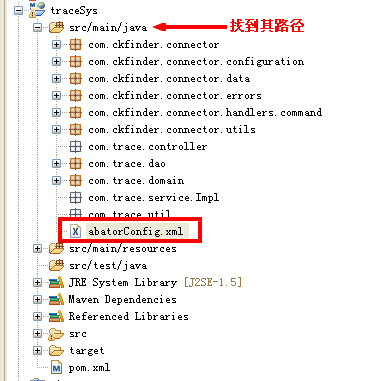
3、编写genertor的xml文件,名下:generator.xml
<?xml version="1.0" encoding="UTF-8" ?><!DOCTYPE generatorConfiguration PUBLIC "-//mybatis.org//DTD MyBatis Generator Configuration 1.0//EN" "http://mybatis.org/dtd/mybatis-generator-config_1_0.dtd" ><generatorConfiguration><classPathEntry location="D:\apache-tomcat-7.0.52\webapps\traceSys\WEB-INF\lib\mysql-connector-java-5.1.29.jar" /><context id="context1"><jdbcConnection driverClass="com.mysql.jdbc.Driver" connectionURL="jdbc:mysql://localhost:3306/trace_sys" userId="root" password="" /><javaModelGenerator targetPackage="com.trace.domain"targetProject="D:\cpn-work\traceSys\src\main\java" /><sqlMapGenerator targetPackage="com.trace.dao" targetProject="D:\cpn-work\traceSys\src\main\java"></sqlMapGenerator><javaClientGenerator targetPackage="com.trace.dao"targetProject="D:\cpn-work\traceSys\src\main\java" type="XMLMAPPER" /><table tableName="company" enableCountByExample="false" enableUpdateByExample="false" enableDeleteByExample="false" enableSelectByExample="false" selectByExampleQueryId="false" /><table tableName="goods" enableCountByExample="false" enableUpdateByExample="false" enableDeleteByExample="false" enableSelectByExample="false" selectByExampleQueryId="false" /><table tableName="goods_discuss" enableCountByExample="false" enableUpdateByExample="false" enableDeleteByExample="false" enableSelectByExample="false" selectByExampleQueryId="false" /><table tableName="goods_production" enableCountByExample="false" enableUpdateByExample="false" enableDeleteByExample="false" enableSelectByExample="false" selectByExampleQueryId="false" /><table tableName="goods_profile" enableCountByExample="false" enableUpdateByExample="false" enableDeleteByExample="false" enableSelectByExample="false" selectByExampleQueryId="false" /><table tableName="goods_record" enableCountByExample="false" enableUpdateByExample="false" enableDeleteByExample="false" enableSelectByExample="false" selectByExampleQueryId="false" /><table tableName="type" enableCountByExample="false" enableUpdateByExample="false" enableDeleteByExample="false" enableSelectByExample="false" selectByExampleQueryId="false" /><table tableName="user" enableCountByExample="false" enableUpdateByExample="false" enableDeleteByExample="false" enableSelectByExample="false" selectByExampleQueryId="false" /></context></generatorConfiguration>
enableCountByExample="false"
enableUpdateByExample="false"
enableDeleteByExample="false"
enableSelectByExample="false"
selectByExampleQueryId="false"
schema即为数据库名, tableName为对应的数据库表, domainObjectName是要生成的实体类,
如果想要mapper配置文件加入sql的where条件查询, 可以将enableCountByExample等设为true,
这样就会生成一个对应domainObjectName的Example类, enableCountByExample等设为false时,
就不会生成对应的Example类了.
java -jar E:\Websoft\mybaits\mybatis-generator-core-1.3.2\lib\mybatis-generator-core-1.3.2.jar -configfile E:\WebWorkSpace\workspace_js\downAttachdemo\src\com\mochasoft\down\generator.xml -overwrite
Ibatis自动生成dao sqlmapper文件和domain文件过程的更多相关文章
- iBatis——自动生成DAO层接口提供操作函数(详解)
iBatis——自动生成DAO层接口提供操作函数(详解) 在使用iBatis进行持久层管理时,发现在使用DAO层的updateByPrimaryKey.updateByPrimaryKeySelect ...
- 【Java MyBatis Generator】使用generator自动生成Dao,Mapping和实体文件
具体请参照: http://blog.csdn.net/fengshizty/article/details/43086833 按照上面博客地址,下载Generator的依赖包: 如下是我的配置文件: ...
- Mybatis-Generator插件自动生成Dao、Model、Mapping相关文件
最近做项目,mapping 有点多而且容易写错,于是试着用了Mybatis-Generator 插件自动生成 dao, domain mapping 文件.感觉还挺好用.把相关配置分享,一边以后做项 ...
- 使用Mybatis-Generator自动生成Dao、Model、Mapping相关文件(转)-----https://www.cnblogs.com/smileberry/p/4145872.html
https://www.cnblogs.com/smileberry/p/4145872.html 使用Mybatis-Generator自动生成Dao.Model.Mapping相关文件(转)
- Mybatis-Generator 自动生成Dao、Model、Mapping相关文档
最近在学习mybatis,结果在写Mapping的映射文件时insert语句一直报错,于是想看看标准的映射文件是什么样.百度到Mybatis-Generator 自动生成Dao.Model.Mappi ...
- T4 模板自动生成带注释的实体类文件
T4 模板自动生成带注释的实体类文件 - 只需要一个 SqlSugar.dll 生成实体就是这么简单,只要建一个T4文件和 文件夹里面放一个DLL. 使用T4模板教程 步骤1 创建T4模板 如果你没有 ...
- IDEA利用mybatis-generator自动生成dao和mapper
pom.xml配置 <properties> <java.version>1.8</java.version> <mybatis-generator-core ...
- ibatis 自动生成map,bean,dao
1.下载 AbatorForEclipse1.1.0 地址:http://download.csdn.net/detail/fym548/9426877 点击Archive按钮选择下载的,然后重启My ...
- 使用mybatis generator插件,自动生成dao、dto、mapper等文件
mybatis generator 介绍 mybatis generator中文文档http://mbg.cndocs.tk/ MyBatis Generator (MBG) 是一个Mybatis的代 ...
随机推荐
- oracle数据库的数据类型
一.字符类型 (1)固定长度的字符串 CHAR(字节长度是1~2000之间) CHAR(8)可以存储4个双字节的字符,8个单字节的字符,不足8字节剩余的部分用空格占据 (2)可变长度字符串 VARCH ...
- Gym 100917L Liesbeth and the String 规律&&胡搞
题目: Description standard input/outputStatements Little Liesbeth likes to play with strings. Initiall ...
- Linux试题及答案
一. 单选题: 1.添加一条静态路由,使到网络196.199.3通过eth2接口出去,用: A. route add -net 196.199.3.0 B. route add -net 196.19 ...
- asp 自我定时删除
<% if now()>"2008-9-15" thenset myfso=server.CreateObject("scripting.filesystem ...
- 改MAC地址
Google TMAC v6. Or click here
- kick_ball
package com.hereyouare.KickBall; import android.app.Activity; import android.app.AlertDialog; import ...
- offsetXXX和scollXXX的一些操作
<!doctype html><html><head><meta charset="utf-8"><title>offs ...
- 利用hibernate实现oracle(每张表的ID)自动增长
设置ID的增长策略是sequence,同时指定sequence的名字,最好每个表建一个sequence 例如创建一个序列:CREATE SEQUENCE DEPARTMENT_ID_SEQ MINVA ...
- UINavigationItem不显示
效果如图: 代码: self.navigationItem.leftBarButtonItem = [UIBarButtonItem itemWithNormalImage:@"MainTa ...
- 素数个数的位数<Math>
小明是一个聪明的孩子,对数论有着很浓烈的兴趣.他发现求1到正整数10^n (10的n次方)之间有多少个素数是一个很难的问题,该问题的难点在于决定于10^n 值的大小. 告诉你n的值,并且用ans表示小 ...