
ssh下常用操作汇总(good)
http://www.cnblogs.com/igrl/archive/2010/09/17/1829358.html

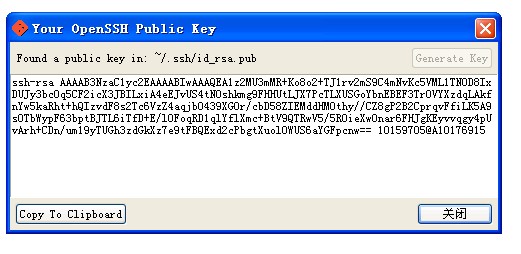
我们在日常工作中会遇到公司有个gitlab,还有些自己的一些项目放在github上。这样就导致我们要配置不同的ssh-key对应不同的环境。下面我们来看看具体的操作:
1,生成一个公司用的SSH-Key
$ ssh-keygen -t rsa -C "youremail@yourcompany.com” -f ~/.ssh/id-rsa
在~/.ssh/目录会生成id-rsa和id-rsa.pub私钥和公钥。 我们将id-rsa.pub中的内容粘帖到公司gitlab服务器的SSH-key的配置中。
2,生成一个github用的SSH-Key
$ ssh-keygen -t rsa -C "youremail@your.com” -f ~/.ssh/github-rsa
在~/.ssh/目录会生成github-rsa和github-rsa.pub私钥和公钥。 我们将github-rsa.pub中的内容粘帖到github服务器的SSH-key的配置中。
3,添加私钥
$ ssh-add ~/.ssh/id_rsa $ ssh-add ~/.ssh/id_rsa_github
如果执行ssh-add时提示"Could not open a connection to your authentication agent",可以现执行命令:
$ ssh-agent bash
然后再运行ssh-add命令。
# 可以通过 ssh-add -l 来确私钥列表
$ ssh-add -l
# 可以通过 ssh-add -D 来清空私钥列表
$ ssh-add -D
测试
$ ssh -T git@github.com
输出
Hi stefzhlg! You've successfully authenticated, but GitHub does not provide shell access.
就表示成功的连上github了.也可以试试链接公司的gitlab.
ssh -v user@host //可输出ssh过程的详细信息
ssh -v 10.1.1.158

.OpenSSH_5.3p1, OpenSSL 1.0.1e-fips 11 Feb 2013

debug1: Reading configuration data /etc/ssh/ssh_config

debug1: Applying options for *

debug1: Connecting to 10.1.1.158 [10.1.1.158] port 22.

debug1: Connection established.

debug1: permanently_set_uid: 0/0

debug1: identity file /root/.ssh/identity type -1

debug1: identity file /root/.ssh/identity-cert type -1

debug1: identity file /root/.ssh/id_rsa type -1

debug1: identity file /root/.ssh/id_rsa-cert type -1

debug1: identity file /root/.ssh/id_dsa type -1

debug1: identity file /root/.ssh/id_dsa-cert type -1

debug1: identity file /root/.ssh/id_ecdsa type -1

debug1: identity file /root/.ssh/id_ecdsa-cert type -1

debug1: Remote protocol version 2.0, remote software version OpenSSH_5.3

debug1: match: OpenSSH_5.3 pat OpenSSH*

debug1: Enabling compatibility mode for protocol 2.0

debug1: Local version string SSH-2.0-OpenSSH_5.3

debug1: SSH2_MSG_KEXINIT sent

debug1: SSH2_MSG_KEXINIT received

debug1: kex: server->client aes128-ctr hmac-md5 none

debug1: kex: client->server aes128-ctr hmac-md5 none

debug1: SSH2_MSG_KEX_DH_GEX_REQUEST(1024<1024<8192) sent

debug1: expecting SSH2_MSG_KEX_DH_GEX_GROUP

debug1: SSH2_MSG_KEX_DH_GEX_INIT sent

debug1: expecting SSH2_MSG_KEX_DH_GEX_REPLY

The authenticity of host '10.1.1.158 (10.1.1.158)' can't be established.

RSA key fingerprint is 3f:6f:11:ff:b7:5e:f7:63:57:ec:22:91:ca:9e:9c:e3.

Are you sure you want to continue connecting (yes/no)? y

Please type 'yes' or 'no': yes

Warning: Permanently added '10.1.1.158' (RSA) to the list of known hosts.

debug1: ssh_rsa_verify: signature correct

debug1: SSH2_MSG_NEWKEYS sent

debug1: expecting SSH2_MSG_NEWKEYS

debug1: SSH2_MSG_NEWKEYS received

debug1: SSH2_MSG_SERVICE_REQUEST sent

debug1: SSH2_MSG_SERVICE_ACCEPT received

debug1: Authentications that can continue: publickey,gssapi-keyex,gssapi-with-mic,password

debug1: Next authentication method: gssapi-keyex

debug1: No valid Key exchange context

debug1: Next authentication method: gssapi-with-mic

debug1: Unspecified GSS failure.  Minor code may provide more information

Cannot determine realm for numeric host address

debug1: Unspecified GSS failure.  Minor code may provide more information

Cannot determine realm for numeric host address

debug1: Unspecified GSS failure.  Minor code may provide more information

debug1: Unspecified GSS failure.  Minor code may provide more information

Cannot determine realm for numeric host address

debug1: Next authentication method: publickey

debug1: Trying private key: /root/.ssh/identity

debug1: Trying private key: /root/.ssh/id_rsa

debug1: Trying private key: /root/.ssh/id_dsa

debug1: Trying private key: /root/.ssh/id_ecdsa

debug1: Next authentication method: password

root@10.1.1.158's password:
ssh
     /etc/ssh/ssh_known_hosts

             Systemwide list of known host keys.  This file should be prepared

             by the system administrator to contain the public host keys of

             all machines in the organization.  It should be world-readable.

             See sshd(8) for further details of the format of this file.
     ~/.ssh/

             This directory is the default location for all user-specific con-

             figuration and authentication information.  There is no general

             requirement to keep the entire contents of this directory secret,

             but the recommended permissions are read/write/execute for the

             user, and not accessible by others.

     ~/.ssh/authorized_keys

             Lists the public keys (RSA/ECDSA/DSA) that can be used for log-

             ging in as this user.  The format of this file is described in

             the sshd(8) manual page.  This file is not highly sensitive, but

             the recommended permissions are read/write for the user, and not

             accessible by others.

     ~/.ssh/config

             This is the per-user configuration file.  The file format and

             configuration options are described in ssh_config(5).  Because of

             the potential for abuse, this file must have strict permissions:

             read/write for the user, and not accessible by others.

     ~/.ssh/environment

             Contains additional definitions for environment variables; see

             ENVIRONMENT, above.

     ~/.ssh/identity

     ~/.ssh/id_dsa

     ~/.ssh/id_ecdsa

     ~/.ssh/id_rsa

             Contains the private key for authentication.  These files contain

             sensitive data and should be readable by the user but not acces-

             sible by others (read/write/execute).  ssh will simply ignore a

             private key file if it is accessible by others.  It is possible

             to specify a passphrase when generating the key which will be

             used to encrypt the sensitive part of this file using 3DES.

     ~/.ssh/identity.pub

     ~/.ssh/id_dsa.pub

     ~/.ssh/id_ecdsa.pub

     ~/.ssh/id_rsa.pub

             Contains the public key for authentication.  These files are not

             sensitive and can (but need not) be readable by anyone.

     ~/.ssh/known_hosts

             Contains a list of host keys for all hosts the user has logged

             into that are not already in the systemwide list of known host

             keys.  See sshd(8) for further details of the format of this

             file.

     ~/.ssh/rc

             Commands in this file are executed by ssh when the user logs in,

             just before the user’s shell (or command) is started.  See the

             sshd(8) manual page for more information.
免密码登陆
http://www.cnblogs.com/softidea/p/5447539.html
Linux SSH常用总结(转)
解决linux中ssh登录Warning:Permanently added (RSA) to the list of known hosts
原因:
在执行scp id_rsa.pub root@hostname:/root/.ssh这一步时,没在本机的/root/.ssh下生成known_hosts文件。
解决方案:
vi /etc/ssh/ssh_config
最后有两行是
StrictHostKeyChecking no
UserKnownHostsFile /dev/null
把这两行注释掉并保存文件
再次执行scp id_rsa.pub root@host141:/root/.ssh
出现提示
The authenticity of host 'host141 (172.20.0.141)' can't be established.
RSA key fingerprint is a0:09:89:d2:3b:aa:91:60:59:7f:7f:bc:03:31:b0:09.
Are you sure you want to continue connecting (yes/no)?
输入yes后,则可看到在/root/.ssh目录下生成了known_hosts文件:
[root@SamuluIndex .ssh]# ls
id_rsa id_rsa.pub known_hosts
http://www.cnblogs.com/wjoyxt/p/6567206.html
ssh下常用操作汇总(good)的更多相关文章
- Linux下常用操作汇总
查看linux操作系统位数 (1) 终端输入: file /sbin/init 如 显示: /sbin/init: ELF 32-bit LSB executable, Intel 80386, ve ...
- Kotlin——初级篇(八):关于字符串(String)常用操作汇总
在前面讲解Kotlin数据类型的时候,提到了字符串类型,当然关于其定义在前面的章节中已经讲解过了.对Kotlin中的数据类型不清楚的同学.请参考Kotlin--初级篇(三):数据类型详解这篇文章. 在 ...
- Kotlin——关于字符串(String)常用操作汇总
在前面讲解Kotlin数据类型的时候,提到了字符串类型,当然关于其定义在前面的章节中已经讲解过了.对Kotlin中的数据类型不清楚的同学.请参考Kotlin——初级篇(三):数据类型详解这篇文章. 在 ...
- Linux下常用操作
************************ 镜像操作 ************************************* screen -s name 新建 screen -r name ...
- SSH概念及常用操作汇总
工作有一段时间了,经常用SSH登录远程机器,但对原理一直不是很了解,所以查阅了一些资料,写个小结. 一. SSH是什么? SSH的全称是Secure Shell, 是一种“用来在不安全的网络上安全地运 ...
- Selenium常用操作汇总二——如何操作select下拉框
下面我们来看一下selenium webdriver是如何来处理select下拉框的,以http://passport.51.com/reg2.5p这个页面为例.这个页面中有4个下拉框,下面演示4种选 ...
- Git常用操作汇总(转)
如果一个文件被删除了,可以使用切换版本号进行恢复.恢复方法: 先确定需要恢复的文件要恢复成哪一个历史版本(commit),假设那个版本号是: commit_id,那么 git checkout com ...
- ElasticSearch 集群基本概念及常用操作汇总(建议收藏)
内容来源于本人的印象笔记,简单汇总后发布到博客上,供大家需要时参考使用. 原创声明:作者:Arnold.zhao 博客园地址:https://www.cnblogs.com/zh94 目录: Elas ...
- ListControl常用操作汇总
本文根据本人在项目中的应用,来谈谈CListCtrl的部分用法及技巧.当初学习时,查了很多资料,零零碎碎的作了些记录,现在主要是来做个总结,方便以后查阅.主要包括以下十三点内容:基本操作.获取选中行的 ...
随机推荐
- Apache Rewrite 理解
因为工作须要,查了一下Apache的文档,对当中反向引用和条件的运行做了理解和实验,以下是对Apache 2.2文档的摘录,并在上面做了实验的样例说明,希望能给一些须要深入理解的一些帮助. 其它部分就 ...
- 【iOS】文件上传小记
iOS由该系统提供API可以实现可以实现文件的上传和下载,有两种方法来. NSURLConnection与NSURLSession. 当中NSURLConnection是使用非常久的的一种方式.NSU ...
- JavaFX它ListView使用
ListView它是通过同一控制非.在JavaFX在.ListView此外,它拥有非常丰富的功能.下列.让我们来看看如何使用ListView. ListView位于javafx.scene.contr ...
- iOS 7 新特性
iOS7更新了很多引人注目的功能.用户界面完全重新设计了.iOS7为开发2D,2.5D游戏引入了全新的动画系统.加强多线程,点对点连接,以及许多其他重要的功能让iOS7成为有史以来最有意义的一次发 ...
- Java他们其中一个IO(一)
1.I/O 操作的目标 其中从数据源读取数据,和写数据到的目标位置数据. 2.IO 的分类方法 watermark/2/text/aHR0cDovL2Jsb2cuY3Nkbi5uZXQvdTAxMTc ...
- js运动动画
原文:js运动动画 今天简单的学了一下js运动动画,再此感谢慕课网的这位老师http://www.imooc.com/view/167,讲的很不错. 下面是我整理出来的结果. 知识点一:速度动画. 1 ...
- 设计模式Adapter模式的五分钟
五分钟一个设计模式.来形容叙述的设计模式的最简单方法.看到许多其他设计模式,请点击五分钟一个设计模式系列 http://blog.csdn.net/daguanjia11/article/catego ...
- Calendar计算日期
一.周六三月进去.星期天 Calendar calendar=Calendar.getInstance();//当前日期 Calendar calendar2=Calendar.getInstance ...
- 一起写2048(160行python代码)
前言: Life is short ,you need python. --Bruce Eckel 我与2048的缘,不是缘于一个玩家.而是一次,一次,重新的ACM比赛.四月份校赛初赛,第一次碰到20 ...
- Event Sourcing - ENode(二)
接上篇文章继续 http://www.cnblogs.com/dopeter/p/4899721.html 分布式系统 前篇谈到了我们为何要使用分布式系统,因为ENode本身就是一个分布式的框架.看了 ...