
C#:iterator 迭代器/partial class 分布类/泛型
C#:iterator 迭代器/partial class 分布类/泛型
iterator 迭代器
写个最简单的迭代,(迭代一个字符串数组):
1.实现接口中的方法:

 1 using System;

 2 using System.Collections.Generic;

 3 using System.Linq;

 4 using System.Text;

 5 using System.Threading.Tasks;

 6 using System.Collections;   //动态数组是在这个命名空间下的,所以使用前要包含

 7

 8 namespace ConsoleApplication1

 9 {

10     //interator_class是继承IEnumerable接口的类

11     class interator_class:System.Collections.IEnumerable

12     {

13         //写一个要迭代的字符串数组

14         ArrayList al = new ArrayList() {"大家好!","我是李晓峰","希望大家多多指教!","谢谢" };

15

16         //实现GETEnumerator()该方法

17         public System.Collections.IEnumerator GetEnumerator()

18         {

19             for (int i = 0; i < 4; i++)

20             { yield return al[i]; }       //返回

21         }

22     }

23 }
2.调用:
 1 using System;

 2 using System.Collections.Generic;

 3 using System.Linq;

 4 using System.Text;

 5 using System.Threading.Tasks;

 6

 7 namespace ConsoleApplication1

 8 {

 9     class Program

10     {

11         static void Main(string[] args)

12         {

13             //实例化interator_class类

14             interator_class ic = new interator_class();

15

16             //迭代

17             foreach (string al_ary in ic)

18             {

19                 Console.WriteLine(al_ary+"\n");

20             }

21

22             //聚焦显示

23             Console.ReadLine();

24         }

25     }

26 }
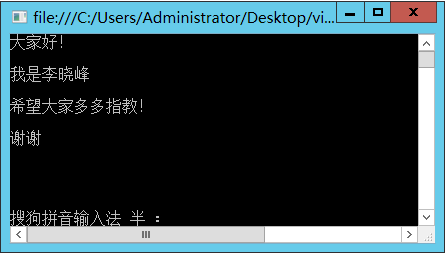
3.运行:
partial class 分布类:
简单说就是将一个类在一个命名空间内解剖开:
例如:写一个partial类,每个class中分布一个方法():
1.分布类:
 1 using System;

 2 using System.Collections.Generic;

 3 using System.Linq;

 4 using System.Text;

 5 using System.Threading.Tasks;

 6

 7 namespace WindowsFormsApplication1

 8 {

 9    //写4个分布类,每个类中分别写了一个运算方法:

10

11    public partial  class jisuan_fangfa

12     {

13        public int jiafa(int a,int b)

14        { return a + b; }

15     }

16

17    public partial class jisuan_fangfa

18    {

19        public int jianfa(int a, int b)

20        { return a - b; }

21    }

22

23    public partial class jisuan_fangfa

24    {

25        public int chengfa(int a, int b)

26        { return a * b; }

27    }

28

29

30    public partial class jisuan_fangfa

31    {

32        public int chufa(int a, int b)

33        { return a /b; }

34    }

35 }
2.调用:
 1 using System;

 2 using System.Collections.Generic;

 3 using System.ComponentModel;

 4 using System.Data;

 5 using System.Drawing;

 6 using System.Linq;

 7 using System.Text;

 8 using System.Threading.Tasks;

 9 using System.Windows.Forms;

10

11 namespace WindowsFormsApplication1

12 {

13     public partial class Form6 : Form

14     {

15         public Form6()

16         {

17             InitializeComponent();

18         }

19

20         private void Form6_Load(object sender, EventArgs e)

21         {

22             //默认回车键为 计算;

23             AcceptButton = button1;

24

25             //向combobox内添加选项;

26             comboBox1.Items.Add("加"); comboBox1.Items.Add("乘");

27             comboBox1.Items.Add("除"); comboBox1.Items.Add("减");

28

29             //combobox默认选择 加法

30             comboBox1.SelectedIndex = 0;

31

32             this.toolStripStatusLabel1.Text = "欢迎使用!";

33

34         }

35

36         private void button1_Click(object sender, EventArgs e)

37         {

38             if (textBox1.Text == string.Empty || textBox2.Text == string.Empty)

39             {

40                 MessageBox.Show("请输入要运算的数据!");

41

42                 //提示输入信息:

43                 if (textBox1.Text == string.Empty)

44                 { errorProvider1.SetError(textBox1, "这里不能为空!"); }

45                 if (textBox2.Text == string.Empty)

46                 { errorProvider1.SetError(textBox2, "这里不能为空!"); }

47             }

48             else

49             {

50                 //实例化类

51                 jisuan_fangfa jisuan = new jisuan_fangfa();

52

53                 switch (comboBox1.Text.Trim())   //判断combobox中选择计算的模式

54                 {

55                         //数据的转换/判断

56                     case "加": textBox3.Text=jisuan.jiafa(Convert.ToInt32(textBox1.Text.Trim()),Convert.ToInt32(textBox2.Text.Trim())).ToString(); break;

57                     case "减": textBox3.Text = jisuan.jianfa(Convert.ToInt32(textBox1.Text.Trim()), Convert.ToInt32(textBox2.Text.Trim())).ToString(); break;

58                     case "乘": textBox3.Text = jisuan.chengfa(Convert.ToInt32(textBox1.Text.Trim()), Convert.ToInt32(textBox2.Text.Trim())).ToString(); break;

59                     case "除": textBox3.Text = jisuan.chufa(Convert.ToInt32(textBox1.Text.Trim()), Convert.ToInt32(textBox2.Text.Trim())).ToString(); break;

60                 }

61

62             }

63         }

64     }

65 }
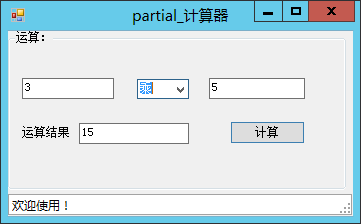
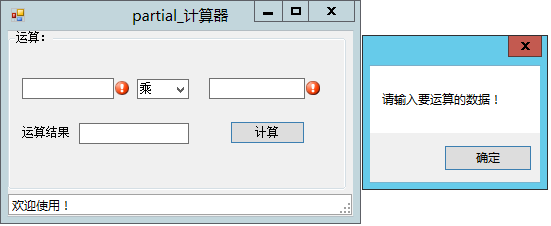
3.实践:
泛型:
泛型是具有占位符(类型参数)的类、结构、接口和方法,这些占位符是类、结构、接口和方法所存储或使用的一个或多个类型的占位符。
1.接口:
 1 using System;

 2 using System.Collections.Generic;

 3 using System.Linq;

 4 using System.Text;

 5 using System.Threading.Tasks;

 6

 7 namespace ConsoleApplication2

 8 {

 9 public interface Interface1<T>

10     {

11     T fangfa();

12     }

13 }
2.继承泛型接口的类:
 1 using System;

 2 using System.Collections.Generic;

 3 using System.Linq;

 4 using System.Text;

 5 using System.Threading.Tasks;

 6

 7 namespace ConsoleApplication2

 8 {

 9      //Class_t类中有2个泛型,T是继承于T1,T可以实例化

10    public  class Class_t<T,T1>:Interface1 <T1 > where T:T1, new()

11     {

12        //实现该方法:

13        public T1 fangfa()

14        { return new T(); }

15

16     }

17 }
3.实例化,调用:
 1 using System;

 2 using System.Collections.Generic;

 3 using System.Linq;

 4 using System.Text;

 5 using System.Threading.Tasks;

 6

 7 namespace ConsoleApplication2

 8 {

 9     class Program

10     {

11         static void Main(string[] args)

12         {

13             //实例化,并添加类型

14             Interface1<System.ComponentModel.IListSource> inter = new Class_t<System.Data.DataTable, System.ComponentModel.IListSource>();

15

16             //输出inter.fangfa()的类型

17             Console.WriteLine("T是:"+inter.fangfa().GetType().ToString()+"类型");

18             Console.ReadLine();

19         }

20     }

21 }
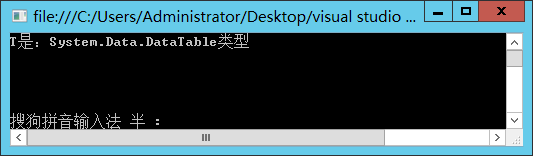
4.运行:
2.方法();
写一个用户名和密码的验证方法:
1.方法:
 1 using System;

 2 using System.Collections.Generic;

 3 using System.Linq;

 4 using System.Text;

 5 using System.Threading.Tasks;

 6

 7 namespace ConsoleApplication2

 8 {

 9   public   class Class1

10     {

11       public void error_show<T, T1>(T yonghuming, T1 mima)

12       {

13           if (string.Equals(yonghuming, "lixiaofeng") && string.Equals(mima.ToString(), "123"))

14           {

15               Console.WriteLine("验证成功!");

16           }

17           else

18           { Console.WriteLine("验证失败,你的输入信息有问题!"); }

19

20

21       }

22

23     }

24 }
2.调用:
 1 using System;

 2 using System.Collections.Generic;

 3 using System.Linq;

 4 using System.Text;

 5 using System.Threading.Tasks;

 6

 7 namespace ConsoleApplication2

 8 {

 9     class Program

10     {

11         static void Main(string[] args)

12         {

13             int mii;  //定义密码变量

14

15             //接受用户输入的用户名和密码

16             Console.WriteLine("请输入用户名:"); string mizi = Console.ReadLine();

17             Console.WriteLine("请输入密码:"); mii = Convert.ToInt32(Console.ReadLine());

18

19             //实例化class1,并填入泛型类型

20             Class1 c1 = new Class1();

21             c1.error_show<string, int>(mizi, mii );

22

23             Console.ReadLine();

24         }

25     }

26 }
3.验证:
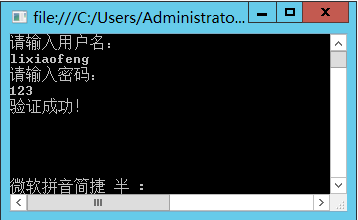
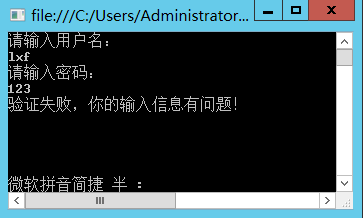
水平有限,还望指教,谢谢!
C#:iterator 迭代器/partial class 分布类/泛型的更多相关文章
- JavaSE Collections类 , Iterator迭代器 , 增强for循环
Collections 它是集合的工具类,为集合体系扩展了一些其他的方法.类中都是静态的方法,可以使用类名直接调用. 可变参数 在JDK1.5之后,如果我们定义一个方法需要接受多个参数,并且多个参数类 ...
- 18_集合框架_第18天_集合、Iterator迭代器、增强for循环 、泛型_讲义
今日内容介绍 1.集合 2.Iterator迭代器 3.增强for循环 4.泛型 01集合使用的回顾 *A:集合使用的回顾 *a.ArrayList集合存储5个int类型元素 public stati ...
- JAVA基础之集合、Iterator迭代器、泛型及增强for循环
个人理解: 对于集合,首先要明确的是最顶层的接口是Collection接口类,其包含一些基本的方法以便子类调用,不过在定义的时候最好定义好数据类型,以免遍历时还得必须进行向上转型:特别注意的是其没有关 ...
- java基础(18):集合、Iterator迭代器、增强for循环、泛型
1. 集合 1.1 集合介绍 集合,集合是java中提供的一种容器,可以用来存储多个数据. 在前面的学习中,我们知道数据多了,可以使用数组存放或者使用ArrayList集合进行存放数据.那么,集合和数 ...
- Collection接口【集合】和Iterator迭代器类
1.1集合的概述 前面基础学习并使用过集合ArrayList<E>,那么集合究竟是什么呢? 集合:集合是Java中提供的一种容器,可以用来存储多个数据. 那么意思就是说集合是容器,但是容器 ...
- Java—包装类/System类/Math类/Arrays类/大数据运算/Collection接口/Iterator迭代器
基本类型包装类 8种基本类型对应的包装类如: 将字符串转成基本类型: 将基本数值转成字符串有3种方式: 基本类型直接与””相连接即可:34+" " 调用String的valueOf ...
- [设计模式] Iterator - 迭代器模式:由一份奥利奥早餐联想到的设计模式
Iterator - 迭代器模式 目录 前言 回顾 UML 类图 代码分析 抽象的 UML 类图 思考 前言 这是一包奥利奥(数组),里面藏了很多块奥利奥饼干(数组中的元素),我将它们放在一个碟子上慢 ...
- [C# 设计模式] Iterator - 迭代器模式:我与一份奥利奥早餐的故事
Iterator - 迭代器模式 目录 前言 回顾 UML 类图 代码分析 抽象的 UML 类图 思考 前言 这是一包奥利奥(数组),里面藏了很多块奥利奥饼干(数组中的元素),我将它们放在一个碟子上慢 ...
- 09 Collection,Iterator,List,listIterator,Vector,ArrayList,LinkedList,泛型,增强for,可变参数,HashSet,LinkedHashSet,TreeSet
09 Collection,Iterator,List,listIterator,Vector,ArrayList,LinkedList,泛型,增强for,可变参数,HashSet,LinkedHas ...
随机推荐
- Python美女[从新手到高手]--阅读"见个面问题 HashMap 储存方法"联想
今伯乐在线 上看到一篇文章.一道面试题看 HashMap 的存储方式.也就是问: 在 HashMap 中存放的一系列键值对,当中键为某个我们自己定义的类型.放入 HashMap 后,我们在外部把某一个 ...
- winform屏幕截图
原文:winform屏幕截图 屏幕截图是一个比较常用的功能,在项目中出现的比例也比较高,至少我做过的每个项目都有屏幕截图这个功能,从全屏截图到区域截图都有出现过.当然区域截图已然包含了全屏截图. 全屏 ...
- PHP_零基础学php
现在学习php的工具有很多,所以一般没必要去搭建环境,我用的工具是phpstudy,IDE是Eclipse 1,用php输出一段文字 <html> <head> <tit ...
- TLD跟踪算法优化(一)并行化
才学疏浅,仅仅言片语,仅仅求志同道的朋友一起交流研究. 并行化不算是算法的改进,仅仅是追求执行的实时性. 简要列举一个样例: TLD算法的C++版本号源代码里: LKTracker::trackf2f ...
- ftk学习记录(IME文章)
[声明:版权全部,欢迎转载.请勿用于商业用途. 联系信箱:feixiaoxing @163.com] 前面说的是全屏设置,还是请大家看一下效果图. watermark/2/text/aHR0cDovL ...
- SQL_修改表结构
***********************************************声明*************************************************** ...
- PHP 做 RSA 签名 生成订单(支付宝例子)
/组合签名 $a=time(); $b=substr($a, 1); //生成随机订单号 $orderid= $b.mt_rand(10000,99999); //合作身份者id,以2088开头的16 ...
- OCP-1Z0-051-题目解析-第3题
3. You need to extract details of those products in the SALES table where the PROD_ID columncontains ...
- leetcode第七题--Reverse Integer
Problem: Reverse digits of an integer. Example1: x = 123, return 321Example2: x = -123, return -321 ...
- HubbleDotNet全文搜索数据库组件(一)
HubbleDotNet 简介及安装详解 2012-11-05 12:59 来源:9SSSD.COM 作者:starts_2000 字号:T|T [摘要]HubbleDotNet 是一个基于.net ...