
Unity3D ShaderLab 使用贴图对模型的高光进行遮罩
Unity3D ShaderLab 使用贴图对模型的高光进行遮罩
前面研究了高光效果的实现,再说说现很多游戏用到的高光贴图技术,因为它可以让3D美工更容易控制最终的视觉效果。
这也就为我们提供了另外的方式,我们可以在同一个着色器上实现垫型表面和光亮表面,也可以使用贴图来控制镜面高光的范围或者高光强度,
以实现一个表面是广泛的镜面高光而另一面确是细小的高光。
新建一个shader,一个材质球。老规矩双击shader脚本,在编辑器中编写代码吧。
1.Properties:
Properties {

_MainTint("Diffuse Tint",Color) = (,,,)

_MainTex ("Base (RGB)", 2D) = "white" {}

_SpecularColor("Specular Tint",Color)=(,,,)

_SpecularMask("Specular Texture",2D)="white"{}

_SpecularPower("Specular Power",Range(,))=

}
2.SubShader中修改CGPROGRAM,加入输出结构体SurfaceMyOutput,修改Input结构体:
CGPROGRAM

#pragma surface surf TexPhong

sampler2D _MainTex;

float4 _MainTint;

float4 _SpecularColor;

sampler2D _SpecularMask;

float _SpecularPower;

struct SurfaceMyOutput{

fixed3 Albedo;

fixed3 Normal;

fixed3 Emission;

fixed3 SpecularColor;

half Specular;

fixed Gloss;

fixed Alpha;

};

struct Input {

float2 uv_MainTex;

float2 uv_SpecularMask;

};
3.实现自定义光照模型LightingTexPhong
inline fixed4 LightingTexPhong(SurfaceMyOutput s,fixed3 lightDir,half3 viewDir, fixed atten){

float diff = dot(s.Normal,lightDir);

float3 reflection = normalize(3.0*s.Normal*diff-lightDir);

float spec = pow(max(,dot(reflection,viewDir)), _SpecularPower)*s.Specular;

float3 finalSpec = s.SpecularColor * spec*_SpecularColor.rgb;

fixed4 c;

c.rgb = (s.Albedo*_LightColor0.rgb*diff)+(_LightColor0.rgb*finalSpec);

c.a = s.Alpha;

return c;

}
4.修改surf函数
void surf (Input IN, inout SurfaceMyOutput o) {

float4 c = tex2D (_MainTex, IN.uv_MainTex)*_MainTint;

float4 specMask = tex2D(_SpecularMask,IN.uv_SpecularMask)*_SpecularColor;

o.Albedo = c.rgb;

o.Specular = specMask.r;

o.SpecularColor = specMask.rgb;

o.Alpha = c.a;

}
修改完毕后,返回unity设置参数,最终效果如下。
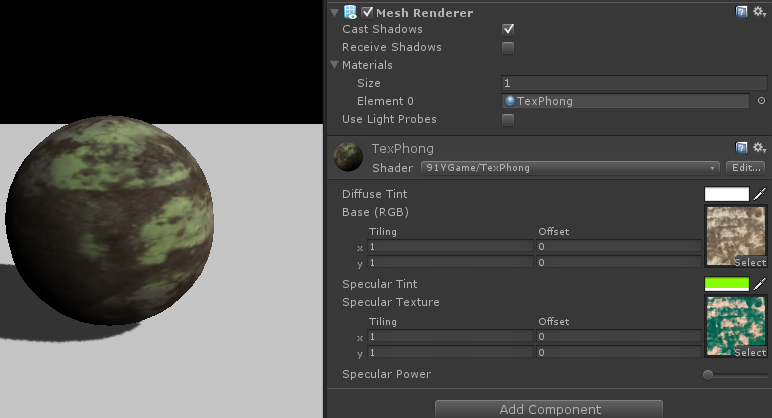
在上面的代码编写过程中,我们需要将表面函数的信息传递给给光照函数,因为我们在光照函数内部不能得到一个物体表面的uv,
所以我们需要通过input结构体来访问数据,唯一途径就是使用surf函数,为了建立数据关系,我们自定义了结构体SurfaceMyOutput,
用这个结构体作为容器存储表面着色器中所有最终数据。这样光照函数和surf函数都可以访问它的内部数据。
然后,我们告诉surf函数和光照函数使用output结构体是我们自定义的SurfaceMyOutput结构体,而不是着色器内置的。
最后我们只需要使用tex2D函数就可以访问纹理讯息返回值,直接传递给SurfaceMyOutput结构体,完成了这些,我们就可以在光照函数中访问讯息纹理。
code start --------------------------------------------------------------------------
Shader "91YGame/TexPhong" {

    Properties {

        _MainTint("Diffuse Tint",Color) = (,,,)

        _MainTex ("Base (RGB)", 2D) = "white" {}

        _SpecularColor("Specular Tint",Color)=(,,,)

        _SpecularMask("Specular Texture",2D)="white"{}

        _SpecularPower("Specular Power",Range(0.5,))=

    }

    SubShader {

        Tags { "RenderType"="Opaque" }

        LOD

        CGPROGRAM

        #pragma surface surf TexPhong

        sampler2D _MainTex;

        float4 _MainTint;

        float4 _SpecularColor;

        sampler2D _SpecularMask;

        float _SpecularPower;

        struct SurfaceMyOutput{

            fixed3 Albedo;

            fixed3 Normal;

            fixed3 Emission;

            fixed3 SpecularColor;

            half Specular;

            fixed Gloss;

            fixed Alpha;

        };

        struct Input {

            float2 uv_MainTex;

            float2 uv_SpecularMask;

        };

        inline fixed4 LightingTexPhong(SurfaceMyOutput s,fixed3 lightDir,half3 viewDir, fixed atten){

            float diff = dot(s.Normal,lightDir);

            float3 reflection = normalize(3.0*s.Normal*diff-lightDir);

            float spec = pow(max(,dot(reflection,viewDir)), _SpecularPower)*s.Specular;

            float3 finalSpec = s.SpecularColor * spec*_SpecularColor.rgb;

            fixed4 c;

            c.rgb = (s.Albedo*_LightColor0.rgb*diff)+(_LightColor0.rgb*finalSpec);

            c.a = s.Alpha;

            return c;

        }

        void surf (Input IN, inout SurfaceMyOutput o) {

            float4 c = tex2D (_MainTex, IN.uv_MainTex)*_MainTint;

            float4 specMask = tex2D(_SpecularMask,IN.uv_SpecularMask)*_SpecularColor;

            o.Albedo = c.rgb;

            o.Specular = specMask.r;

            o.SpecularColor = specMask.rgb;

            o.Alpha = c.a;

        }

        ENDCG

    }

    FallBack "Diffuse"

}
code end ---------------------------------------------------------------------------
Unity3D ShaderLab 使用贴图对模型的高光进行遮罩的更多相关文章
- Unity3D ShaderLab 静态贴图光照模型
Unity3D ShaderLab 静态贴图光照模型 其实在unity的光照模型中,我们可以把光照讯息烘培进入一个2D贴图,来实现着色器的光照效果. 下面是在unity中关闭灯光和打开灯光的对比效果. ...
- Unity3D ShaderLab法线贴图
Unity3D ShaderLab法线贴图 说到法线贴图,应该算是我们最常使用的一种增强视觉效果的贴图.将法线贴图的各个像素点座位模型的法线,这样我们的光照可以模拟出高分辨率的效果, 同时也保持较低的 ...
- Unity3D ShaderLab 立方体图的菲涅尔反射
Unity3D ShaderLab 立方体图的菲涅尔反射 菲涅尔反射是反射类型中比较常见的一种类型,当我们的视线正对物体表面,那么反射量会明显增加, 我们几乎可以在任何支持反射类型的物体表面看到这种情 ...
- Unity3D ShaderLab立方体图的法线渲染
Unity3D ShaderLab立方体图的法线渲染 某些情况下,我们希望立方体图的材质球上产生法线效果,来更多的表现细节,比如菱形花纹的玻璃,冰块的表面. 在帧数的协调下,我们可以通过input结构 ...
- Unity3D ShaderLab 立方体图的反射遮罩
Unity3D ShaderLab 立方体图的反射遮罩 上一篇,简单的介绍了立方体图的反射,那么我们能不能使用一张纹理对其进行指定遮罩呢?这样美工可以更好的控制图像的效果. 我们接着使用上一篇的sha ...
- Unity3D ShaderLab 简单的立方体图反射
Unity3D ShaderLab 简单的立方体图反射 反射是着色器模拟现实环境的一个关键因素,它能使我们的着色器渲染效果更加具备视觉冲击,因为他利用了我们周围的环境, 让着色器反射外界的场景信息并将 ...
- Unity3D ShaderLab压缩混合纹理贴图
Unity3D ShaderLab压缩混合纹理贴图 纹理可以用于存储大量的数据,我们可以把多个图像打包存储在单一的RGBA纹理上,然后通过着色器代码提取这些元素, 我们就可以使用每个图片的RGBA通道 ...
- Unity3D 导入贴图、模型等资源文件时自动设置参数
脚本继承至AssetPostprocessor, 存放在Editor目录下! using UnityEngine; using System.Collections; using UnityEdito ...
- Unity3D ShaderLab 漫反射卷积光照模型
Unity3D ShaderLab 漫反射卷积光照模型 漫反射卷积[Diffuse convolution]是一个模糊立方体的过程,它保留了立方图的整体光照强度,只模糊了细节. 这种效果在我们要活得一 ...
随机推荐
- Spring配置文件解析--集合注入方法
<bean id="moreComplexObject" class="example.ComplexObject"> <property n ...
- ScrollView嵌套StackView提示需要宽度和高度限制
场景: 在一个xib的view中,添加一个ScrollView,再在这个ScrollView中添加一个StackView,StackView中不加控件(用代码动态加). 问题: 提示ScrollVie ...
- php中PCRE正则表达式分隔符的使用
转自:http://www.baiwar.com/post/the-use-of-php-pcre-regex-delimiter.html 在php5.3.0以前,PHP可使用两套正则表达式规则,一 ...
- placeholder修改颜色
:-moz-placeholder { /* Mozilla Firefox 4 to 18 */ color: #f00; } ::-moz-placeholder { /* Mozilla Fir ...
- div垂直居中的问题
工作和面试时常常会遇到怎么设置div垂直居中与浏览器中:包括固定宽高和不固定宽高的 1.固定宽高的div垂直居中 宽高固定的div很容易设置让其垂直居中 <div class="cen ...
- MongoDB replicaSet
MongoDB 的replication机制除了最普通的Master/Slave模式之外,更强大的就是其支持自动故障转移的Replica Sets模式了.相对于其问题多多的auto-sharding机 ...
- 启动、关闭Service
//获取程序界面中的start.stop两个按钮 start = (Button) findViewById(R.id.start); stop = (Button) findViewById(R.i ...
- ajax状态码
1- AJAX状态值与状态码区别 AJAX状态值是指,运行AJAX所经历过的几种状态,无论访问是否成功都将响应的步骤,可以理解成为AJAX运行步骤.如:正在发送,正在响应等,由AJAX对象与服务器交互 ...
- jquery插件理解看这
zepto 插件写法 一个更换背景颜色的小插件 html 1 <div id="box">content</div> javascript 12345678 ...
- java程序(一)----HashMap同时获取键值
快速会用: HashMap<Integer,String> maps=new HashMap<Integer,String>(); maps.put(1,"xiaom ...