
自制tab页
没事自己弄着玩,写了个tab页。不要当真。想看就看看。希望相互学习。

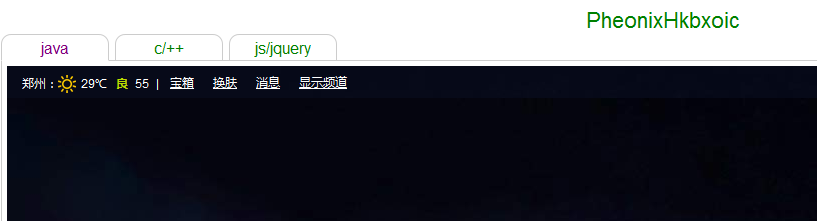
效果预览:

html源码:
 <!DOCTYPE html>

 <html lang="en">

 <head>

     <meta charset="UTF-8">

     <title>tabs</title>

     <script type="text/javascript" src="jquery-1.10.1.js"></script>

     <script type="text/javascript" src="tabs.js"></script>

     <style type="text/css">

         body{

             background-color: #fff;

         }

         p{

             color:green;

             text-align: center;

             font-size: 22px;

             margin:0px;

             padding:0px;

         }

         .tabs{

             /* border: 1px solid green; */

         }

         .tab_titles{

             border: 1px solid #ccc;

             margin:1px 1px -1px 5px;

             padding: 3px;

             border-radius: 10px 10px 0px 0px;

             float: left;

             cursor: pointer;

         }

         .tab_titles_inner{

             width:100%;

             height: 100%;

             text-align: center;

         }

         .tab_selected{

             border-bottom: 1px solid white;

             margin-bottom:-1px;

             border-radius: 10px 10px 0px 0px;

         }

         .contents{

             border:1px solid #ccc;

             width:100%;

             height:800;

             margin-left: 5px;

             padding:5px;

         }

         .clear_float{

             height: 0px;

             width:0px;

             clear: both;

         }

     </style>

 </head>

 <body>

     <p>PheonixHkbxoic</p>

     <div class="tabs">

         <div>0</div>

         <div>1</div>

         <div>2</div>

     </div>

     <script type="text/javascript">

         var title = ["java","c/++","js/jquery"];

         var src = [

                     'http://www.baidu.com',

                     'http://www.360.com',

                     'http://www.csdn.net'

                 ];

         var MyTabs = tabs.init(title,src);

         MyTabs.setTabTitlesStyle("width","100px");

         MyTabs.select(1);

         // var _$$ = $$(title,src);

         // _$$.select(1);

         // _$$.setTabTitlesStyle("width","100px");

     </script>

 </body>

 </html>
js源码:
 /**

  * @FileName   :    tabs.js

  * @Author     :    PheonixHkbxoic

  * @Mail       :    hkbxoic@gmail.com

  * @DateTime   :    2016-07-03 13:18:55

  * @Version    :    v1.0.0

  * @Description:    Description

  */

 (function(w){

     var tabs = function(tab_titles,tab_content_srcs){

         return new tabs.fn._init(tab_titles,tab_content_srcs);

     }

     tabs.fn = tabs.prototype = {//对象原型,对象属性,由类(构造函数)创建的所有对象都拥有的这些属性

         tab_titles : [],

         tab_content_srcs : [],

         len : 0,

         tab_selected : 0,

         tab_selectedTitle_color: "purple",

         setTabTitles : function(titles){

             this.tab_titles = titles;

         },

         setTabContentSrcs :function(contentSrcs){

             this.tab_content_srcs = contentSrcs;

         },

         setLen :function(len){

             this.len = len|0;

         },

         _init : function(tab_titles,tab_content_srcs){

             this.setTabTitles(tab_titles);

             this.setTabContentSrcs(tab_content_srcs);

             this.setLen(tab_titles.length);

             tabs.currentSrc = tab_content_srcs[0];

             //add class to tab contents

             $(".tabs div").each(function(index, el) {

                 $(this).addClass("contents");

                 $(this).addClass("content_"+index);

             });

             //根据tab title 数组 创建tab title div

             var _title = "<div class=\"clear_float\">.</div>";

             $(".tabs").prepend(_title);

             for (var i = tab_titles.length-1; i >= 0; i--) {

                 _title = "<div id=\"tab_titles_"+i+"\" class=\"tab_titles\"><div class=\"tab_titles_inner\">"+tab_titles[i]+"</div></div>";

                 $(".tabs").prepend(_title);

             };

             //默认选中第0个

             tabs.select(0);

             //添加点击事件

             $(".tab_titles").each(function(index, el) {

                 $(this).on('click', function(event) {

                     event.preventDefault();

                     tabs.fn.tab_selected = index;

                     tabs.currentSrc = tab_content_srcs[index];

                     tabs.select(index);

                 });

             });

             return this;

         }

     };

     tabs.fn._init.prototype = tabs.fn;

     var tab_properties = {//类属性

         currentSrc : "",

         init : function(tab_titles,tab_content_srcs){

             var _tabs = new tabs(tab_titles, tab_content_srcs);

             return _tabs;

         },

         select: function(index){//设置选中第几个

             //清除之前选中

             $(".tab_titles").each(function(i, el) {

                 $(this).removeClass("tab_selected");

                 $("#tab_titles_"+i).css('color', 'green');

             });

             //选中所选

             $("#tab_titles_"+index).addClass('tab_selected');

             $("#tab_titles_"+index).css('color', tabs.fn.tab_selectedTitle_color);

             tabs.hideContents();//都隐藏

             tabs.showContents(index);//默认显示第一个

             //加载数据

             tabs.loadHtml(index,tabs.currentSrc);

         },

         setTabTitlesStyle : function(styleName,styleValue,index){

             if (typeof index == 'number'&&index>-1) {

                 $("#tab_titles_"+index).css(styleName,styleValue);

             }else{

                 $(".tab_titles").each(function(index, el) {

                     $(this).css(styleName,styleValue);

                 });

             }

         },

         hideContents : function(index){//index隐藏

             if (typeof index == 'number'&&index>-1) {

                 $(".content_"+index).hide();

             }else{

                 $(".contents").each(function(index, el) {

                     $(this).hide();

                 });

             }

         },

         showContents : function(index){//index显示

             if (typeof index == 'number'&&index>-1){

                 $(".content_"+index).show();

             }else{

                 $(".contents").each(function(index, el) {

                     $(this).show();

                 });

             }

         },

         setSelectedTitlecolor : function(color){

             tabs.fn.tab_selectedTitle_color = color;

         },

         loadHtml : function(index,url){

             $(".content_"+index).html("<iframe src=\""+url+"\" style=\"height:1000px;width:100%;border:none;\"></iframe>");

         }

     }

     tabs.extend = tabs.fn.extend = function(){

         var target = arguments[0]||{};

         for(name in target){

             this[name] = target[name];

         }

         return target;

     };

     tabs.extend(tab_properties);    //类属性赋值

     tabs.fn.extend(tab_properties);    //对象属性赋值

     w.$$ = w.tabs = tabs;

 })(window);
自制tab页的更多相关文章
- JS组件系列——基于Bootstrap Ace模板的菜单和Tab页效果分享(你值得拥有)
前言:最近园子里多了许多谈语言.谈环境.谈逼格(格局)的文章,看看笑笑过后,殊不知其实都是然并卵.提升自己的技术才是王道.之前博主分享过多篇bootstrap组件的文章,引起了很多园友的关注和支持,看 ...
- 使用CSS和jQuery实现tab页
使用jquery来操作DOM是极大的方便和简单,这儿只是简单的用一个使用css和jquery来实现的tab页来简单介绍一些jQuery的一些方便使用的方法,下面是html文件: <!DOCTYP ...
- 在bootstrap ace样式框架上修改的后台管理型模板(Tab页后台管理模板)
后台管理模板开始用frameset布局,但是有时候会遮挡比如上面导航或者左边导航的二级三级弹出菜单,因为宽度被限制了,所以有时候就用easyui或者ext的,但是样式不好看,然后看到了bootstra ...
- jquery实现tab页切换显示div
1.jQuery实现tab切换显示代码实现 <!DOCTYPE html PUBLIC "-//W3C//DTD HTML 4.01 Transitional//EN" &q ...
- Android下实现tab页个人比较推崇的方法
使用fragment实现tab页的效果: 三个页面是单独的三个Fragment 主Activity的实现: package com.hsx.tab; import android.os.Bundle; ...
- 多tab页框架的使用场合
多tab页框架适合应用于功能较少的场合,例如邮箱后台之类的. 对于一些业务功能多且复杂的场合就不适用.打开过多的tab页容易给用户造成混乱,页面的跳转也存在一定的难度. 一种新技术不能完全取代旧技术, ...
- Android 常用UI控件之TabHost(5)Tab栏在底部且在最上层也不盖tab页
tab栏在底部 <TabHost android:id="@android:id/tabhost" android:layout_width="match_pare ...
- ECSHOP:首页实现显示子分类商品,并实现点击Tab页切换分类商品
例子:首页实现显示子分类商品,并实现点击Tab页切换分类商品(非AJAX) 开始: 1. 打开调试开关 文件地址:include/cls_template.php 找到 : functi ...
- 使用原生js与jQuery分别实现一个简单的tab页签
tab页签通常适用于空间有限而内容较多同时兼顾页面美观度不给用户一种信息过量视觉疲劳的情形.使用面非常广,下面我们用两种方法简单实现之. 首先,构建页面元素.页签的可点击部分我们通常用列表来承载,包括 ...
随机推荐
- Java中的Comparable<T>和Comparator<T>接口
有的时候在面试时会被问到Comparable<T>和Comparator<T>的区别(或者Java中两种排序功能的实现区别). 1) 在使用普通数组的时候,如果想对数据进行排序 ...
- JDBC中的批量插入和乱码解决
字符集-乱码问题 用JDBC访问MySql数据库的时候,如果JDBC使用的字符集和MySql使用的字符集不一致,那么会导致乱码发生.解决办法当时是在使用JDBC的时候指定和数据库一样的字符集.我们可以 ...
- Sq server 关于存储过程,触发器的一些理论简述
http://www.doc88.com/p-2905916227462.html
- Zookeeper分布式协调服务
1.zookeeper是一个分布式协调的服务. 2.安装zookeeper的软件的机器,我们称之为zk server 3.zk里面的角色有leader.follower.observer,注意只有一个 ...
- 修复:"Failed to start Load Kernel Modules"
使用非默认内核而出现的错误. [zsj@arch ~]$ systemctl --state=failed UNIT LOAD ACTIVE SUB DESCRIPTION● systemd-modu ...
- [ CodeVS冲杯之路 ] P1197
不充钱,你怎么AC? 题目:http://codevs.cn/problem/1197/ 密钥的字母可以全转换为小写字母,然后一一映射,a→0,b→1,c→2,依此类推 对于密文只需将每一位减去对应密 ...
- 【练习】创建私有的dblink
1.创建dblink第一种方法,是在本地数据库tnsnames.ora文件中配置了要远程访问的数据库. .设置监听: ①[root@host02 ~]# vi /etc/hosts 添加:[IP和名字 ...
- 解决wamp mysql数据库出现乱码的问题。
一般的乱码情况: 如果在控制台上出现這样的乱码,一般在phpmysqladmin上也会出现乱码,因为他们都一样 一个在控制台出现,一个在页面出现. 首先在mysql.exe上输出 mysql>S ...
- cordova 日曆 聯系人 插件使用
日曆插件 聯係人插件 我用聯係人插件, function onSuccess(contact) { alert("Save Success"); }; function onErr ...
- 法线贴图——Normal Mapping
对于不曾学过.用过法线贴图的人来说,提到法线贴图,经常会提到的问题是什么是法线贴图?法线贴图用于解决什么问题?法线贴图的原理是什么?本文将就这三个问题阐述本人的一些见解,各位不喜勿喷!!! 谈到法线贴 ...