
登录界面 beta版
1.MainActivity.java
 package com.example.administrator.myapplication;

 import android.content.Intent;

 import android.support.v7.app.AppCompatActivity;

 import android.os.Bundle;

 import android.view.View;

 import android.widget.EditText;

 import android.widget.Toast;

 public class MainActivity extends AppCompatActivity {

     EditText et_usercode;

     EditText et_password;

     @Override

     protected void onCreate(Bundle savedInstanceState) {

         super.onCreate(savedInstanceState);

         setContentView(R.layout.activity_main);

         et_usercode=(EditText)findViewById(R.id.et_usercode);

         et_password=(EditText)findViewById(R.id.et_password);

     }

     //view 代表事件发起者

     public void bt1_onclick(View v)

     {

         //带返回的打开 注册Acivity

         //第一步:构造意图

         Intent intent = new Intent(this,zhuceActivity.class);

         startActivityForResult(intent,1);

     }

     //成员变量

     String usercode;

     String username;

     String password;

     //重写处理返回信息的回调方法

     @Override

     protected void onActivityResult(int requestCode, int resultCode, Intent data) {

         super.onActivityResult(requestCode, resultCode, data);

         //处理返回信息

         //1-判断请求码

         if (requestCode==1)

         {

             //2-判断结果码

             if (resultCode==RESULT_OK)

             {

                 //接收返回的注册信息

                 usercode = data.getStringExtra("usercode");

                 username = data.getStringExtra("username");

                 password = data.getStringExtra("userpassword");

             }

         }

     }

     //登录的方法

     public void bt2_onclick(View v)

     {

         //1.取得填写信息

         String uc = et_usercode.getText().toString();

         String pw = et_password.getText().toString();

         // 2.判断是否正确填写

         if (uc.trim().length()==0||pw.trim().length()==0)

         {

             Toast.makeText(MainActivity.this, "用户代码和密码不能为空", Toast.LENGTH_LONG).show();

             return;

         }

         // 3.判断有没有注册信息

         //1-没有找到注册信息 2-填写的用户信息尚未注册

         if (usercode ==null||(usercode !=null && !usercode.equals(uc)))

         {

             Toast.makeText(MainActivity.this, "用户未注册", Toast.LENGTH_LONG).show();

             return;

         }

         // 4.注册信息与登录信息是否匹配

         if (!password.equals(pw))

         {

             Toast.makeText(MainActivity.this, "密码错误", Toast.LENGTH_LONG).show();

             return;

         }

         else

         {

             //可以登录系统

             Toast.makeText(MainActivity.this, "用户验证成功", Toast.LENGTH_LONG).show();

             //跳转到主界面

             startActivity(new Intent(this,TestActivity.class));

         }

     }

 }
2.Actvitymain.xml
 <?xml version="1.0" encoding="utf-8"?>

 <LinearLayout xmlns:android="http://schemas.android.com/apk/res/android"

     xmlns:tools="http://schemas.android.com/tools"

     android:layout_width="match_parent"

     android:layout_height="match_parent"

     android:paddingBottom="@dimen/activity_vertical_margin"

     android:paddingLeft="@dimen/activity_horizontal_margin"

     android:paddingRight="@dimen/activity_horizontal_margin"

     android:paddingTop="@dimen/activity_vertical_margin"

     tools:context="com.example.administrator.myapplication.MainActivity"

     android:orientation="vertical">

     <EditText

         android:layout_width="match_parent"

         android:layout_height="wrap_content"

         android:hint="用户代码"

         android:id="@+id/et_usercode"/>

     <EditText

         android:layout_width="match_parent"

         android:layout_height="wrap_content"

         android:hint="密码"

         android:id="@+id/et_password"

         android:inputType="textPassword"/>

     <LinearLayout

         android:layout_width="match_parent"

         android:layout_height="wrap_content">

         <Button

             android:layout_width="0dp"

             android:layout_height="wrap_content"

             android:layout_weight="1"

             android:text="登录"

             android:onClick="bt2_onclick"/>

         <Button

             android:layout_width="0dp"

             android:layout_height="wrap_content"

             android:layout_weight="1"

             android:text="注册"

             android:onClick="bt1_onclick"/>

     </LinearLayout>

 </LinearLayout>
3.zhuceActivity.xml
 package com.example.administrator.myapplication;

 import android.content.Intent;

 import android.support.v7.app.AppCompatActivity;

 import android.os.Bundle;

 import android.view.View;

 import android.widget.EditText;

 import android.widget.Toast;

 public class zhuceActivity extends AppCompatActivity {

     EditText et_usercode1;

     EditText et_password1;

     EditText et_username1;

     @Override

     protected void onCreate(Bundle savedInstanceState) {

         super.onCreate(savedInstanceState);

         setContentView(R.layout.activity_zhuce);

         et_usercode1 = (EditText)findViewById(R.id.et_usercode_1);

         et_password1 = (EditText)findViewById(R.id.et_password_1);

         et_username1 = (EditText)findViewById(R.id.et_username_1);

     }

     //view 代表事件发起

     public void bt1_onclick(View v)

     {

         //返回注册信息

         //用户代码

         String usercode = et_usercode1.getText().toString();

         if(usercode==null||usercode.trim().length()==0)

         {

             Toast.makeText(zhuceActivity.this, "请正确填写用户代码", Toast.LENGTH_LONG).show();

             return;

         }

         String username = et_username1.getText().toString();

         if(username==null||username.trim().length()==0)

         {

             Toast.makeText(zhuceActivity.this, "请正确填写用户名称", Toast.LENGTH_LONG).show();

             return;

         }

         String password = et_password1.getText().toString();

         if(password==null||password.trim().length()==0)

         {

             Toast.makeText(zhuceActivity.this, "请正确填写用户密码", Toast.LENGTH_LONG).show();

             return;

         }

         Intent intent = new Intent();

         intent.putExtra("usercode",usercode);

         intent.putExtra("username",username);

         intent.putExtra("password",password);

         //设置返回信息:1-结果码;2-携带数据的Intent.

         setResult(RESULT_OK,intent);

         finish();

     }

     public void bt2_onclick(View v)

     {

         setResult(RESULT_CANCELED, null);

         finish();

     }

 }
4.activity_zhuce.xml
 <?xml version="1.0" encoding="utf-8"?>

 <RelativeLayout xmlns:android="http://schemas.android.com/apk/res/android"

     xmlns:tools="http://schemas.android.com/tools"

     android:layout_width="match_parent"

     android:layout_height="match_parent"

     android:paddingBottom="@dimen/activity_vertical_margin"

     android:paddingLeft="@dimen/activity_horizontal_margin"

     android:paddingRight="@dimen/activity_horizontal_margin"

     android:paddingTop="@dimen/activity_vertical_margin"

     tools:context="com.example.administrator.myapplication.zhuceActivity">

     <EditText

         android:layout_width="match_parent"

         android:layout_height="wrap_content"

         android:hint="用户代码"

         android:id="@+id/et_usercode_1"/>

     <EditText

         android:layout_width="match_parent"

         android:layout_height="wrap_content"

         android:hint="用户名称"

         android:id="@+id/et_username_1"

         android:layout_below="@+id/et_usercode_1"/>

     <EditText

         android:layout_width="match_parent"

         android:layout_height="wrap_content"

         android:hint="登录密码"

         android:id="@+id/et_password_1"

         android:layout_below="@+id/et_username_1"

         android:inputType="textPassword"/>

     <LinearLayout

         android:layout_width="match_parent"

         android:layout_height="wrap_content"

         android:layout_alignParentBottom="true">

         <Button

             android:layout_width="0dp"

             android:layout_height="wrap_content"

             android:layout_weight="1"

             android:text="取消"

             android:onClick="bt2_onclick"/>

         <Button

             android:layout_width="0dp"

             android:layout_height="wrap_content"

             android:layout_weight="1"

             android:text="确定"

             android:onClick="bt1_onclick"/>

     </LinearLayout>

 </RelativeLayout>
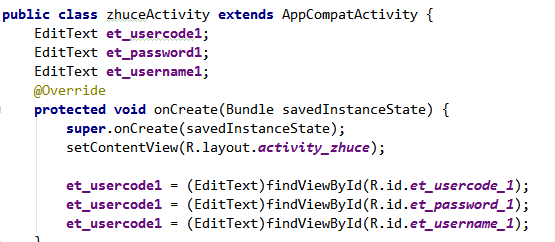
呵呵,导致程序无法运行的错误啊!
登录界面 beta版的更多相关文章
- QT Designer基础——登录界面设计基础版2
认识QT Designer提供的可选控件:以下八个大类 Layouts:布局相关 Spacers:留空 Buttons:可点击的按钮类 Item Views和 Item Widgets:高级控件,例如 ...
- 登录注册beta版
注册 login_count = 0 username_inp = input('请输入用户名:') while login_count < 3: pwd_inp = input('请输入密码: ...
- QT Designer基础——登录界面设计基础版
认识QT Designer提供的可选控件:以下八个大类 Layouts:布局相关 Spacers:留空 Buttons:可点击的按钮类 Item Views和 Item Widgets:高级控件,例如 ...
- iOS开发UI篇—模仿ipad版QQ空间登录界面
iOS开发UI篇—模仿ipad版QQ空间登录界面 一.实现和步骤 1.一般ipad项目在命名的时候可以加一个HD,标明为高清版 2.设置项目的文件结构,分为home和login两个部分 3.登陆界面的 ...
- Win7隐藏登录界面中的用户(不建议HOME版使用)
一天一點 能登多高,靠的不是双脚!能看多远,靠的不是双眼!人生路,贵在坚持! Win7隐藏登录界面中的用户(不建议HOME版使用) Win7中如何隐藏不想出现在登录界面中的用户 在Windows系统管 ...
- “我爱背单词”beta版发布与使用说明
我爱背单词BETA版本发布 第二轮迭代终于画上圆满句号,我们的“我爱背单词”beta版本已经发布. Beta版本说明 项目名称 我爱背单词 版本 Beta版 团队名称 北京航空航天大学计算机学院 拒 ...
- Beta版
Beta版使用说明 各文件介绍:本软件是基于visual studio 2010 平台,使用C#语言开发的windows窗体游戏.该游戏共有七个界面,分别是开始界面,游戏说明界面,模式选择界面,经典模 ...
- XE8 & IOS开发之免费证书真机调试:开发证书、AppID、开发授权profile的申请,附Debug真机调试演示(XCode7 Beta版或以上版本适用,有图有真相)
网上能找到的关于Delphi XE系列的移动开发的相关文章甚少,本文尽量以详细的图文内容.傻瓜式的表达来告诉你想要的答案. 原创作品,请尊重作者劳动成果,转载请注明出处!!! 注意,苹果发布Xcode ...
- 一起买beta版UI测试
一起买beta版UI测试 测试目的 保证代码质量,对各个单元进行测试,可以有效地保证代码的可靠性,让模块在与别的模块整合时出现更少的错误. UI测试 登录模块测试 登录模拟过程. 发帖模块测试 ...
随机推荐
- zw版【转发·台湾nvp系列Delphi例程】HALCON HWindowX 01
zw版[转发·台湾nvp系列Delphi例程]HALCON HWindowX 01 procedure TForm1.Button1Click(Sender: TObject);var img : H ...
- 【海岛帝国系列赛】No.1 海岛帝国:诞辰之日
50111117海岛帝国:诞辰之日 [试题描述] YSF自从上次“被盗投降”完(带着一大堆债)回去以后,YSF对“海盗”怀念至今,他想要建立一个“药师傅”海岛帝国. 今天,他要像“管理部”那样去探寻 ...
- 杭电1003 MAX SUN
Problem Description Given a sequence a[1],a[2],a[3]......a[n], your job is to calculate the max sum ...
- 人工智能大数据,公开的海量数据集下载,ImageNet数据集下载,数据挖掘机器学习数据集下载
人工智能大数据,公开的海量数据集下载,ImageNet数据集下载,数据挖掘机器学习数据集下载 ImageNet挑战赛中超越人类的计算机视觉系统微软亚洲研究院视觉计算组基于深度卷积神经网络(CNN)的计 ...
- Erlang-特性
一.模式匹配: 模式匹配作为Erlang的基础,用来完成很多不同的任务:可以用它从数据结构中提取字段值,在函数中进行流程控制,或者当你向一个进程发送消息时,从并行程序刷选那些需要处理的消息: 二.函数 ...
- Android 常用工具类之LogUtil,可以定位到代码行,双击跳转
package cn.utils; import android.util.Log; public class LogUtils { public static boolean isDebug = t ...
- [转]centos中wget的使用方法
本文转自 http://www.cnblogs.com/chusiping/archive/2011/11/10/2243805.html 和 http://www.jb51.net/os/RedHa ...
- Nagios监控磁盘
1.查看check_disk脚本 [oracle@rhel5 ~]$ /usr/local/nagios/libexec/check_disk --h check_disk v1.) Copyrigh ...
- jquery与服务器交换数据的利器--ajax(异步javascript and xml)
load() 方法从服务器加载数据,并把返回的数据放入被选元素中. 一.下面的例子把 "demo_test.txt" 文件中 id="p1" 的元素的内容,加载 ...
- 使用mysqlbinlog server远程备份binlog的脚本
#注意,备份机到远程mysql服务器需要免密钥登录,此脚本放到计划任务中每五分钟执行一次,避免mysqlbinlog server进程长时间挂掉无人知晓 cat backup_binlog.sh ...