
ROS入门学习(基于Ubuntu16.04+kinetic)
本文主要部分全部来源于ROS官网的Tutorials.
Setup
roscore # making sure that we have roscore running

rosrun turtlesim turtlesim_node

rosrun turtlesim turtle_teleop_key # Now you can use the arrow keys of the keyboard to drive the turtle around.
ROS Topics
sudo apt-get install ros-kinetic-rqt

sudo apt-get install ros-kinetic-rqt-common-plugins

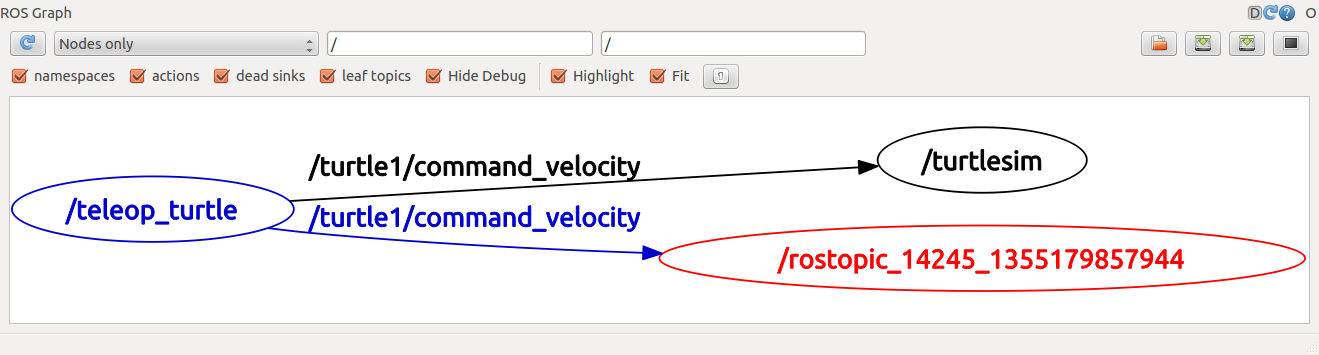
rosrun rqt_graph rqt_graph
rostopic -h

rostopic echo /turtle1/cmd_vel # you will now see topic datas when you press the arrow key in turtle_teleop_key terminal
rostopic list -h # figure out what argument the list sub-command needs

rostopic list -v # displays a verbose list of topics to publish to and subscribe to and their type
rostopic type /turtle1/cmd_vel  # You should get the message type of the topic: geometry_msgs/Twist

rosmsg show geometry_msgs/Twist  #  look at the details of the message using rosmsg
Using rostopic pub
# publishes data on to a topic, rostopic pub [topic] [msg_type] [args]

rostopic pub -1 /turtle1/cmd_vel geometry_msgs/Twist -- '[2.0, 0.0, 0.0]' '[0.0, 0.0, 1.8]'

#  publishes the velocity commands at a rate of 1 Hz on the velocity topic

rostopic pub /turtle1/cmd_vel geometry_msgs/Twist -r 1 -- '[2.0, 0.0, 0.0]' '[0.0, 0.0, -1.8]'

# Now We can also look at what is happening in rqt_graph.

# and see the data published by our turtlesim

rostopic echo /turtle1/pose

# see how fast the turtlesim_node is publishing /turtle1/pose, $ rostopic hz [topic]
rostopic hz /turtle1/pose

# get in depth information about a topic
rostopic type /turtle1/cmd_vel | rosmsg show
Using rqt_plot
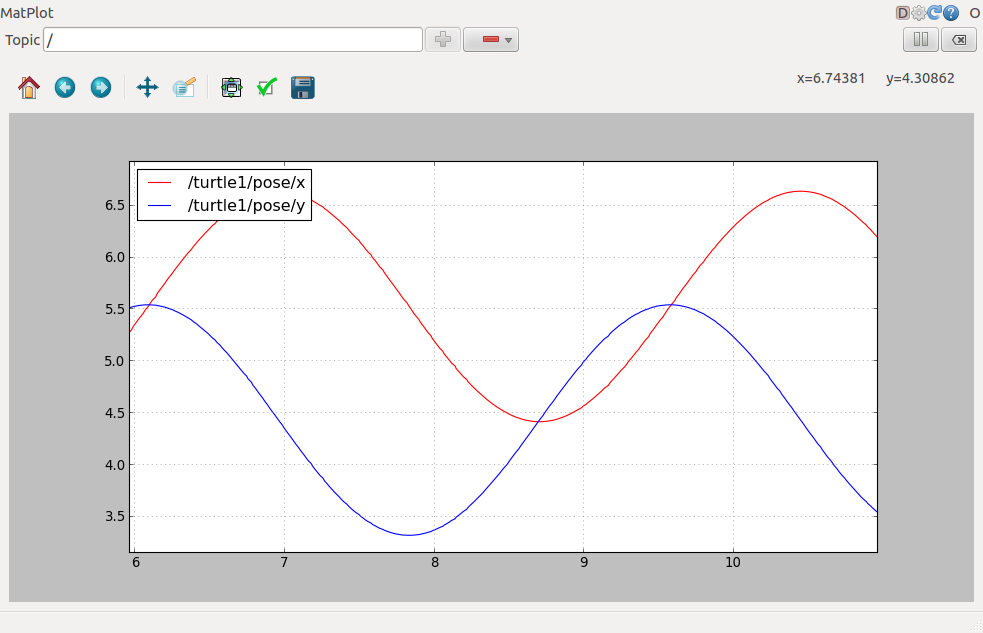
rosrun rqt_plot rqt_plot

# a text box in the upper left corner gives you the ability to add any topic to the plot.

# Typing /turtle1/pose/x and add it.

# Typing /turtle1/pose/y and add it.
ROS Services and Parameters
rosservice list # shows us that the turtlesim node provides nine services

rosservice type /clear # find out what type the clear service is

rosservice call /clear # clears the background of the turtlesim_node

#  look at the case where the service has arguments by looking at the information for the service spawn

rosservice type /spawn | rossrv show

rosservice call /spawn 2 2 0.2 "" # spawn a new turtle at a given location and orientation

rosparam list # look at what parameters are currently on the param server

rosparam set /background_r 150  # change the red channel of the background color

rosservice call /clear # call the clear service for the parameter change to take effect

rosparam get /background_g # get the value of the green background channel

rosparam get / # show us the contents of the entire Parameter Serve

rosparam dump params.yaml #  write all the parameters to the file ./params.yaml (current directory)

rosparam load params.yaml copy # load these yaml files into new namespaces

rosparam get /copy/background_b
Using rqt_console and roslaunch
This tutorial introduces ROS using rqt_console and rqt_logger_level for debugging and roslaunch for starting many nodes at once.
sudo apt-get install ros-kinetic-rqt ros-kinetic-rqt-common-plugins ros-kinetic-turtlesim

# in two new terminals start rqt_console and rqt_logger_level

rosrun rqt_console rqt_console

rosrun rqt_logger_level rqt_logger_level

rosrun turtlesim turtlesim_node # Since the default logger level is INFO you will see any info that the turtlesim publishes when it starts up
roscd beginner_tutorials

mkdir launch

cd launch

gedit turtlemimic.launch
<launch>

  <group ns="turtlesim1">

    <node pkg="turtlesim" name="sim" type="turtlesim_node"/>

  </group>

  <group ns="turtlesim2">

    <node pkg="turtlesim" name="sim" type="turtlesim_node"/>

  </group>

  <node pkg="turtlesim" name="mimic" type="mimic">

    <remap from="input" to="turtlesim1/turtle1"/>

    <remap from="output" to="turtlesim2/turtle1"/>

  </node>

</launch>
roslaunch beginner_tutorials turtlemimic.launch

rostopic pub /turtlesim1/turtle1/cmd_vel geometry_msgs/Twist -r 1 -- '[2.0, 0.0, 0.0]' '[0.0, 0.0, -1.8]' #  the two turtlesims start moving even though the publish command is only being sent to turtlesim1
Using rosed to edit files in ROS
rosed roscpp Logger.msg #  demonstrates how you would edit the Logger.msg file within the roscpp package

rosed roscpp <tab><tab> # tab auto complete

echo "export EDITOR='gedit -w'" >> ~/.bashrc

source ~/.bashrc

echo $EDITOR

rosed roscpp Logger.msg # This time file will be open by The more beginner-friendly editor
Creating a ROS msg and srv
- msg: msg files are simple text files that describe the fields of a ROS message. They are used to generate source code for messages in different languages.
- srv: an srv file describes a service. It is composed of two parts: a request and a response.
Aboat Msg
$ roscd beginner_tutorials

$ mkdir msg

$ echo "int64 num" > msg/Num.msg

rosed beginner_tutorials package.xml
Open package.xml, and make sure these two lines are in it.
  <build_depend>message_generation</build_depend>

  <exec_depend>message_runtime</exec_depend>
rosed beginner_tutorials CMakeLists.txt
Modify it like this:
find_package(catkin REQUIRED COMPONENTS

   roscpp

   rospy

   std_msgs

   message_generation

)

...

catkin_package(

  ...

  CATKIN_DEPENDS message_runtime ...

  ...)

...

add_message_files(

  FILES

  Num.msg

)

...

generate_messages(

  DEPENDENCIES

  std_msgs

)

...
Make sure ROS can see it.
rosmsg show beginner_tutorials/Num # You will see: int64 num

rosmsg show Num # You will see: [beginner_tutorials/Num]: int64 num
Aboat srv
$ roscd beginner_tutorials

$ mkdir srv

$ roscp rospy_tutorials AddTwoInts.srv srv/AddTwoInts.srv
$ rosed beginner_tutorials CMakeLists.txt
Modify it like this:
...
add_service_files(

  FILES

  AddTwoInts.srv

)
...
make sure that ROS can see it using the rossrv show command
rossrv show beginner_tutorials/AddTwoInts
rossrv show AddTwoInts
Now that we have made some new messages we need to make our package again:
$ roscd beginner_tutorials

$ cd ../..

$ catkin_make install

$ cd -
Any .msg file in the msg directory will generate code for use in all supported languages. The C++ message header file will be generated in ~/catkin_ws/devel/include/beginner_tutorials/.
rosmsg -h
Review
Let's just list some of the commands we've used so far:
- rospack = ros+pack(age) : provides information related to ROS packages
roscd = ros+cd : changes directory to a ROS package or stack
rosls = ros+ls : lists files in a ROS package
roscp = ros+cp : copies files from/to a ROS package
- rosmsg = ros+msg : provides information related to ROS message definitions
- rossrv = ros+srv : provides information related to ROS service definitions
- catkin_make : makes (compiles) a ROS package
- rosmake = ros+make : makes (compiles) a ROS package (if you're not using a catkin workspace)
ROS入门学习(基于Ubuntu16.04+kinetic)的更多相关文章
- SLAM+语音机器人DIY系列:(二)ROS入门——3.在ubuntu16.04中安装ROS kinetic
摘要 ROS机器人操作系统在机器人应用领域很流行,依托代码开源和模块间协作等特性,给机器人开发者带来了很大的方便.我们的机器人“miiboo”中的大部分程序也采用ROS进行开发,所以本文就重点对ROS ...
- 基于ubuntu16.04部署IBM开源区块链项目-弹珠资产管理(Marbles)
前言 本教程基本上是对Marbles项目的翻译过程. 如果英文比较好的话,建议根据官方操作说明,一步步进行环境部署.当然你也可以参考本教程在自己的主机上部署该项目. Marbles 介绍 关于 Mar ...
- 基于ubuntu16.04快速构建Hyperledger Fabric网络
前言 最近在参加一个比赛,使用到了区块链的开源软件hyperledger,由于之前从未接触过区块链,以及和区块链开发相关的内容,所有在网上查阅了大量的资料,并且通过学习yeasy(杨宝华)开源的入门书 ...
- ROS入门学习
ROS学习笔记 ROS入门网站; ROS入门书籍 ROS主要包含包括功能包.节点.话题.消息类型和服务; ROS功能包/软件包(Packages) ROS软件包是一组用于实现特定功能的相关文件的集合, ...
- C#码农的大数据之路 - 使用Ambari自动化安装HDP2.6(基于Ubuntu16.04)并运行.NET Core编写的MR作业
准备主机 准备3台主机,名称作用如下: 昵称 Fully Qualified Domain Name IP 作用 Ubuntu-Parrot head1.parrot 192.168.9.126 Am ...
- 基于Ubuntu16.04的GeForce GTX 1080驱动安装,遇到的问题及对应的解决方法
1.在主机上插上GPU之后,查看设备: $ nvidia-smi Tue Dec :: +------------------------------------------------------- ...
- Kubernetes入门学习--在Ubuntu16.0.4安装配置Minikube
目 录 一. 安装minikube环境 1.1. 安装前准备 1.2. 安装Lantern 1.2.1. Lantern下载网站 1.2.2. Lantern下载地址 1.2.3. Lantern安装 ...
- 深度学习caffe:Ubuntu16.04安装指南(1)
caffe [CPU ONLY] 2017-01-15 最简单的安装配置方式: 不用GPU加速,使用OPENCV2.4图像库, 这是根据官方教程(链接如下)简化而得到. Ubuntu 16.04 or ...
- Hadoop完全分布式环境搭建(三)——基于Ubuntu16.04安装和配置Java环境
[系统环境] 1.宿主机OS:Win10 64位 2.虚拟机软件:VMware WorkStation 12 3.虚拟机OS:Ubuntu16.04 4.三台虚拟机 5.JDK文件:jdk-8u201 ...
随机推荐
- (JAVA1)学习,复习的好帮手
学习准备:博客 博客,英文名Blog,它的正式名称为网络日记. 为什么要写博客 我们学习任何东西都需要总结和思考.有时候我们一直在赶路,却忘了放慢脚步 提升文笔组织能力 提升学习总结能力 提升逻辑思维 ...
- HttpRunner3源码阅读: 1. 目录结构分析
初衷 身处软件测试行业的各位应该都有耳闻HttpRunner 开源测试工具/框架(接口测试),作者博客 为什么出这系列? 不少测试同行都建议阅读HttpRunner,源码学习其设计思想. 社区当下Py ...
- 论文笔记:(2017NIPS)DeepSets
目录 摘要 一.引言 二.置换不变性和等变性 2.1 问题定义 2.2 结构 2.3 相关结果 三.Deep Sets 3.1 架构 3.2 其他相关工作 四.应用和实验结果 4.1 设置输入标量响应 ...
- InnoDB锁机制-转载
InnoDB锁机制 1. 锁类型 锁是数据库区别与文件系统的一个关键特性,锁机制用于管理对共享资源的并发访问. InnoDB使用的锁类型,分别有: 共享锁(S)和排他锁(X) 意向锁(IS和IX) 自 ...
- PDL语言/ 盒图N-S/ PAD图
PDL语言 伪码伪代码 基本语法 算法用Begin开始,以End结束(如果只表示中间部分的算法可以不要) 每一条指令,占一行.指令的结束不用任何符号 注释 用"//"表示 用Pri ...
- Linux远程访问控制
目录 一.SSH远程管理 1.1.定义 1.2.配置OpenSSH服务端 二.sshd服务支持两种验证方式 2.1.密码验证 2.2.使用SSH客户端程序 ssh远程登录 scp远程复制 sftp安全 ...
- Golang语言系列-10-包
包 自定义包 package _0calc import ( "fmt" ) /* [Go语言的包] 在工程化的Go语言开发项目中,Go语言的源码复用是建立在包(package)基 ...
- 树莓派远程连接工具SSH使用教程
树莓派远程连接工具SSH使用教程 树莓派 背景故事 树莓派作为一款迷你小主机,大部分的使用场景都会用到远程调试,远程调试用到最多的方式一般就是VNC和SSH,SSH就是命令行型的远程方式,简单来说就是 ...
- 嵌入式Linux可用的防火墙——iptables:实现ip白名单、mac地址白名单
iptables是linux系统下的一个功能强大的模块,不仅可以用作防火墙,还可以实现NAT等众多路由功能.iptables的容器有很清晰的层次关系: 1. iptables是表的容器,iptable ...
- Nmap 常用命令及抓包分析
1.主机发现:主机发现也称为ping扫描,但是Nmap中主机发现的技术已经不是简单的采用ping工具发送简单的ICMP回声请求报文.用户完全可以通过使用列表扫描(-sL)或者通过关闭ping(-P0) ...