
【Azure API 管理】在APIM 中添加 log-to-eventhub 策略,把 Request Body 信息全部记录在Event Hub中
问题描述
根据文档 https://docs.azure.cn/zh-cn/api-management/api-management-howto-log-event-hubs, 可以将Azure API Management中的请求记录到Azure 事件中心。文档中有详细的步骤描述。但是在对于如何创建APIM的Logger, 如何在API中配置策略描述非常不清楚,所以本文就补充如何创建Logger及在APIM的API中添加log-to-eventhub 策略。
前提条件
- 创建 Azure 事件中心:https://docs.azure.cn/zh-cn/event-hubs/event-hubs-create
- Create APIM Logger: https://docs.microsoft.com/zh-cn/rest/api/apimanagement/2020-12-01/logger/create-or-update
- Postman
- 下载 Service Bus Explorer查看事件中心消息:https://github.com/paolosalvatori/ServiceBusExplorer/releases
操作步骤
1) 创建APIM Logger
示例
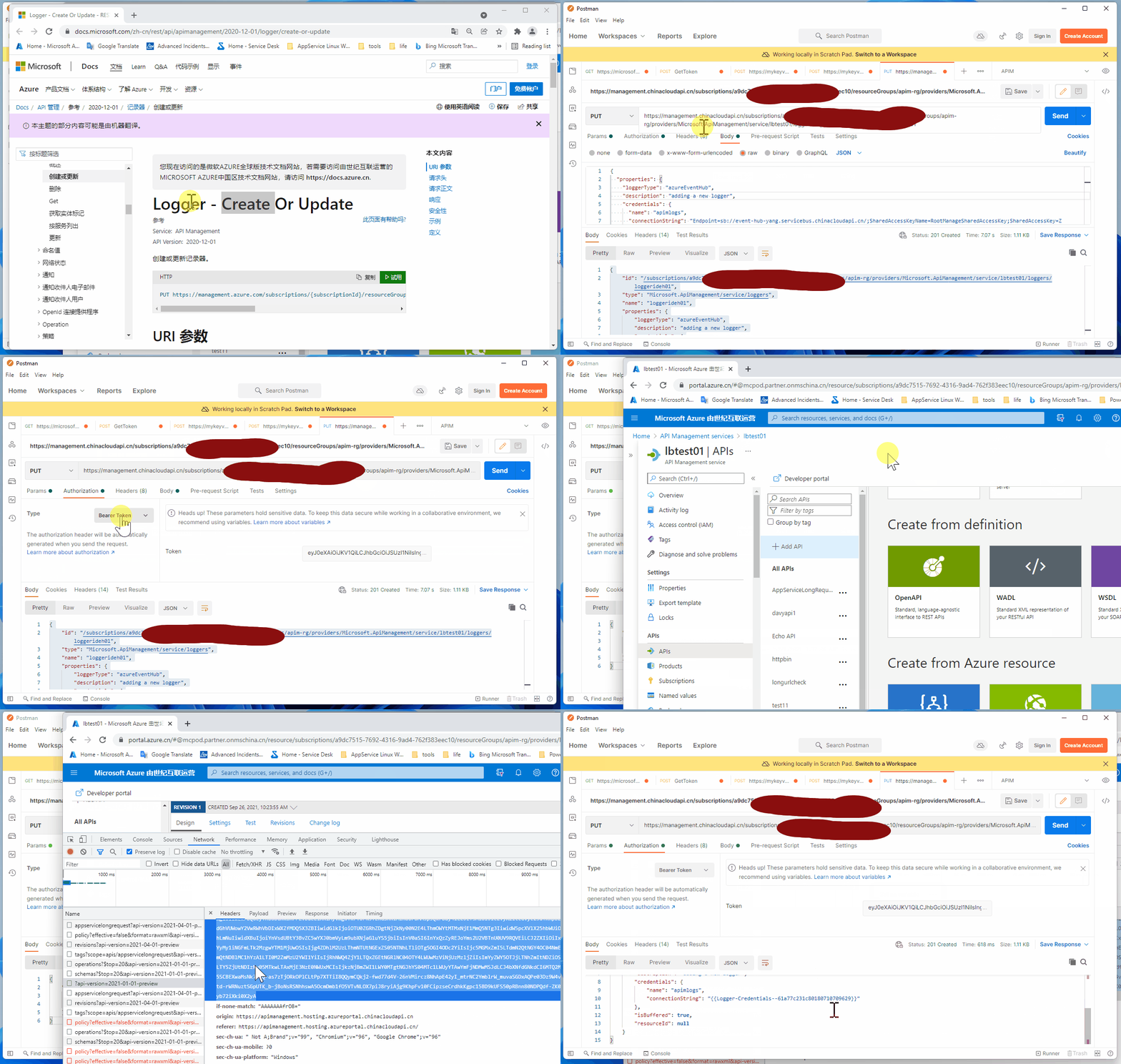
PUT https://management.chinacloudapi.cn/subscriptions/<your subscription id>/resourceGroups/<group name>/providers/Microsoft.ApiManagement/service/<your apim name>/loggers/<loggerideh01>?api-version=2020-12-01
注:替换<>中的内容为自己的相应资源信息,同时也定义loggers的名称。
这里的Endpoint为中国区Azure的Endpoint: https://management.chinacloudapi.cn/, 如果需要Global Azure,则为:https://management.azure.com/
Authorization
两种方式任选其一:
- Azure Active Directory OAuth2 Flow : https://www.cnblogs.com/lulight/p/14279338.html
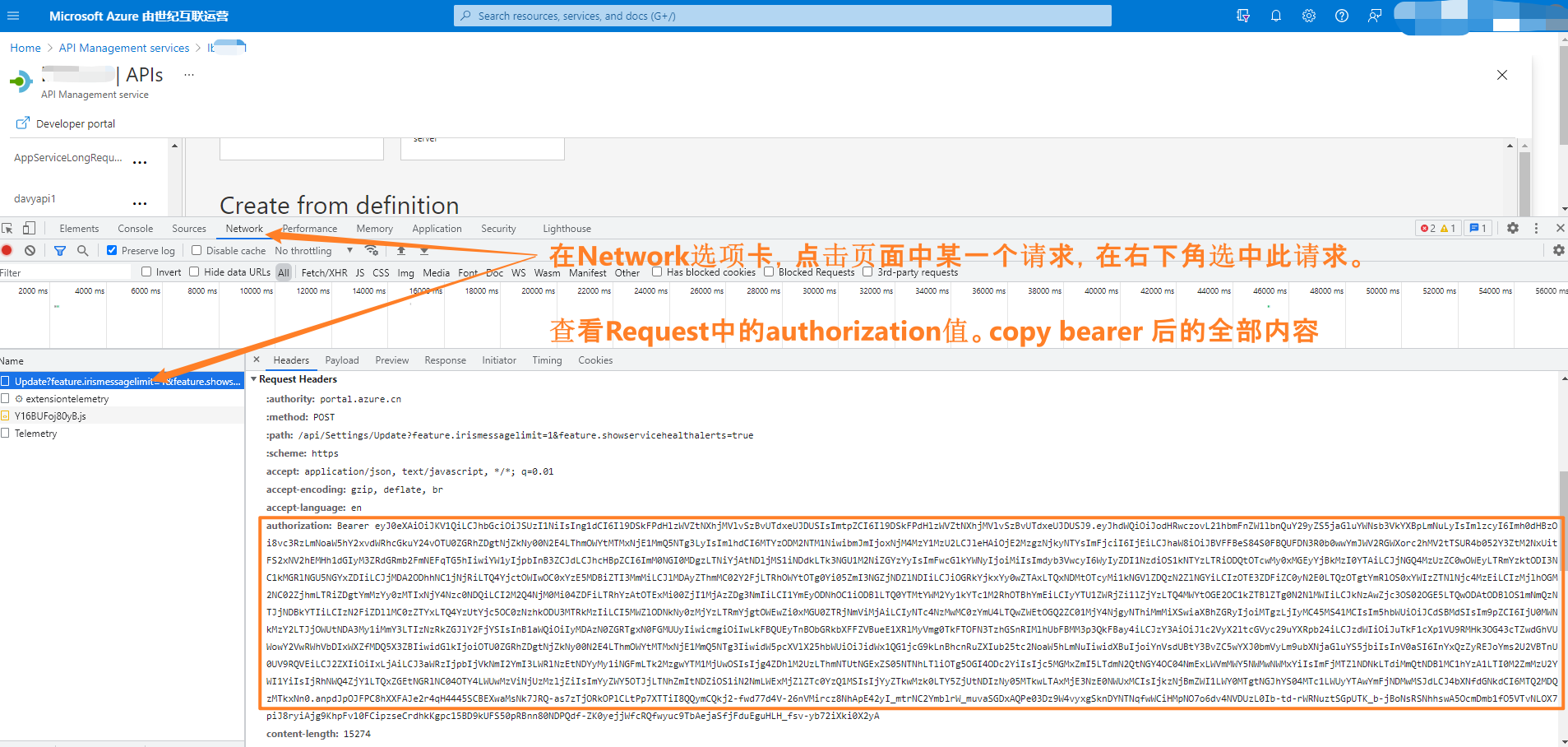
- 似乎用浏览器打开Azure APIM的门户,通过F12--开发者选项中的 Network, 查看其中对API的请求,复制其中的Authorization 值
Body
{

  "properties": {

    "loggerType": "azureEventHub",

    "description": "adding a new logger",

    "credentials": {

      "name": "<your event hub name>",

      "connectionString": "Endpoint=sb://<your event hub namespace>.servicebus.chinacloudapi.cn/;SharedAccessKeyName=xxxxxxxxxxxxxxxxx;SharedAccessKey=xxxxxxxxxxxxxxxxxxxxxxxxxxxxxxxxxx"

    }

  }

}
Response - 201 Created
{

    "id": "/subscriptions/xxxxxxxx-xxxx-xxxx-xxxx-xxxxxxxxxxxx/resourceGroups/xxxx-rg/providers/Microsoft.ApiManagement/service/xxxx/loggers/loggerideh01",

    "type": "Microsoft.ApiManagement/service/loggers",

    "name": "loggerideh01",

    "properties": {

        "loggerType": "azureEventHub",

        "description": "adding a new logger",

        "credentials": {

            "name": "xxxxxxxxxxxx",

            "connectionString": "{{Logger-Credentials--xxxxxxxxxxxx}}"

        },

        "isBuffered": true,

        "resourceId": null

    }

}
演示动画
2) 添加 log-to-eventhub 策略
- 浏览到自己的 APIM 实例。
- 选择“API”选项卡。
- 选择要将策略添加到的 API。
- 选择“所有操作”。
- 选择屏幕顶部的“设计”选项卡。
- 在“入站或出站处理”窗口中,单击三角形(铅笔旁边)。
- 选择“代码编辑器”。 有关详细信息,请参阅如何设置或编辑策略。
- 将光标放在
inbound或outbound策略部分中。 - 在右侧窗口中,选择“高级策略” > “记录到 EventHub”。 这会插入
log-to-eventhub策略语句模板。
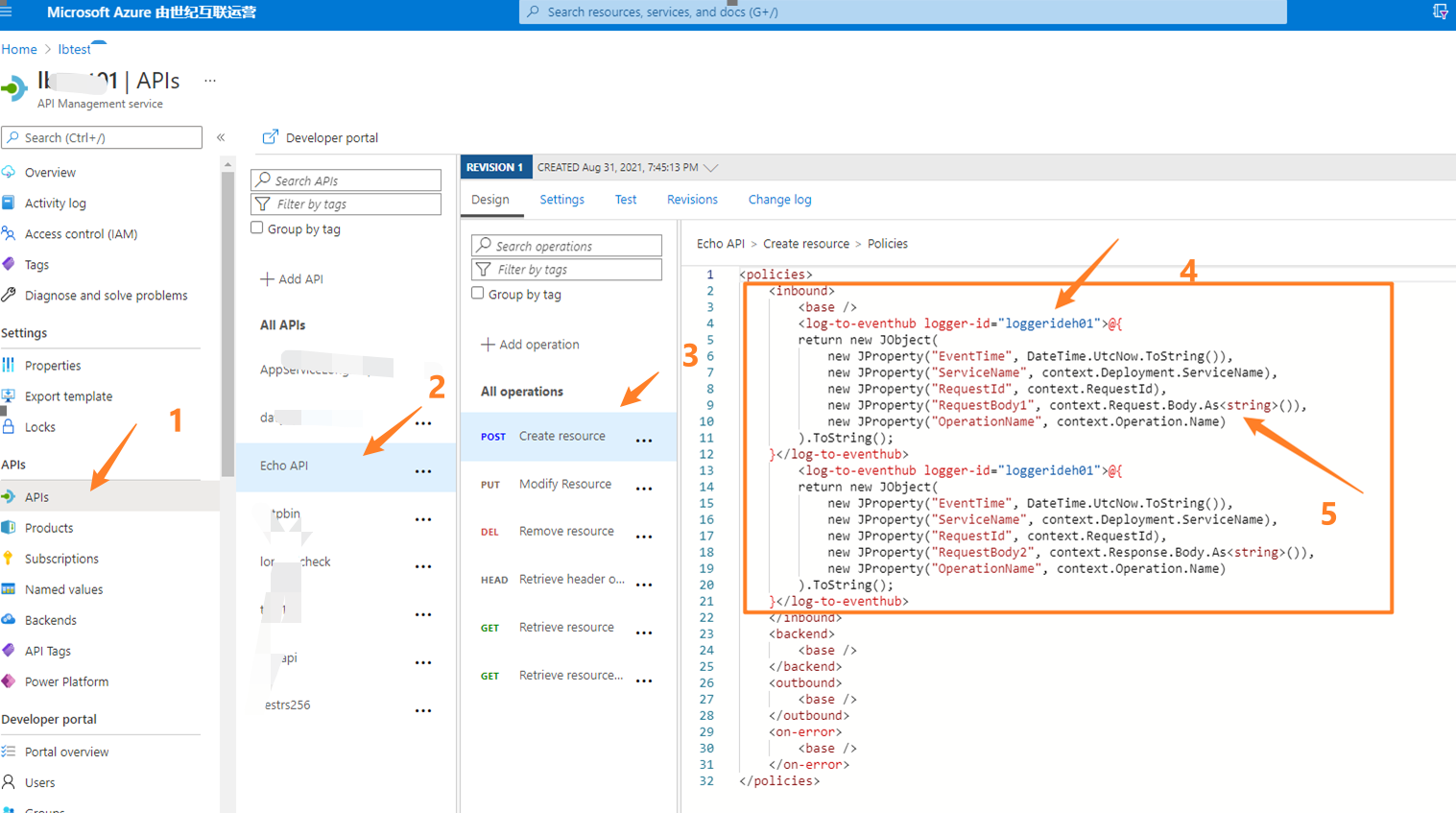
注: Log-to-eventhub 中的logger-id由上面第一步创建。 Request Body的信息一定要进行格式转换。所以需要使用 context.Request.Body.As<string>()
<policies>

    <inbound>

        <base />

        <log-to-eventhub logger-id="loggerideh01">@{

        return new JObject(

            new JProperty("EventTime", DateTime.UtcNow.ToString()),

            new JProperty("ServiceName", context.Deployment.ServiceName),

            new JProperty("RequestId", context.RequestId),

            new JProperty("RequestBody1", context.Request.Body.As<string>()),

            new JProperty("OperationName", context.Operation.Name)

        ).ToString();

    }</log-to-eventhub>

    </inbound>

    <backend>

        <base />

    </backend>

    <outbound>

        <base />

        <log-to-eventhub logger-id="loggerideh01">@{

        return new JObject(

            new JProperty("EventTime", DateTime.UtcNow.ToString()),

            new JProperty("ServiceName", context.Deployment.ServiceName),

            new JProperty("RequestId", context.RequestId),

            new JProperty("RequestBody2", context.Response.Body.As<string>()),

            new JProperty("OperationName", context.Operation.Name)

        ).ToString();

    }</log-to-eventhub>

    </outbound>

    <on-error>

        <base />

    </on-error>

</policies>
3) 连接到Event Hub,查看 Request Body 信息
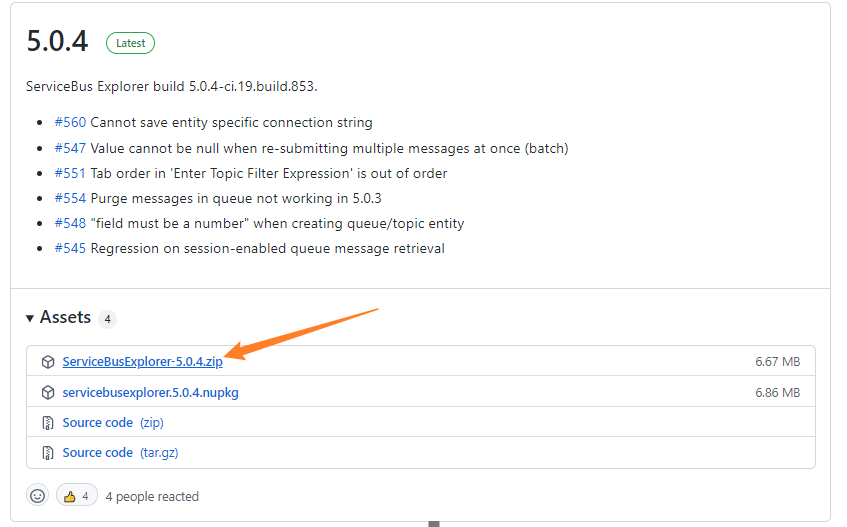
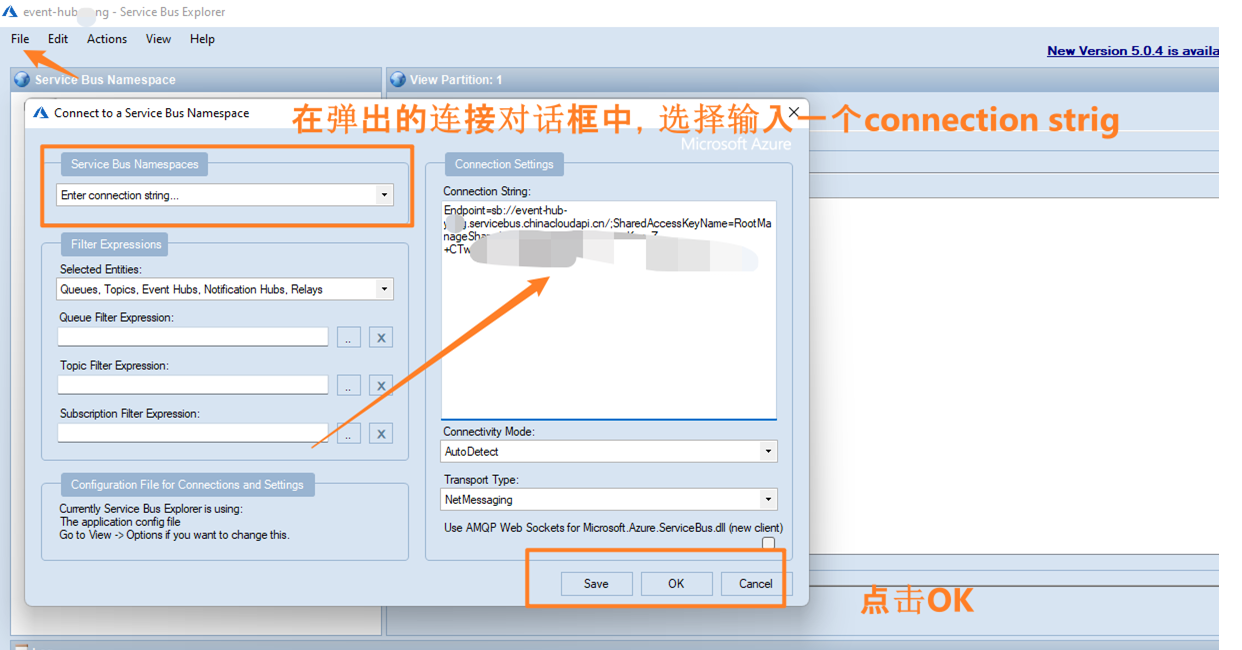
下载zip包,解压后在里面找到文件名为:ServiceBusExplorer.exe。 双击即可运行
在下面的字符串框中输入Event Hub Namespace的连接字符串。点击Save/ OK后,即可连接到Event Hub中。
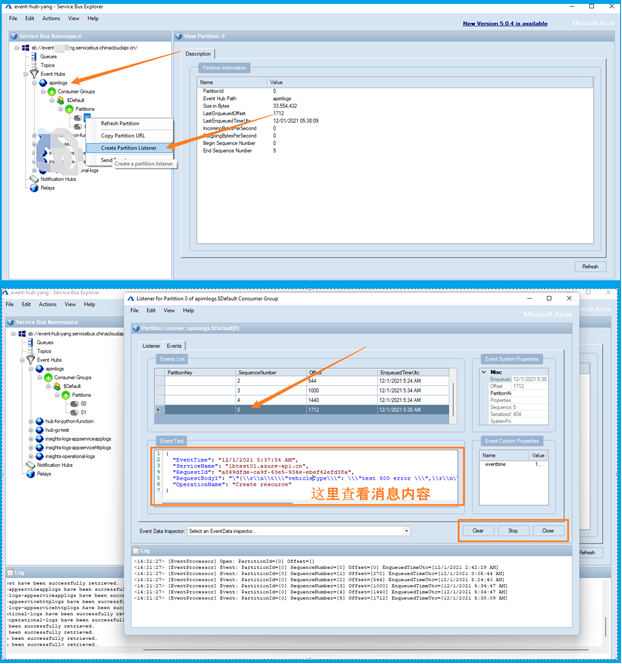
进入保存日志的Event Hub中,找到合适的分区数,点击“Create Partitions Listener ”, 然后再弹出的页面中点击 “Strat”按钮,就可以收到Event Hub中所存储的消息
参考资料
如何在 Azure API 管理中将事件记录到 Azure 事件中心 : https://docs.azure.cn/zh-cn/api-management/api-management-howto-log-event-hubs#configure-log-to-eventhub-policies
Logger - Create Or Update : https://docs.microsoft.com/zh-cn/rest/api/apimanagement/2020-12-01/logger/create-or-update#apimanagementcreateehlogger
创建 Azure 事件中心:https://docs.azure.cn/zh-cn/event-hubs/event-hubs-create
下载 Service Bus Explorer查看事件中心消息:https://github.com/paolosalvatori/ServiceBusExplorer/releases
【Azure API 管理】在APIM 中添加 log-to-eventhub 策略,把 Request Body 信息全部记录在Event Hub中的更多相关文章
- 【Azure API 管理】APIM集成内网虚拟网络后,启用自定义路由管理外出流量经过防火墙(Firewall),遇见APIs加载不出来问题
问题描述 使用 Azure 虚拟网络,Azure APIM 可以管理无法通过 Internet 访问的 API,达到以保护企业内部的后端API的目的.在虚拟网络中,启用网络安全组(NSG:Networ ...
- 【Azure API 管理】APIM 配置Validate-JWT策略,验证RS256非对称(公钥/私钥)加密的Token
问题描述 在APIM中配置对传入的Token进行预验证,确保传入后端被保护的API的Authorization信息正确有效,可以使用validate-jwt策略.validate-jwt 策略强制要求 ...
- 【Azure API 管理】APIM CORS策略设置后,跨域请求成功和失败的Header对比实验
在文章"从微信小程序访问APIM出现200空响应的问题中发现CORS的属性[terminate-unmatched-request]功能"中分析了CORS返回空200的问题后,进一 ...
- 【Azure API 管理】Azure APIM服务集成在内部虚拟网络后,在内部环境中打开APIM门户使用APIs中的TEST功能失败
问题描述 使用微软API管理服务(Azure API Management),简称APIM. 因为公司策略要求只能内部网络访问,所以启用了VNET集成.集成方式见: (在内部模式下使用 Azure A ...
- 【Azure API 管理】在APIM中使用客户端证书验证API的请求,但是一直提示错误"No client certificate received."
API 管理 (APIM) 是一种为现有后端服务创建一致且现代化的 API 网关的方法. 问题描述 在设置了APIM客户端证书,用户保护后端API,让请求更安全. 但是,最近发现使用客户端证书的API ...
- 【Azure API 管理】为调用APIM的请求启用Trace -- 调试APIM Policy的利器
问题描述 在APIM中,通过门户上的 Test 功能,可以非常容易的查看请求的Trace信息,帮助调试 API 对各种Policy,在Inbound,Backend, Outbound部分的耗时问题, ...
- 【Azure API 管理】解决API Management添加AAD Group时遇见的 Failed to query Azure Active Directory graph due to error 错误
问题描述 为APIM添加AAD Group时候,等待很长很长的时间,结果添加失败.错误消息为: Write Groups ValidationError :Failed to query Azure ...
- Android开发过程中在sh,py,mk文件中添加log信息的方法
Android开发过程中在sh,py,mk文件中添加log信息的方法 在sh文件中: echo "this is a log info" + $info 在py文件中: print ...
- 【Azure API 管理】从微信小程序访问APIM出现200的空响应的问题中发现CORS的属性[terminate-unmatched-request]功能
问题描述 使用微信小程序调用APIM(API Management)中的接口,发现POST和PUT请求被拦截,返回的状态码为200,但是无消息内容. 在小程序中的调用JS代码如: 通过浏览器测试得到的 ...
随机推荐
- 对cpu与load的理解及线上问题处理思路
cpu如何计算 当我们执行top命令的时候,看到里面的值(主要是cpu和load)值是一直在变的,因此有必要简单了解一下Linux系统中cpu的计算方式. cpu分为系统cpu和进程.线程cpu,系统 ...
- Java---String和StringBuffer类
Java---String和StringBuffer类 Java String 类 字符串在Java中属于对象,Java提供String类来创建和操作字符串. 创建字符串 创建字符串常用的方法如下: ...
- 耗时一个月,整理出这份Hadoop吐血宝典
本文目录: 一.HDFS 二.MapReduce 三.Yarn 四.Hadoop3.x 新特性 五.Hadoop 大厂面试真题解析 Hadoop 涉及的知识点如下图所示,本文将逐一讲解: 本文档参考了 ...
- 240.搜索二维矩阵II
从左下角位置开始搜索 时间复杂度:O(行数+列数). 想法有点像二分法,大了往一个方向找,小了往另一个方向找.由于矩阵横向和纵向都是递增,如果从(0,0)位置开始找,往右和往下都是增大,因此不知道实际 ...
- Coursera Deep Learning笔记 改善深层神经网络:超参数调试 正则化以及梯度相关
笔记:Andrew Ng's Deeping Learning视频 参考:https://xienaoban.github.io/posts/41302.html 参考:https://blog.cs ...
- UltraSoft - Alpha - Scrum Meeting 7
Date: Apr 22th, 2020. Scrum 情况汇报 进度情况 组员 负责 昨日进度 后两日任务 CookieLau PM 完成课程中心的json格式传递 完成邮箱验证机制 刘zh 前端 ...
- [Beta]the Agiles Scrum Meeting 6
会议时间:2020.5.20 21:00 1.每个人的工作 今天已完成的工作 成员 已完成的工作 issue yjy 帮助成员解决配置环境问题 tq 增加功能:添加多个评测机 评测部分增加更多评测指标 ...
- UVM RAL模型和内置seq
转载:UVM RAL模型:用法和应用_寄存器 (sohu.com) 在系统设计中通常会面临两大挑战:缩小技术节点的规模和上市时间(TTM,Time to Market).为了适应激烈的市场竞争,大多数 ...
- SI Macro
获取 buf 里的 symbol cbuf = BufListCount() msg(cbuf) ibuf = 0 while (ibuf < cbuf) { hbuf = BufListIte ...
- (三)FastDFS 高可用集群架构学习---Client 接口开发
一.Python3 与 FastDFS 交互 1.安装 py3fdfs模块 # pip3 install py3Fdfs 2.测试使用 py3Fdfs 与 Fastdfs 集群交互(上传文件) fro ...