
用HttpClient模拟HTTP的GET和POST请求(转)
本文转自:http://blog.csdn.net/xiazdong/article/details/7724349
一、HttpClient介绍
二、服务器端代码
- package org.xiazdong.servlet;
- import java.io.IOException;
- import java.io.OutputStream;
- import javax.servlet.ServletException;
- import javax.servlet.annotation.WebServlet;
- import javax.servlet.http.HttpServlet;
- import javax.servlet.http.HttpServletRequest;
- import javax.servlet.http.HttpServletResponse;
- @WebServlet("/Servlet1")
- public class Servlet1 extends HttpServlet {
- protected void doGet(HttpServletRequest request, HttpServletResponse response) throws ServletException, IOException {
- String nameParameter = request.getParameter("name");
- String ageParameter = request.getParameter("age");
- String name = new String(nameParameter.getBytes("ISO-8859-1"),"UTF-8");
- String age = new String(ageParameter.getBytes("ISO-8859-1"),"UTF-8");
- System.out.println("GET");
- System.out.println("name="+name);
- System.out.println("age="+age);
- response.setCharacterEncoding("UTF-8");
- OutputStream out = response.getOutputStream();//返回数据
- out.write("GET请求成功!".getBytes("UTF-8"));
- out.close();
- }
- protected void doPost(HttpServletRequest request, HttpServletResponse response) throws ServletException, IOException {
- request.setCharacterEncoding("UTF-8");
- String name = request.getParameter("name");
- String age = request.getParameter("age");
- System.out.println("POST");
- System.out.println("name="+name);
- System.out.println("age="+age);
- response.setCharacterEncoding("UTF-8");
- OutputStream out = response.getOutputStream();
- out.write("POST请求成功!".getBytes("UTF-8"));
- out.close();
- }
- }
三、Android客户端代码
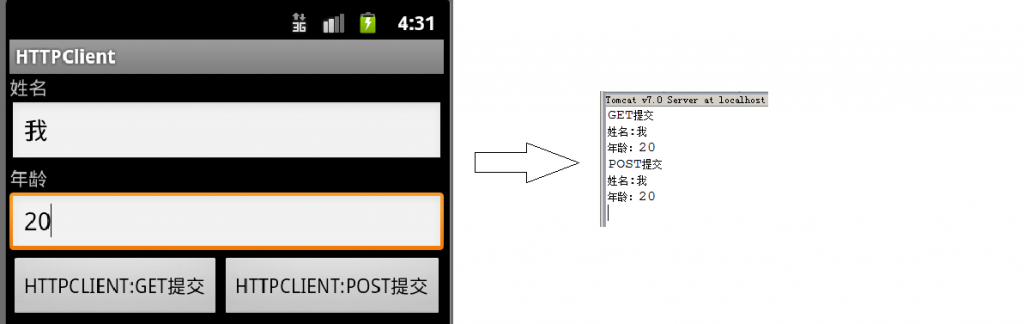
在AndroidManifest.xml加入:
- <uses-permission android:name="android.permission.INTERNET"/>
- package org.xiazdong.network.httpclient;
- import java.io.ByteArrayOutputStream;
- import java.io.IOException;
- import java.io.InputStream;
- import java.net.URLEncoder;
- import java.util.ArrayList;
- import java.util.List;
- import org.apache.http.HttpResponse;
- import org.apache.http.NameValuePair;
- import org.apache.http.client.entity.UrlEncodedFormEntity;
- import org.apache.http.client.methods.HttpGet;
- import org.apache.http.client.methods.HttpPost;
- import org.apache.http.impl.client.DefaultHttpClient;
- import org.apache.http.message.BasicNameValuePair;
- import android.app.Activity;
- import android.os.Bundle;
- import android.view.View;
- import android.view.View.OnClickListener;
- import android.widget.Button;
- import android.widget.EditText;
- import android.widget.Toast;
- public class MainActivity extends Activity {
- private EditText name, age;
- private Button getbutton, postbutton;
- private OnClickListener listener = new OnClickListener() {
- @Override
- public void onClick(View v) {
- try{
- if(postbutton==v){
- /*
- * NameValuePair代表一个HEADER,List<NameValuePair>存储全部的头字段
- * UrlEncodedFormEntity类似于URLEncoder语句进行URL编码
- * HttpPost类似于HTTP的POST请求
- * client.execute()类似于发出请求,并返回Response
- */
- DefaultHttpClient client = new DefaultHttpClient(); //这里的DefaultHttpClient现在已经过时了,现在用的是HttpClient
- List<NameValuePair> list = new ArrayList<NameValuePair>();
- NameValuePair pair1 = new BasicNameValuePair("name", name.getText().toString());
- NameValuePair pair2 = new BasicNameValuePair("age", age.getText().toString());
- list.add(pair1);
- list.add(pair2);
- UrlEncodedFormEntity entity = new UrlEncodedFormEntity(list,"UTF-8");
- HttpPost post = new HttpPost("http://192.168.0.103:8080/Server/Servlet1");
- post.setEntity(entity);
- HttpResponse response = client.execute(post);
- if(response.getStatusLine().getStatusCode()==200){
- InputStream in = response.getEntity().getContent();//接收服务器的数据,并在Toast上显示
- String str = readString(in);
- Toast.makeText(MainActivity.this, str, Toast.LENGTH_SHORT).show();
- }
- else Toast.makeText(MainActivity.this, "POST提交失败", Toast.LENGTH_SHORT).show();
- }
- if(getbutton==v){
- DefaultHttpClient client = new DefaultHttpClient();
- StringBuilder buf = new StringBuilder("http://192.168.0.103:8080/Server/Servlet1");
- buf.append("?");
- buf.append("name="+URLEncoder.encode(name.getText().toString(),"UTF-8")+"&");
- buf.append("age="+URLEncoder.encode(age.getText().toString(),"UTF-8"));
- HttpGet get = new HttpGet(buf.toString());
- HttpResponse response = client.execute(get);
- if(response.getStatusLine().getStatusCode()==200){
- InputStream in = response.getEntity().getContent();
- String str = readString(in);
- Toast.makeText(MainActivity.this, str, Toast.LENGTH_SHORT).show();
- }
- else Toast.makeText(MainActivity.this, "GET提交失败", Toast.LENGTH_SHORT).show();
- }
- }
- catch(Exception e){}
- }
- };
- @Override
- public void onCreate(Bundle savedInstanceState) {
- super.onCreate(savedInstanceState);
- setContentView(R.layout.main);
- name = (EditText) this.findViewById(R.id.name);
- age = (EditText) this.findViewById(R.id.age);
- getbutton = (Button) this.findViewById(R.id.getbutton);
- postbutton = (Button) this.findViewById(R.id.postbutton);
- getbutton.setOnClickListener(listener);
- postbutton.setOnClickListener(listener);
- }
- protected String readString(InputStream in) throws Exception {
- byte[]data = new byte[1024];
- int length = 0;
- ByteArrayOutputStream bout = new ByteArrayOutputStream();
- while((length=in.read(data))!=-1){
- bout.write(data,0,length);
- }
- return new String(bout.toByteArray(),"UTF-8");
- }
- }
用HttpClient模拟HTTP的GET和POST请求(转)的更多相关文章
- Android入门:用HttpClient模拟HTTP的GET和POST请求
一.HttpClient介绍 HttpClient是用来模拟HTTP请求的,其实实质就是把HTTP请求模拟后发给Web服务器: Android已经集成了HttpClient,因此可以直接使用: ...
- HttpClient模拟http请求
Http协议的重要性相信不用我多说了,HttpClient相比传统JDK自带的URLConnection,增加了易用性和灵活性(具体区别,日后我们再讨论),它不仅是客户端发送Http请求变得容易,而且 ...
- 一步步教你为网站开发Android客户端---HttpWatch抓包,HttpClient模拟POST请求,Jsoup解析HTML代码,动态更新ListView
本文面向Android初级开发者,有一定的Java和Android知识即可. 文章覆盖知识点:HttpWatch抓包,HttpClient模拟POST请求,Jsoup解析HTML代码,动态更新List ...
- httpClient模拟浏览器发请求
一.介绍 httpClient是Apache公司的一个子项目, 用来提高高效的.最新的.功能丰富的支持http协议的客户端编程工具包.完成可以模拟浏览器发起请求行为. 二.简单使用例子 : 模拟浏览器 ...
- 关于HttpClient模拟浏览器请求的參数乱码问题解决方式
转载请注明出处:http://blog.csdn.net/xiaojimanman/article/details/44407297 http://www.llwjy.com/blogdetail/9 ...
- HTTPClient模拟Get和Post请求
一.模拟Get请求(无参) 首先导入HttpClient依赖 <dependency> <groupId>org.apache.httpcomponents</group ...
- JAVA--利用HttpClient模拟浏览器登陆请求获取响应的Cookie
在通过java采集网页数据时,我们常常会遇到这样的问题: 站点需要登陆才能访问 而这种网站,一般都会对请求进行账号密码的验证,验证的方式也有多种,需要具体分析. 今天分析其中的一种情况: 站点对登陆密 ...
- 记一次HTTPClient模拟登录获取Cookie的开发历程
记一次HTTPClient模拟登录获取Cookie的开发历程 环境: springboot : 2.7 jdk: 1.8 httpClient : 4.5.13 设计方案 通过新建一个 ...
- [Java] 模拟HTTP的Get和Post请求
在之前,写了篇Java模拟HTTP的Get和Post请求的文章,这篇文章起源与和一个朋友砍飞信诈骗网站的问题,于是动用了Apache的comments-net包,也实现了get和post的http请求 ...
随机推荐
- syslog/rsyslog的使用
syslogd是Linux下的一个记录日志文件服务.从结构来说,可以理解为这个服务下面有一系列的子服务,例如mail.auth.cron.kern等等,这些子服务对外提供日志记录的功能,而当其它的程序 ...
- SpringMVC+Shiro权限管理(转载)
源码 http://pan.baidu.com/s/1pJzG4t1 SpringMVC+Shiro权限管理 博文目录 权限的简单描述 实例表结构及内容及POJO Shiro-pom.xml Shir ...
- 打包python脚本为exe
更新pip 安装
- 剖析ifstream打开含中文路径名文件失败的原因
http://blog.csdn.net/yukin_xue/article/details/7543423 最近写程序的时候遇到了使用ifstream打开含中文路径文件时失败的问题,在网上翻了一下, ...
- Android性能优化第(三)篇---MAT比Menmery Monitor更强大
作者 LooperJing 2016.11.17 16:42* 字数 1687 阅读 1603评论 3喜欢 21 在Android性能优化第(一)篇---基本概念中讲了JAVA的四大引用,讲了一下GC ...
- python测试网络可达性的方法
1.ping连通性测试 #!/usr/bin/env python #-*- coding: utf-8 -*- import os,sys,re import subprocess def NetC ...
- sql语句中几个需要注意的点
1.在写join语句的时候,一定要注意不要漏了on语句,例如: Select * from Student inner join Sc on Student.Sno=Sc.sno 2.having语句 ...
- 【音乐App】—— Vue-music 项目学习笔记:播放器内置组件开发(二)
前言:以下内容均为学习慕课网高级实战课程的实践爬坑笔记. 项目github地址:https://github.com/66Web/ljq_vue_music,欢迎Star. 播放模式切换 歌词滚动显示 ...
- Linux后台进程管理(转)
fg.bg.jobs.&.ctrl + z命令一. &加在一个命令的最后,可以把这个命令放到后台执行 ,如gftp &,二.ctrl + z可以将一个正在前台执行的命令放到后台 ...
- 115. distinct subsequence leetcode python
Given a string S and a string T, count the number of distinct subsequences of T in S. A subsequence ...