
Android入门:用HttpClient模拟HTTP的GET和POST请求
一、HttpClient介绍
二、服务器端代码
- package org.xiazdong.servlet;
- import java.io.IOException;
- import java.io.OutputStream;
- import javax.servlet.ServletException;
- import javax.servlet.annotation.WebServlet;
- import javax.servlet.http.HttpServlet;
- import javax.servlet.http.HttpServletRequest;
- import javax.servlet.http.HttpServletResponse;
- @WebServlet("/Servlet1")
- public class Servlet1 extends HttpServlet {
- protected void doGet(HttpServletRequest request, HttpServletResponse response) throws ServletException, IOException {
- String nameParameter = request.getParameter("name");
- String ageParameter = request.getParameter("age");
- String name = new String(nameParameter.getBytes("ISO-8859-1"),"UTF-8");
- String age = new String(ageParameter.getBytes("ISO-8859-1"),"UTF-8");
- System.out.println("GET");
- System.out.println("name="+name);
- System.out.println("age="+age);
- response.setCharacterEncoding("UTF-8");
- OutputStream out = response.getOutputStream();//返回数据
- out.write("GET请求成功!".getBytes("UTF-8"));
- out.close();
- }
- protected void doPost(HttpServletRequest request, HttpServletResponse response) throws ServletException, IOException {
- request.setCharacterEncoding("UTF-8");
- String name = request.getParameter("name");
- String age = request.getParameter("age");
- System.out.println("POST");
- System.out.println("name="+name);
- System.out.println("age="+age);
- response.setCharacterEncoding("UTF-8");
- OutputStream out = response.getOutputStream();
- out.write("POST请求成功!".getBytes("UTF-8"));
- out.close();
- }
- }
三、Android客户端代码
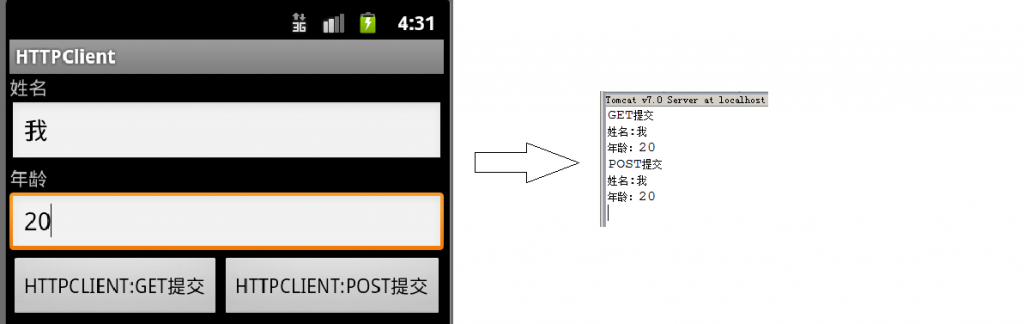
在AndroidManifest.xml加入:
- <uses-permission android:name="android.permission.INTERNET"/>
- package org.xiazdong.network.httpclient;
- import java.io.ByteArrayOutputStream;
- import java.io.IOException;
- import java.io.InputStream;
- import java.net.URLEncoder;
- import java.util.ArrayList;
- import java.util.List;
- import org.apache.http.HttpResponse;
- import org.apache.http.NameValuePair;
- import org.apache.http.client.entity.UrlEncodedFormEntity;
- import org.apache.http.client.methods.HttpGet;
- import org.apache.http.client.methods.HttpPost;
- import org.apache.http.impl.client.DefaultHttpClient;
- import org.apache.http.message.BasicNameValuePair;
- import android.app.Activity;
- import android.os.Bundle;
- import android.view.View;
- import android.view.View.OnClickListener;
- import android.widget.Button;
- import android.widget.EditText;
- import android.widget.Toast;
- public class MainActivity extends Activity {
- private EditText name, age;
- private Button getbutton, postbutton;
- private OnClickListener listener = new OnClickListener() {
- @Override
- public void onClick(View v) {
- try{
- if(postbutton==v){
- /*
- * NameValuePair代表一个HEADER,List<NameValuePair>存储全部的头字段
- * UrlEncodedFormEntity类似于URLEncoder语句进行URL编码
- * HttpPost类似于HTTP的POST请求
- * client.execute()类似于发出请求,并返回Response
- */
- DefaultHttpClient client = new DefaultHttpClient();
- List<NameValuePair> list = new ArrayList<NameValuePair>();
- NameValuePair pair1 = new BasicNameValuePair("name", name.getText().toString());
- NameValuePair pair2 = new BasicNameValuePair("age", age.getText().toString());
- list.add(pair1);
- list.add(pair2);
- UrlEncodedFormEntity entity = new UrlEncodedFormEntity(list,"UTF-8");
- HttpPost post = new HttpPost("http://192.168.0.103:8080/Server/Servlet1");
- post.setEntity(entity);
- HttpResponse response = client.execute(post);
- if(response.getStatusLine().getStatusCode()==200){
- InputStream in = response.getEntity().getContent();//接收服务器的数据,并在Toast上显示
- String str = readString(in);
- Toast.makeText(MainActivity.this, str, Toast.LENGTH_SHORT).show();
- }
- else Toast.makeText(MainActivity.this, "POST提交失败", Toast.LENGTH_SHORT).show();
- }
- if(getbutton==v){
- DefaultHttpClient client = new DefaultHttpClient();
- StringBuilder buf = new StringBuilder("http://192.168.0.103:8080/Server/Servlet1");
- buf.append("?");
- buf.append("name="+URLEncoder.encode(name.getText().toString(),"UTF-8")+"&");
- buf.append("age="+URLEncoder.encode(age.getText().toString(),"UTF-8"));
- HttpGet get = new HttpGet(buf.toString());
- HttpResponse response = client.execute(get);
- if(response.getStatusLine().getStatusCode()==200){
- InputStream in = response.getEntity().getContent();
- String str = readString(in);
- Toast.makeText(MainActivity.this, str, Toast.LENGTH_SHORT).show();
- }
- else Toast.makeText(MainActivity.this, "GET提交失败", Toast.LENGTH_SHORT).show();
- }
- }
- catch(Exception e){}
- }
- };
- @Override
- public void onCreate(Bundle savedInstanceState) {
- super.onCreate(savedInstanceState);
- setContentView(R.layout.main);
- name = (EditText) this.findViewById(R.id.name);
- age = (EditText) this.findViewById(R.id.age);
- getbutton = (Button) this.findViewById(R.id.getbutton);
- postbutton = (Button) this.findViewById(R.id.postbutton);
- getbutton.setOnClickListener(listener);
- postbutton.setOnClickListener(listener);
- }
- protected String readString(InputStream in) throws Exception {
- byte[]data = new byte[1024];
- int length = 0;
- ByteArrayOutputStream bout = new ByteArrayOutputStream();
- while((length=in.read(data))!=-1){
- bout.write(data,0,length);
- }
- return new String(bout.toByteArray(),"UTF-8");
- }
- }
Android入门:用HttpClient模拟HTTP的GET和POST请求的更多相关文章
- 用HttpClient模拟HTTP的GET和POST请求(转)
本文转自:http://blog.csdn.net/xiazdong/article/details/7724349 一.HttpClient介绍 HttpClient是用来模拟HTTP请求的,其 ...
- 一步步教你为网站开发Android客户端---HttpWatch抓包,HttpClient模拟POST请求,Jsoup解析HTML代码,动态更新ListView
本文面向Android初级开发者,有一定的Java和Android知识即可. 文章覆盖知识点:HttpWatch抓包,HttpClient模拟POST请求,Jsoup解析HTML代码,动态更新List ...
- Android入门(十二)SQLite事务、升级数据库
原文链接:http://www.orlion.ga/610/ 一.事务 SQLite支持事务,看一下Android如何使用事务:比如 Book表中的数据都已经很老了,现在准备全部废弃掉替换成新数据,可 ...
- HttpClient模拟http请求
Http协议的重要性相信不用我多说了,HttpClient相比传统JDK自带的URLConnection,增加了易用性和灵活性(具体区别,日后我们再讨论),它不仅是客户端发送Http请求变得容易,而且 ...
- 【转】Xamarin.Android 入门之:Xamarin+vs2015 环境搭建
Xamarin.Android 入门之:Xamarin+vs2015 环境搭建 一.前言 此篇博客主要写了如何使用搭建xamarin开发的环境,防止我自己万一哪天电脑重装系统了,可以直接看这篇博客 ...
- android 入门 006(sqlite增删改查)
android 入门 006(sqlite增删改查) package cn.rfvip.feb_14_2_sqlite; import android.content.Context; import ...
- android 入门 005(登录记住)
android 入门 005(登录记住) <LinearLayout xmlns:android="http://schemas.android.com/apk/res/android ...
- Android入门:绑定本地服务
一.绑定服务介绍 前面文章中讲过一般的通过startService开启的服务,当访问者关闭时,服务仍然存在: 但是如果存在这样一种情况:访问者需要与服务进行通信,则我们需要将访问者与服务进行绑定: ...
- Android入门视频推荐
marschen老师的Android入门视频推荐网址: 1.Android应用程序开发视频教程(重制版)第一季 2.Android应用开发视频教程(重制版)第二季 2.marschen老师的个人微 ...
随机推荐
- autocomplete参数说明以及实例
JQuery autocomplete使用手册 Jquery autocomplete是一个很强大的类似google suggest的自动提示插件.它几乎可以满足我们所有的需要. 官方网站:http: ...
- web服务器、应用服务器、http服务器区别
引用 WEB服务器.应用程序服务器.HTTP服务器有何区别?IIS.Apache.Tomcat.Weblogic.WebSphere都各属于哪种服务器 Web服务器的基本功能就是提供Web信息 ...
- Hibernate逍遥游记-第13章 映射实体关联关系-001用外键映射一对一(<many-to-one unique="true">、<one-to-one>)
1. <?xml version="1.0"?> <!DOCTYPE hibernate-mapping PUBLIC "-//Hibernate/Hi ...
- yii2 学习中
属性: public function __get($name) // 这里$name是属性名 { $getter = 'get' . $name; // getter函数的函数名 if (metho ...
- Java API —— Calendar类
1.Calendar类概述 Calendar 类是一个抽象类,它为特定瞬间与一组诸如 YEAR.MONTH.DAY_OF_MONTH.HOUR 等 日历字段之间的转换提供了一些方法,并为操作日历字段 ...
- ios7 webapp touch bug
// ios7 touchstart bug if(navigator.userAgent.indexOf("iPhone OS 7") != -1){ var startX = ...
- IOS数据类型
id – 动态对象类型.动态类型和静态类型对象的否定词汇为 nil. Class – 动态类的类型.它的否定词汇为 Nil.SEL – 选择器的数据类型(typedef):这种数据类型代表运行时的一种 ...
- 1287. Mars Canals(DP)
1287 水DP #include <iostream> #include<cstdio> #include<cstring> #include<algori ...
- TC SRM 593 DIV1 250(dfs)
这图最多3色就可以 搜2就行了 #include <iostream> #include<cstdio> #include<cstring> #include< ...
- java转换json需导入的jar包说明
commons-beanutils-1.8.0.jar不加这个包 java.lang.NoClassDefFoundError: org/apache/commons/beanutils/DynaBe ...