
springcloud-Netflix创建服务消费者
springcloud-Netflix创建服务消费者
在微服务架构中,业务都会被拆分成一个独立的服务,服务与服务的通讯是基于 http restful 的。Spring cloud 有两种服务调用方式,两种都是http方式的不是rpc方式
一种是 ribbon + restTemplate
另一种是 feign。首先讲解下基于 ribbon + rest
Ribbon
创建服务消费者-Ribbon方式
Ribbon 是一个负载均衡客户端,可以很好的控制 http 和 tcp 的一些行为。
创建方式也是,在总工程下面创建maven工程包,导入pom.xml,application.yml,Application入口类;以及编写自己的业务逻辑
1.创建一个 hello-spring-cloud-web-admin-ribbon 服务消费者项目
POM.XML,导入springboot和Ribbon的依赖
<?xml version="1.0" encoding="UTF-8"?>

<project xmlns="http://maven.apache.org/POM/4.0.0" xmlns:xsi="http://www.w3.org/2001/XMLSchema-instance"

         xsi:schemaLocation="http://maven.apache.org/POM/4.0.0 http://maven.apache.org/xsd/maven-4.0.0.xsd">

    <modelVersion>4.0.0</modelVersion>

    <parent>

        <groupId>com.outlook.liufei32</groupId>

        <artifactId>hello-spring-cloud-dependencies</artifactId>

        <version>1.0.0-SNAPSHOT</version>

        <relativePath>../hello-spring-cloud-dependencies/pom.xml</relativePath>

    </parent>

    <artifactId>hello-spring-cloud-web-admin-ribbon</artifactId>

    <packaging>jar</packaging>

    <name>hello-spring-cloud-web-admin-ribbon</name>

    <url>https://github.com/Swagger-Ranger</url>

    <inceptionYear>2018-Now</inceptionYear>

    <dependencies>

        <!-- Spring Boot Begin -->

        <dependency>

            <groupId>org.springframework.boot</groupId>

            <artifactId>spring-boot-starter-web</artifactId>

        </dependency>

        <dependency>

            <groupId>org.springframework.boot</groupId>

            <artifactId>spring-boot-starter-tomcat</artifactId>

        </dependency>

        <!--web需要thymeleaf模板引擎-->

        <dependency>

            <groupId>org.springframework.boot</groupId>

            <artifactId>spring-boot-starter-thymeleaf</artifactId>

        </dependency>

        <dependency>

            <groupId>org.springframework.boot</groupId>

            <artifactId>spring-boot-starter-actuator</artifactId>

        </dependency>

        <dependency>

            <groupId>org.springframework.boot</groupId>

            <artifactId>spring-boot-starter-test</artifactId>

            <scope>test</scope>

        </dependency>

        <!-- Spring Boot End -->

        <!-- Spring Cloud Begin -->

        <dependency>

            <groupId>org.springframework.cloud</groupId>

            <artifactId>spring-cloud-starter-netflix-eureka-server</artifactId>

        </dependency>

        <!--ribbon的插件-->

        <dependency>

            <groupId>org.springframework.cloud</groupId>

            <artifactId>spring-cloud-starter-netflix-ribbon</artifactId>

        </dependency>

        <!-- Spring Cloud End -->

        <!-- 解决 thymeleaf 模板引擎一定要执行严格的 html5 格式校验问题 -->

        <dependency>

            <groupId>net.sourceforge.nekohtml</groupId>

            <artifactId>nekohtml</artifactId>

        </dependency>

    </dependencies>

    <build>

        <plugins>

            <plugin>

                <groupId>org.springframework.boot</groupId>

                <artifactId>spring-boot-maven-plugin</artifactId>

                <configuration>

                    <mainClass>com.outlook.liufei32.hello.spring.cloud.web.admin.ribbon.WebAdminRibbonApplication</mainClass>

                </configuration>

            </plugin>

        </plugins>

    </build>

</project>
完善结构目录,并将服务注册到服务中心
在启动类上加入@EnableDiscoveryClient 注解注册到服务中心
package com.outlook.liufei32.hello.spring.cloud.web.admin.ribbon;

import org.springframework.boot.SpringApplication;

import org.springframework.boot.autoconfigure.SpringBootApplication;

import org.springframework.cloud.client.discovery.EnableDiscoveryClient;

@SpringBootApplication

@EnableDiscoveryClient    //发现服务注解,注解是不分顺序的

public class WebAdminRibbonApplication {

    public static void main( String[] args ) {

        SpringApplication.run(WebAdminRibbonApplication.class, args);

    }

}
配置application.yml
spring:

  application:

    name: hello-spring-cloud-web-admin-ribbon

  thymeleaf:

    cache: false

    mode: LEGACYHTML5

    encoding: UTF-8

    servlet:

      content-type: text/html

server:

  port: 8764

eureka:

  client:

    serviceUrl:

      defaultZone: http://localhost:8761/eureka/
配置Configuration,注入RestTemplate 的 Bean,并通过 @LoadBalanced 注解表明开启负载均衡功能
package com.outlook.liufei32.hello.spring.cloud.web.admin.ribbon.config;

import org.springframework.cloud.client.loadbalancer.LoadBalanced;

import org.springframework.context.annotation.Bean;

import org.springframework.context.annotation.Configuration;

import org.springframework.web.client.RestTemplate;

@Configuration

public class RestTemplateConfiguration {

    @Bean//生成配置一个Bean

    @LoadBalanced//访问负载均衡器,自动去寻找服务提供者

    public RestTemplate restTemplate() {

        return new RestTemplate();

    }

}
创建service,来测试请求restTemplate负载均衡
package com.outlook.liufei32.hello.spring.cloud.web.admin.ribbon.service;

import org.springframework.beans.factory.annotation.Autowired;

import org.springframework.stereotype.Service;

import org.springframework.web.client.RestTemplate;

@Service

public class AdminService {

    @Autowired

    private RestTemplate restTemplate;//因为我在config里配置了restTemplate Bean所以能自动注入

    /**

     * url:就是http://+服务名,即在你要调用的service微服务里applicat.yml中配置的服务名,restTemplate会自动去寻找可用的服务

     * @param message

     * @return

     */

    public String sayHi( String message ) {

        return restTemplate.getForObject("http://hello-spring-cloud-service-admin/hi?message=" + message, String.class);

    }

}
创建controller来解释web访问然后去访问service
package com.outlook.liufei32.hello.spring.cloud.web.admin.ribbon.controller;

import com.outlook.liufei32.hello.spring.cloud.web.admin.ribbon.service.AdminService;

import org.springframework.beans.factory.annotation.Autowired;

import org.springframework.web.bind.annotation.RequestMapping;

import org.springframework.web.bind.annotation.RequestMethod;

import org.springframework.web.bind.annotation.RequestParam;

import org.springframework.web.bind.annotation.RestController;

@RestController

public class AdminController {

    @Autowired

    private AdminService adminService;

    @RequestMapping(value = "hi",method = RequestMethod.GET)

    public String sayHi( @RequestParam String message ) {

        return adminService.sayHi(message);

    }

}
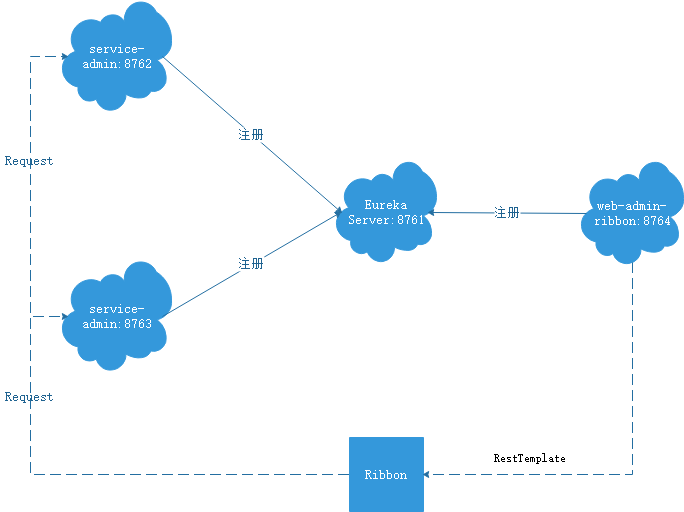
ribbon的架构
Feign
创建包和基本项目结构
在总的包下新建
spring-cloud-web-admin-feign工程,导入pom.xml
<?xml version="1.0" encoding="UTF-8"?>

<project xmlns="http://maven.apache.org/POM/4.0.0" xmlns:xsi="http://www.w3.org/2001/XMLSchema-instance"

         xsi:schemaLocation="http://maven.apache.org/POM/4.0.0 http://maven.apache.org/xsd/maven-4.0.0.xsd">

    <modelVersion>4.0.0</modelVersion>

    <parent>

        <groupId>com.outlook.liufei32</groupId>

        <artifactId>spring-cloud-dependencies</artifactId>

        <version>1.0.0-SNAPSHOT</version>

        <relativePath>../spring-cloud-dependencies/pom.xml</relativePath>

    </parent>

    <artifactId>spring-cloud-web-admin-feign</artifactId>

    <packaging>jar</packaging>

    <name>spring-cloud-web-admin-feign</name>

    <url></url>

    <inceptionYear>2019-Now</inceptionYear>

    <dependencies>

        <!-- Spring Boot Begin -->

        <dependency>

            <groupId>org.springframework.boot</groupId>

            <artifactId>spring-boot-starter-web</artifactId>

        </dependency>

        <dependency>

            <groupId>org.springframework.boot</groupId>

            <artifactId>spring-boot-starter-tomcat</artifactId>

        </dependency>

        <dependency>

            <groupId>org.springframework.boot</groupId>

            <artifactId>spring-boot-starter-thymeleaf</artifactId>

        </dependency>

        <dependency>

            <groupId>org.springframework.boot</groupId>

            <artifactId>spring-boot-starter-actuator</artifactId>

        </dependency>

        <dependency>

            <groupId>org.springframework.boot</groupId>

            <artifactId>spring-boot-starter-test</artifactId>

            <scope>test</scope>

        </dependency>

        <!-- Spring Boot End -->

        <!-- Spring Cloud Begin -->

        <dependency>

            <groupId>org.springframework.cloud</groupId>

            <artifactId>spring-cloud-starter-netflix-eureka-server</artifactId>

        </dependency>

        <dependency>

            <groupId>org.springframework.cloud</groupId>

            <artifactId>spring-cloud-starter-openfeign</artifactId>

        </dependency>

        <!-- Spring Cloud End -->

        <!-- 解决 thymeleaf 模板引擎一定要执行严格的 html5 格式校验问题 -->

        <dependency>

            <groupId>net.sourceforge.nekohtml</groupId>

            <artifactId>nekohtml</artifactId>

        </dependency>

    </dependencies>

    <build>

        <plugins>

            <plugin>

                <groupId>org.springframework.boot</groupId>

                <artifactId>spring-boot-maven-plugin</artifactId>

                <configuration>

                    <mainClass>com.outlook.liufei32.spring.cloud.web.admin.feign.WebAdminFeignApplication</mainClass>

                </configuration>

            </plugin>

        </plugins>

    </build>

</project>
其中feign的依赖就是:
<dependency>

  <groupId>org.springframework.cloud</groupId>

    <artifactId>spring-cloud-starter-openfeign</artifactId>

</dependency>
创建启动类
package com.outlook.liufe32.spring.cloud.web.admin.feign;

import org.springframework.boot.SpringApplication;

import org.springframework.boot.autoconfigure.SpringBootApplication;

import org.springframework.cloud.client.discovery.EnableDiscoveryClient;

import org.springframework.cloud.openfeign.EnableFeignClients;

@SpringBootApplication

@EnableDiscoveryClient//发现服务

@EnableFeignClients//Feign

public class WebAdminFeignApplication {

    public static void main( String[] args ) {

        SpringApplication.run(WebAdminFeignApplication.class, args);

    }

}
配置yml
spring:

  application:

    name: spring-cloud-web-admin-feign

  thymeleaf:

    cache: false

    mode: LEGACYHTML5

    encoding: UTF-8

    servlet:

      content-type: text/html

server:

  port: 8765

eureka:

  client:

    serviceUrl:

      defaultZone: http://localhost:8761/eureka/
创建Feign访问服务的接口和访问controller
这一步是不同于ribbon的地方,feign其实也集成了ribbon
package com.outlook.liufe32.spring.cloud.web.admin.feign.service;

import org.springframework.cloud.openfeign.FeignClient;

import org.springframework.web.bind.annotation.RequestMapping;

import org.springframework.web.bind.annotation.RequestMethod;

import org.springframework.web.bind.annotation.RequestParam;

@FeignClient(value = "spring-cloud-service-admin")//这里就是访问的服务名,在服务提供者的yml里或者去eureka里找服务名

public interface AdminService {

//这里的写法就类似controller但不是方法而是接口

    @RequestMapping(value = "hi", method = RequestMethod.GET)

    public String sayHi( @RequestParam(value = "message") String message );

}
创建controller
package com.outlook.liufe32.spring.cloud.web.admin.feign.controller;

import com.outlook.liufe32.spring.cloud.web.admin.feign.service.AdminService;

import org.springframework.beans.factory.annotation.Autowired;

import org.springframework.web.bind.annotation.RequestMapping;

import org.springframework.web.bind.annotation.RequestMethod;

import org.springframework.web.bind.annotation.RequestParam;

import org.springframework.web.bind.annotation.RestController;

@RestController

public class WebAdminController {

    @Autowired

    private AdminService adminService;

    @RequestMapping(value = "hi", method = RequestMethod.GET)

    public String sayHi(@RequestParam(value = "message") String message) {

        return adminService.sayHi(message);

    }

}
测试访问
访问feign的fontroller,就可以看到feign去调用了不同的服务提供者端口,即不同的服务者实例
Hi,your message is :"HelloFeign" i am from port:8762

Hi,your message is :"HelloFeign" i am from port:8763
本博客为Swagger-Ranger的笔记分享,文章会持续更新
文中源码地址: https://github.com/Swagger-Ranger
欢迎交流指正,如有侵权请联系作者确认删除: liufei32@outlook.com
springcloud-Netflix创建服务消费者的更多相关文章
- 创建服务消费者(Feign)
概述 Feign 是一个声明式的伪 Http 客户端,它使得写 Http 客户端变得更简单.使用 Feign,只需要创建一个接口并注解.它具有可插拔的注解特性,可使用 Feign 注解和 JAX-RS ...
- springcloud干货之服务消费者(ribbon)
本章介绍springcloud中的服务消费者 springcloud服务调用方式有两种实现方式: 1,restTemplate+ribbon, 2,feign 本来想一篇讲完,发现篇幅有点长,所以本章 ...
- 「 从0到1学习微服务SpringCloud 」05服务消费者Fegin
系列文章(更新ing): 「 从0到1学习微服务SpringCloud 」01 一起来学呀! 「 从0到1学习微服务SpringCloud 」02 Eureka服务注册与发现 「 从0到1学习微服务S ...
- 创建服务消费者(Ribbon)
概述 在微服务架构中,业务都会被拆分成一个独立的服务,服务与服务的通讯是基于 http restful 的.Spring cloud 有两种服务调用方式,一种是 ribbon + restTempla ...
- springcloud干活之服务消费者(feign)
springcloud系列文章的第三篇 本章将继续讲述springcloud的消费者(feign) Spring Cloud Feign是一套基于Netflix Feign实现的声明式服务调用客户端. ...
- 「 从0到1学习微服务SpringCloud 」04服务消费者Ribbon+RestTemplate
系列文章(更新ing): 「 从0到1学习微服务SpringCloud 」01 一起来学呀! 「 从0到1学习微服务SpringCloud 」02 Eureka服务注册与发现 「 从0到1学习微服务S ...
- SpringCloud学习系列之二 ----- 服务消费者(Feign)和负载均衡(Ribbon)使用详解
前言 本篇主要介绍的是SpringCloud中的服务消费者(Feign)和负载均衡(Ribbon)功能的实现以及使用Feign结合Ribbon实现负载均衡. SpringCloud Feign Fei ...
- springcloud的服务提供者与服务消费者
1.说明 springcloud中由服务消费者调用服务提供者一共有两种方法rest和feign 2.feign (1)使用feign的方式进行服务调,搭建服务提供者. 创建一个web项目(服务提供者) ...
- springCloud学习-服务消费者(rest+ribbon)
1.ribbon简介 spring cloud的Netflix中提供了两个组件实现软负载均衡调用:ribbon和feign. Ribbon 是一个基于 HTTP 和 TCP 客户端的负载均衡器 它可以 ...
随机推荐
- Codeforces Gym 101190 NEERC 16 G. Game on Graph(博弈+拓扑)
Gennady and Georgiy are playing interesting game on a directed graph. The graph has n vertices and m ...
- [Poi2011] Meteors(从不知所措到整体二分)
Byteotian Interstellar Union (BIU) has recently discovered a new planet in a nearby galaxy. The plan ...
- 【LeetCode】027. Remove Element
题目: Given an array and a value, remove all instances of that value in place and return the new lengt ...
- sublime插件insertDate显示ISO时间
1 下载insertDate插件以及安装完毕 2 把光标放在想插入ISO时间的地方 3 按住:alt+f5,之后,在sublime下面的Date format string输入:iso.之后按ente ...
- c++常用函数STL
完c++快一年了,感觉很有遗憾,因为一直没有感觉到c++的强大之处,当时最大的感觉就是这个东西的输入输出比C语言要简单好写. 后来我发现了qt,opencv,opengl,原来,c++好玩的狠. 在这 ...
- 在VC6的debug框里面输出版权信息
在VC6的debug框里面输出版权信息,效果如下: 原理是: 新建一个批处理文档:如:"info.bat",放置到工程目录下[和dsw同级] @echo ===本程序作者是不要呵呵 ...
- (一)新建一个javaweb项目
一.为了不影响其他项目,可以重新选择一个新的工作目录:swith workspace 二.为了尽可能统一项目,所使用的编程环境,包括:Tomcat.JRE都是项目组自己的,所以在新建项目的时候要注意选 ...
- linux下使用c判断文件夹是否为空的小程序
自己写了一个 判断文件夹是否为空的小代码 //文件夹操作相关的函数的帮助$: man 3 readdir #include <stdio.h> #include <sys/types ...
- 转载TCP-IP协议解释
本文转载自 http://www.ruanyifeng.com/blog/2009/03/tcp-ip_model.html TCP/IP模型是互联网的基础, 理解 TCP/IP对理解互联网至关重要 ...
- 洛谷P2652 同花顺
P2652 同花顺 题目背景 所谓同花顺,就是指一些扑克牌,它们花色相同,并且数字连续. 题目描述 现在我手里有n张扑克牌,但它们可能并不能凑成同花顺.我现在想知道,最少更换其中的多少张牌,我能让这 ...