
WCF basicHttpBinding之Transport Security Mode, clientCredentialType="None"
原创地址:http://www.cnblogs.com/jfzhu/p/4071342.html
转载请注明出处
前面文章介绍了《WCF basicHttpBinding之Message Security Mode》如何basicHttpBinding的Message Security Mode,并且clientCredentialType用的是certificate。
本文演示basicHttpbinding使用Transport Security Mode,并且clientCredentialType="None"。
(一)WCF 服务代码与配置文件
IDemoService.cs
using System.ServiceModel;

namespace WCFDemo

{

    [ServiceContract(Name = "IDemoService")]

    public interface IDemoService

    {

        [OperationContract]

        [FaultContract(typeof(DivideByZeroFault))]

        int Divide(int numerator, int denominator);

    }

}
DemoService.cs
using System;

using System.ServiceModel;

using System.ServiceModel.Activation;

namespace WCFDemo

{

    [AspNetCompatibilityRequirements(RequirementsMode = AspNetCompatibilityRequirementsMode.Allowed)]

    public class DemoService : IDemoService

    {

        public int Divide(int numerator, int denominator)

        {

            try

            {

                return numerator / denominator;

            }

            catch (DivideByZeroException ex)

            {

                DivideByZeroFault fault = new DivideByZeroFault();

                fault.Error = ex.Message;

                fault.Detail = "Denominator cannot be ZERO!";

                throw new FaultException<DivideByZeroFault>(fault);

            }

        }

    }

}
完整的代码也可以参见《WCF服务创建与抛出强类型SOAP Fault》。
server web.config
<?xml version="1.0"?>

<configuration>

    <system.web>

      <compilation debug="true" targetFramework="4.0" />

    </system.web>

    <system.serviceModel>

      <bindings>

        <basicHttpBinding>

          <binding name="basicBinding">

            <security mode="Transport">

              <transport clientCredentialType="None" />

            </security>

          </binding>

        </basicHttpBinding>

      </bindings>

      <services>

        <service name="WCFDemo.DemoService" behaviorConfiguration="CustomBehavior">

          <endpoint address="DemoService" binding="basicHttpBinding" contract="WCFDemo.IDemoService" bindingConfiguration="basicBinding" />

          <endpoint address="mex" binding="mexHttpBinding" contract="IMetadataExchange"></endpoint>

        </service>

      </services>

        <behaviors>

            <serviceBehaviors>

                <behavior name="CustomBehavior">

                    <serviceMetadata httpsGetEnabled="true" />

                    <serviceDebug includeExceptionDetailInFaults="false" />

                </behavior>

            </serviceBehaviors>

        </behaviors>

        <serviceHostingEnvironment multipleSiteBindingsEnabled="true" />

    </system.serviceModel>

</configuration>
(二)为WCF Service application添加一个https binding。
具体作法参见《Step by Step 配置使用HTTPS的ASP.NET Web应用》。
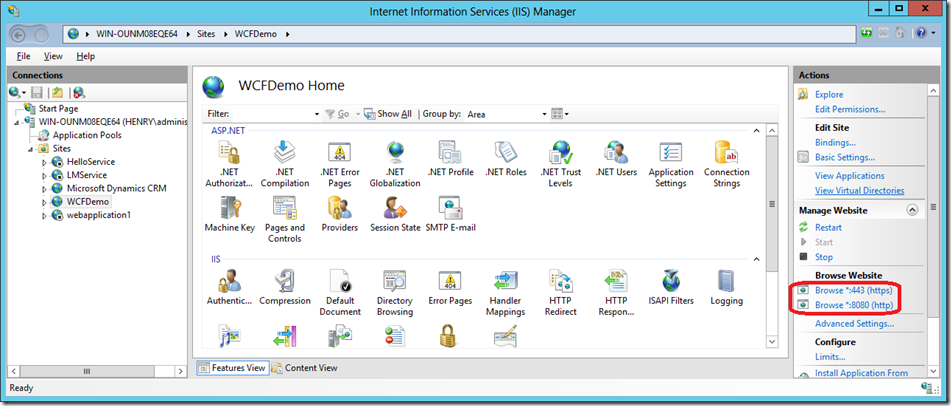
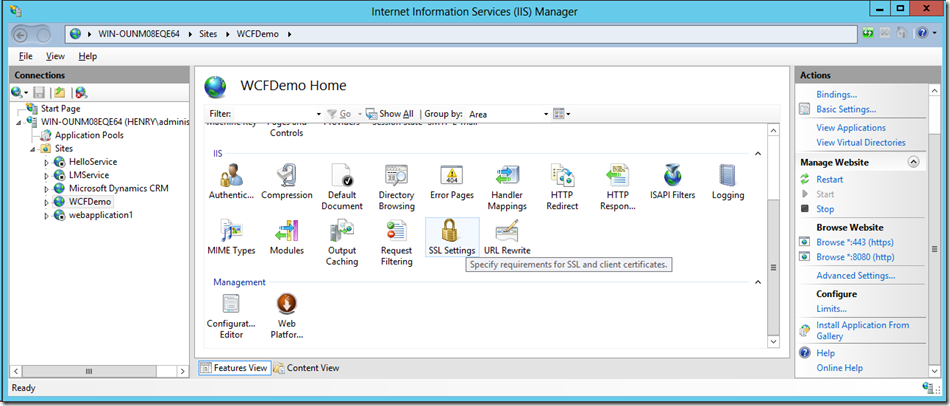
配置完https binding之后,双击SSL Settings
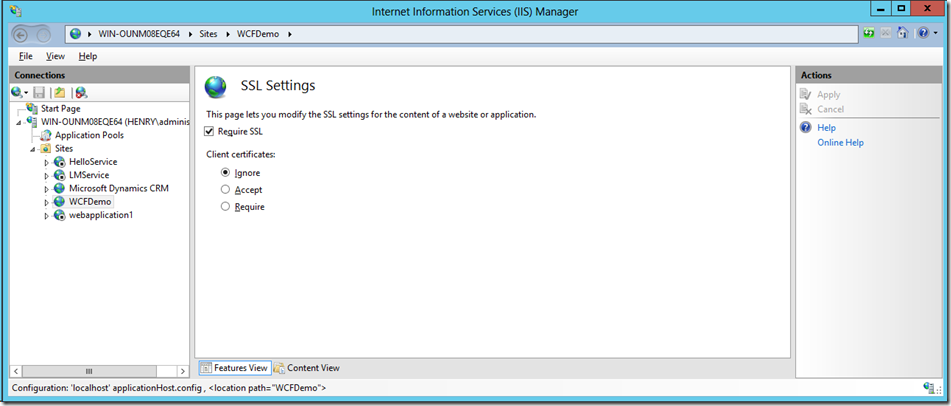
勾选Require SSL,点击Apply。
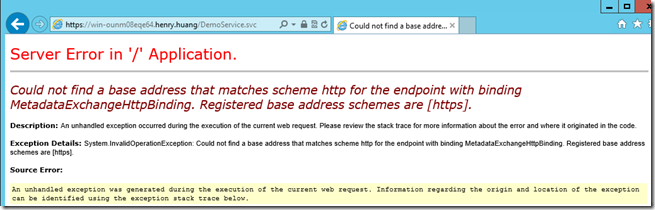
Http的Binding还是不可缺少,否则会出现下面的错误
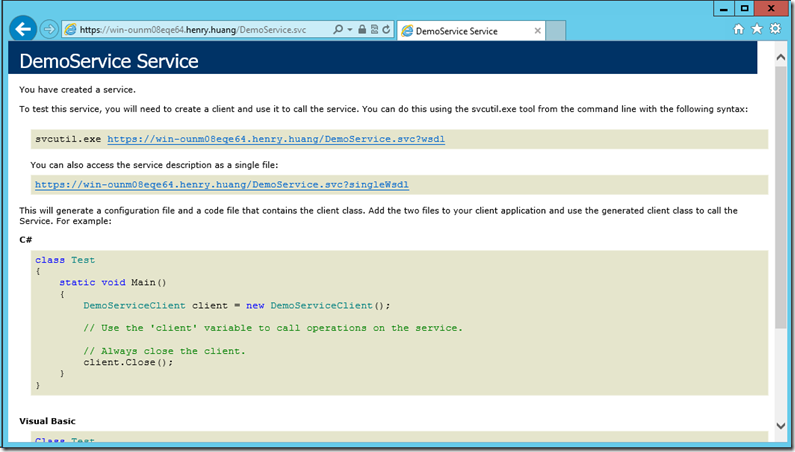
(三)在客户端安装SSL根证书
由于https证书使用的是
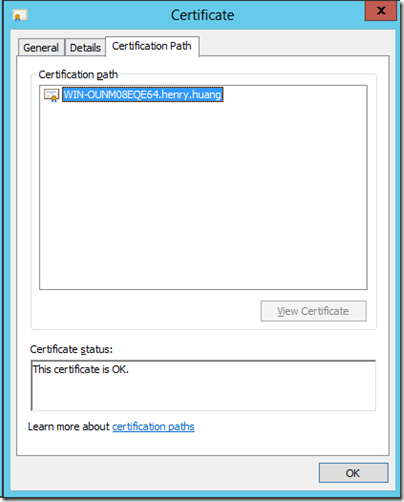
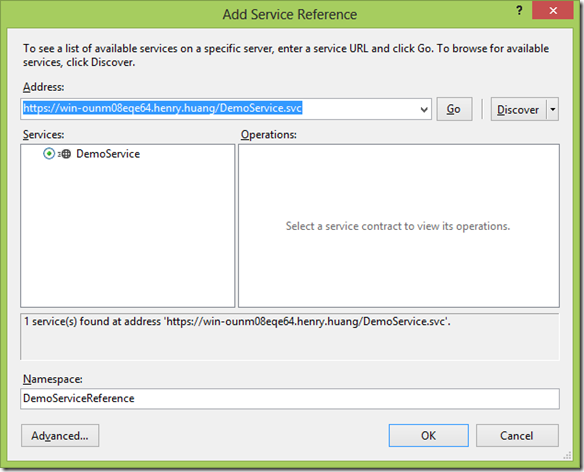
所以我们使用的WCF Service URL为 https://win-ounm08eqe64.henry.huang/DemoService.svc
在客户端,为C:\Windows\System32\Drivers\etc\host 添加一条记录
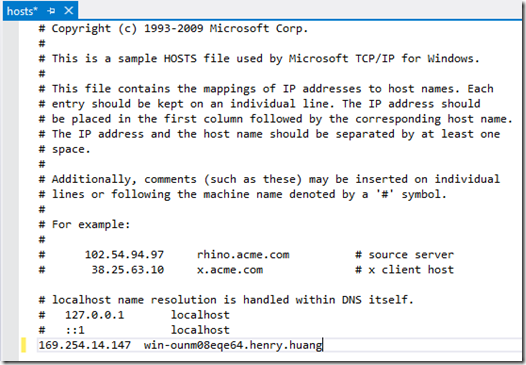
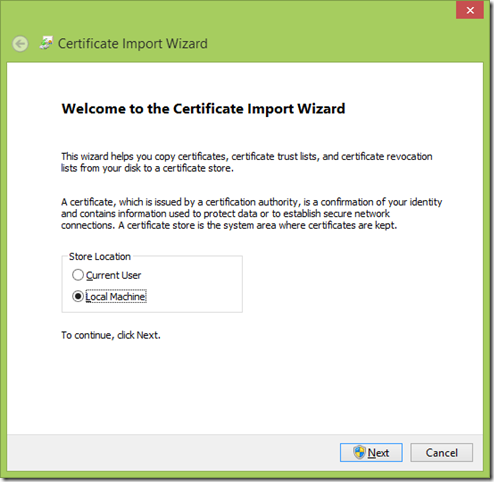
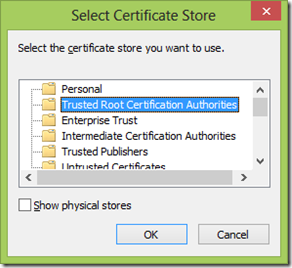
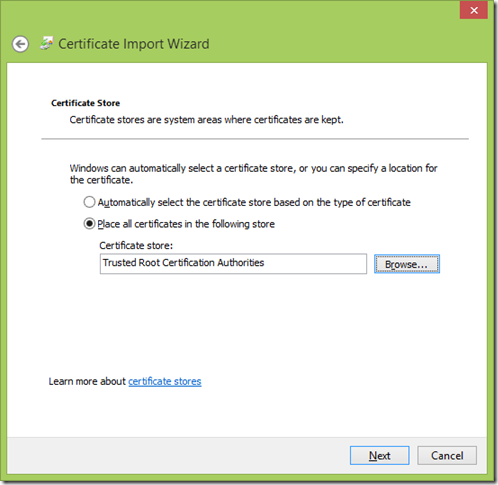
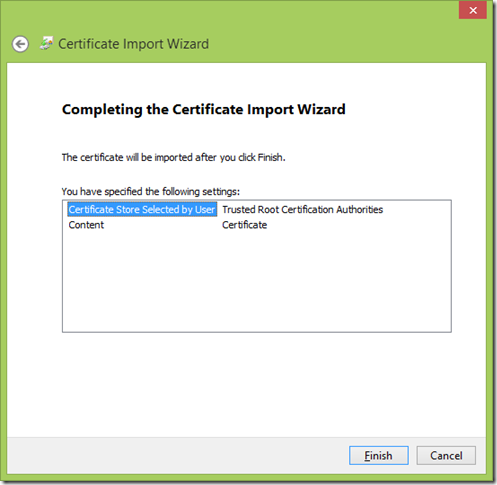
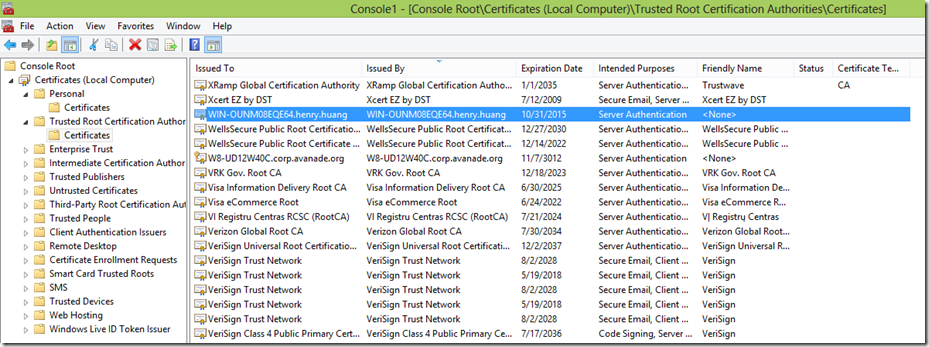
然后安装根证书
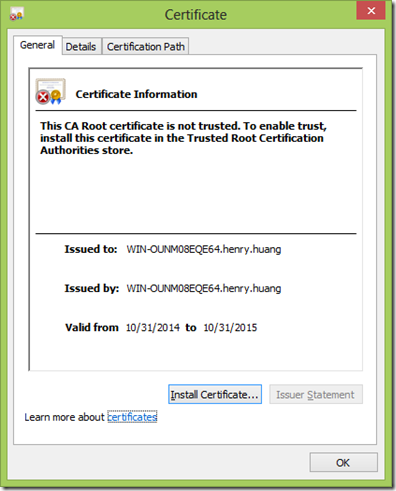
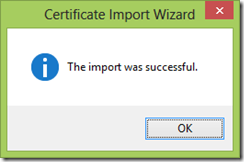
双击根证书文件,弹出证书属性的对话框,此时该根证书并不受信任,我们需要将其加入“受信任的根证书颁发机构”,点击安装证书

(四)客户端代码与配置文件
在客户端Visual Studio添加Service Reference
private void buttonCalculate_Click(object sender, EventArgs e)

{

    try

    {

        textBoxResult.Text = demoServiceClient.Divide(Convert.ToInt32(textBoxNumerator.Text), Convert.ToInt32(textBoxDenominator.Text)).ToString();

    }

    catch (FaultException<DemoServiceReference.DivideByZeroFault> fault)

    {

        MessageBox.Show(fault.Detail.Error + " - " + fault.Detail.Detail);

    }

}
client app.config
<?xml version="1.0" encoding="utf-8" ?>

<configuration>

    <system.serviceModel>

        <bindings>

            <basicHttpBinding>

                <binding name="BasicHttpBinding_IDemoService">

                    <security mode="Transport" />

                </binding>

            </basicHttpBinding>

        </bindings>

        <client>

            <endpoint address="https://win-ounm08eqe64.henry.huang/DemoService.svc/DemoService"

                binding="basicHttpBinding" bindingConfiguration="BasicHttpBinding_IDemoService"

                contract="DemoServiceReference.IDemoService" name="BasicHttpBinding_IDemoService" />

        </client>

    </system.serviceModel>

</configuration>
(五)运行代码,监听Message

使用Fiddler,发现消息全部加密
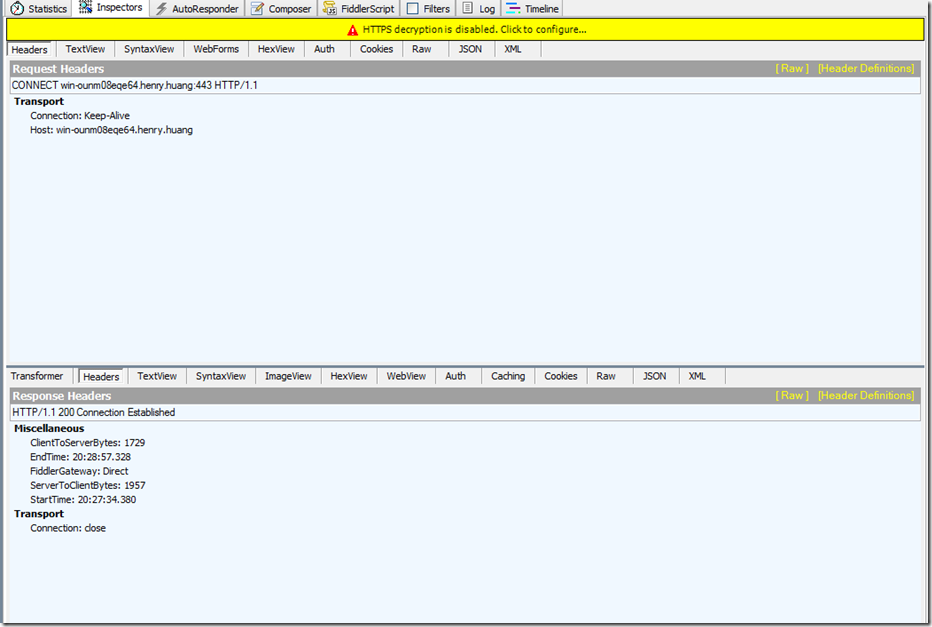
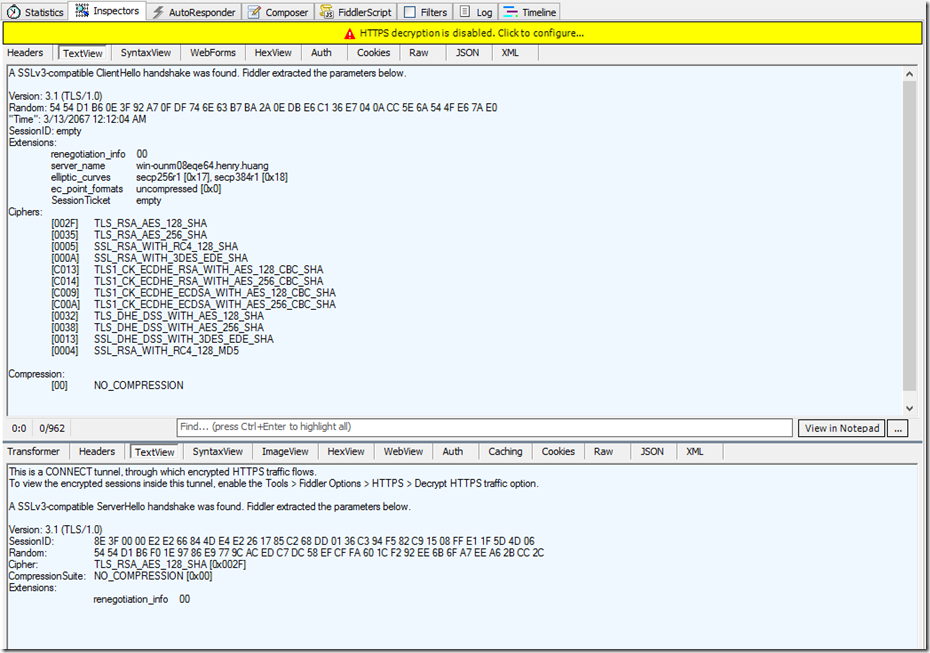
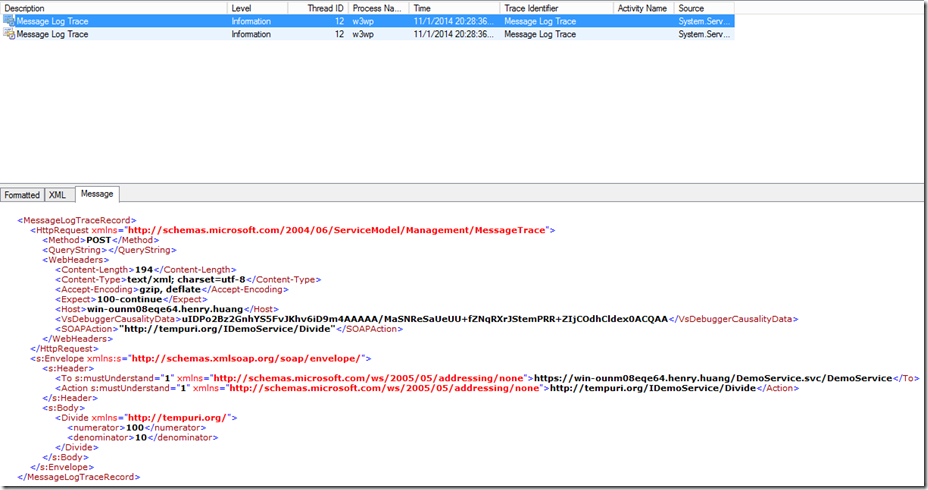
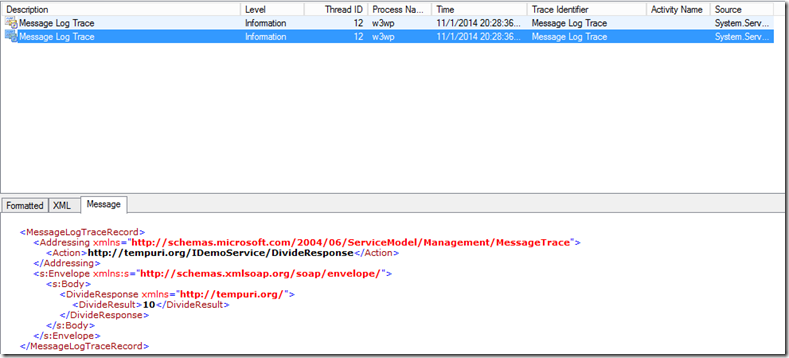
但是如果用Microsoft Service Trace Viewer查看Message Log(参见《使用WCF的Trace与Message Log功能 》),可以看到解密后的信息,因为它不是在wire上监听,而Fiddler是在wire上进行监听。
Request:
Response:
(六)总结
Transport Security Mode是传输协议级的加密,而Message Security Mode是对消息级别的加密。每种协议都有自己对应的传输协议级的加密方式,比如HTTP的加密方式就为SSL。
WCF basicHttpBinding之Transport Security Mode, clientCredentialType="None"的更多相关文章
- WCF wsHttpBinding之Transport security Mode, clientCredentialType=”Basic”
原创地址:http://www.cnblogs.com/jfzhu/p/4071342.html 转载请注明出处 如何在WCF中使用Transport Security Mode,以及如何创建证书,请 ...
- WCF basicHttpBinding之Message Security Mode
原创地址:http://www.cnblogs.com/jfzhu/p/4067873.html 转载请注明出处 前面的文章<WCF Security基本概念>介绍了WCF的securit ...
- iOS App 不支持http协议 App Transport Security has blocked a cleartext HTTP (http://)
目前iOS已经不支持http协议了,不过可以通过info.plist设置允许 App Transport Security has blocked a cleartext HTTP (http://) ...
- App Transport Security has blocked a cleartext HTTP (http://) resource load since it is insecure. Temporary exceptions can be configured via your app's Info.plist file
ios进行http请求,会出现这个问题: App Transport Security has blocked a cleartext HTTP (http://) resource load sin ...
- App Transport Security has blocked a cleartext HTTP (http://)
使用SDWebImage加载“http://”开头的图片报错,错误如下: App Transport Security has blocked a cleartext HTTP (http://) r ...
- iOS9中的App Transport Security
问题:webView加载网页加载不出来 原因:苹果在iOS9 sdk中加入了App Transport Security限制(iOS9以前的iOS sdk默认关闭ATS),默认强制使用https,并且 ...
- 网络请求报错:The resource could not be loaded because the App Transport Security policy requires the use of a secure connection.
iOS9引入了新特性App Transport Security (ATS).详情:App Transport Security (ATS) 如果你想设置不阻止任何网络,只需要在info.plist文 ...
- IOS开发 App Transport Security has blocked a cleartext HTTP (http://) resource load since it is insecure. Temporary exceptions can be configured via your app's Info.plist file.
xcode自7后不再使用http,而是使用https请求,但目前很多网络请求还只是以http请求,我们可以这样解决 info.plist->添加@“App Transport Security ...
- App Transport Security has blocked a cleartext
错误描述: App Transport Security has blocked a cleartext HTTP (http://) resource load since it is insecu ...
随机推荐
- c语言快速入门1
如果你想快速入门计算机,可以参考我的上一篇帖子,先了解一些必备的软知识,然后再来进行语言的快速入门 计算机入门基础知识 目录 1.1.1 计算机与程序 现代计算机可以自动完成计算任务 程序就是按 ...
- 学习微信小程序之css12设置盒子内容的宽高
<!DOCTYPE html> <html lang="en"> <head> <meta charset="UTF-8&quo ...
- 将jsp页面转化为图片或pdf(一)
在项目中遇见了将jsp页面转化为pdf的问题,试过itext,但是itext需要标准的html代码,我的页面中的一些属性是itext所不识别的,所以努力了一段时间后就放弃了,后来发现htmlutil抓 ...
- Windows - 性能监控之磁盘剩余空间大小警报
开始 -> 运行 -> 键入命令 perfmon.msc 数据收集器(Data Collector Sets) -> 用户自定义(User Defined)
- java中Class.forName("xxx")和ClassLoader().loadClass("xxx")的区别
一.首先,查看Class类中的forName方法,可以发现有如下三个方法,但是我们通常用的是只有一个参数的方法. 简单介绍一下这三个方法: 第一个方法Class.forName("xxx&q ...
- 【刷题记录】首师附NOIP练习20160820
[由于老师不让发题目,So只能发考点喽!!!!噜噜噜] [题目(嘘~~~~~)]:百度云下载 [T1]:好像是DP,路径压缩+排序+分情况处理100分(噜噜噜) [T2]:正解好难的样子,DFS乱搞了 ...
- Asp.Net WebApi开发注意
1.Api的版本控制 2.Api的异常处理 设置全局异常处理 3.Api的权限控制 4.Api的请求处理 get:查询 post:创建 put:修改 delete:删除 5.Api的文档说明
- 本地xdebug调试搭建 Laravel+homestead+phpstorm
1.在homestead virtual box安装和配置xdebug 先在终端运行vagrant up 和 vagrant ssh,ssh远程到homestead,然后复制以下代码到一个shell文 ...
- JSTL标签库
JSP页面作为内嵌java的Html简化了Servlet在控制页面显示的语法,但JSP脚本中的表达式功能不够强大,语法也稍显繁杂,EL(Expression Language)表达式语言的出现能够大大 ...
- Android MVP 利用rxjava 避免向Model传入监听方法
传统的MVP: 1.抽离出View的接口,即ILoginView. 2.抽离Model的接口,即ILoginModel. 3.抽离Presenter的接口,即ILoginPresenter. 4.实现 ...