
vue2.0+vue-dplayer实现hls播放
vue2.0+vue-dplayer实现hls播放
开始
安装依赖
npm install vue-dplayer -S
1,编写组件HelloWorld.vue
<template>

    <div class="hello">

      <d-player ref="player" @play="play" :logo="logo" :lang="lang" :video="video" :contextmenu="contextmenu"></d-player>

    </div>

</template>

<script>

import VueDPlayer from './VueDPlayerHls';

import logoImg from '@/assets/logo.png';

export default {

 name: 'HelloWorld',

 data () {

  return {

   video: {

     quality: [{

        name: '240P',

        url: 'https://video-dev.github.io/streams/x36xhzz/x36xhzz.m3u8',

     },{

        name: '360P',

        url: 'https://video-dev.github.io/streams/x36xhzz/x36xhzz.m3u8',

     },{

        name: '720P',

        url: 'https://video-dev.github.io/streams/x36xhzz/x36xhzz.m3u8',

     }],

     pic: 'http://static.smartisanos.cn/pr/img/video/video_03_cc87ce5bdb.jpg',

     defaultQuality: 1,

     thumbnails: logoImg,

     type: 'hls'

    },

    lang: 'zh-cn',

    logo: logoImg,

    autoplay: false,

    player: null,

    contextmenu: [

      {

        text: '博客园',

        link: 'http://www.cnblogs.com/maqingyuan/'

      },{

        text: '博客园',

        link: 'http://www.cnblogs.com/maqingyuan/'

      },{

        text: '博客园',

        link: 'http://www.cnblogs.com/maqingyuan/'

      }

    ]

  }

 },

 components: {

  'd-player': VueDPlayer

 },

 methods: {

  play() {

    // console.log('开始播放...')

   }

 },

 mounted() {

  // this.player = this.$refs.player.dp;

  // console.log(this.player);

  // var hls = new Hls();

  // hls.loadSource('https://video-dev.github.io/streams/x36xhzz/x36xhzz.m3u8');

  // hls.attachMedia(this.player);

 }

}

</script>

<style scoped>

h1, h2 {

  font-weight: normal;

}

ul {

  list-style-type: none;

  padding: 0;

}

li {

  display: inline-block;

  margin: 0 10px;

}

a {

  color: #42b983;

}

.hello{

    width: 750px;

    margin: 0 auto 50px;

}

@media only screen and (max-width: 640px){

  .hello{

      width: 100%;

  }

}

</style>
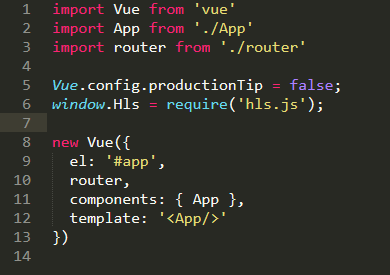
2,引入hls.js (在main.js引入)
window.Hls = require('hls.js');
3,自定义一个组件VueDPlayerHls.vue
<template>

 <div class="dplayer"></div>

</template>

<script>

 require('../../node_modules/dplayer/dist/DPlayer.min.css');

 import DPlayer from 'DPlayer'

 export default {

  props: {

   autoplay: {

    type: Boolean,

    default: false

   },

   theme: {

    type: String,

    default: '#FADFA3'

   },

   loop: {

    type: Boolean,

    default: false

   },

   lang: {

    type: String,

    default: 'zh'

   },

   screenshot: {

    type: Boolean,

    default: false

   },

   hotkey: {

    type: Boolean,

    default: true

   },

   preload: {

    type: String,

    default: 'auto'

   },

   contextmenu: {

    type: Array

   },

   logo: {

    type: String

   },

   video: {

    type: Object

    // required: true,

    // validator(value) {

    //  return typeof value.url === 'string'

    // }

   }

  },

  data() {

   return {

    dp: null

   }

  },

  mounted() {

   const player = this.dp = new DPlayer({

    element: this.$el,

    autoplay: this.autoplay,

    theme: this.theme,

    loop: this.loop,

    lang: this.lang,

    screenshot: this.screenshot,

    hotkey: this.hotkey,

    preload: this.preload,

    contextmenu: this.contextmenu,

    logo: this.logo,

    video: {

     pic: this.video.pic,

     defaultQuality: this.video.defaultQuality,

     quality: [{

       url: this.video.quality[0].url,

       name: this.video.quality[0].name

     },{

       url: this.video.quality[1].url,

       name: this.video.quality[1].name

     },{

       url: this.video.quality[2].url,

       name: this.video.quality[2].name

     }],

     thumbnails: this.video.thumbnails,

     type: this.video.type

    }

   })

   player.on('play', () => {

    this.$emit('play')

   })

   player.on('quality_start', () => {

    this.$emit('quality_start')

    player.on('play')

   })

   player.on('pause', () => {

    this.$emit('pause')

   })

   player.on('canplay', () => {

    this.$emit('canplay')

   })

   player.on('playing', () => {

    this.$emit('playing')

   })

   player.on('ended', () => {

    this.$emit('ended')

   })

   player.on('error', () => {

    this.$emit('error')

   })

  }

 }

</script>

<style scoped>

</style>
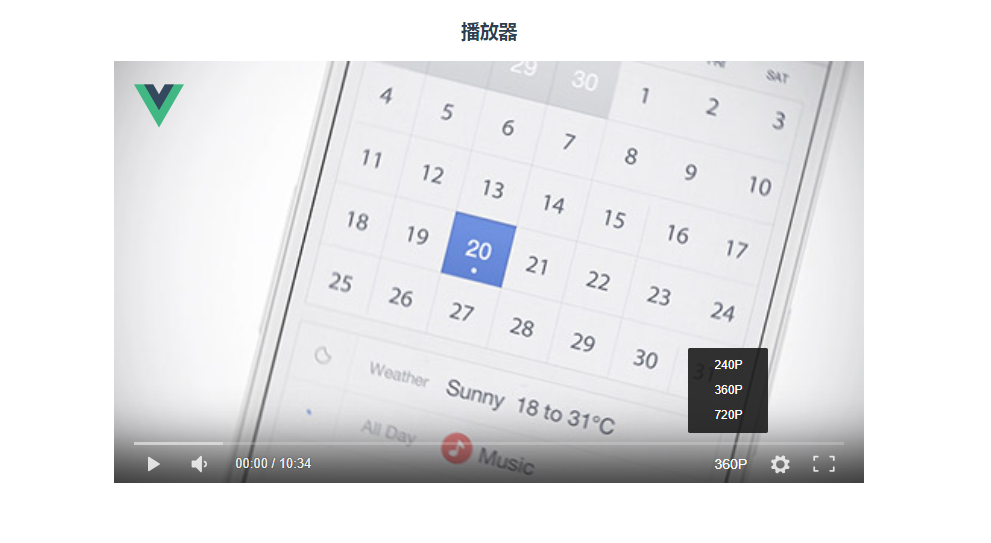
4,实现播放(如下图) :
最后
github地址:https://github.com/whiskyma/vue-dplayer
以上就是本文的全部内容,希望对大家的学习有所帮助,谢谢大家,记得点赞哦!!!
vue2.0+vue-dplayer实现hls播放的更多相关文章
- vue2.0 vue.set()
<!DOCTYPE html> <html lang="en"> <head> <meta charset="UTF-8&quo ...
- vue2.0 vue.extend()的拓展
<!DOCTYPE html> <html lang="en"> <head> <meta charset="UTF-8&quo ...
- Vue2.0 Vue.set的使用
原文链接: https://blog.csdn.net/qq_30455841/article/details/78666571
- vue1.0和vue2.0的区别(二)
这篇我们继续之前的vue1.0和vue2.0的区别(一)继续说 四.循环 学过vue的同学应该知道vue1.0是不能添加重复数据的,否则它会报错,想让它重复添加也不是不可以,不过需要定义别的东西 而v ...
- VUE2.0学习总结
摘要: 年后公司项目开始上vue2.0,自己对学习进行了总结,希望对大家有帮助! VUE2.0学习 vue介绍 vue是什么? https://vuefe.cn/guide vue也是一个数据驱动框架 ...
- vue 专题 vue2.0各大前端移动端ui框架组件展示
Vue 专题 一个数据驱动的组件,为现代化的 Web 界面而生.具有可扩展的数据绑定机制,原生对象即模型,简洁明了的 API 组件化 UI 构建 多个轻量库搭配使用 请访问链接: https://ww ...
- Vue2.0音乐播放器
学习了几周的vuejs,学习的过程中做了一个音乐播放器WebApp (顺便听听音乐~) ,过程中也有借鉴过别人做的,感觉受益匪浅 链接 项目在线地址 : 音乐播放器 github : https:// ...
- vue2.0实践 —— Node + vue 实现移动官网
简介 使用 Node + vue 对公司的官网进行了一个简单的移动端的实现. 源码 https://github.com/wx1993/node-vue-fabaocn 效果 组件 轮播图(使用 vu ...
- 从壹开始前后端分离 [ Vue2.0+.NET Core2.1] 十五 ║Vue基础:JS面向对象&字面量& this字
缘起 书接上文<从壹开始前后端分离 [ Vue2.0+.NET Core2.1] 十四 ║ VUE 计划书 & 我的前后端开发简史>,昨天咱们说到了以我的经历说明的web开发经历的 ...
随机推荐
- Codeforces 850C E. Arpa and a game with Mojtaba
对每个数统计其素数因子各次方数的数,然后通过y = (x>>i) | (x&((1<<(i-1))-1)) 模拟delete x and add to the lis ...
- 03 WIndows编程——手绘函数调用过程
源码 #include<Windows.h> #include<stdio.h> int MessageBoxPrint(char *szFormat, ...); int W ...
- Fiddler之文件代理
开发中,上线的一个页面有bug,但是在本地的环境和测试环境却没有任何问题,只能按照自己的猜测去修复其中的bug,修改了再发布到测试环境,然后再到生产,发现bug定位不对,只能继续猜测,继续发到测试环境 ...
- 学JAVA有哪些好的技巧方法?干货分享
作为编程语言届的老大哥,学习JAVA的人数不胜数,在这里分享一些学习JAVA的技巧以及方法,当然,这些技巧及方法使用范围包含但不限于JAVA. ① 笔记软件 印象笔记:多端互通很方便(https:// ...
- 谷歌网页性能分析工具 Lighthouse 的安装及使用
github地址:https://github.com/GoogleChrome/lighthouse 一.如果可以翻墙的话可以从 chrome 扩展插件里直接安装. 二.下面是另一种使用方法:基于 ...
- GEF中TreeViewer的叶子节点展开
/** * GEF树叶子节点的展开 * @param items */ private void expand(TreeItem[] items) { for (int i = 0; i < i ...
- pandas处理json脱坑(一)--JsonError: Expecting property name enclosed in double quotes
python执行json.loads(…)时遇到的错误json格式的文本中应该用双引号,而不是单引号,如: brief=json.loads(row["brief"].replac ...
- 时间戳、String、Date转换
时间戳(String or long) =>Date long s=1557230621043L; Date date=new Date(s); System.out.println(date) ...
- E:only-child
E:only-child 语法: E:only-child { sRules } 说明: 匹配父元素仅有的一个子元素E.大理石机械构件维修 要使该属性生效,E元素必须是某个元素的子元素,E的父元素最高 ...
- 007_FreeROTS队列
(一)目的:进程间的通信 (二)队列创建 1. 动态创建队列,函数 xQueueCreate() QueueHandle_t xQueueCreate( UBaseType_t uxQueueLeng ...